

Introduction
The fastest way to make an SAP landscape harder to maintain is not necessarily to build more integrations; it is to expose the wrong interface, put orchestration in the wrong layer, or treat every integration as a synchronous API call.
For SAP teams connecting S/4HANA with CRM, HR, e-commerce, analytics, or third-party applications, the real challenge, however, is architectural: Which API or event pattern should handle the business interaction? Where should transformation and orchestration take place? And, most importantly, how can the interface remain secure, reliable, and easy to monitor as the landscape grows?
Moreover, this article focuses on SAP APIs and the SAP Integration Suite capabilities that surround them. It explains when to use OData, REST, SOAP, or event-driven communication; where API management and cloud integration fit; and which design mistakes can create unnecessary coupling or performance problems. The examples focus on current SAP BTP and SAP Integration Suite patterns; exact API availability depends on the S/4HANA edition and release.
What is the SAP Integration API?
An SAP integration API is an interface that exposes selected business data or functionality so another application can consume it through a defined contract. The API itself is not the same thing as SAP Integration Suite.
For example:
- SAP Business Accelerator Hub helps teams discover SAP APIs and integration content.
- API Management helps organizations publish, secure, govern, monitor, and manage APIs.
- Cloud Integration handles process integration, including routing, transformation, mappings, and connectivity.
- Event Mesh supports asynchronous business-event communication.
- Open Connectors provide prebuilt connectivity to many non-SAP applications.
That distinction matters because an API answers, “How can another system access this capability?”, while an integration platform answers, “How do multiple systems exchange, transform, secure, monitor, and orchestrate information?”
| SAP Tool/Platform | Purpose |
| SAP API Business Hub | Pre-built APIs for SAP services |
| SAP Integration Suite | Middleware for orchestration |
| OData APIs | Lightweight data exchange |
| REST APIs | Modern web-based integration |
SAP Integration APIs avoid tightly coupling systems, acting more like gates that allow clean and efficient flows of data. If your architecture needs asynchronous communication rather than request-response APIs, SAP Event Mesh provides a separate event-driven pattern for publishing and consuming business events.
The SAP Integration API: How It Works
SAP Integration APIs act as a controlled bridge between SAP systems and external applications, allowing them to exchange data and trigger business processes without creating rigid dependencies.
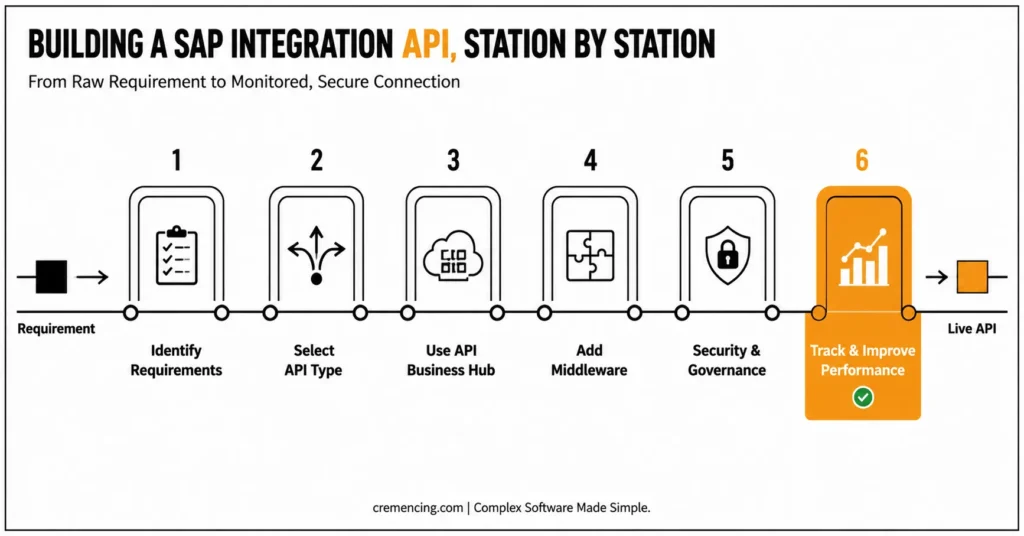
Step 1: Identify Integration Requirements
Before building anything, define:
- Systems involved (SAP ↔ Non-SAP)
- Data types (real-time vs batch)
- Business processes (orders, HR data, finance)
This step avoids over-engineering while keeping the business in line.
Step 2: Select a suitable type of API
SAP supports multiple API formats. Selection matters in this way:
- OData APIs → Best to use for SAP native apps
- REST APIs → Best suited for Modern Web/Mobile apps
- SOAP APIs → Used in legacy systems
However, if there is a mismatch between the API design and the system’s requirements, the impact can extend beyond a single integration point. Over time, inefficient data handling, unnecessary API calls, or poorly designed requests can increase processing time and system load. As a result, these issues may lead to higher latency, slower response times, and performance bottlenecks as integration traffic grows.
| Integration requirement | Recommended starting point | Why |
|---|---|---|
| Query SAP business entities | OData | Standardized entity/query semantics |
| Existing HTTP resource API | REST/OpenAPI | Resource-oriented API contract |
| Existing enterprise web service | SOAP | Preserves the provider’s established contract |
| React to a business event | Event Mesh | Asynchronous publish/subscribe pattern |
| Transform and route messages | Cloud Integration | Integration-flow orchestration and mapping |
| Secure and govern consumer-facing APIs | API Management | API lifecycle, policies and monitoring |
| Connect many third-party applications | Open Connectors | Prebuilt connectivity |
Step 3: Use the SAP API Enterprise Hub
SAP API Business Hub offers ready-to-use APIs that either
- Reduce development time
- Follow SAP best practices
- Ensure compatibility
Use existing APIs as much as possible instead of making every component from scratch.
Step 4: Add Middleware
Middleware is the neural center of integration.
Key functions include:
- Data transformation
- Routing logic
- Error handling
- Security enforcement
Integrations are tightly coupled and hard to scale without middleware.
Step 5: Security & Governance
Security is not optional. Implement:
- OAuth 2.0 authentication
- API rate limiting
- Role-based access control
It protects your SAP Integration API from being misused or being overloaded.
Step 6: Track and Improve Performance
Once deployed, continuously track:
- API response time
- Error rates
- Throughput
Why optimization? It prevents your system from degrading over time.
SAP Integration API Benefits & ROI
Using SAP Integration APIs correctly yields measurable business value.
- Faster Time-to-Market
Reusable APIs allow organizations to deliver integrations in 40–60% less time. - Reduced Development Costs
By reusing APIs:- Less custom coding
- Lower maintenance effort
- Reduced dependency on specialists
Potential savings: 30–50% in integration costs
- Improved System Performance
Decoupled architecture prevents the following:- System overload
- Bottlenecks
- Downtime
Result: 20–35% performance improvement
- Scalability for Growth
Moreover, using APIs as an intermediary between systems allows them to scale without creating direct dependencies on one another.
- Integration Built on 200+ Connectors
- Add new plugins without rewriting any integrations
- Handle increased traffic seamlessly
- Better Data Consistency
Standardized APIs ensure:- Accurate data flow
- Reduced duplication
- Real-time synchronization
API Management is only one capability within SAP Integration Suite; Cloud Integration, Event Mesh, Open Connectors, and other capabilities address different integration requirements.
How to Choose Between OData, REST, SOAP, and Events
Do not choose an interface simply because it is newer. Start with the interaction pattern and the contract already exposed by the source system.
OData works well when consumers need structured access to SAP business entities, including filtering, querying, and CRUD-style operations.
For broader web-based integrations, REST/OpenAPI is a strong choice when the interface follows a resource-oriented HTTP model with a defined OpenAPI contract.
Meanwhile, SOAP remains valuable when SAP or third-party systems already expose SOAP services or rely on capabilities built into the existing SOAP contract.
By contrast, events are better suited to asynchronous scenarios where applications need to react to business changes instead of repeatedly polling for updates.
As a result, SAP Integration Suite can support these different interaction patterns, while Event Mesh enables applications to publish and consume business events.
Common Mistakes & Best Practices
Common Mistakes
- Point-to-Point Integrations → Fragile architecture: direct system connections
- Ignoring API Governance → APIs without governance
- Overloading APIs → Lack of rate limits provokes performance issues
- Poor Documentation → Confusing APIs slow down development and onboarding
Best Practices
- Use API-first design
- Always implement middleware
- Maintain clear documentation
- Monitor performance continuously
- Adhere to SAP API Business Hub standards
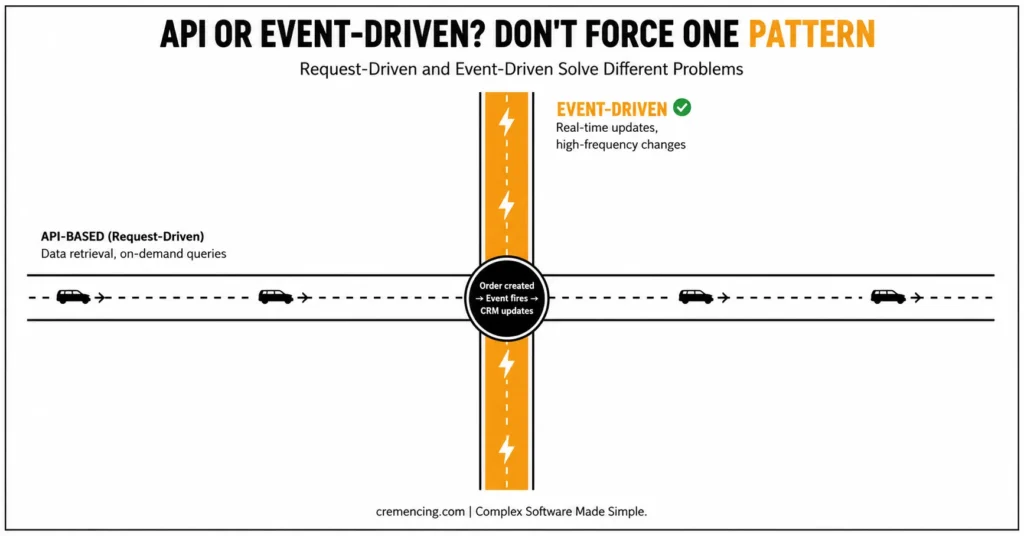
Event-Driven SAP integration
Even though most blogs are concentrated around API-based integration, event-driven integration is often skipped as a modern architecture.
What is Event-Driven Integration?
One key difference being that systems are event-driven rather than request-driven—they might react to an event instead of requesting data.
Example:
- Order created → Event fired → Automatic CRM Update
Why It Matters
- Reduces API calls
- Improves real-time responsiveness
- Enhances scalability
SAP Tools for Event-Driven Integration
- SAP Event Mesh
- SAP Integration Suite (event capabilities)
When to Use It
| Use Case | Best Approach |
| Real-time updates | Event-driven |
| Data retrieval | API-based |
| High-frequency changes | Event-driven |
SAP integration API with event-driven architecture is a smart, modern integration approach.
SAP Integration API Production Checklist
Before development
- Identify the business process and system of record.
- Check SAP Business Accelerator Hub for an existing API or integration package.
- Confirm the S/4HANA edition and release.
- Select API vs event-driven communication based on the interaction pattern.
Before deployment
- Define authentication and authorization.
- Validate payload size and pagination behaviour.
- Design retry and idempotency handling.
- Configure appropriate API policies.
- Test expected and peak volumes.
After deployment
- Monitor API consumption and integration-flow failures.
- Track latency, error rates, throughput, and retries.
- Version interfaces are deliberately.
- Document ownership, dependencies, and support procedures.
Conclusion
SAP integration APIs are not a single technology choice. The production result depends on choosing the right interaction pattern and putting each responsibility in the right architectural layer.
Use OData, REST, or SOAP when a consumer needs an API-based interaction, and use events when systems need to react asynchronously to business changes. Meanwhile, use Cloud Integration when transformation, routing, and process orchestration are required and API Management when APIs need centralized security, governance, lifecycle management, and monitoring.
Ultimately, the most important takeaway is not to expose more APIs; instead, expose the right APIs, avoid unnecessary coupling, define production behaviour for retries and failures, and monitor the complete path from consumer to SAP backend.
For an S/4HANA landscape, start by checking SAP Business Accelerator Hub for an existing interface, confirm its applicability to your exact release and deployment model, and only then decide whether the integration needs direct API consumption, Cloud Integration, API Management, Event Mesh, or a combination of these capabilities. SAP Cloud Connector: Connect On-Prem Systems
Through API-first design, SAP API Business Hub, and an event-driven, pattern-based integrations approach, organizations can roll out robust and future-ready integrations. For on-premises S/4HANA connectivity, Cloud Connector can provide the controlled connection path between SAP systems and BTP services.
FAQ Section
Q: What is SAP Integration API, and what can it be used for?
It is utilized to integrate SAP with external or other internal applications and allows communication of data between supported systems.
Q: Is middleware better than SAP Integration API?
They work together. APIs expose data, and middleware manages orchestration, transformation, and routing.
Q: What are the differences between OData and REST APIs in SAP?
OData is SAP-optimized for structured data
RESTs, which are more flexible, hence their wide use for modern applications
Q: How secure are the SAP integration APIs?
When utilized alongside certain security best practices, such as OAuth, encryption, and access control mechanisms, they offer good levels of protection.
Q: Can SAP Integration APIs help in enhancing performance?
Yes. If your APIs are designed well, they reduce system load and response time without being a bottleneck.
Q: Should SAP integrations use OData or REST?
Neither is universally better. OData is useful when the provider exposes OData semantics and entity-based operations, while REST/OpenAPI is appropriate when the integration is built around an existing REST contract. SAP Integration Suite supports both.
Q: When should SAP integration use events instead of APIs?
Use events when consumers need to react asynchronously to business changes. APIs are generally more appropriate when an application needs to request data or execute a synchronous operation.
Q: Is SAP Integration Suite only for SAP-to-SAP integration?
No. SAP Integration Suite is designed to connect SAP and non-SAP applications across cloud and on-premises landscapes. Open Connectors specifically support connectivity to non-SAP applications.





6 Responses