
Following SAP data migration best practices is essential because a successful SAP go-live does not always mean the migrated business data is accurate. Incorrect customer information, duplicate suppliers, inconsistent material records, and unreconciled financial balances can disrupt operations after the new system becomes available.
Following SAP data migration best practices helps organizations identify these issues before they affect daily business processes. However, data migration requires more than transferring records from legacy applications into SAP S/4HANA.
Business teams must verify that migrated information is complete, correctly mapped, and suitable for its intended use.
Moreover, problems that remain undetected during migration testing can affect financial reporting, procurement, inventory management, and other connected processes.
A technically completed migration is therefore different from a migration that is ready for business operations.
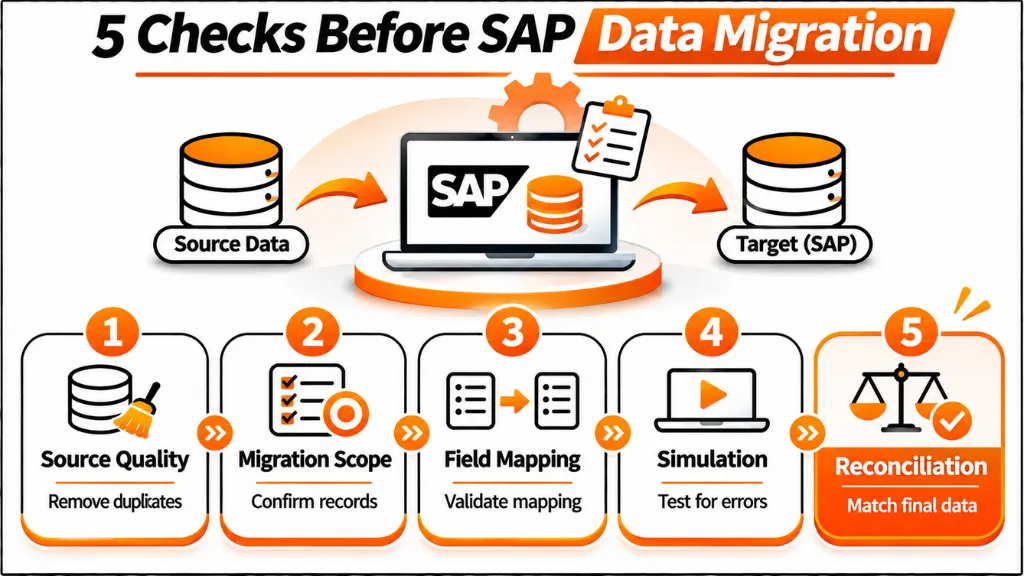
This article explains seven essential checks that SAP migration teams can use to validate data, reduce operational risks, and improve readiness before and after go-live.
Quick Answer: What Are the 7 Essential SAP Data Migration Checks?
The seven essential checks are source-data quality, migration scope and dependencies, field mapping, migration simulation, business reconciliation, end-to-end transaction testing, and final cutover readiness.
SAP S/4HANA Migration Cockpit supports relevant data transfer and validation activities. However, successful technical processing does not independently confirm that every migrated business record is accurate.
Therefore, migration teams should combine technical checks with business validation, financial reconciliation, and documented approval before production use.
Why SAP Data Migration Best Practices Matter for Go-Live
SAP data migration involves transferring business information into an SAP environment while preserving the information needed for business operations.
In SAP S/4HANA projects, relevant data may include customers, suppliers, materials, financial balances, and open business transactions.
However, the precise migration scope depends on the selected implementation approach.
A new implementation may transfer selected master data, open transactions, and balances. Meanwhile, a system conversion retains and transforms much of the existing system data through a different technical process.
Teams should not treat these approaches as identical Migration Cockpit projects.
SAP Data Migration: Technical Success vs. Business Readiness
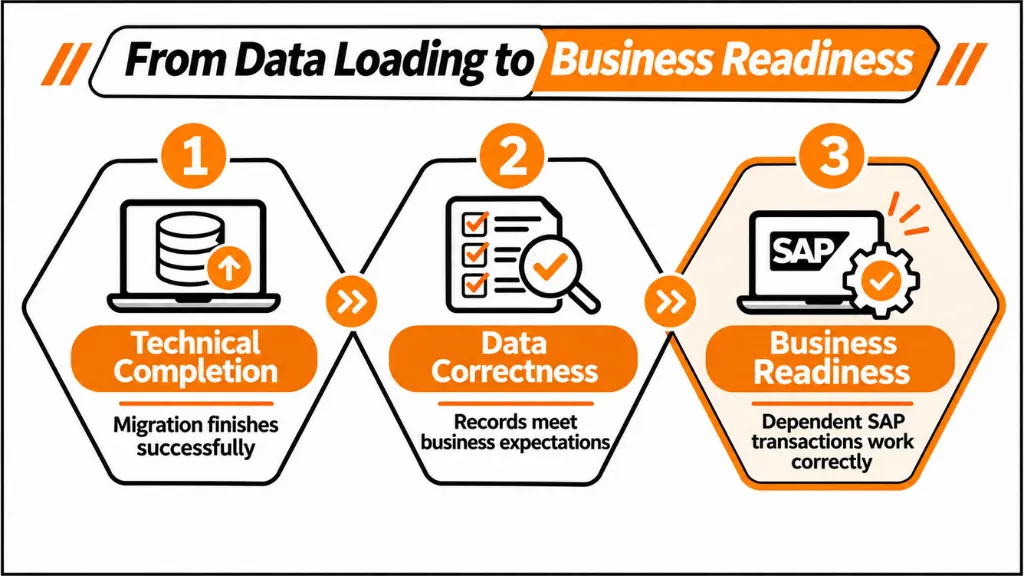
Migration teams need to distinguish three important outcomes.
Technical completion means the selected migration mechanism has successfully processed the relevant records.
Data correctness means the migrated information matches approved source data and transformation rules.
Business readiness means users can execute required transactions with that information.
For example, a supplier record may migrate successfully while containing an incorrect payment-term assignment.
The issue may remain undetected until an invoice is processed.
Consequently, migration completion logs cannot replace business validation or financial reconciliation.
Check 1: SAP Data Migration Best Practices for Source Data Quality
Poor source-data quality can create problems that continue into the new SAP environment.
Legacy systems may contain duplicate records, incomplete master data, obsolete information, and inconsistent business attributes.
Therefore, the first migration check should determine whether source data meets the target organization’s requirements.
SAP Data Migration: Identify Duplicate and Incomplete Master Data
Business Partner records require particular attention during SAP S/4HANA migration.
A single customer or supplier may appear under different identifiers across legacy applications.
Additionally, records may lack required fields or contain inconsistent organizational assignments.
The source assessment should examine customer and vendor duplicates, mandatory attributes, and relevant cross-role relationships.
However, technical matching alone cannot determine which business records should be retained or consolidated.
SAP Data Migration: Review Material Master Consistency
Material information can differ across plants, systems, and business units.
For example, inconsistent units of measure or missing required material views may create problems during migration.
The migration team should also identify obsolete records that no longer support the intended business processes.
Furthermore, data owners need to verify which material records are necessary for the target environment.
Establish Data Ownership
Data cleansing should involve the business teams responsible for the information.
Finance representatives may validate accounting-related attributes, while procurement teams review supplier purchasing data.
Meanwhile, supply chain teams can confirm material information and relevant organizational assignments.
Each critical data category should have a responsible owner who approves corrections.
Check outcome: Critical source-data errors are identified, assigned to business owners, and resolved or formally addressed before final extraction.
Check 2: SAP Data Migration Best Practices for Scope Planning
Defining migration scope is one of the important SAP data migration best practices because it determines which information enters the target SAP environment.
An incorrect scope may transfer unnecessary data or exclude records required for business continuity.
Therefore, the second check should validate data selection and the relationships between migration objects.
Identify Which Data Must Be Migrated
SAP S/4HANA projects commonly assess four major data categories.
- Master data: Customers, suppliers, materials, bills of materials, routings, and relevant business records.
- Open transactions: Open purchase orders, sales orders, invoices, and other required business documents.
- Financial balances: General Ledger and asset balances, along with relevant financial information.
- Historical information: Records that may be migrated, archived, or retained outside the target environment depending on the migration approach.
However, not every historical transaction needs to enter a new implementation.
Businesses must determine which records support current operations, reporting, and regulatory requirements.
Verify Migration Object Relationships
SAP S/4HANA Migration Cockpit provides predefined migration objects for supported data-transfer scenarios.
Depending on the object, the migration process may involve specific structures, mappings, and dependencies.
For example, an open purchasing document may reference a supplier, material, and organizational information that must already exist in the target system.
If required reference data is missing, the transaction may fail migration or subsequent processing.
Consequently, the loading sequence should reflect the relevant object dependencies.
Review Organizational Scope
Migration scope may also depend on company codes, plants, purchasing organizations, and other business dimensions.
For example, excluding a relevant organizational unit could leave necessary transactions outside the migrated environment.
The migration team should compare selected records with approved business requirements.
Additionally, source and target record counts should be reviewed using relevant organizational classifications.
Check outcome: The migration scope has business approval, and required dependencies are identified before migration begins.
Check 3: SAP Data Migration Best Practices for Accurate Field Mapping
Accurate data mapping is essential when following SAP data migration best practices because it determines how source information is represented in SAP S/4HANA.
A record can pass technical checks while containing an incorrect business value.
Therefore, mapping validation must focus on the meaning of the resulting data, not only its technical format.
Validate Customer and Vendor Mapping
SAP S/4HANA uses the Business Partner model for relevant customer and supplier master-data processes.
Legacy customer and vendor information may require harmonization with the target Business Partner structure.
Furthermore, Customer Vendor Integration requirements can introduce additional mandatory fields and relationships.
Relevant checks include Business Partner grouping, category, country, tax-related information, and organizational assignments.
Incorrect mapping may cause problems in purchasing, accounting, or downstream integrations.
Review Material and Financial Mapping
Material migration may require consistent units of measure and plant-related attributes.
Meanwhile, financial migration can involve chart-of-accounts harmonization and cost or profit center validity.
These mappings should be checked against the approved target business structure.
However, a successful technical transformation does not establish whether the chosen account or organizational assignment is correct.
Business representatives must validate critical mapping decisions.
Use Representative Test Records
Migration teams should test mapping rules against records with different relevant business characteristics.
For example, supplier records may have different purchasing assignments, payment terms, and currencies.
Testing should also include incomplete or conflicting source values.
Additionally, corrections should be documented to preserve the relationship between original source data and approved target values.
Check outcome: Critical mapping and transformation rules are documented, tested, and approved by the responsible business teams.
Check 4: SAP Data Migration Best Practices for Testing
Migration simulations help identify processing problems before data is transferred into the target business application.
SAP S/4HANA Migration Cockpit supports simulation for applicable migration objects.
However, simulation success should not be interpreted as complete business acceptance.
Review Migration Simulation Results
Simulation can identify technical problems involving source values, mappings, and referenced information.
For example, a migration object may fail because required reference data is missing.
Some scenarios may also produce additional mapping tasks that need to be completed before another simulation.
Therefore, teams should examine individual errors rather than relying exclusively on summary completion percentages.
Resolve Errors Before Repeating the Load
Migration errors should be classified according to their underlying causes.
Missing reference data may require a different correction from invalid field mapping.
Furthermore, repeatedly submitting unchanged migration files does not resolve the original issue.
Teams should confirm that the relevant correction has been applied before beginning another test cycle.
Conduct Multiple Mock Migrations
The supplied migration guidance recommends repeated test cycles.
A typical approach includes an initial load to identify technical problems, another cycle to improve quality and processing, and a final rehearsal based on the intended cutover sequence.
However, the required number of rehearsals depends on project complexity and unresolved issues.
A project should not approve production migration simply because a predetermined number of tests has been completed.
Prevent Duplicate Loads
Repeated migration attempts can introduce existing-object conflicts or duplicate records.
The behavior depends on the migration object and supported processing method.
Consequently, test teams should establish appropriate environment-reset, correction, or reload procedures.
Check outcome: Critical simulation errors are resolved, testing evidence is documented, and repeated loads follow an approved procedure.
Check 5: SAP Data Migration Best Practices for Data Reconciliation
Reconciliation verifies that the information transferred into SAP S/4HANA matches approved business expectations.
It is one of the most important SAP data migration best practices because technically accepted records may still contain incorrect values.
Therefore, migration approval should include more than successful processing messages.
Compare Source and Target Records
Record counts provide an initial indication of migration completeness.
However, matching counts do not guarantee that the records contain identical or correctly transformed information.
For example, a supplier may exist in both environments but have an incorrect company-code assignment.
Similarly, inventory quantities may match while valuations differ.
Reconciliation should consider the relevant business attributes and financial totals.
Table 1: SAP Data Migration Reconciliation Checklist
| Data Category | Required Validation | Potential Issue | Responsible Business Area |
| Business Partners | Identifiers, attributes, organizational assignments | Duplicate or incomplete records | Master data and finance |
| Material Masters | Material identifiers, units, plant information | Invalid material values | Supply chain |
| Inventory | Quantities, valuation, locations | Stock discrepancies | Warehouse and finance |
| Open Sales Orders | References, quantities, remaining values | Incorrect outstanding orders | Sales operations |
| Open Supplier Invoices | Supplier, currency, outstanding amounts | Payable discrepancies | Accounts payable |
| Financial Balances | Agreed ledger and organizational totals | Financial reconciliation differences | Finance |
| Cost and Profit Centers | Validity and organizational assignments | Incorrect reporting structures | Finance and controlling |
These controls represent business validation requirements rather than universal automated Migration Cockpit checks.
Reconcile Financial Information Carefully
Financial reconciliation should cover the relevant General Ledger, Accounts Payable, Accounts Receivable, and Asset Accounting information.
For example, migrated invoice counts may match the source records while the outstanding amounts differ.
Such differences can affect financial reporting immediately after go-live.
Furthermore, intentional data transformations should be documented so that the expected differences can be distinguished from unexplained errors.
Require Business Sign-Off
Technical teams should provide reconciliation evidence to the responsible business owners.
Finance representatives should confirm that relevant balances and totals meet approved requirements.
Meanwhile, operational teams should verify the business attributes they depend on.
Critical unresolved differences should be investigated before production approval.
Check outcome: Critical source-to-target reconciliation results are supported by evidence and approved by accountable business owners.
Check 6: SAP Data Migration Validation Through Business Testing
Correct-looking records do not always produce correct business outcomes.
Data may be technically complete while associated business rules or dependencies behave differently in the new SAP environment.
Therefore, migration testing should include representative end-to-end business transactions.
Validate Procure-to-Pay Processes
Procurement processes rely on supplier, material, purchasing, and financial information.
Migrated records may pass individual checks but fail when purchase orders or invoices are processed.
For example, incorrect supplier attributes may affect purchasing or payment processing.
The team should verify that required procurement transactions produce the expected results.
Test Order-to-Cash and Inventory Processes
Sales and distribution processes depend on customer information, material records, inventory, and relevant organizational assignments.
A migrated sales order might be present in SAP S/4HANA but encounter problems during delivery or billing.
Consequently, testing should follow the process beyond the initial document.
Relevant activities may include sales order processing, delivery, goods issue, billing, and financial posting.
Validate Business Rules
Migration testing should also consider business rules that influence how records are processed.
The supplied research identifies several areas requiring attention:
- Pricing conditions
- Tax determination
- Partner functions
- Approval workflows
- Organizational assignments
However, correct field values alone do not prove that every associated rule will behave as intended.
Functional consultants and business users must confirm the expected transaction results.
Test Reporting and Integration Dependencies
SAP ECC to SAP S/4HANA migration can introduce changes to underlying data structures.
These changes may affect extractors, reporting models, and custom integrations.
For example, BI applications that rely on legacy tables may require remediation when the underlying SAP S/4HANA data model differs.
Furthermore, connected applications may use legacy customer or material identifiers that require adjustment.
The testing scope should therefore include relevant reporting and external interfaces.
Check outcome: Critical business transactions, reporting processes, and connected applications operate correctly with the migrated data.
Check 7: SAP Data Migration Best Practices for Cutover Readiness
Cutover is an important part of SAP data migration best practices. It is the controlled transition from the source environment to productive use of the target SAP system.
Even accurate migration rules can create problems when final extraction, loading, and validation activities are poorly coordinated.
Therefore, cutover readiness should be verified before the production transition.
Define the Cutover Sequence
A detailed cutover plan identifies the main activities and their order.
The supplied migration guidance includes source-system freeze, final extraction, data loading, validation, go/no-go decisions, and recovery arrangements.
Furthermore, the plan should identify the responsible team for each critical activity.
Migration object dependencies must also be reflected in the execution sequence.
Control Final Source-Data Changes
Business records may continue changing between the final rehearsal and actual production cutover.
For example, additional invoices or purchase orders may be created after a previous test extraction.
The migration team must establish how these changes will be handled.
Consequently, the final source-data cutoff and reconciliation approach should be documented.
Prepare Recovery Procedures
Cutover planning should include actions for unsuccessful migration activities.
For example, a critical financial reconciliation difference may require the team to stop the deployment.
Similarly, an incomplete master-data migration could affect dependent transactions.
The responsible teams should understand the approved correction and recovery procedures before beginning production migration.
Validate Early Production Activity
Data validation should continue after go-live.
The first production transactions may reveal errors that were not visible during individual migration tests.
Additionally, support teams should monitor critical purchasing, sales, inventory, and financial activities.
This initial stabilization period helps organizations identify data-related exceptions and assign corrective actions.
Check outcome: Cutover rehearsals, reconciliation, recovery responsibilities, and post-go-live monitoring meet approved business requirements.
SAP Data Migration Best Practices: Final Readiness Checklist
The seven checks should lead to a clear decision about whether the data is ready for production use.
Technical completion reports are useful, but they should be supported by evidence of business correctness and operational readiness.
Table 2: SAP Data Migration Go-Live Decision Matrix
| Readiness Area | Required Evidence | Approval Responsibility | Decision Requirement |
| Source-data quality | Data-quality assessment and approved corrections | Data owners | Critical errors addressed |
| Migration scope | Approved object selection and dependencies | Business and migration leads | Required records included |
| Field mapping | Reviewed transformation rules | Functional owners | Critical mappings approved |
| Migration simulation | Test results and resolved errors | Migration team | Critical issues resolved |
| Financial reconciliation | Approved source-to-target totals | Finance | Critical balances reconciled |
| Business validation | End-to-end test results | Business process owners | Essential transactions successful |
| Cutover readiness | Rehearsal, recovery plan, and support arrangements | Project leadership | Go-live criteria satisfied |
The assessment should distinguish critical defects from lower-impact exceptions.
However, acceptance of an exception must include an understanding of its business impact.
Unexplained financial differences and untested recovery arrangements should not be treated as routine issues.
Common SAP Data Migration Mistakes to Avoid
Many migration difficulties arise from weaknesses that become visible only during testing or productive operations.
The supplied research identifies recurring problems involving source-data quality, unclear ownership, insufficient testing, and incomplete cutover preparation.
Migrating Unnecessary Legacy Records
Transferring obsolete or inactive information can increase migration volume without adding business value.
Therefore, teams should define the required scope before extracting data.
Discovering Data Problems Too Late
Late identification of duplicate suppliers, incomplete Business Partner fields, or inconsistent materials can delay migration activities.
Additionally, corrections made under cutover pressure may be difficult to validate properly.
Relying Only on Technical Testing
Successful migration processing does not prove that all financial balances or business rules are correct.
Business validation and reconciliation remain necessary.
Ignoring Post-Go-Live Governance
Data quality can deteriorate after migration because of organizational changes, new integrations, and inconsistent record maintenance.
Consequently, organizations should establish ongoing data ownership and monitoring responsibilities.
Recent SAP Data Migration Guidance in 2026
March 2, 2026: SAP Community Highlights BI Remediation Risks
A SAP Community article examined Business Intelligence remediation during ECC-to-S/4HANA migration.
It discussed extractor compatibility, replacement objects, obsolete tables, key-field changes, and Business Partner data models.
Furthermore, the article highlighted the need to validate reporting dependencies before they become production issues.
March 5, 2026: Birchman Examines Cloud ERP Migration Challenges
Birchman’s 2026 analysis emphasized data governance, early cleansing, process standardization, and post-go-live stabilization.
The article also discussed risks associated with incomplete data, insufficient resources, and compressed implementation schedules.
Consequently, it reinforces the importance of treating migration as a business-led activity rather than only a technical transfer.
October 16, 2026: LeverX Updates SAP S/4HANA Data Migration Strategy Guidance
LeverX’s updated article discusses migration scope, source-system dependencies, historical data access, and legacy system decommissioning.
It distinguishes system conversion, new implementation, and selective data transition.
Additionally, it emphasizes that decisions about what remains outside SAP S/4HANA can affect reporting and business continuity after go-live.
Frequently Asked Questions
1. What are the most important SAP data migration best practices?
The most important SAP data migration best practices include assessing source-data quality, defining migration scope, identifying object dependencies, verifying field mappings, and performing repeated tests. Additionally, organizations should reconcile source and target records and validate essential business transactions. Cutover rehearsals and recovery planning are equally important. Technical teams should not approve migration based only on successful loading. Instead, accountable business owners must confirm that migrated information is accurate, complete, and suitable for production operations.
2. What is SAP S/4HANA Migration Cockpit?
SAP S/4HANA Migration Cockpit is an SAP tool used to transfer supported business data into SAP S/4HANA. Depending on the deployment model and source environment, relevant approaches include staging tables and direct transfer from eligible SAP systems. The tool supports predefined migration objects and applicable mapping, simulation, and monitoring activities. However, the available functionality depends on the target release and migration scenario. Business teams must still verify that transferred records contain correct information and support their required transactions.
3. Why can SAP data migration cause problems after successful loading?
SAP data migration can produce post-go-live issues when technically accepted records contain incorrect business information. Common problems include duplicate Business Partners, incomplete material records, incorrect field mappings, and inconsistent financial balances. Furthermore, migrated data may interact with business rules that differ from those in the source system. These problems may remain unnoticed during technical testing. Therefore, teams should reconcile critical records and execute representative business transactions before approving the new SAP environment for productive use.
4. How do you validate migrated data in SAP S/4HANA?
Validating migrated data requires comparing target records with approved source information and transformation rules. Teams should examine identifiers, mandatory attributes, organizational assignments, quantities, and financial balances. Additionally, they should verify that critical business processes operate correctly using the migrated records. Record-count comparisons provide an initial completeness check but cannot confirm all data values. Functional consultants and business owners should review the resulting evidence, investigate unexplained differences, and approve critical reconciliation results before production release.
5. Can SAP Migration Cockpit prevent duplicate records automatically?
SAP S/4HANA Migration Cockpit provides migration processing and validation capabilities, but duplicate prevention should not be assumed for every migration object. Actual behavior depends on the selected object and target application rules. For example, repeated loads may create existing-record conflicts or other problems. Therefore, teams should cleanse source data, identify duplicate Business Partners, and review existing target records before migration. Retesting should follow an approved reload, correction, or environment-reset procedure rather than repeatedly importing unchanged files.
6. How many mock migrations are required before SAP go-live?
There is no universal number of mock migrations suitable for every SAP project. The required testing effort depends on data volume, object complexity, unresolved defects, and cutover requirements. A common approach includes an initial technical load, another cycle to improve quality and performance, and a final cutover rehearsal. However, completing these cycles does not automatically establish readiness. Teams should continue testing until critical data is validated, reconciliation is approved, execution timing is understood, and recovery procedures are appropriately tested.
7. Why is financial reconciliation important during SAP data migration?
Financial reconciliation verifies that relevant balances and transaction amounts remain correct after migration. Critical areas may include General Ledger balances, Accounts Payable, Accounts Receivable, and Asset Accounting. A migrated invoice count can match the source while the outstanding amounts differ because of incorrect mappings or other discrepancies. Consequently, comparing record totals alone is insufficient. Finance teams should validate the relevant accounting information, document approved transformation differences, and investigate unexplained discrepancies before accepting the migrated financial data.
8. What is the difference between greenfield and brownfield SAP migration?
A greenfield approach involves implementing a new SAP S/4HANA environment and selecting the data needed for future operations. Organizations commonly migrate relevant master data, open transactions, and balances while maintaining historical information through another approved arrangement. Brownfield migration, or system conversion, transforms an existing SAP environment while retaining much of its data and established structures. However, these approaches involve different technical procedures. Migration teams should select the appropriate strategy before defining data scope, tools, and validation requirements.
9. Why should SAP migration teams test complete business processes?
Individual record validation cannot confirm that migrated information will support every required business activity. A customer, supplier, or material record may be present but contain attributes that affect transaction processing. Therefore, teams should test complete business processes such as Procure-to-Pay, Order-to-Cash, Record-to-Report, and Inventory Management. Additionally, connected applications and reporting dependencies should be examined. End-to-end testing helps reveal issues involving organizational assignments, business rules, missing references, and integration behavior that technical migration checks may miss.
10. What should organizations check immediately after SAP go-live?
After SAP go-live, organizations should monitor critical transactions, financial reconciliation, master-data consistency, and migration-related exceptions. Support teams should examine issues involving purchasing, sales, inventory, billing, and reporting. Furthermore, they should confirm that connected applications use the correct business identifiers and that required approvals and authorizations behave as expected. Ongoing data governance is also important because new transactions and integrations can introduce additional inconsistencies. Each significant issue should have a responsible owner and an agreed correction process.
Conclusion
Following SAP data migration best practices can help organizations identify data problems before they disrupt operations after go-live.
The seven essential checks cover source-data quality, migration scope, mapping, simulation, reconciliation, business transactions, and cutover readiness.
Furthermore, they connect technical migration activities with the business validation required for reliable SAP S/4HANA operations.
However, successful data loading alone does not prove that financial information, master records, and transaction relationships are correct.
Organizations should establish clear data ownership, perform repeated validation, and require documented approval of critical migration results.
Ultimately, migration success depends on moving the necessary information accurately and ensuring that the new system can support normal business operations.
References
- Ravian Matrix Systems. SAP Data Migration Best Practices for S/4HANA Projects. September 14, 2026.
- Tale of Data. Is Your SAP Migration Data Ready for S/4HANA Cutover? Data migration readiness checklist.
- DataVapte / Innovapte. S/4HANA Post-Migration Data Validation: 7 Critical Checks for a Successful Go-Live.
- SAP. What Is ERP Migration? December 13, 2024.
- SAP Community. BI Remediation Checks during ECC to S/4HANA Migration. March 2, 2026.
- Birchman. 7 Top Challenges and Best Practices for SAP Cloud ERP (S/4HANA) Public Migration in 2026. March 5, 2026.
- Syniti. The Ultimate SAP Data Migration Checklist for 2026. December 9, 2025.
- LeverX. SAP S/4HANA Data Migration Strategy: Data Scope, Quality, and Legacy System Decommissioning. Updated October 16, 2026.
- Supplied research draft. 7 SAP Data Migration Checks That Can Prevent Problems After Go-Live.