

Introduction
Purchase orders wait five days for approval while Salesforce orders fail to reach SAP S/4HANA. Both problems usually trace back to the gap between standard SAP functionality and real business processes. Teams running SAP ECC or SAP S/4HANA, such as manufacturers, retailers, and logistics providers, often try to close that gap with spreadsheets, manual re-keying, or modifications inside the core, which slow execution and complicate upgrades.
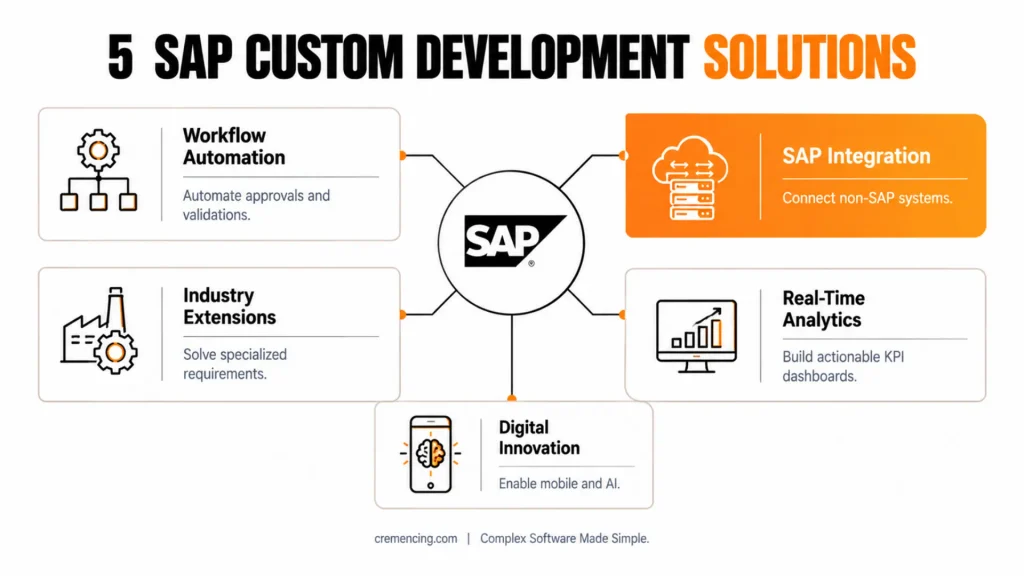
SAP Custom Development Services address the problem through extensions built on SAP BTP, the SAP Cloud Application Programming Model (CAP), and SAP Fiori that leave the core untouched. This guide explains five practical areas where custom development delivers value, with implementation guidance and examples for each.
How SAP Custom Development Services Automate Complex Business Workflows
Manual approval chains in procurement, finance, and HR usually run through email, spreadsheets, or generic workflow steps that do not match how the business actually approves work. SAP Custom Development Services replace these steps with purpose-built applications that route each request to the right approver, validate data before submission, and write the result back to SAP automatically. As a result, teams reduce re-keying errors, shorten approval cycles, and gain a single audit trail for every decision.
A typical build combines an SAP Fiori front end with a service layer created in CAP on SAP BTP. The Fiori app presents the request to the approver in a role-specific view, while CAP exposes the business logic and connects to SAP S/4HANA through released OData APIs. In SAP ECC landscapes, the same pattern works through SAP Gateway and SAP Cloud Connector. Because the extension runs on SAP BTP, upgrades to the core do not break the workflow, which supports a clean core strategy.
For example, a global manufacturing company automated its purchase order approval through a custom-built SAP Fiori app, which reduced approval time from five days to one day and eliminated duplicate entries. Improvements of this size typically come from two design choices: validating vendor and cost center data before submission, and notifying approvers directly instead of relying on them to check an inbox.
To get similar results, start with processes that show the highest rework or error rates, since these produce measurable gains fastest. Next, build the approval flow with SAP Fiori and CAP, and add notifications so approvers see pending items without logging in. Finally, apply role-based authorization so that approval limits follow the same rules as the SAP backend.
Read more about SAP Fiori app development
Integrating SAP with Non-SAP Systems Through Custom Development
Most SAP landscapes run alongside CRM, logistics, and analytics platforms that were purchased separately. When these systems exchange data manually or through batch files, the result is data silos, delayed decisions, and reports that contradict each other.
SAP Custom Development Services solve this by building integration layers that connect SAP with third-party systems through APIs and connectors. SAP Integration Suite on SAP BTP provides prebuilt connectors and integration flows for common systems, while custom development fills the gaps where a standard connector does not match a specific data model or process. Real-time APIs then synchronize master data and transactions, and consolidated dashboards pull data from every connected source.
For example, a logistics company connected SAP S/4HANA with Salesforce and its warehouse management system through custom integration services. This reduced order processing errors by 30% and improved delivery tracking. Security deserves equal attention in such projects, because every connection should use OAuth 2.0 authentication, and on-premise systems should connect through SAP Cloud Connector instead of open network ports.made SAP integration services, thus cutting order processing errors by 30% and enhancing delivery tracking.
For more insights, read our blog on 7 Ways SAP BTP Improvement
Meeting Industry-Specific Requirements Beyond Standard SAP Modules
Standard SAP modules cover common processes across industries, but they rarely cover niche requirements such as machine downtime tracking in discrete manufacturing or loyalty program rules in retail. Custom development fills these gaps with industry-specific applications, specialized reports, and features that follow the exact business process. Moreover, these extensions run side-by-side on SAP BTP, so they stay upgrade-safe when the core changes.
| Industry | Business Challenge | SAP Custom Solution | Result |
|---|---|---|---|
| Manufacturing | Machine downtime tracking | Custom IoT-integrated SAP app | 25% reduction in downtime |
| Retail | Loyalty program management | Custom CAP/Fiori app | 30% higher customer retention |
| Healthcare | Patient record workflow | Custom SAP extension | Faster approvals and compliance |
When designing industry-specific apps, use CAP for the data model and services, and use SAP Fiori for a user-friendly interface that business users adopt quickly.
Improving Reporting and Analytics with Custom SAP Applications
Many organizations still base decisions on reports that are weeks old. Data must often be extracted, reconciled, and formatted manually before anyone sees it. SAP Custom Development Services can shorten this cycle. Teams can build KPI dashboards, scheduled reports, and real-time analytics directly on SAP data. SAP Analytics Cloud can serve as the visualization layer. SAP BTP services can handle integration and data access.
For example, a retail company built a custom app for real-time reporting. The app feeds SAP Analytics Cloud with sales, inventory, and customer data. SAP BTP connects data from each branch. As a result, operational efficiency improved by 15%.
To achieve similar results, define important KPIs before designing any dashboard. Unclear metrics can create cluttered reports that nobody uses. Use the predictive features of SAP Analytics Cloud for forecasting. Also, give users real-time access to data across connected systems.
Supporting Digital Transformation and Innovation
Digital transformation projects often stall because legacy custom code and manual processes cannot support new channels or data sources. SAP Custom Development Services address this in three ways: mobile applications for employees and customers, AI-based features such as predictive maintenance, sales forecasting, and customer support, and the migration of legacy custom code to cloud-native extensions built with ABAP Cloud or CAP. SAP AI Core and SAP AI Launchpad on SAP BTP typically provide the AI runtime for such use cases.
For example, a financial services company built a custom mobile app with SAP Fiori that automates status updates and client alerts for loan approvals. The result was faster turnaround time, higher client satisfaction, and lower operating costs.
Why Organizations Choose SAP Custom Development
Custom development gives organizations flexibility because applications follow individual business rules and process flows instead of forcing teams to adapt to standard functionality. It also scales without disruption, since extensions add capabilities around the SAP core and the organization does not need to replace its existing SAP system. In addition, custom applications speed up innovation and process optimization, which creates a competitive advantage. Automation also reduces human error, which improves compliance and data integrity.
For example, a healthcare provider combined SAP with IoT sensors to monitor the status of critical machines. Alerts and dashboards reduced equipment downtime by 20%, which led to better patient care and easier regulatory compliance.
Implementation Best Practices for SAP Custom Development
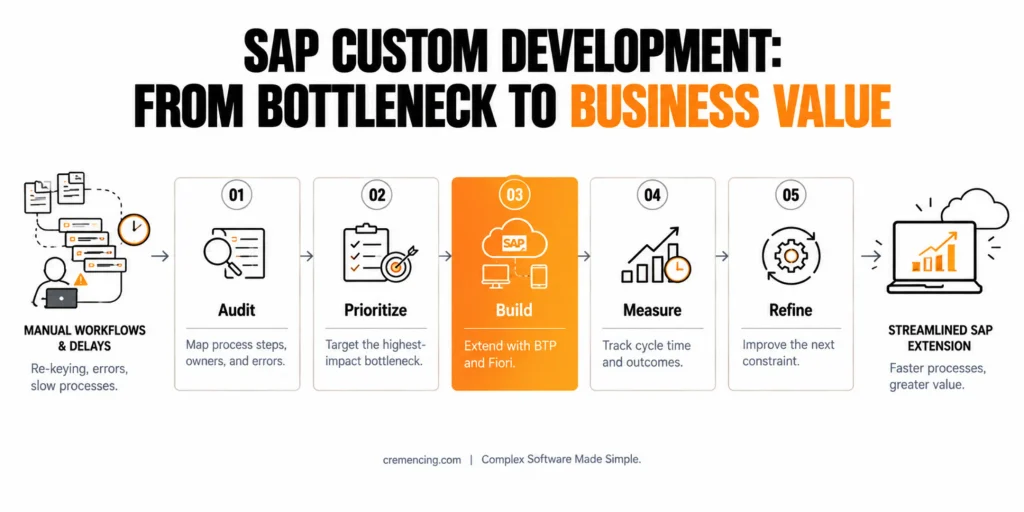
Successful implementations start with a process audit that maps each step, its owner, its duration, and its error rate. Benchmarking these steps against each other exposes the largest bottleneck, so the team can direct development effort to remove it first. After the fix, the team measures again, because the next slowest step becomes the new constraint, and the cycle repeats.
Beyond the audit, prioritize high-impact workflows for automation, since they return the most value per development hour. Build on SAP BTP and SAP Fiori to keep applications cloud-native and user-centered, and enforce role-based access for every sensitive workflow. Finally, track results through analytics dashboards and keep refining the processes after go-live.
Where SAP Custom Development Fits Across Industries
| Industry | Common Use Cases | Benefit |
|---|---|---|
| Manufacturing | IoT-enabled maintenance, production tracking | Reduced downtime, better forecasting |
| Retail | Custom POS integrations, loyalty apps | Increased customer retention |
| Logistics | Route optimization, warehouse management | Faster deliveries, lower costs |
| Finance | Automated reporting, loan processing | Reduced errors, faster approvals |
Conclusion
SAP Custom Development Services give organizations a structured way to close the gap between standard SAP functionality and real business requirements. Workflow automation, integration with non-SAP systems, industry-specific applications, and real-time analytics each address a measurable problem, and together they shorten cycle times, reduce errors, and improve decision quality without altering the SAP core.
Looking ahead, the clean core strategy and the growing role of SAP BTP and AI services will make well-designed extensions increasingly important for both SAP S/4HANA and cloud landscapes. Organizations that audit their processes, prioritize high-impact workflows, and build upgrade-safe extensions now will adapt faster as SAP release cycles and business needs change.
FAQs
What are SAP Custom Development Services?
SAP Custom Development Services cover the design, building, and maintenance of applications, extensions, and integrations that add functionality to SAP systems. They automate workflows, connect SAP with third-party platforms, and deliver industry-specific features that standard SAP modules do not provide, typically using SAP BTP, CAP, and Fiori.
Can SAP custom development integrate non-SAP systems with SAP?
Yes. Custom development connects SAP with CRM, logistics, and analytics systems through APIs, OData services, and SAP Integration Suite. This keeps data synchronized in real time and removes manual transfers, while authentication and API governance protect the connection. Salesforce and warehouse management systems are common examples.
How does SAP custom development optimize workflows?
It replaces manual steps with automated approvals, validations, and notifications inside custom Fiori apps, and adds real-time dashboards that show where processes slow down. Teams then adjust the workflow based on measured cycle times instead of assumptions, which reduces errors and rework across departments.
Which industries use SAP custom development most?
Manufacturing, retail, banking, logistics, and healthcare use it most often, because each has process requirements that standard modules only partly cover. Examples include IoT-based downtime tracking, loyalty program management, loan processing, route optimization, and patient record workflows built as SAP extensions.
Can I customize SAP without modifying the core system?
Yes. Side-by-side extensions on SAP BTP, released APIs, and in-app extensibility let organizations add features without changing standard SAP code. This clean core approach reduces upgrade effort, lowers the risk of instability, and keeps the system aligned with SAP support requirements.
What is the difference between in-app and side-by-side extensions?
side extensions run on SAP BTP and communicate through APIs. In-app suits small changes close to core data, whereas side-by-side suits independent applications, integrations, and heavier custom logic.
How long does an SAP custom development project take?
Timelines depend on scope. A single Fiori app with a CAP backend often takes several weeks to a few months, while multi-system integrations take longer. The process audit, API availability, and testing effort usually influence the schedule more than the coding itself.
Does custom development affect SAP S/4HANA upgrades?
Extensions built on released APIs and SAP BTP generally survive upgrades with little rework, because they do not alter core objects. Modifications to standard SAP code create the most upgrade effort, so a clean core design is the safer approach for any new development.




