
Most teams evaluating SAP Event Mesh assume they’re choosing a single product: turn it on, publish some events, and they’re done. They’re not. SAP now sells three different event-messaging tiers on BTP: a free-with-license event broker, the mid-tier event mesh, and an enterprise-grade advanced event mesh built on Solace, each with different message-size limits, throughput ceilings, and monitoring capabilities. Pick the wrong one, and you’ll either overpay for capacity you don’t need or hit a 1 MB message wall six months into a “real-time” integration project that was never designed to handle it.
For CIOs, integration architects, and SAP transformation owners planning event-driven architecture, the real question isn’t “Should we use Event Mesh?” It’s “Which tier and for which processes?” This post breaks down how the messaging backbone works, where each tier fits, and the governance decisions that determine whether your event-driven rollout scales cleanly or becomes another integration bottleneck.
Real-Time Communication Across SAP and Non-SAP Systems
Therefore, with real-time communication across SAP and non-SAP systems, Event Mesh gives the opportunity to respond immediately to business events as they happen, similarly simplifying integration complexity and accelerating digital transformation.
What is SAP Event Mesh?
Moreover, in conventional request-response integration systems, systems invoke each other directly. Thus, with Event Mesh, systems can publish events and subscribe to them without needing to understand the details of the other receivers/arenas.
Key characteristics include:
- Event-driven architecture: Automatically causes an action in response to a business event
- Decoupled communication: Systems are not relying on synchronized communication, which eliminates bottlenecks
- Real-time integration: SAP and non-SAP systems are directly linked as soon as a message is posted
- Cloud-native, scalable: Runs gracefully in SAP BTP and supports high-throughput scenarios
In SAP’s event portfolio: There are currently three closely related but distinguishable services in SAP on BTP. The entry-tier is SAP Cloud Application Event Hub (Event Broker), which is included in the standard BTP license for low-volume, single-region applications. The mid-tier default most teams default to is SAP Event Mesh (roughly a 1MB per message limit, open protocol support, AMQP, MQTT, and REST), which is most commonly used in the transition from SAP S/4HANA to cloud-based applications.
The enterprise tier: larger messages (up to 30 MB), advanced event mesh (Solace-powered) with multi-broker mesh topology across regions, on-premises bridging, and message replay for high-volume and mission-critical event flows.
Example:
However, if an order is generated in S/4HANA, Event Mesh automatically lets inventory management, logistics, and billing systems know, so no human intervention is necessary. Furthermore, it guarantees instantaneous interoperability between cloud-based services and accelerates order execution.
Why SAP Event Mesh is Important for Businesses
Many digital transformation efforts fail less because technology is inadequate than because information doesn’t flow effectively or rapidly.
Without event-driven integration:
- Processes remain fragmented and reactive
- Important data is delayed or acted upon in isolation
- The requests’ cycle time is slow, adversely affecting customer experience
- Initiatives to innovate get stuck because integration is complicated and slow
| Capability | Event Broker (entry) | SAP Event Mesh (mid) | Advanced Event Mesh (enterprise) |
|---|---|---|---|
| Included with BTP license | Yes | No (separate service) | No (separate service) |
| Protocols | Limited | AMQP, MQTT, REST | AMQP, MQTT, REST, JMS, Solace native |
| Typical message size cap | Small | ~1 MB | Up to ~30 MB |
| Multi-region mesh | No | Limited | Yes |
| On-prem bridging | No | Limited | Yes |
| Best fit | Low-volume pilots | Standard S/4HANA↔cloud events | High-volume, multi-region, mission-critical |
SAP Event Mesh addresses these challenges by providing the following:
- Immediate Event Response: React in the moment, from order placement to a compliance warning
- Business Agility: Rapidly adjust workflows and systems to changing business needs
- Less Complex: Decoupling saves integration and technical debt
- Scalable Architecture: Support many events without compromising performance
In a nutshell, SAP Event Broker turns integration from a technical liability to a strategic advancement of agility and innovation. Fore more insights read our Blog on SAP Operating Model
How SAP Event Mesh Works
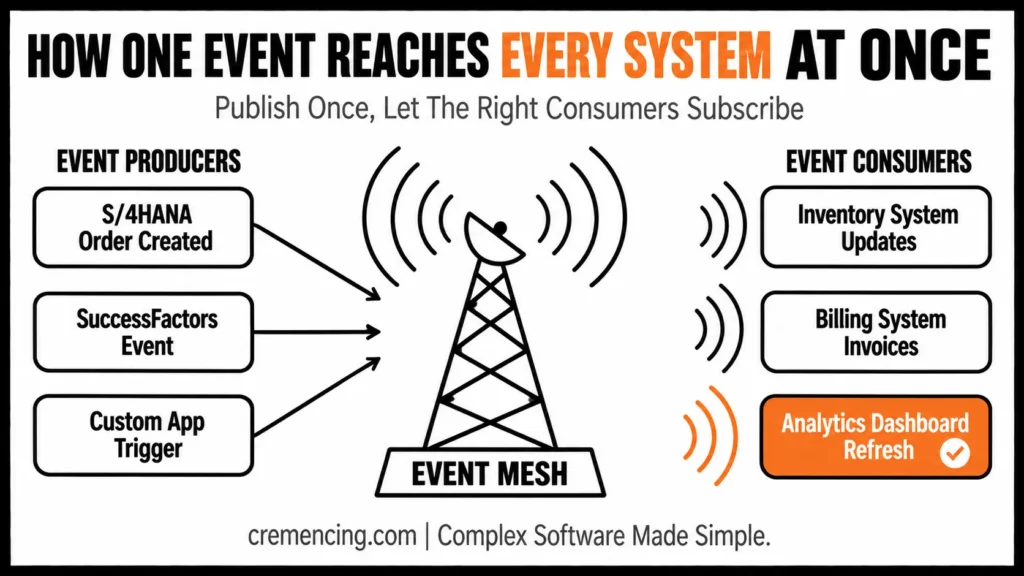
SAP Event Mesh is based on publish/subscribe messaging.
Event Producers
Dependencies, e.g., S/4HANA, SuccessFactors, or custom applications, publish events happening as business transactions:
- Sales order created
- Purchase requisition approved
- Customer complaint logged
Consequently, these features contain the basic information that can be used for further analysis.
Messaging Backbone with Event Mesh
In simple words, events are sent across the network, and Event Mesh handles them to:
- Reliable delivery
- Firm sequence of events if necessary
- Scalable processing for large volumes
- Decoupling of producers and consumers
Event Consumers
Similary, other systems or applications subscribe to relevant events and take action automatically:
- Inventory system updates stock availability
- The billing system generates an invoice
- Analytics platform refreshes real-time dashboards
As a result, their decoupled, asynchronous approach to communication leads to high resiliency, low latency, and scalability.
Example:
For instance, a world-leading logistics company leverages Event Mesh to synchronize S/4HANA orders with such a fleet management system. “Shipment ready” and “delivery completed” announcements are published and consumed in real time, improving operational efficiency and reducing transaction latency. For more insight, read our blog on SAP integration.
Benefits of SAP Event Mesh
- Real-Time Integration: Events are sent instantly system-wide, providing real-time operational intel and replacing batch-based processes
- Reduced System Dependencies: Decoupled architecture enables systems to function independently and in synchronization
- Enhanced Agility: New applications or services can subscribe to existing events without modification, leading to more rapid innovation
- Scalability and Reliability: SAP event broker processes millions of events every day
- Simplified Monitoring and Governance: Built-in dashboards and logs provide visibility into event flows, empowering IT teams to track performance, exceptions, and SLA compliance
How SAP Event Mesh Fits with Event-Driven Architectures
It is an event-driven architecture (EDA) where systems respond to events rather than follow a schedule.
Use Cases:
- Order-to-Cash Process: Update inventory, billing, and shipping with order creation
- Procure-to-Pay Process: Inform finance and procurement systems upon receipt of invoices or approval of purchase orders
- HR Operations: Generate notifications when new employees join or roles change in SuccessFactors
- IoT Integrations: Track production lines and set up alerts or work orders when issues are found
Thus, with SAP Event Mesh, organizations can transform S/4HANA into an agile and responsive central nervous system enabling real-time decision-making.
How To: Utilize Best Practices in SAP Event Mesh
Step 1:
Firsty, Identify Critical Events
- Map core business processes
- Identify events that need to travel in real-time
- Focus on impact areas such as finance, logistics, or customer-facing processes
Step 2:
Next, Specify What Events to Consume and Actions
- Determine which systems require response to each event
- Set up standards, alerts, and processes
- Align actions with business needs and compliance
Step 3:
Then Establish Governance
- Define roles and responsibilities for event publication and subscription
- Add logging, monitoring, and alerting for failed or delayed events
- Set SLA targets for event delivery
Step 4:
Finally, Connect with SAP BTP
- Utilize SAP BTP solutions to control and monitor events
- Use dashboards for visibility into flows from front to back-end
- Develop event flows to maximize efficiency
Step 5: Iterate and Scale
- Pilot high-touch processes
- Monitor performance and adoption
- Broaden Event Mesh integration to other SAP apps or cloud applications
Real-Life Applications of SAP Event Mesh
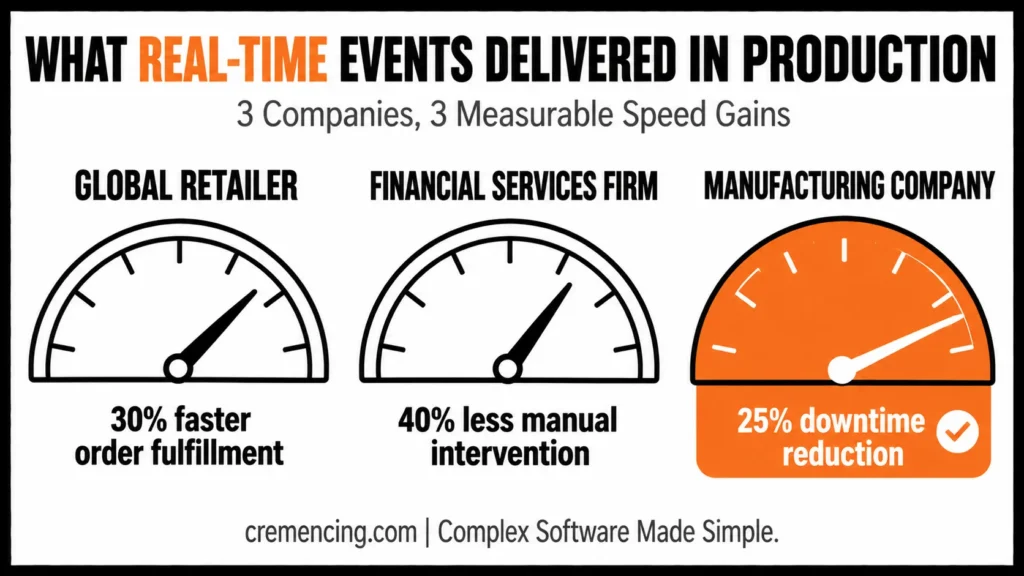
Global Retailer:
- S/4HANA, inventory, and shipping integrated
- Improved order fulfillment time by 30%
- Automatic customer notifications in live mode
Financial Services Firm:
- Automated alerts for compliance on high-risk transactions
- Reduced manual intervention by 40%
- Improved regulatory reporting accuracy
Manufacturing Company:
- Monitored IoT-enabled production lines
- Automatic anomaly notifications are sent to maintenance personnel
- Reduced duty time by 25% and increased OEE
Cases like this prove: SAP Event Mesh isn’t merely an integration tool; it’s a strategic enabler of real-time business response.
Executive Checklist for Success with SAP Event Mesh
- Recognize critical business occasions and workflows
- Get IT, Process Owners, and Executive Sponsors involved early
- Add logging and monitoring for event flows
- Decouple your systems to reduce complex dependencies
- Begin with impactful pilot projects
- Scale incrementally and permanently optimize event-driven processes
Conclusion
The mistake most teams make with SAP Event Mesh isn’t technical it’s a scoping decision made too early. Defaulting to the standard Event Mesh tier because it’s the one that comes up first in search results, without checking message size, region, or volume requirements against the advanced event mesh or entry-tier alternatives, is how “real-time integration” projects end up re-platformed a year later.
The fix isn’t complicated: map your critical events, size them honestly against each tier’s limits, assign governance ownership before go-live, and connect BTP monitoring so failures surface immediately rather than silently. Get that sequence right, and Event Mesh (whichever tier you land on) does exactly what this post opened with turns SAP from a batch-oriented system of record into a responsive, event-driven one. Get it wrong, and you’ve just moved the integration bottleneck from ECC to the cloud.
Overall, SAP Event Mesh transforms classic, batch-oriented ERP into a responsive, event-driven platform, enabling system-to-system integrations between SAP and third-party apps and delivering real-time insights across an ecosystem of systems. Utilize SAP BTP solutions to control and monitor events (in the Best Practices section).
FAQs
What is SAP Event Mesh?
A managed messaging backbone providing event-driven integration across SAP and non-SAP systems in real time.
Why does Event Mesh matter for SAP environments?
It enables immediate system-to-system communication, facilitating agile processes, quick decision-making, and reduced operational risk.
Is SAP Event Mesh capable of processing high-volume events?
Yes. It is scalable and handles millions of events every day without performance penalties.
What do you mean by Event Mesh breaks system dependencies?
By decoupling producers and consumers, it eliminates direct synchronous calls that slow down system traffic and cause downtime.
Who leads the SAP Event Mesh initiative?
CIOs, SAP transformation owners, enterprise architects, and business process leaders should partner to align strategy, adoption, and measurable business results.
How is SAP Event Mesh different from SAP Integration Suite, Advanced Event Mesh?
Event Mesh is the mid-tier BTP messaging service (open protocols, ~1 MB messages); Advanced Event Mesh is the Solace-powered enterprise tier for high-volume, multi-region, mission-critical event flows.
Does SAP Event Mesh work with S/4HANA on-premises or only S/4HANA Cloud?
It’s a BTP service, so on-premises systems can connect, but they typically need additional connectivity (e.g., Cloud Connector); the setup differs from a native S/4HANA Cloud connection. Confirm current connectivity requirements against SAP Help before scoping.
What’s the maximum message size SAP Event Mesh supports?
The standard tier caps messages well below the enterprise tier; teams with large payloads should evaluate advanced event mesh instead.
Do I need SAP Integration Suite to use Event Mesh?
Not always for basic pub/sub, but Integration Suite adds flow orchestration, monitoring, and the bridge to advanced event mesh; most production rollouts pair the two.
What happens if an event fails to deliver?
This depends on the retry/dead-letter and queue configuration set up during governance; it’s not automatic, which is why Step 3 (Establish Governance) in this post matters.





One Response