
You’re on your first SAP project. Someone says, “Write it in ABAP.” You nod confidently, but internally you’re wondering: What is ABAP? Is it a programming language or simply a scripting layer atop an ERP system?
It’s a valid question. This is a common confusion because ABAP is not Python, so it does not look like Python. It is not Java! And many of its concepts are unique to software development.
The quick answer is:
ABAP is indeed a full-fledged programming language.
It has been over 40 years since the language has been part of the SAP business ecosystem, and it has been well designed to develop, extend, and deploy enterprise business applications at scale. Realizing that design philosophy is the first step to being productive in SAP development.
Core Architectural Pillars of ABAP
ABAP is not an interpreted scripting layer; it is a compiled, stateful, enterprise-grade language running inside the ABAP Kernel within the SAP Application Server.
| Misconception | Reality |
|---|---|
| “ABAP is just a scripting layer” | Compiled into platform-independent bytecode (ABAP Load), executed by the SAP runtime kernel |
| “ABAP doesn’t support OOP” | Full object-oriented support since SAP Basis 4.6 — classes, interfaces, inheritance, polymorphism |
| “ABAP needs external database tools” | Database abstraction (Open SQL) is built directly into the language, not a bolted-on framework |
| “ABAP is legacy-only, irrelevant for S/4HANA” | Actively extended via RAP, CDS Views, ABAP Cloud, and Clean Core development |
What is ABAP, and why is it important?
SAP’s own programming language is called Advanced Business Application Programming (ABAP). It was first developed in the 1980s for the SAP R/2 mainframe system and then used as the primary language for the development of SAP R/3 and SAP ECC, and it is the primary language used for SAP S/4HANA. This confirms that ABAP is a programming language purpose-built for enterprise SAP environments, not a scripting layer.
So, ABAP is a programming language?
Absolutely. ABAP is compiled into platform-independent bytecode called “ABAP Load,” executed by the SAP runtime environment, and provides developers with complete control over:
- Data types
- Control flow
- Subroutines
- Exception handling
- Object-oriented programming
- Database interaction
The advantage of ABAP over other programming languages is that it is tightly coupled with the SAP runtime environment.
In fact, the database layer is embedded within the language. Database drivers and ORM frameworks are not installed by developers. ABAP, however, does not use standard SQL but rather Open SQL, which automatically converts the database operations into the native SQL of the database platform (SAP HANA, Oracle, SQL Server, MaxDB, or other supported databases).
This database abstraction is not a framework. It’s an inherent part of the language. In addition, ABAP comes with a full development environment, comprising the following:
- Data Dictionary (SE11)
- Development Workbench (SE80)
- ABAP Development Tools (ADT)
- Runtime Debugger
- Transport Management System
By contrast, most programming languages require multiple external tools to achieve the same functionality.
They are available on ABAP as part of the platform. One of the biggest mind changes comes for the developer moving from a Java or C environment to ABAP, as ABAP programs do not run on their own. They are executed within SAP work processes controlled by the ABAP Dispatcher. When writing production code, it’s important to understand this architecture.
How ABAP a Programming Language Works Internally
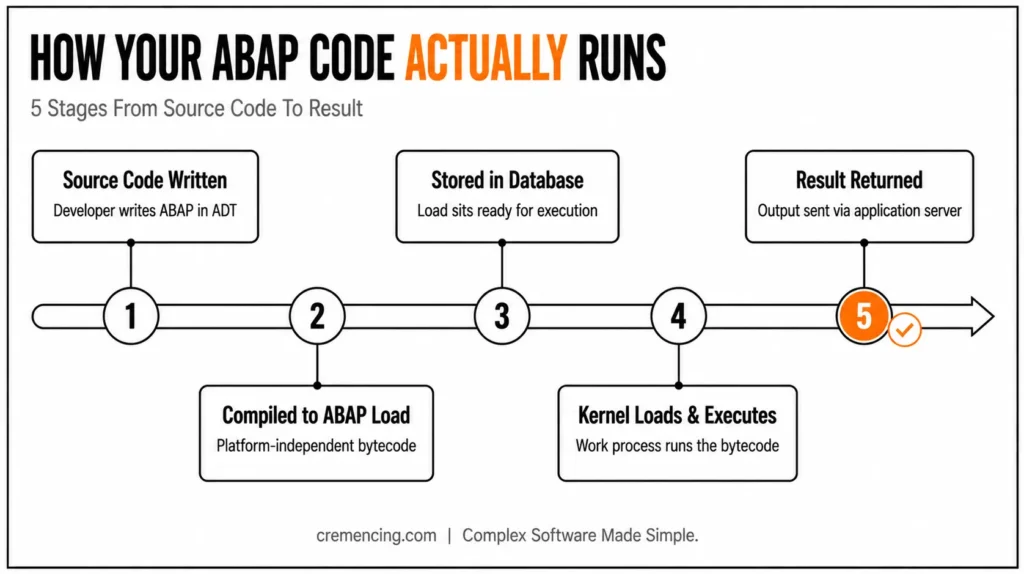
In the activation of an ABAP program, the program source code is translated into platform-independent bytecode, named ABAP Load.
The generated load is stored in the SAP database.
At runtime:
- The ABAP runtime kernel loads the bytecode.
- A work process executes the program.
- Results are returned through the SAP application server.
As a result, this architecture allows the same ABAP program to run consistently across different operating systems and infrastructure platforms.
The ABAP runtime environment manages:
- Program execution stack
- User sessions
- Shared memory
- Database connections
- Authorization checks
- Resource allocation
Developers interact with these mechanisms using SAP-specific constructs such as:
- ABAP Memory
- Shared Objects
- EXPORT/IMPORT statements
- Database persistence
Understanding the ABAP Type System
ABAP’s type system is much more sophisticated than many newcomers expect. The depth of this type system is one more reason ABAP is a programming language suited for precision-critical, large-scale enterprise use.
Elementary Data Types
ABAP provides several built-in data types:
| Type | Purpose |
| C | Character fields |
| N | Numeric text |
| I | Integer |
| P | Packed decimal |
| F | Floating point |
| D | Date |
| T | Time |
| STRING | Variable-length text |
| XSTRING | Binary data |
Specifically, the P (Packed Decimal) type deserves special attention.
For example, financial calculations often require exact decimal precision. Packed decimals store values using binary-coded decimal (BCD) representation, helping prevent rounding issues commonly seen with floating-point arithmetic.
Modern S/4HANA systems also support:
- DECFLOAT16
- DECFLOAT34
These provide IEEE 754 decimal floating-point precision and are frequently used in financial and currency-related calculations.
Complex Data Types
ABAP also supports:
Structures
Simply put, structures group related fields into a single logical object.
Internal Tables
Internal tables are in-memory collections and represent one of the most important concepts in ABAP development.
Most business processing in SAP involves reading, transforming, and manipulating internal tables.
Reference Types
Reference variables support object-oriented programming and dynamic memory management.
Database Access Through Open SQL
Database interaction in ABAP happens through Open SQL.
For example:
SELECT matnr,
matkl,
meins,
ersda
FROM mara
INTO TABLE @lt_material.
The ABAP runtime automatically converts this statement into the database-specific SQL required by the underlying database platform.
Benefits include:
- Database independence
- Reduced maintenance effort
- Consistent application behaviour
- Easier database migrations
This design was revolutionary when ABAP was introduced and remains one of its biggest advantages today.
Practical Code Walkthrough
If you’re unfamiliar with internal tables, consider reviewing the following:
The following example demonstrates why ABAP a programming language offers such fine-grained control, covering several important concepts:
- Typed internal tables
- Open SQL
- Host variables
- Field symbols
- Inline declarations
“============================================================
” Program: Z_MATERIAL_OVERVIEW
” Purpose: Fetch and display material master records
” Release: ABAP 7.40 SP8+ (ECC 6.0 with compatible kernel
” or any S/4HANA release)
“============================================================
REPORT z_material_overview.
“————————————————————
” 1. Structure Type Definition
“————————————————————
TYPES: BEGIN OF ty_material,
matnr TYPE mara-matnr,
matkl TYPE mara-matkl,
meins TYPE mara-meins,
ersda TYPE mara-ersda,
END OF ty_material.
“————————————————————
” 2. Data Declarations
“————————————————————
DATA: lt_material TYPE TABLE OF ty_material,
ls_material TYPE ty_material.
“————————————————————
” 3. Selection Screen
“————————————————————
SELECT-OPTIONS: s_matkl FOR ls_material-matkl.
START-OF-SELECTION.
“————————————————————
” 4. Open SQL Query
“————————————————————
SELECT matnr,
matkl,
meins,
ersda
FROM mara
INTO TABLE @lt_material
WHERE matkl IN @s_matkl
AND lvorm = @abap_false.
IF sy-subrc <> 0.
MESSAGE ‘No materials found for selected material group’
TYPE ‘I’.
RETURN.
ENDIF.
“————————————————————
” 5. Field Symbol Loop
“————————————————————
FIELD-SYMBOLS: <ls_mat> TYPE ty_material.
LOOP AT lt_material ASSIGNING <ls_mat>.
IF <ls_mat>-ersda < ‘20200101’.
WRITE: / <ls_mat>-matnr,
<ls_mat>-matkl,
‘(legacy record)’.
ELSE.
WRITE: / <ls_mat>-matnr,
<ls_mat>-matkl,
<ls_mat>-meins.
ENDIF.
ENDLOOP.
Breaking Down the Example: ABAP a Programming Language in Action
SELECT-OPTIONS
The SELECT-OPTIONS statement automatically creates an interactive SAP selection screen.
Without writing any UI code, developers receive:
- Low values
- High values
- Include/Exclude options
- Range handling
This level of built-in functionality is uncommon in most programming languages.
sy-subrc
sy-subrc is ABAP’s system return code.
After database operations, function calls, or table reads, SAP automatically updates sy-subrc. Ignoring it is one of the fastest ways to create debugging headaches.
Field Symbols
Field symbols behave similarly to pointers.
For instance, when looping using:
LOOP AT lt_material ASSIGNING <ls_mat>.
ABAP works directly with memory references rather than creating copies.
Consequently, this significantly improves performance when processing large internal tables.
Host Variables (@)
Modern ABAP requires the @ symbol to distinguish ABAP variables from database columns. Nevertheless, this syntax became standard with ABAP 7.40 and is mandatory in modern S/4HANA development.
When Should You Use ABAP?
The practical question isn’t whether ABAP is a programming language.
The real question is
When should ABAP be used, and when should another technology be used instead?
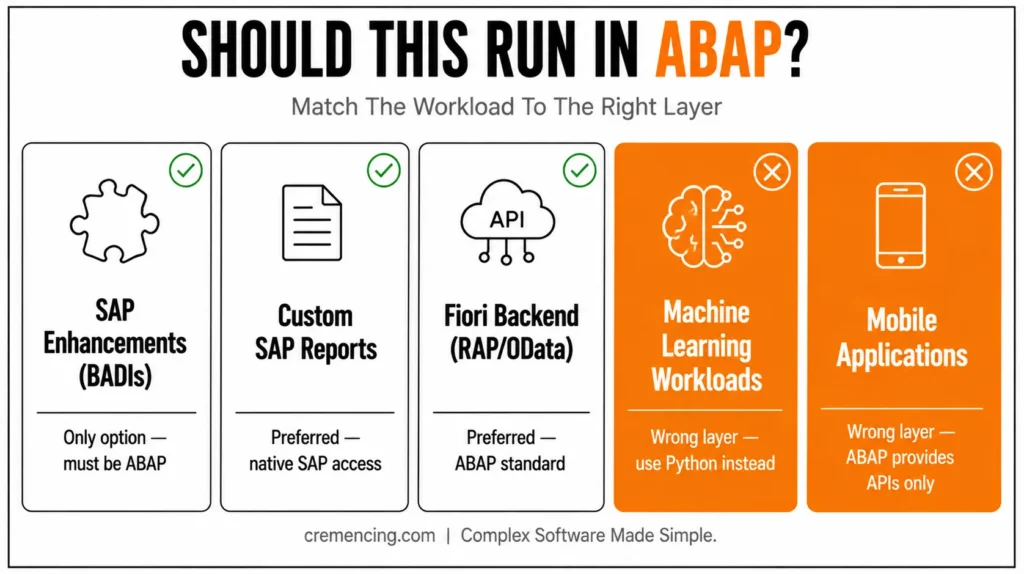
| Scenario | ABAP | Alternative | Why |
| SAP enhancement framework (BADIs, User Exits) | Only option | — | SAP enhancements run in ABAP |
| Custom SAP reports | Preferred | SAP Analytics Cloud | Native SAP access |
| Fiori backend development | Preferred | — | RAP and OData are ABAP standards |
| Data migration into SAP | Preferred | LSMW, Data Services | Direct SAP validation |
| Standalone analytics dashboards | Overkill | BW, SAC | Better reporting capabilities |
| Mobile applications | Wrong layer | SAP Mobile Services | ABAP provides APIs only |
| Machine learning workloads | Wrong layer | Python, SAP AI Core | Better ML tooling |
| Enterprise integration | Possible | SAP Integration Suite | Middleware designed for integration |
The rule is simple:
- Use ABAP when business logic must run inside SAP.
- Use other technologies when the workload belongs outside SAP.
ABAP in the S/4HANA Era
The role of ABAP has evolved significantly.
Modern ABAP now supports:
- RESTful APIs
- CDS Views
- RAP (RESTful ABAP Programming Model)
- Modern syntax improvements
- Embedded analytics
- Cloud-ready development patterns
With RAP, ABAP can expose SAP business objects directly as OData services.
Meanwhile, front-end developers can consume those services using:
- JavaScript
- TypeScript
- SAPUI5
- React
- Angular
However, the underlying business logic still resides in ABAP. For that reason, ABAP expertise remains critical in S/4HANA projects. How to fix common ABAP errors.
Conclusion
The question this guide opened with — “is ABAP really a programming language, or just SAP’s scripting layer?” — has a clear answer once you’ve seen the architecture: compiled bytecode, a full type system built for financial precision, database abstraction baked into the language itself, and object-oriented development that’s been standard since SAP Basis 4.6. That’s not a scripting layer. That’s a language purpose-built for one job — running enterprise business logic reliably at scale — and it’s still SAP’s answer to that job in S/4HANA today, extended through RAP and ABAP Cloud rather than replaced by them.
Whether you’re writing your first report in SE38 or building a RAP service in ADT, the syntax gets easier once the architecture makes sense. Learn how the runtime, the type system, and Open SQL fit together first — the rest follows faster than most new SAP developers expect.
For more insight read our blog on ABAP AI development.
Frequently Asked Questions
1. Is ABAP a compiled or interpreted language?
ABAP uses a hybrid execution model. Source code is compiled into ABAP Load (bytecode) during activation. At runtime, the ABAP kernel executes that bytecode — an approach similar to Java’s JVM model.
2. Is ABAP object-oriented?
Yes, ABAP has supported object-oriented development since SAP Basis 4.6.
Developers can create:
- Classes
- Interfaces
- Inheritance hierarchies
- Polymorphic designs
Modern S/4HANA development strongly favors object-oriented ABAP.
3. Can ABAP communicate with external systems and APIs?
Yes.
ABAP supports:
- HTTP
- HTTPS
- REST APIs
- SOAP services
- RFC communication
Classes such as CL_HTTP_CLIENT and newer HTTP frameworks allow SAP systems to interact with external applications.
4. Is ABAP difficult to learn if I already know Java or C#?
The programming concepts transfer well. The challenge is learning SAP-specific concepts such as:
- Work processes
- Authorizations
- Transport management
- Data Dictionary
- SAP architecture
Most developers become productive after a few months of hands-on practice.
5. Is ABAP still relevant for S/4HANA?
Absolutely. SAP continues to position ABAP as the primary development language for S/4HANA.
Modern enhancements include the following:
- RAP
- CDS Views
- Embedded Analytics
- ABAP Cloud
- Clean Core development
ABAP remains a strategic technology for SAP’s future roadmap.
6. What is the ABAP Editor in ECC?
Traditional ABAP development uses:
- SE38 (ABAP Editor)
- SE80 (Object Navigator)
For modern development, SAP recommends:
ABAP Development Tools (ADT) in Eclipse.
ADT supports modern syntax, code checks, debugging, and RAP development.
7. Does ABAP support asynchronous processing?
Yes, indeed. ABAP provides several mechanisms for asynchronous execution, such as background jobs (via SM36/SM37), RFC calls in asynchronous mode, and parallel processing frameworks. As a result, long-running or resource-intensive tasks can run without blocking the main dialog process. However, developers must carefully manage locking and data consistency, since asynchronous operations execute independently of the calling program.
8. Why do SAP systems still rely heavily on ABAP instead of switching entirely to modern languages?
First and foremost, ABAP is deeply embedded in SAP’s core architecture — database access, authorization checks, and transport mechanisms are all built around it. Furthermore, decades of business logic across thousands of SAP implementations exist in ABAP, making a full rewrite impractical. In addition, SAP continues to actively modernize ABAP itself through RAP, CDS views, and ABAP Cloud, rather than replacing it. Therefore, ABAP remains the standard rather than a legacy leftover.
9. What are the biggest mistakes beginners make when learning ABAP?
To begin with, many beginners ignore sy-subrc, which often leads to silent failures that are hard to debug later. Similarly, developers coming from other languages sometimes try to bypass Open SQL with raw native SQL, which breaks database independence. Moreover, skipping the Data Dictionary (SE11) fundamentals often causes confusion when working with structures and table types. Consequently, most experts recommend mastering the underlying architecture before diving into advanced syntax.
10. Is it necessary to learn classic ABAP before moving to RAP (RESTful ABAP Programming)?
Not strictly, but it’s highly recommended. Since RAP is built on top of core ABAP concepts like CDS views, structures, and Open SQL, having that foundation first makes the transition much smoother. Otherwise, beginners often struggle to understand why RAP behaves the way it does. Consequently, most training paths still start with classic ABAP basics before progressing to modern extensibility models like RAP and ABAP Cloud.




