
This is usually one of the initial indicators of a broken HR process— and often, it’s a clear sign that SAP SuccessFactors and ServiceNow aren’t properly connected.
Here’s a number worth sitting with: in HR service delivery deployments, the most commonly cited failure point isn’t the technology connecting the systems — it’s the absence of a clear answer to one question: which system owns this field? Organizations that skip that question end up with SAP SuccessFactors and ServiceNow technically connected but practically still disconnected, employees still switching between two logins to get one answer, HR teams still reconciling two versions of the same record.
The integration itself is almost never the hard part. Deciding what data moves, who owns it, and what ServiceNow actually needs versus what it’s tempting to replicate — that’s where most of these projects succeed or quietly stall. This guide walks through how the integration actually works, the real benefits it delivers when scoped correctly, and what to get right before the first API call is made.
ServiceNow SuccessFactors Integration
According to ServiceNow and SAP documentation, integrating ServiceNow HR Service Delivery with SAP SuccessFactors establishes a clear boundary between employee service workflows and core Human Capital Management records. Utilizing specialized integration mechanisms like ServiceNow IntegrationHub spokes or REST APIs allows organizations to synchronize specific worker profile data without duplicating entire database structures.
This architecture ensures SAP SuccessFactors remains the authoritative system of record for workforce information, while ServiceNow manages cross-departmental tasks such as onboarding equipment requests, access permissions, and case management. Establishing explicit field ownership, unique employee matching rules, and error handling upfront mitigates data inconsistency risks while improving overall operational scalability.
What is ServiceNow and SAP SuccessFactors integration?
The integration of ServiceNow and SAP SuccessFactors allows ServiceNow HR Service Delivery to be integrated with SAP SuccessFactors in such a way that the two platforms can share relevant employee information and authorize connected HR processes.
The two systems are mainly for different purposes.
- SAP SuccessFactors offers cloud-based human capital management solutions and ensures critical employee and workforce data.
- ServiceNow HR Service Delivery is the service layer that presents HR cases, requests, workflows, knowledge, tasks, and other HR services to the employee.
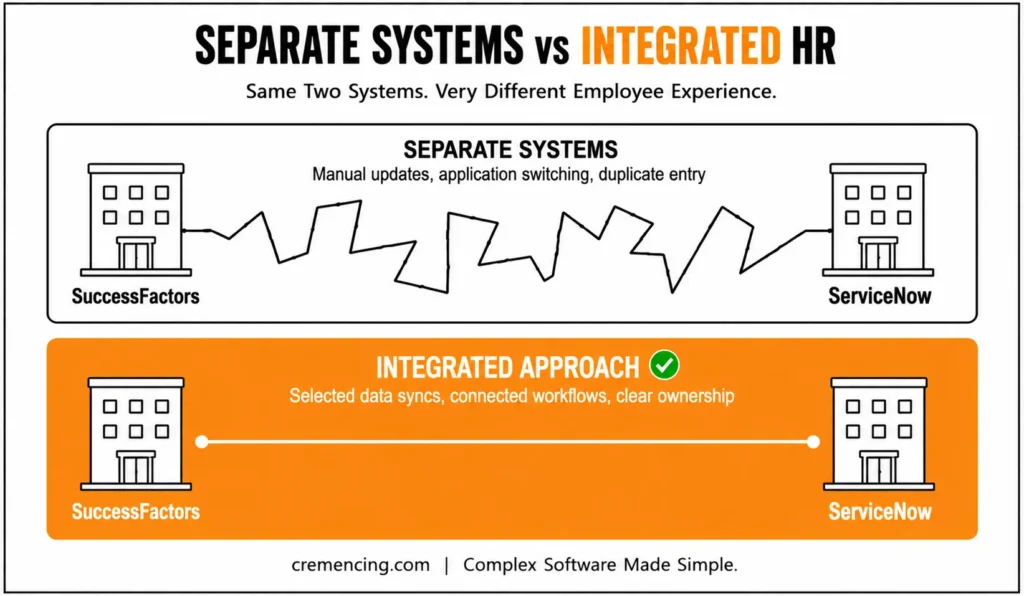
These platforms integrate seamlessly with each other, without the need to supplant one with another.
A simplified architecture looks like this:
SAP SuccessFactors
Employee and workforce information
↓
Integration Layer
APIs, spokes, flows, synchronization, transformation
↓
ServiceNow HR Service Delivery
Employee services, cases, tasks, and workflows
ServiceNow’s integration capabilities, IntegrationHub spokes, scheduled flows, APIs, middleware, or custom integration components can be implemented depending on the organization’s use of ServiceNow.
The first key design decision is to identify which system is responsible for each piece of information.The purpose is not to duplicate all of the SuccessFactors fields to ServiceNow.Rather, organizations should synchronize just the information they need to deliver specific employee services and workflows.
How ServiceNow and SAP SuccessFactors Integration Works
A typical integration involves four layers.
SAP SuccessFactors
SuccessFactors acts as the source for relevant employee and workforce information. Depending on the configuration, this can include employee identity, employment status, job information, organizational relationships, and manager information.
The organization should define which fields ServiceNow actually needs rather than synchronizing unnecessary data.
ServiceNow HR Service Delivery
ServiceNow provides the employee-facing service experience. Employees may use it to submit HR requests, access knowledge, complete tasks, and track service activities. This creates a central interaction point for supported HR services.
Integration Layer
The integration layer transfers information between the platforms.
Possible mechanisms include:
- SuccessFactors APIs
- ServiceNow IntegrationHub
- SuccessFactors spokes
- Scheduled flows
- REST or SOAP services
- Middleware
- Data transformation and mapping
The correct approach depends on the required frequency, data volume, business process, and technical architecture.
Governance and Monitoring
The integration also needs operational controls.
Organizations should define:
- System of record
- Data ownership
- Synchronization frequency
- Employee matching rules
- Error handling
- Security requirements
- Monitoring responsibilities
ServiceNow documentation describes scheduled synchronization for worker profile information in its SuccessFactors integration scenarios, with configuration options that can support full or incremental data retrieval.
This means integration design should focus on controlled data movement, not simply technical connectivity.
7 Benefits of Connecting ServiceNow With SAP SuccessFactors
1. Employees Get a More Connected HR Experience
Employees don’t care which platform owns a particular database record.
They care about completing their task quickly.
When HR information and services exist in separate systems, employees may have to switch applications, repeat information, or contact HR for updates that should be visible through a service experience.
With ServiceNow SAP SuccessFactors integration, organizations can connect relevant employee information with ServiceNow HR Service Delivery processes.
SuccessFactors can continue managing core HR information while ServiceNow provides a more accessible employee service layer. This can reduce unnecessary application switching and make HR interactions easier to follow. The objective isn’t to recreate SuccessFactors inside ServiceNow. It’s to provide employees with a clearer path to the services and tasks they actually need. That distinction keeps the integration focused and prevents unnecessary duplication.
2. HR Teams Spend Less Time Repeating Data Entry
Manual data entry becomes costly when HR teams maintain the same employee information in multiple systems.
Consider a simple employee change. Someone changes departments.A manager changes. An employee’s employment status changes.
If multiple systems require manual updates, HR teams spend time maintaining duplicate records. Every additional manual update also creates another opportunity for inconsistent information.
Employee data synchronization — a core benefit of connecting SAP SuccessFactors and ServiceNow — can reduce this problem by moving defined information between the two platforms according to established rules.
However, synchronization works best when organizations clearly define:
- Which system owns the data
- Which fields synchronize
- How often updates occur
- How employees are matched
- What happens when synchronization fails
The result is less repetitive administration and a clearer data ownership model. Integration doesn’t eliminate the need for data governance. It makes good governance more important.
3. Employee Lifecycle Workflows Become Easier to Coordinate
Onboarding is rarely just an HR process.
A new employee may require:
- HR onboarding
- IT equipment
- Application access
- Identity creation
- Security permissions
- Manager approvals
- Training activities
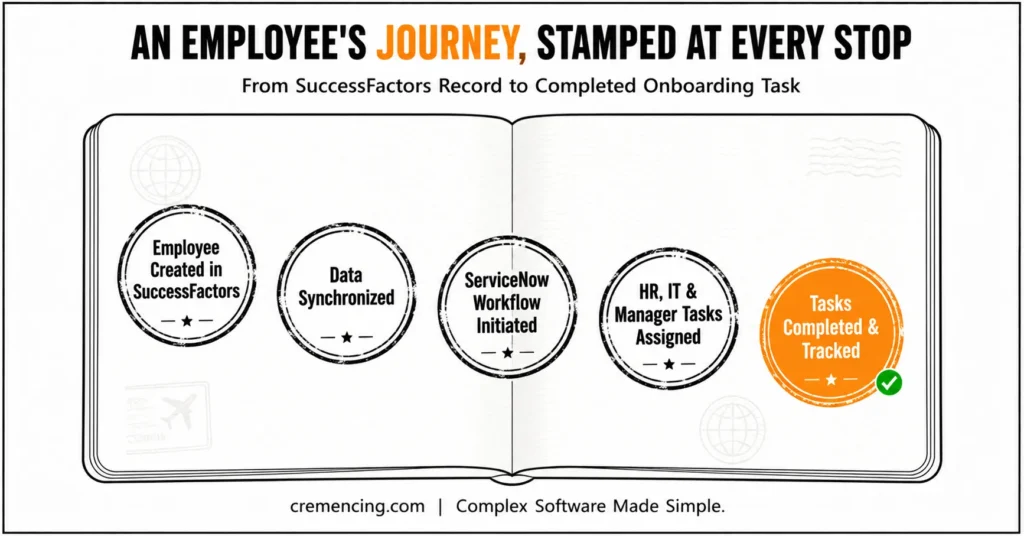
Without connected workflows, HR teams may coordinate these activities through emails, spreadsheets, and separate applications. This is where employee lifecycle management can benefit from integration.
A simplified process could look like:
Employee created in SuccessFactors
↓
Relevant employee data synchronized
↓
ServiceNow workflow initiated
↓
HR, IT, and manager tasks assigned
↓
Tasks completed and tracked
The same concept can apply to transfers, promotions, organizational changes, and offboarding.
ServiceNow can coordinate service activities while SuccessFactors continues to manage core HR information.This creates a more structured process without requiring every system to perform the same job.
4. HR Tasks Become Easier to Track
Email is useful for communication. It isn’t always the best place to manage operational work.
When an HR task sits in an employee’s inbox, HR may have limited visibility into whether the task was completed or where the process is delayed.
ServiceNow provides workflow and task-management capabilities that can make supported HR activities easier to track.
When integrated with SuccessFactors, employee information and relevant tasks can participate in a more connected service experience.
This can help HR teams identify the following:
- Incomplete tasks
- Delayed approvals
- Process bottlenecks
- Outstanding employee actions
Instead of asking, “Did this employee complete the task?” HR can use workflow status and task visibility to understand the process. That creates a more measurable HR operation. This HR-specific use case is part of a wider shift — check out the broader workflow automation benefits companies are seeing across enterprise system integrations.
5. HR and IT Can Coordinate Employee Services More Effectively
Many employee processes cross the boundary between HR and IT, and onboarding is the clearest example. HR knows the moment an employee has joined, but that information alone doesn’t get the employee set up—IT needs to know what access and equipment they require, security needs to manage permissions, and managers may need to approve access along the way. Meanwhile, the employee simply expects everything to work on day one, regardless of how many systems and teams are working behind the scenes to make that happen.
A connected architecture helps coordinate these moving parts by giving each system a clear role. SuccessFactors provides the relevant employee information, ServiceNow manages the service workflows and tasks that follow, and IT teams handle the actual technical provisioning. This creates a much clearer relationship between the HR event that kicks things off and the IT actions that need to happen as a result.
Importantly, the integration doesn’t need to automate every technical operation to be valuable. Its real purpose is simpler than that: making sure the right workflow receives the right information at the right stage so nothing falls through the cracks between HR and IT.
6. Data Quality and Consistency Can Improve
Disconnected systems often create multiple, conflicting versions of employee information. One system might show an employee in a new department while another still reflects the old one, simply because HR updated one record but the change never propagated to the rest of the landscape. Left unresolved, this kind of mismatch creates confusion for everyone involved. HR, IT, managers, and employees all end up working from different pictures of the same reality.
With SAP SuccessFactors integration with ServiceNow, organizations can establish a defined source of truth for selected employee information instead of letting data drift apart across systems. In practice, this often means SuccessFactors stays authoritative for employment and organizational data, while ServiceNow consumes exactly what it needs to power employee services — keeping both systems aligned without either one having to own everything.
Before implementation, teams should define:
- Unique employee identifiers
- Required fields
- Matching rules
- Data formats
- Update frequency
- Error handling
ServiceNow’s integration guidance also addresses employee-number indexing and transform-map matching considerations. Clean identifiers matter because the integration must reliably determine which employee record belongs to which employee.
Integration can improve consistency, but only when the underlying data model and ownership rules are clear.
7. HR Operations Become Easier to Scale
Manual HR processes often become harder to manage as workforce size increases. A process that works for 500 employees may become inefficient for 50,000. The volume of onboarding, transfers, employee changes, and offboarding activities increases administrative workload.
HR workflow automation can help organizations manage predictable processes more efficiently.
A useful model is:
Standard event → Automated workflow
Missing information → Exception
Integration failure → Exception
Complex decision → Human review
This approach allows HR teams to focus on cases that require judgment instead of manually coordinating every routine activity.
The result can be a more scalable operating model.
However, automation should follow process design.
Automating a poorly designed workflow simply creates problems faster.Organizations should first identify where manual effort exists, determine which steps are predictable, and then automate the parts that produce measurable value.
ServiceNow and SAP SuccessFactors Integration vs. Separate Systems
| Area | Separate Systems | Integrated Approach |
| Employee data | More manual updates | Selected data can synchronize |
| Employee experience | More application switching | More connected service experience |
| HR tasks | Managed independently | Supported workflows can connect |
| Onboarding | Manual coordination | Cross-team workflows can be coordinated |
| Data consistency | Higher risk of mismatched records | Defined synchronization rules |
| HR visibility | Information spread across platforms | Better workflow visibility |
| Scalability | More manual administration | Greater automation potential |
Separate systems aren’t automatically a problem. An organization with simple HR processes and limited integration requirements may not need a complex connection.
The business case becomes stronger when employees repeatedly switch between platforms, HR teams manually duplicate information, or lifecycle processes require extensive cross-department coordination.
The right question is
Which business processes are currently slowed down because ServiceNow and SuccessFactors don’t share the information they need?
That answer should determine the integration scope.
Short answer: don’t skip it entirely — this is the strategic/planning section that gives the post credibility and differentiates it from a pure how-to. But you can definitely trim it down. Here’s why it matters and a tighter version.
Planning the Integration: What to Get Right First
A successful ServiceNow SuccessFactors integration starts with the business problem, not the technology. Before touching any APIs, identify what you’re actually trying to fix — manual onboarding coordination, duplicate data entry, poor HR task visibility, or delayed employee updates — and document the current process. Starting with a tool instead of a defined problem tends to produce integrations that work technically but solve nothing.
From there, establish data ownership: decide which system is the system of record for each data element. Employment information and HR profiles typically belong to SuccessFactors, while HR cases and service requests belong to ServiceNow — though the exact model depends on your organization. Once ownership is clear, choose an integration pattern (scheduled sync, API-based, event-driven, or middleware) based on business timing and data requirements, not technical preference.
Security needs equal attention given the sensitivity of HR data. Review authentication, authorization, API credentials, encryption, and access controls, and only transfer the data the receiving process actually needs — this limits both risk and complexity.
Finally, treat monitoring as part of the design, not an afterthought. Track technical signals like failed syncs, missing records, and authentication errors, but also measure business outcomes like reduced manual entry, faster onboarding, and quicker HR case resolution.
Conclusion
One common HR technology challenge is employees’ information and employees’ services are distinct from one another and live in different workflows. ServiceNow and SAP SuccessFactors integration can help organizations solve this challenge. Integrating SuccessFactors data with ServiceNow HR Service Delivery can help lower duplicate data entry, enhance employee service experience, synchronize lifecycle processes, and provide HR teams with more visibility of operational work.
The most successful ones don’t try to replicate all things from one platform to the other. They establish clear data ownership, choose the appropriate integration pattern, defend employee data, and prioritize automation for processes that deliver value in terms of measurable outcomes. If planned that way, it isn’t just a technical link but a means of creating service delivery that is consistent, connected, and scalable for HR.
Frequently Asked Questions
1. What is ServiceNow and SAP SuccessFactors integration?
ServiceNow and SAP SuccessFactors integration connects ServiceNow HR Service Delivery with SuccessFactors to exchange selected employee information and support connected HR workflows. The integration can reduce manual processes and improve employee services while allowing each platform to continue performing its primary role.
2. Why integrate ServiceNow with SAP SuccessFactors?
Organizations use the integration to reduce duplicate data entry, improve employee experiences, connect HR workflows, and synchronize relevant employee information. It can be especially useful when HR teams manage employee lifecycle processes across multiple departments and applications.
3. What data can ServiceNow synchronize with SuccessFactors?
The exact data depends on the implementation and configured integration capabilities. Supported scenarios can include worker profile information and related tasks or to-dos. Organizations should synchronize only the employee data required for the defined business process.
4. Can the integration support employee onboarding?
Yes. The integration can support onboarding by allowing relevant employee information from SuccessFactors to participate in ServiceNow workflows. ServiceNow can coordinate HR, IT, and other tasks while SuccessFactors continues to manage core employee information.
5. Does ServiceNow replace SAP SuccessFactors?
No. ServiceNow doesn’t replace SuccessFactors. SuccessFactors can remain the core HR information platform, while ServiceNow HR Service Delivery manages employee services. Cases, workflows, and tasks. Integration connects the platforms according to the organization’s process and data requirements.
6. How long does a typical SAP SuccessFactors and ServiceNow integration take to implement?
Generally, the timeline depends on the complexity of the integration and the number of workflows involved. A basic synchronization setup can take a few weeks, while a comprehensive integration covering multiple HR processes may take two to three months. Therefore, organizations should scope their requirements carefully before estimating a timeline.
7. What are the common challenges organizations face during this integration?
Typically, challenges include unclear data ownership, mismatched employee identifiers, and inconsistent synchronization rules. Additionally, organizations sometimes underestimate the importance of governance, which can lead to duplicate or conflicting records over time. Consequently, addressing these issues early in the planning phase helps prevent long-term maintenance problems.
8. Can smaller organizations benefit from integrating SAP SuccessFactors and ServiceNow?
Yes, in fact, even smaller organizations with straightforward HR processes can benefit from reduced manual data entry and improved employee experience. However, the business case becomes stronger as HR complexity and employee volume increase. Therefore, organizations should evaluate their specific pain points before deciding on the scope of integration.
9. What happens if the integration between SAP SuccessFactors and ServiceNow fails or experiences errors?
Usually, well-designed integrations include monitoring and alerting mechanisms to detect failed syncs or missing records quickly. Moreover, organizations should define clear error-handling procedures, such as retry logic or manual review processes, as part of the initial design. As a result, issues can be identified and resolved before they impact HR operations significantly.
10. Does integrating SAP SuccessFactors and ServiceNow require ongoing maintenance?
Yes, since employee data and business processes evolve over time, periodic reviews of synchronization rules and workflows are necessary. Furthermore, as new use cases emerge, integration configurations may need to be updated to reflect changing business needs. Ultimately, treating integration as an ongoing process, rather than a one-time setup, ensures long-term reliability and value.





2 Responses