
The incident is already open when someone asks the question nobody wants to answer — and it’s usually a sign that SAP software management wasn’t in place before things went wrong.
“What changed in SAP production?”
You visit the transport history. Then check monitoring alerts. That is followed by recent configuration changes. Afterwards, an interface log. Users are waiting, the service desk is escalating, and the business process is already impacted.
This is where weak SAP software management comes into play and costs the company. Because of this, when it comes to running ECC 6.0, SAP S/4HANA, or a hybrid landscape with a mix of SAP cloud services and on-premises systems, service delivery requires more than just getting systems up and running. Teams require insight into change, incident, integration, performance, maintenance, and business processes that systems support.
The mistake is treating SAP operations as a collection of technical tasks.
Aligning SAP Operations with Outcomes
Effective SAP software management enhances IT service delivery by shifting IT operations from reactive troubleshooting to structured, business-aligned lifecycle management. Across SAP ECC, S/4HANA, and hybrid cloud environments, unscheduled configuration edits or transport deployments frequently disrupt core business operations—such as order pricing or invoice processing—when operational visibility is lacking.
Modern Application Lifecycle Management (ALM) frameworks bridge this operational gap by integrating change control, proactive system monitoring, and incident management into a unified process model. Supported by platform-specific tools like SAP Cloud ALM, SAP Solution Manager, and SAP Focused Run, this approach correlates technical disruptions directly with specific business processes, drastically reducing root-cause diagnosis time and minimizing business downtime.
What Is SAP Software Management?
SAP software management refers to the processes, tools, and governance practices used to manage SAP software across its operational lifecycle.
That lifecycle can include:
- System implementation
- Configuration
- Software updates
- Change management
- Transport management
- Incident resolution
- System monitoring
- Performance management
- Security and authorization administration
- Integration monitoring
- Job monitoring
- Maintenance planning
- Application lifecycle management
- Continuous improvement
The exact activities depend on the SAP landscape.
| Factor | SAP Solution Manager | SAP Cloud ALM | SAP Focused Run |
|---|---|---|---|
| Primary landscape | On-premises, hybrid | Cloud, hybrid | High-volume on-prem/private-cloud/hybrid |
| Deployment model | On-premise installation | SaaS | On-premise or cloud |
| Best suited for | Established ECC/hybrid landscapes | Cloud-first S/4HANA environments | Large-scale, high-volume monitoring needs |
| Status | Still relevant, SAP guides transition | Actively expanding | Specialized for scale |
Consider a simple example: a functional consultant makes a pricing configuration change in production on a Friday afternoon. Without SAP software management practices in place, that change is invisible until Monday, when orders start pricing incorrectly and nobody can immediately connect the two events. With proper change visibility, monitoring, and incident linkage, the same scenario becomes a five-minute diagnosis instead of a multi-hour investigation. That gap — between invisible operations and traceable ones — is what SAP software management is built to close.
SAP Software Management Model
An ECC 6.0 environment may depend heavily on traditional on-premises operations, SAP Solution Manager, change and transport system processes, batch jobs, custom ABAP programs, and third-party integrations.
An SAP S/4HANA environment may include a mixture of on-premises or private-cloud systems, SAP BTP extensions, APIs, cloud services, and hybrid integrations. The operational challenge changes with the architecture. You need to deliver reliable IT services to the business.
SAP’s broader application lifecycle management approach covers activities across implementation and operations, including requirements, solution configuration, change deployment, operations, and service improvement. SAP’s ALM portfolio includes SAP Cloud ALM, SAP Solution Manager, and SAP Focused Run, with capabilities varying according to the scenario and platform.
This distinction is important because SAP software management isn’t one specific transaction code or one standalone product. It’s an operating model.
The technology supports the model, but the model determines how teams respond to changes, incidents, maintenance, and service disruptions.
When that model works well, IT teams can answer critical questions quickly:
- What changed?
- Who changed it?
- What systems are affected?
- Which business processes depend on those systems?
- Is the issue isolated or widespread?
- What happened immediately before the incident?
- Has the same issue occurred before?
- What action should the support team take next?
Quick Reference — Operational Readiness Check
- What changed?
- Who changed it?
- What systems are affected?
- Which business processes depend on those systems?
- Is the issue isolated or widespread?
- What happened immediately before the incident?
- Has the same issue occurred before?
- What action should the support team take next?
If your team can’t answer these within minutes of an incident, that’s a software management gap — not a monitoring tool gap.
SAP Software Management Payback
Those answers directly influence IT service delivery. The faster and more accurately your team can answer, the less time users will be waiting for a resolution.
This course outlines how SAP Software Management facilitates IT service delivery. The course describes how SAP software management enhances IT service delivery.
The main payback of SAP software management is integration with service delivery and technical operations. A business user does not care if there is a failed interface, a failed background job, a database problem, or an incorrect configuration that results in a failed invoice. They are concerned about the invoice not being processed. IT service delivery turns technical events into business outcomes, and SAP software management helps in this transformation in a few ways.
SAP Software Management Improves Change Visibility
All SAP environments evolve. Developers build new objects, functional consultants tweak the setup, administrators can do maintenance, security teams can add or remove roles, infrastructure teams can update technical components, and cloud services are updated. If not managed appropriately by SAP, it can be challenging to keep track of these changes.
A sound change process document details the “what,” “why,” “who,” “when” and “how” of the change. When an incident happens, that information can prove very useful if the team is asking “What might have changed?” With that information, they could look at recent change history and narrow down the investigation. This helps to minimize the time spent in diagnosis and also establishes responsibility.
It’s not about stopping ALL changes; it’s about making them controlled, visible, and trackable.
SAP Software Management Enhances Incident Resolution
A user’s ticket has been received in a service desk: “Users cannot create sales orders. You can’t tell from that statement what the technical cause is. The issue may be a problem in SAP applications, authorization problems, integration problems, master data, database problems, background jobs, problems with external systems, or network issues. Effective SAP incident management will link the user-facing problem with technical investigation.
The support team will be able to explore the time of occurrence, users impacted, which system is in question, recent changes, alerts, application logs, interface status, and failure of background jobs. This process enables teams to avoid trying to troubleshoot randomly and facilitates a more efficient escalation process.
The service desk may respond, “The issue started at 10:32 UTC since the transport XYZ was imported, and the sales order is unable to be created for the user assigned to the role ABC. The application log indicates that the issue is due to the error DEF. It is a whole new service experience.
SAP Software Management Enables Proactive System Monitoring
Traditional support typically begins by a user reporting the issue, while modern operations attempt to identify the issue before the user does. The transition is complemented by SAP system monitoring, which enables teams to monitor system availability, application performance, database health, background jobs, interfaces, integration failure, system capacity, technical alerts, and business process indicators.
Depending on the SAP platform and landscape, the capabilities encompassed in monitoring can vary, such as SAP Focused Run’s advanced operating capabilities for high-volume monitoring, alerting, and analytics, as well as SAP Cloud ALM’s operational capabilities in supported cloud and hybrid scenarios. The upsides are simple: imagine a user interface goes down at 2 a.m.
Reactive support can result in end-users finding out about the problem at 8:00 AM. The operations team can be notified at 2:01 AM and investigate before business users. This distinction can have a major impact on service availability.
SAP Software Management Makes Maintenance More Predictable
There are various types of maintenance that are required for SAP systems, such as security updates, software updates, support packages, kernel updates, database maintenance, configuration changes, custom code adjustments, and cloud services updates. If maintenance is not planned for the entire lifecycle, it is reactive; teams only act when something goes wrong.
A disciplined SAP software lifecycle management strategy considers maintenance a continuous duty. The team understands the systems that are in need of updates, the dependencies, the changes to test, the environments to validate, and/or the business processes to be impacted.
This can turn maintenance periods into planned activities rather than emergencies. In SAP S/4HANA environments, this is particularly crucial due to the increased rate of innovation cycles and cloud-based services. Integration plays a big role here too. ServiceNow and SAP integration delivers similar service-delivery gains by breaking down workflow silos between systems.
SAP Software Management Bolsters Service-Level Visibility
IT leaders require more than just a list of individual incidents; they need a wider perspective. How many incidents were there in this month? What systems have the highest number of tickets? How long does it take for critical issues to be resolved? What causes the most failures? Do the incidents occur more frequently over time? Which business processes are impacted the most?
Yield data is required for these questions. Having consistent information in the SAP software management processes throughout changes, incidents, monitoring, and maintenance enables teams to find patterns.
For instance, when the failure rate of changes rises, it might be necessary to examine the processes in the release mechanism; failing recurring interfaces could be a sign of problems in integration architecture; failing batches could be a symptom of scheduling and dependency issues; and gradually increasing resolution time could be a symptom of not monitoring and escalating. In the end, this information becomes a quantifiable part of IT service delivery.
The Core Components of SAP Software Management
A strong SAP software management strategy normally includes several interconnected disciplines.
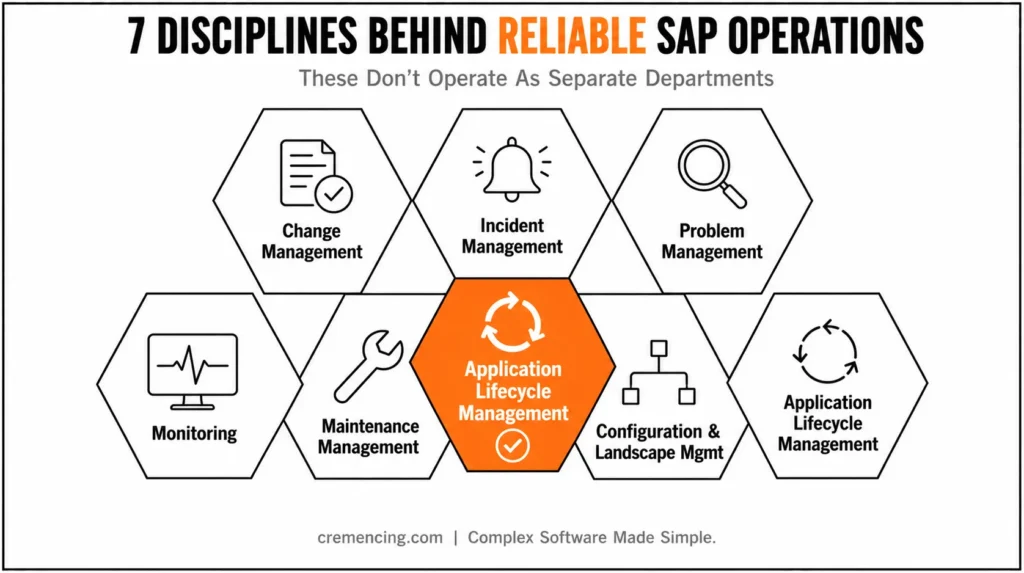
Change Management
Controls how changes move through development, testing, approval, and production.The objective is to reduce unintended impact while maintaining delivery speed.For SAP landscapes, this may involve transport management, release governance, approval workflows, and testing.
Incident Management
Focuses on restoring normal service as quickly as possible after an interruption.The priority is service restoration first, followed by deeper root-cause analysis where required.
Problem Management
Looks beyond individual incidents.
If the same interface fails every Monday, fixing each ticket individually doesn’t solve the underlying problem. Problem management investigates recurring causes and identifies permanent corrective actions.
Monitoring
Detects technical or business-impacting conditions that require attention. Effective monitoring should focus on meaningful signals rather than generating thousands of alerts that nobody can process.
Maintenance Management
Plans software updates, patches, upgrades, and related activities. Maintenance should consider dependencies, testing requirements, business impact, and rollback planning.
Configuration and Landscape Management
Maintains visibility into systems, components, relationships, and dependencies. Without accurate landscape information, impact analysis becomes guesswork.
Application Lifecycle Management
Connects implementation and operational activities across the solution lifecycle. SAP Cloud ALM, SAP Solution Manager, and SAP Focused Run each support different parts of this broader lifecycle depending on the landscape.
These components shouldn’t operate as independent departments.
- A production incident may originate from a change.
- A recurring incident may reveal a problem.
- A problem may require a software update.
That update requires testing and change approval. The lifecycle is connected.
How SAP Software Management Works Across the IT Service Lifecycle
A practical SAP service-management lifecycle can be viewed in seven stages.
Stage 1: Plan
The organization identifies business requirements and technical needs.
Examples include:
- New functionality
- System upgrades
- Cloud adoption
- Integration projects
- Performance improvements
At this stage, teams should identify potential operational requirements early.
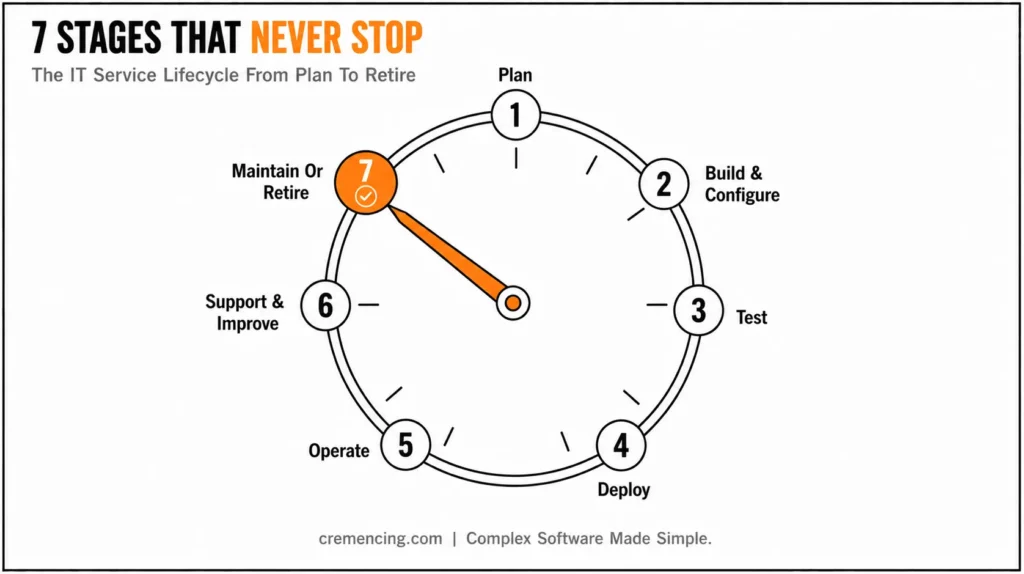
Stage 2: Build and Configure
Developers and functional teams create or configure the solution.
- For an ECC environment, this may involve ABAP development and configuration.
- For SAP S/4HANA, teams may use modern extensibility approaches alongside configuration.
- For SAP BTP, teams may develop cloud extensions and integrations.
The lifecycle management requirement is the same: the solution must eventually enter production and become an operational service.
Stage 3: Test
Testing validates whether the change works as expected.
Depending on the project, this can include the following:
- Unit testing
- Integration testing
- Regression testing
- User acceptance testing
- Performance testing
Testing should also validate operational readiness.
A technically successful deployment can still create an operational problem if these questions remain unanswered.
Stage 4: Deploy
The approved change moves into the production landscape. Transport management and release processes control the movement of changes. This is where traceability matters.
The organization should know exactly what moved, when it moved, and who approved it.
Stage 5: Operate
Once deployed, the solution becomes part of normal IT operations.
Teams monitor:
- Availability
- Performance
- Interfaces
- Jobs
- Errors
- Business processes
The focus shifts from “Did we deploy it?” to “Is the service working?”
Stage 6: Support and Improve
Users report incidents. Operations teams investigate alerts. Support teams resolve problems. Technical teams identify recurring issues. The organization uses this information to improve the solution. This is where operational feedback becomes valuable for future development.
Stage 7: Maintain or Retire
Every SAP solution eventually requires maintenance or retirement.
The organization may:
- Upgrade the system
- Replace a component
- Move to a cloud service
- Retire custom functionality
- Decommission an application
A lifecycle approach ensures the organization doesn’t forget the final stage. Software management isn’t complete when deployment succeeds. It’s complete when the organization can safely operate, maintain, evolve, and eventually retire the solution.
SAP Software Management vs. Traditional IT Operations
| Area | Traditional IT Operations | SAP Software Management Approach |
| Incident Response | React after user reports | Combine user reports with monitoring |
| Change Control | Focus on technical execution | Track business and technical impact |
| Monitoring | System-focused | Technical and service-focused |
| Maintenance | Often scheduled separately | Connected to lifecycle planning |
| Documentation | Distributed | Linked to operational processes |
| Problem Resolution | Fix individual incidents | Identify recurring root causes |
| Reporting | Ticket counts | Service, change, and operational metrics |
| Decision Making | Experience-driven | Supported by lifecycle data |
Traditional IT operations aren’t necessarily ineffective.
The problem appears when teams manage complex SAP landscapes using processes designed for simpler environments. SAP systems often sit at the center of critical business processes.
A problem with an SAP system may affect:
- Order management
- Procurement
- Manufacturing
- Finance
- Supply chain
- Human resources
Therefore, IT service delivery must understand both the technology and the business process. That is the real advantage of a mature SAP software management strategy. It connects technical operations to business services.
Conclusion
SAP software management improves IT service delivery when organizations stop treating SAP operations as a series of disconnected technical activities. The real value comes from connecting change management, monitoring, incident response, maintenance, and lifecycle planning to the business services those systems support.
Whether an organization operates ECC 6.0, SAP S/4HANA, or a hybrid cloud landscape, the objective remains the same: detect problems earlier, understand their impact faster, control changes more effectively, and maintain reliable services over time.
Tools such as SAP Cloud ALM, SAP Solution Manager, and SAP Focused Run can support that objective, but technology alone isn’t enough. Clear ownership, disciplined processes, accurate system information, and meaningful operational metrics ultimately determine whether SAP software management translates into better IT service delivery.
Frequently Asked Questions
1. What is SAP software management?
SAP software management is the structured process of managing SAP systems, applications, changes, maintenance, incidents, monitoring, and lifecycle activities. It connects technical operations with business service delivery. A mature approach may incorporate SAP Application Lifecycle Management, change control, monitoring, incident management, and maintenance processes across ECC, SAP S/4HANA, and hybrid landscapes.
2. How does SAP software management improve IT service delivery?
SAP software management improves IT service delivery by making changes, incidents, monitoring, and maintenance more visible and controlled. Teams can identify what changed, understand which services are affected, and respond faster to disruptions. This creates a more predictable SAP IT service management model with stronger traceability from technical events to business impact.
3. What tools are used for SAP software management?
The tools depend on the SAP landscape and required capabilities. Organizations may use SAP Cloud ALM, SAP Solution Manager, SAP Focused Run, SAP Change and Transport System, and external ITSM platforms. These tools address different lifecycle and operational needs, so teams should design the process first and then select the appropriate technology.
4. Is SAP Solution Manager still relevant?
Yes. SAP Solution Manager 7.2 remains relevant for many existing SAP landscapes and supports capabilities such as application operations, change control, business process monitoring, testing, and landscape management. SAP also provides transition guidance toward SAP Cloud ALM. Organizations should evaluate their current architecture and future roadmap before deciding whether to change platforms.
5. What is the role of SAP Cloud ALM?
SAP Cloud ALM provides cloud-based application lifecycle management capabilities for supported cloud and hybrid SAP environments. It helps organizations manage implementation and operations processes from a centralized cloud service. Its relevance increases as organizations adopt more SAP cloud solutions, although the appropriate ALM architecture still depends on the customer’s landscape and operational requirements.
What’s the difference between change management and application lifecycle management in SAP?
Change management focuses specifically on how individual changes move through development, testing, approval, and production. Application lifecycle management is broader — it connects requirements, configuration, deployment, operations, and continuous improvement across the entire solution lifecycle, with change management as one component within it.
How does monitoring differ between SAP Cloud ALM and traditional on-premise monitoring?
Traditional on-premise monitoring typically focuses on system-level metrics like availability and performance. SAP Cloud ALM extends this with business-process-level visibility, helping teams see not just whether a system is up, but whether the business processes running on it are functioning correctly.
Can SAP software management practices be applied to a hybrid landscape mixing ECC and S/4HANA?
Yes. The core disciplines — change visibility, incident linkage, proactive monitoring, and lifecycle planning — apply regardless of whether systems run ECC, S/4HANA, or both. What changes is the specific tooling and integration points needed to maintain visibility across the mixed landscape.
Why do recurring incidents indicate a problem management gap rather than an incident management gap?
Incident management restores service quickly for each individual occurrence, but it doesn’t investigate why the same issue keeps happening. When an interface fails repeatedly, resolving each ticket without identifying the underlying cause means the same disruption keeps returning, which is specifically what problem management is designed to address.
What role does landscape and configuration management play in impact analysis?
Without accurate visibility into systems, components, and their dependencies, teams can’t reliably predict what a change or incident will affect elsewhere in the landscape. Configuration and landscape management provides that dependency map, turning impact analysis from guesswork into a structured assessment.





4 Responses