
Introduction
SAP Solution Manager End of Life is approaching, and every month an organization delays its transition assessment is a month it doesn’t get back before December 31, 2027. However, that date doesn’t mean Solution Manager stops working. Instead, the clock is running on a transition that, in practice, takes most organizations the better part of a year to plan and execute properly. For this reason, organizations should begin by inventorying processes, mapping them to Cloud ALM, migrating selective data, retraining users, and piloting the new approach before full rollout.
SAP Solution Manager End of Life and the Shift to Cloud ALM
Mainstream maintenance for SAP Solution Manager 7.2 concludes on December 31, 2027, marking a fundamental shift in SAP’s Application Lifecycle Management (ALM) strategy from a monolithic on-premise architecture to a cloud-native model. Rather than providing a direct one-to-one replacement, SAP designates SAP Cloud ALM as the core successor platform for cloud and hybrid landscapes, complemented by SAP Focused Run for advanced technical operations. Organizations must evaluate functional dependencies immediately—particularly for Change Request Management (ChaRM) and IT Service Management (ITSM)—as capabilities may require adopting the Flexible Programming Model, native deployment management, or third-party ITSM integrations. Executing the official SAP Readiness Check for SAP Cloud ALM enables IT teams to identify capability gaps, assess data transfer requirements, and structure a phased transition well before maintenance expires.
Key Dates at a Glance
- Dec 31, 2027 — End of mainstream maintenance for SAP Solution Manager 7.2
- Before end of 2028 — SAP’s recommended deadline to complete the transition to SAP Cloud ALM
- Through 2030 — Optional extended maintenance available for selected functionality
SAP Solution Manager End of Life Comparison
| Area | SAP Solution Manager 7.2 | SAP Cloud ALM |
| Deployment model | On-premise | Cloud-based |
| Maintenance milestone | Mainstream maintenance ends 2027 | SAP’s strategic ALM platform |
| Operations | Customer-managed infrastructure | SAP-managed SaaS |
| ALM focus | Mature, broad on-premise ALM capabilities | Cloud-native implementation and operations |
| Transition path | Existing platform | Target platform for SAP’s ALM strategy |
| Data migration | Existing Solution Manager data | Selective transfer options for supported content |
| Best fit | Existing complex on-premise landscapes | Modern cloud and hybrid SAP landscapes |
| Advanced operations | Existing Solution Manager capabilities. Focused Run may complement | SAP Cloud ALM and Focused Run can complement for extensive or advanced operations |
According to SAP, Cloud ALM is its strategic, next-generation ALM platform, and customers are recommended to transition from Solution Manager before the end of 2027. In addition, SAP Focused Run follows an independent maintenance schedule. For advanced monitoring and extensive on-premise operations, it can complement Cloud ALM where additional capabilities are required.
What SAP Solution Manager End of Life Means
SAP Solution Manager End of Life does not mean that the system will suddenly stop working in 2027.
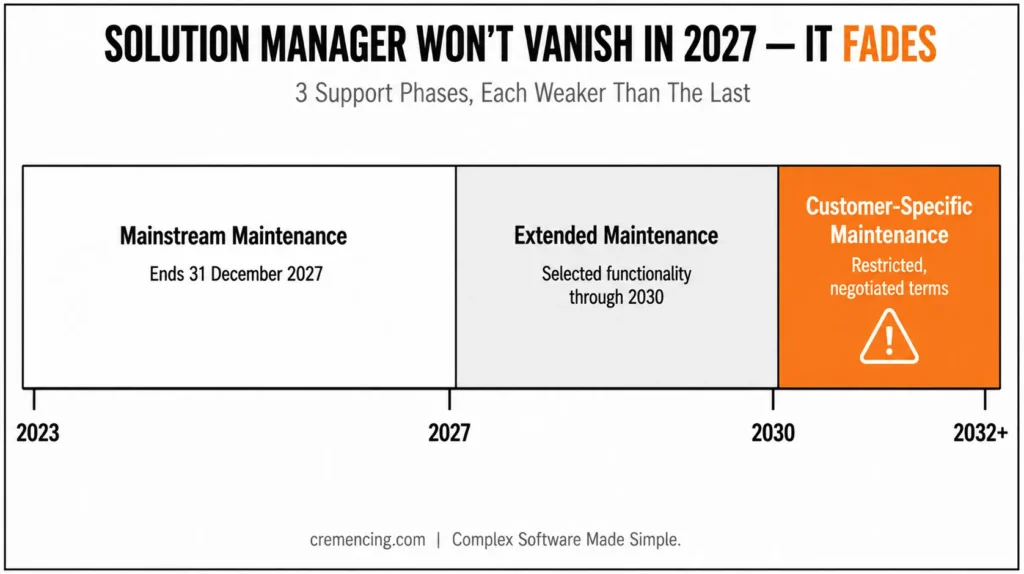
The 2027 milestone is more accurately described as the end of mainstream maintenance for SAP Solution Manager 7.2.
Furthermore, according to SAP, mainstream maintenance continues until the end of 2027. Customers that choose optional extended maintenance for SAP Business Suite 7 can receive extended maintenance for Solution Manager 7.2 through the end of 2030, but only selected functionality is included. SAP identifies requirements management, project management, process management, test suite, change control management, IT service management, and landscape management among the covered areas.
However, after mainstream or extended maintenance, SAP Solution Manager 7.2 can continue under customer-specific maintenance, subject to the applicable restrictions and SAP’s support conditions.
Therefore, that distinction matters for planning. Your Solution Manager system won’t suddenly disappear on January 1, 2028.
However, staying on it indefinitelymay mean accepting a support model that doesn’t align with SAP’s strategic direction. SAP recommends customers transition to SAP Cloud ALM before the end of 2027. SAP’s transition guidance also provides a readiness check, transition methodology, implementation services, and tools for selected data transfer and third-party integration scenarios.
This scope and the 2027/2030 dates are documented in SAP Note 3255311 and SAP Knowledge Base Article 3585220, worth bookmarking directly if your team is building an internal transition timeline.
So the business decision is not
“Will Solution Manager stop working in 2027? “
It’s
“Which ALM capabilities should we move, when should we move them, and what should remain temporarily or permanently in our landscape?” That is a much more useful question.
SAP Solution Manager After End of Life
SAP Solution Manager 7.2 has supported a broad range of application lifecycle management processes.
These include:
- Application Operations
- Business Process Monitoring
- Business Process Operations
- Change Control Management
- Custom Code Management
- IT Service Management
- Job Scheduling Management
- Landscape Management
- Maintenance Planner
- Process Management
- Test Suite
For organizations with large on-premise SAP environments, Solution Manager may be deeply embedded in daily operations.
Teams may rely on it for:
- Change requests
- Release management
- ITSM processes
- Test management
- Monitorin
- Documentation
- Process management
- Operational reporting
That makes a direct “switch off and replace everything” approach unrealistic.
More importantly, the problem with waitin, however, is that the transition itself takes time.
- You need to identify dependencies.
- You need to understand which processes have direct equivalents in Cloud ALM.
- You need to determine which data should move.
- You need to review integrations.
- You need to retrain users.
You need to test the new operating model. You may also need to determine whether some advanced operational requirements call for SAP Focused Run alongside Cloud ALM.
The biggest mistake is therefore treating 2027 as the start of the project. By then, your organization should be close to completing its transition—not beginning the assessment.
Moving Beyond SAP Solution Manager End of Life
SAP Cloud ALM is SAP’s strategic, cloud-native ALM platform for SAP customers.
Moreover, SAP positions it as the central ALM platformfor implementing and operating SAP solutions, particularly in cloud and hybrid environments. SAP’s transition guidance recommends using Cloud ALM as the target platform and provides a structured path for customers currently running Solution Manager.
SAP Solution Manager End of Life Transition to Cloud ALM
The major difference is architectural. Solution Manager requires customers to operate an on-premise ALM platform within their SAP landscape. Cloud ALM is delivered as a cloud service. That changes the operational model. Your organization no longer has to manage the ALM platform in the same way as an on-premise Solution Manager installation.
SAP highlights Cloud ALM’s cloud-native model, lower operational overhead, and reduced maintenance requirements as part of its transition rationale. But the transition shouldn’t be viewed as a one-for-one technical replacement. Solution Manager’s retirement is also a good moment to rethink your broader approach and see how strong SAP software management improves IT service delivery beyond just this one tool.
SAP Solution Manager End of Life Transition Planning
Therefore, the correct approach is to map business capabilities, not just transactions or screens.
For example:
Solution Manager process
First, identify the key dependencies.
Next, review all integrations carefully.
At this stage, user training should also be planned.
Finally, test the new process before rollout.
This is especially important because SAP’s transition tooling supports selective data transfer rather than a simple “move everything” operation. SAP documentation describes Selective Data Transfer capabilities for moving specific relevant data from Solution Manager 7.2 or Focused Build to Cloud ALM. The transfer is designed as a one-time migration of supported content rather than ongoing synchronization between the two platforms.
SAP Solution Manager Data Migration
As a result, your organization should decide what is worth moving before attempting the transfer. Old documentation that nobody uses may not deserve migration. Active processes and valuable test content may. Historical information may require a separate retention strategy. The transition is therefore partly a technology project and partly an information-governance project. As you plan your Solution Manager transition, it’s worth stepping back to look at how SAP Solution Lifecycle Management supports faster deployment and reliable maintenance across your whole landscape — not just the one retiring tool.
SAP Solution Manager End of Life Migration Checklist
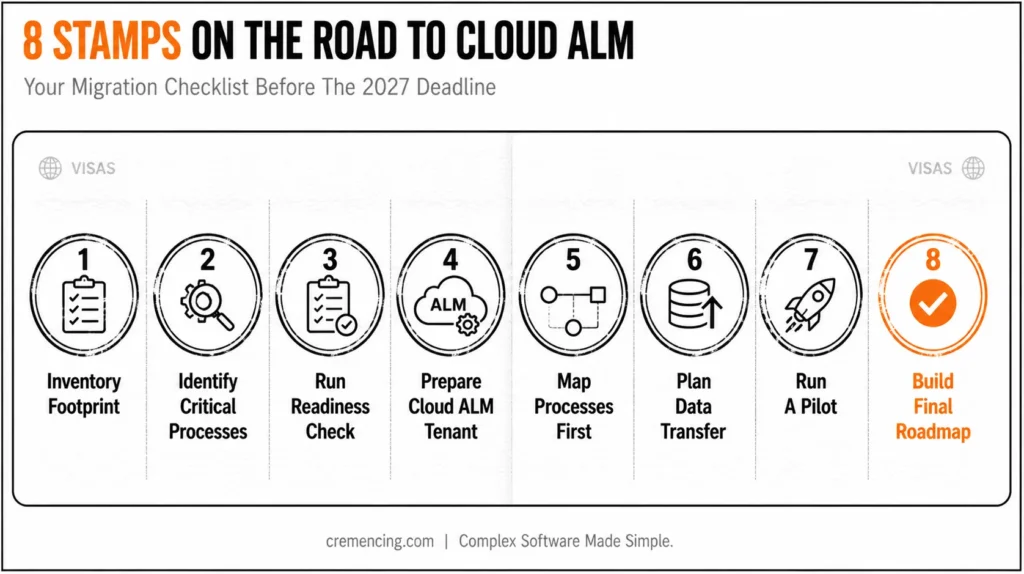
1. Inventory Your Solution Manager Footprint
Document everything your organization uses.
Review:
- ITSM
- Change Control Management
- Test Suite
- Process Management
- Monitoring
- Custom Code Management
- Business Process Monitoring
- Landscape Management
- Integrations
- Custom developments
For this reason, don’t rely on assumptions A capability that appears unused may support a critical process owned by another team.
2. Identify Business-Critical Processes
Separate your Solution Manager footprint into three groups:
Must continue
Processes required for daily operations.
Should transition
Processes that Cloud ALM can support and that should move as part of the modernization strategy.
Needs further assessment
Processes that require detailed technical or functional evaluation. This classification creates a realistic roadmap.
3. Run SAP Cloud ALM Readiness Check
SAP recommends starting with the SAP Readiness Check for SAP Cloud ALM to understand the current Solution Manager footprint and receive transition guidance.
Use the assessment to identify:
- Current processes
- Relevant data
- Integration dependencies
- Potential transition areas
- Gaps requiring additional planning
This gives the project a factual starting point.
4. Request and Prepare Your Cloud ALM Tenant
After the organization understands the target scope, request the SAP Cloud ALM tenant and establish the required administration and governance model.
Define:
- Administrators
- User roles
- Security
- Integration ownership
- Monitoring responsibilities
- Support processes
Don’t wait until the final migration phase to determine who owns the new platform.
5. Map Processes Before Migrating Data
Create a capability mapping.
For every important Solution Manager process, document:
Solution manager: Current process → Cloud ALM target → Data required → Integration required → Owner → Migration status. This prevents teams from assuming that every existing Solution Manager object needs to move.
6. Plan Selective Data Transfer
Review which data should move and which data should remain archived.
SAP provides selective data transfer capabilities for supported scenarios, including selected Solution Manager process content and Focused Build test-related content. The available scope depends on the supported functionality and Solution Manager release.
Treat data migration as a controlled activity. Validate the result. Don’t assume successful export automatically means successful operational adoption.
7. Run a Pilot
Choose one manageable process.
- Move it.
- Test it.
- Measure it.
Collect user feedback.
Then expand. A pilot can expose issues with the following:
- Roles
- Data
- Integrations
- User experience
- Process ownership
- Reporting
Fixing these issues early is cheaper than discovering them during a large-scale transition.
8. Build the Final Transition Roadmap
Your roadmap should include:
- Assessment
- Readiness Check
- Cloud ALM setup
- Process mapping
- Data migration
- Integration changes
- User training
- Testing
- Go-live
- Solution Manager retirement or reduced-scope operation
Set internal deadlines well before December 31, 2027. That gives your team time to handle unexpected dependencies.
Conclusion
The real risk in this transition was never Solution Manager “switching off.” Instead, SAP has been clear that customer-specific maintenance keeps it usable well past 2027 and 2030.
What separates organizations that handle this well is sequencing: inventory first, classify what’s actually business-critical, run the Readiness Check before assuming anything about scope, and pilot one process before committing to a full rollout. None of that requires waiting for 2027 to get started, and starting now is what turns a hard deadline into a manageable, phased project instead of a scramble.
Frequently Asked Questions
Will SAP Solution Manager really reach the end of its life in 2027?
At the end of 2027, SAP Solution Manager 7.2 enters the end of its mainstream maintenance phase. This is not to say that the software is going to stop automatically. Customers are able to keep maintenance in accordance with customer-specific support agreements, and selected functionality is able to be maintained further until 2030 under the relevant SAP Business Suite 7 maintenance agreements.
What will be the next SAP solution manager to replace it after 2027?
SAP Cloud ALM is SAP’s strategic ALM platform and the recommended transition destination for customers who want to move away from SAP Solution Manager. But it’s not always a 1-for-1 replacement for all Solution Manager functionality. Cloud ALM can be used alongside SAP Focused Run for large and complex operations and monitoring.
Will I need to migrate from SAP Solution Manager before 2027?
The deadline for the migration to SAP Cloud ALM is recommended to be before the end of 2027. But customers don’t need to turn off Solution Manager right after the end of the mainstream maintenance. While it may still be possible to undertake customer-specific maintenance (it may not be), organizations need to make a strategic maintenance transition decision based on their landscape and requirements.
What happens to SAP Solution Manager after 2027?
After mainstream maintenance ends, SAP Solution Manager 7.2 can continue under customer-specific maintenance, with applicable restrictions. Selected functionality may also qualify for optional extended maintenance through the end of 2030. Organizations should review SAP’s current maintenance terms and applicable SAP Notes before making long-term support decisions.
Is SAP Cloud ALM free for Solution Manager customers?
Eligibility depends on the customer’s SAP support and subscription arrangements. SAP states that Cloud ALM usage rights are included with certain Enterprise Support offerings, while customers on SAP Standard Support alone may not have Cloud ALM usage rights unless they also have an eligible cloud subscription. Check your specific contract before planning the transition.
Do I need to migrate all Solution Manager functionality to Cloud ALM at once?
No, SAP’s transition tooling supports selective data transfer, so organizations typically move business-critical processes first and phase the rest.
What happens to ChaRM (Change Request Management) after 2027?
ChaRM isn’t a one-to-one match in Cloud ALM; organizations relying heavily on ChaRM should evaluate this specific gap early, since it’s one of the more commonly cited functional differences.
Can SAP Focused Run replace Solution Manager entirely? No, Focused Run is aimed at advanced monitoring and large-scale operations; it complements Cloud ALM rather than replacing Solution Manager’s full ALM scope on its own.
How long does a typical Solution Manager to Cloud ALM transition take?
It varies by landscape complexity, but SAP’s own guidance and this post’s checklist both assume the assessment-through-rollout process takes many months, not weeks, which is why starting well before 2027 matters.
Does moving to Cloud ALM require moving to S/4HANA first? No, Cloud ALM can support both cloud and on-premises SAP landscapes; it’s an ALM platform decision, not dependent on completing an S/4HANA migration first.





One Response