
ServiceNow and SAP integration becomes valuable when the problem is not a lack of data but a lack of connected workflow.
In practice, IT teams may manage incidents, changes, approvals, and requests in ServiceNow, while SAP runs the financial, procurement, manufacturing, and supply-chain processes behind those requests. However, when these systems operate separately, people often become the integration layer: they copy data, check another system, send updates, and reconcile statuses manually. As a result, routine handoffs consume valuable time and increase the risk of inconsistent information. Ultimately, a connected workflow can reduce these manual steps while giving teams better visibility across both platforms.
That creates delays precisely where enterprise teams need traceability most.
A well-designed ServiceNow and SAP integration connects those workflow steps without forcing either platform to replace the other. ServiceNow can coordinate service-management work, while SAP remains responsible for the business transactions and data it owns. Depending on the landscape, the connection may use ServiceNow IntegrationHub spokes, APIs, OData, RFC, or SAP Integration Suite.
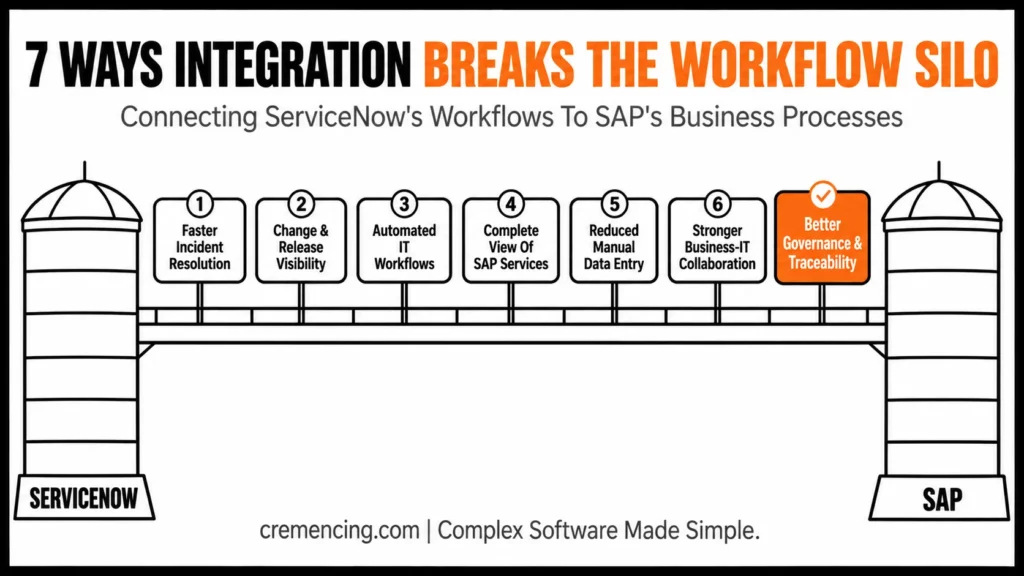
The seven benefits below focus on what that connection changes operationally: incident resolution, change visibility, workflow automation, service context, data entry, team collaboration, and governance.
What Is ServiceNow and SAP Integration and Why Does It Matter?
ServiceNow and SAP integration connects ServiceNow workflows and service management processes with SAP applications, systems, and business data.
The integration can support different scenarios depending on the organization’s landscape.
For example:
ServiceNow → SAP
A ServiceNow workflow may trigger an action in SAP.
SAP → ServiceNow
An SAP event, incident condition, or operational signal may create or update a ServiceNow record.
ServiceNow ↔ SAP
Both systems exchange information as part of a longer workflow.
The technical implementation can vary.
Organizations may use:
- REST APIs
- OData services
- SOAP services
- RFC-based connectivity
- Integration Hub
- SAP BTP Integration Suite
- Middleware
- Prebuilt ServiceNow spokes
- Custom integration services
The correct architecture depends on the SAP environment and the workflow being automated.
For example, ServiceNow currently documents an SAP S/4HANA OData spoke that can manage items, journals, procurements, and transactions from a ServiceNow instance. In addition, ServiceNow documents an SAP ECC RFC spoke and an SAP S/4HANA Public Cloud spoke for different integration scenarios.
This is important because SAP integration with ServiceNow isn’t one universal connector that solves every enterprise process.
The integration must be designed around the data and workflow that need to move between the systems. Consider a simple incident. A user reports that a critical SAP process has failed.
Without integration:
User → ServiceNow Ticket → Manual SAP Investigation → Manual Update → User Notification
With integration:
User → ServiceNow Incident → SAP Context Retrieved → Support Action → Status Synchronized → User Updated
The second model reduces the number of manual handoffs.
That’s where the real value appears.
The goal isn’t simply to exchange data.
The goal is to connect workflows.
How ServiceNow and SAP Integration Work
A typical architecture contains four layers.
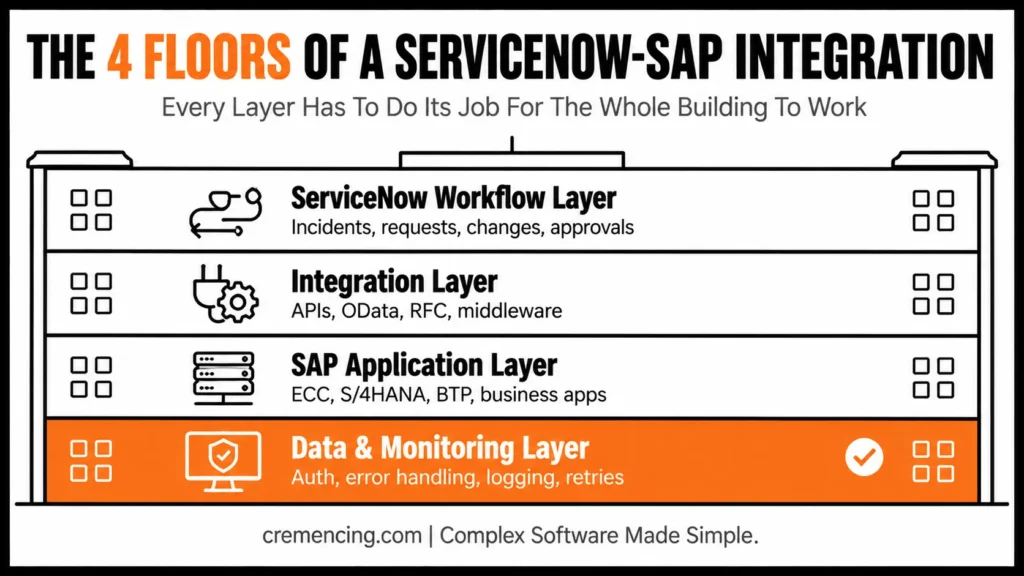
1. ServiceNow Workflow Layer
ServiceNow manages the process.
This may include:
- Incidents
- Service requests
- Changes
- Approvals
- Tasks
- Notifications
- Workflow automation
The platform becomes the orchestration layer for the service process.
2. Integration Layer
The integration layer connects ServiceNow to SAP.
Depending on the architecture, this may include the following:
ServiceNow Integration Hub
- SAP BTP Integration Suite
- APIs
- OData
- RFC
- Middleware
- Custom integration services
ServiceNow describes Integration Hub as a platform for building reusable integrations with external systems through prebuilt connectors, reusable actions, and integration workflows. It can send data to external systems and receive data from them.
3. SAP Application Layer
SAP performs the business or technical operation.
Depending on the scenario, this might involve the following:
- SAP ECC
- SAP S/4HANA
- SAP S/4HANA Cloud
- SAP BTP
- SAP Solution Manager
- SAP Focused Run
- SAP business applications
The SAP side remains responsible for the underlying business transaction or technical operation.
4. Data and Monitoring Layer
The integration must also handle:
- Authentication
- Authorization
- Data transformation
- Error handling
- Logging
- Retry mechanisms
- Monitoring
- Audit trails
This layer is often underestimated.
A successful API call isn’t enough.
The integration must also answer:
- What happens if SAP is unavailable?
- What happens if the payload is invalid?
- How does ServiceNow know the transaction failed?
- Who receives the alert?
- Can the transaction be retried safely?
- How do you prevent duplicate records?
These questions determine whether the integration can operate reliably at scale.
Choose the Integration Pattern by SAP landscape.
The integration mechanism should follow the SAP environment rather than the preference for a particular connector.
| SAP environment | Common ServiceNow integration option | Key consideration |
|---|---|---|
| SAP ECC | SAP ECC RFC / IDoc spokes, APIs, middleware | RFC-based scenarios remain relevant for supported ECC processes |
| SAP S/4HANA | OData, RFC, APIs, middleware | Use released APIs and supported business objects where available |
| SAP S/4HANA Cloud Public Edition | Public Cloud spoke, OData/APIs, SAP Integration Suite | Cloud API and authentication constraints matter |
| Hybrid SAP landscape | IntegrationHub + SAP Integration Suite or other middleware | Centralize transformation, security, monitoring, and routing where appropriate |
ServiceNow currently documents SAP ECC RFC, SAP S/4HANA OData, and SAP S/4HANA Public Cloud integration options. The documented OData spoke was tested with SAP S/4HANA 2023, while the public cloud spoke has its own supported-version requirements.
SAP Integration Suite can also provide a separate integration layer for cloud, on-premises, and hybrid scenarios. SAP describes it as an enterprise integration platform that connects applications, data, and processes across these environments.
Therefore, the architectural decision should also consider API availability, transaction semantics, authentication, connectivity, data volume, latency, monitoring, retry behaviour, and long-term supportability. In addition, teams should evaluate how each factor affects scalability, security, and maintenance rather than simply determining whether a connector exists.
7 ServiceNow and SAP Integration Benefits That Break Workflow Silos
1. Faster Incident Resolution
A major benefit of ServiceNow and SAP integration is reducing the time support teams spend moving between systems.
Imagine a user submits this incident:
“The purchase order process is failing.”
The ServiceNow ticket contains the user’s description.
But the SAP team needs more information.
They may need to check:
- SAP system availability
- Interface status
- Background jobs
- Application logs
- Recent changes
- User authorization
- Related business documents
Without integration, the service desk may need to contact the SAP team manually. The SAP team investigates separately. The service desk then updates the incident manually.
The user waits. Integration can reduce those handoffs. Depending on the architecture, ServiceNow can retrieve relevant SAP information or trigger workflows that involve SAP systems.
This gives support teams more context inside the service-management process. The result isn’t necessarily that every incident gets solved automatically.
The real improvement is that the right information reaches the right team faster. That distinction matters. Automation should remove unnecessary investigation steps, not eliminate expert judgment where it is still required.
For critical SAP environments, faster context can reduce the following:
- Mean time to detect
- Mean time to acknowledge
- Mean time to resolve
- Manual escalation effort
The improvement becomes even more valuable when incidents affect high-volume business processes. A delay in resolving one technical issue can quickly become a business problem.
2. Better Change and Release Visibility
Changes are one of the biggest sources of operational risk in enterprise SAP environments.
- A developer transports a change.
- A configuration team updates a setting.
- A release manager approves a deployment.
Then production starts behaving differently. The first question is usually:
“What changed?”
This is where SAP change management and ServiceNow workflows can work together. ServiceNow can manage the request, approval, risk assessment, and change record. SAP manages the technical implementation and transport execution. Integration can connect those events.
A simplified process could look like this:
Change Request Created
↓
Risk Assessment
↓
Approval
↓
SAP Change Implemented
↓
Testing Completed
↓
Production Deployment
↓
Validation
↓
Change Closed
Instead of maintaining separate records with no relationship between them, the organization can build traceability across the lifecycle.
That helps teams investigate failed changes more quickly.
It also improves governance.
A change record can answer:
- Who requested it?
- Who approved it?
- What SAP system did it affect?
- When was it deployed?
- What was the outcome?
This doesn’t eliminate change failures. It makes them easier to understand
3. Automated IT Workflows
The third benefit is workflow automation.
ServiceNow is designed around workflows. SAP is designed around enterprise business processes. Integration allows the two to interact. Consider employee onboarding. A new employee joins the company.
The process may require:
- Employee record creation
- Identity provisioning
- System access
- SAP role assignment
- Application access
- Manager approval
Without automation, several teams may process these steps manually.
With an integrated workflow, ServiceNow can coordinate the request while SAP systems handle relevant business or identity-related operations. The same principle can apply to other processes.
For example:
- Procurement requests
- Access requests
- Asset processes
- Supplier onboarding
- Incident escalation
- Change workflows
- Employee lifecycle events
ServiceNow’s Integration Hub provides reusable actions and integrations that can be called from workflow automation. Its current documentation also describes integration scenarios with SAP systems through available SAP spokes and applications.
The key is to automate repeatable workflows. Don’t automate a process simply because automation is available. First identify the manual steps that create delay.
4. A More Complete View of SAP Services
One of the biggest challenges in enterprise IT is that users see services, while technical teams see systems. A finance user doesn’t think:
“The SAP S/4HANA application server has an issue.”
They think:
“I can’t post my invoice.”
The difference is important. A system-centric view tells you that something is technically wrong. A service-centric view tells you what the problem means to the business. ServiceNow can provide the service-management context.
SAP provides the application and business-process context.
When these systems exchange relevant information, support teams can connect the two.
For example:
- Business Service: Procure-to-Pay
- SAP Systems: S/4HANA + Integration Layer
- Related ServiceNow Record: Major Incident
- Affected Process: Purchase Order Creation
- Technical Signal: SAP Interface Failure
This creates a more complete operational picture.
It also improves communication.
Executives don’t need a technical dump.
They need to know:
- What service is affected?
- How many users are affected?
- What business process is impacted?
- What is the current status?
- Who owns the resolution?
That’s where integration becomes valuable beyond simple data synchronization.
5. Reduced Manual Data Entry
Manual data entry seems harmless until you multiply it across thousands of transactions. A service desk agent copies information from ServiceNow into SAP.
An SAP administrator copies the result back. Another team updates the ticket. Someone else sends an email.
Each handoff creates another opportunity for:
- Typographical errors
- Missing information
- Duplicate records
- Delayed updates
- Inconsistent status
Automation reduces those repetitive tasks.
For example, ServiceNow’s documented Source-to-Pay integration with SAP supports scenarios involving purchase requisitions, purchase orders, receipts, and invoices. ServiceNow describes Integration Hub actions and subflows that connect these processes to SAP through supported integration mechanisms.
This demonstrates an important principle. The value of integration isn’t only technical.
If employees don’t need to re-enter the same information in two systems, they can spend more time on exceptions and decisions that actually require human attention.
6. Stronger Business and IT Collaboration
SAP and IT service teams often speak different languages.
The SAP team thinks about:
- Transactions
- Interfaces
- Jobs
- Transports
- Applications
- Business processes
The IT service team thinks about:
- Incidents
- Requests
- SLAs
- Changes
- Problems
- Service availability
Integration creates a shared operating model.
A ServiceNow incident can carry SAP context. An SAP event can trigger a service-management workflow.A change request can be connected to a deployment. A business service can be linked to the systems supporting it. This gives different teams a common view of the same event That can reduce the classic escalation loop:
Service Desk → SAP Team → Integration Team → Infrastructure Team → Service Desk
Instead, the teams can work from shared information.
The objective isn’t to remove specialized teams.
It’s to reduce the information gaps between them.
7. Better Governance and Operational Traceability
The final benefit is governance. Enterprise environments need to know what happened.
What caused it?
Who approved the change?
Which system processed the transaction?
Did the integration succeed?
Was the request completed?
Integration can help create an end-to-end record.
For example:
ServiceNow Change #12345
↓
SAP Transport Request XYZ
↓
Production Deployment
↓
Monitoring Alert
↓
ServiceNow Incident #67890
↓
Root Cause Analysis
This chain creates operational traceability.
It helps with:
- Audits
- Compliance
- Root-cause analysis
- Change reviews
- Service reporting
- Operational improvement
The benefit becomes particularly important in large SAP landscapes. The more systems and teams you have, the harder it becomes to reconstruct events manually.
Integration creates the possibility of maintaining that history automatically. But governance still requires design. You need clear data ownership. You need defined integration boundaries. You need secure authentication. You need logging and monitoring.
You need to decide which system is authoritative for each data object.
Integration without governance can simply create faster confusion. HR teams are a great example of this in action; see why HR departments are connecting ServiceNow with SAP SuccessFactors to eliminate manual handoffs.
When to Integrate ServiceNow and SAP
Not every process needs integration.
A good architecture starts with business value.
The first question shouldn’t be:
“Can we integrate ServiceNow and SAP?”
The better question is:
“Which workflow currently loses the most time because people have to move information between systems?”
Start there.
For example, if incident resolution is slow because support teams lack SAP context, begin with incident integration. If change failures are difficult to investigate, connect ServiceNow change records with SAP deployment information.
| Integration scenario | Strong case for integration | Keep separate when |
|---|---|---|
| SAP incident context | Service desk repeatedly needs SAP status or business context | SAP data adds little value to ticket handling |
| Change management | Teams need traceability between ServiceNow changes and SAP deployments | Existing tooling already provides reliable correlation |
| Procurement | Users repeatedly enter requests, POs, receipts, or invoices in both systems | Process volume is too low to justify integration |
| Employee lifecycle | Multiple approvals and SAP-related access steps create manual handoffs | Identity/access processes already have a reliable automation layer |
| Monitoring | SAP events need service-management escalation | Monitoring already has an effective incident-management integration |
| Master data | ServiceNow needs selected SAP reference data | Data ownership is unclear, or synchronization would create conflicts |
If procurement workflows contain repetitive manual steps, evaluate Source-to-Pay integration. This approach keeps the project focused. It also makes success measurable.
A Practical Architecture for ServiceNow and SAP Integration
A typical architecture may look like this:
User / Employee
↓
ServiceNow
Incident, Request, Change, Workflow
↓
Integration Layer
Integration Hub / APIs / Middleware / SAP BTP Integration Suite
↓
SAP Landscape
ECC / SAP S/4HANA / SAP BTP / SAP Business Applications
↓
Response or Event
↓
Integration Layer
↓
ServiceNow
Status / Task / Incident / Notification
The integration layer handles the technical differences between platforms. But architecture decisions matter.
For example, ServiceNow’s SAP S/4HANA Public Cloud spoke documentation describes configuring a connection and credential alias and using basic authentication for the documented setup scenario. However, production architectures should evaluate the appropriate authentication method, security requirements, and SAP API capabilities rather than blindly copying a development configuration. In addition, for SAP S/4HANA, OData-based integration may be appropriate for supported business objects and APIs. Meanwhile, for SAP ECC, RFC-based scenarios may be relevant.
For complex enterprise integration, SAP BTP Integration Suite or another integration platform may provide a better architecture.
The point is to select the integration mechanism based on:
- Data volume
- Latency requirements
- API availability
- Security
- Error handling
- Transaction consistency
- Monitoring
- Supportability
Conclusion:
ServiceNow and SAP integration is most valuable when it removes the gaps between the teams that manage IT services and the SAP systems that run critical business operations. The strongest integrations don’t try to replace either platform. Instead, they connect ServiceNow’s workflow, incident, change, and service-management capabilities with SAP’s business processes and enterprise applications.
That connection can reduce manual handoffs, improve incident context, strengthen change traceability, and automate repetitive workflows. The key is to start with a measurable business problem, define clear data ownership, choose the right integration architecture, and treat the integration itself as a production service that requires security, monitoring, error handling, and ongoing governance.
Frequently Asked Questions
1. What is ServiceNow and SAP integration?
ServiceNow and SAP integration connects ServiceNow workflows and service management processes with SAP applications and business systems. It can synchronize information, trigger actions, and automate workflows across both platforms. Common architectures use APIs, OData, RFC, Integration Hub, middleware, or SAP BTP Integration Suite depending on the landscape and use case.
2. How does ServiceNow integrate with SAP?
ServiceNow can integrate with SAP through several methods, including ServiceNow Integration Hub, SAP-specific spokes, APIs, OData services, RFC-based connectivity, and external middleware. ServiceNow currently documents SAP ECC RFC, SAP S/4HANA OData, and SAP S/4HANA Public Cloud integration options, with capabilities depending on the specific spoke or application.
3. What is ServiceNow Integration Hub used for with SAP?
ServiceNow Integration Hub can connect ServiceNow workflows with external systems through reusable actions, connectors, and integration flows. In SAP scenarios, it can support workflows involving SAP systems and available spokes or applications. The right approach depends on the business process, API availability, integration volume, and required error-handling model.
4. Can ServiceNow and SAP automate incident management?
Yes, ServiceNow and SAP can support automated incident-management workflows when the integration is designed to exchange relevant events and context. For example, an SAP monitoring event can potentially trigger or enrich a ServiceNow incident. At the same time, ServiceNow can coordinate assignment, escalation, communication, and resolution tracking.
5. What are the benefits of integrating SAP with ServiceNow?
The major benefits include faster incident resolution, better change visibility, workflow automation, reduced manual data entry, stronger governance, improved service context, and better collaboration between SAP and IT service teams. The actual benefit depends on selecting high-value workflows and designing reliable data synchronization rather than integrating systems simply for technical connectivity.
6. Can ServiceNow integrate with SAP S/4HANA?
Yes, ServiceNow provides documented integration options for SAP S/4HANA, including an SAP S/4HANA OData spoke and an SAP S/4HANA Public Cloud spoke. In addition, ServiceNow’s OData spoke documentation states that it can manage items, journals, procurements, and transactions from ServiceNow, with supported versions including SAP S/4HANA 2023 for the documented release.
7. Does ServiceNow need middleware to integrate with SAP?
Not always. ServiceNow supports direct integration scenarios through IntegrationHub and SAP-specific spokes, while organizations can also use SAP Integration Suite or another middleware platform. The choice depends on the SAP landscape, API availability, security model, integration complexity, and monitoring requirements.
8. Can ServiceNow integrate with SAP ECC?
Yes. ServiceNow currently documents an SAP ECC RFC Spoke, and ServiceNow also maintains an SAP ECC IDoc Spoke. The RFC spoke supports SAP ECC integration through standard SAP BAPIs and RFC-based communication.




