
A beginner can write ABAP that activates, produces output, and still contains a serious logic defect. A NUMC field can be treated like an integer, a READ TABLE can fail while the program continues, and a SELECT SINGLE can return one row when the business logic actually requires several. These mistakes become harder to spot when the same code moves between ECC, S/4HANA, and ABAP Cloud.
That is why ABAP programming basics are more than syntax. The real skill is understanding what the type, internal table, SQL statement, and runtime result actually mean. This guide focuses on six common beginner mistakes and shows the corrected patterns, with release differences called out where they matter. The goal is not to memorize newer syntax. It is to understand why the code behaves differently and how to verify that behaviour in the debugger and SQL trace.
What Are ABAP Programming Basics and Why They Matter
ABAP programming basics are the core language habits you need before you write reports, enhancements, BAPIs, CDS views, or RAP applications. They include data types, variables, internal tables, Open SQL, control flow, classes, system fields, and debugger use. These are not “junior-only” topics because most production bugs still come from weak fundamentals.
ABAP runs inside the SAP application server. Your code not only manipulate memory; it works with SAP Dictionary types, database tables, business documents, authorization checks, conversion exits, and transportable repository objects. That context makes SAP ABAP programming basics different from a general programming tutorial.
The biggest beginner mistake is learning syntax before learning data behavior. For example, a material number may look like a string, but SAP often stores it with leading zeros and displays it through conversion logic. A customer number may look numeric, but it may use a character-like type. An internal table may look like an array, but its key and table category change how reads behave.
Good ABAP programming fundamentals prevent silent defects. Once you understand the type system, you stop treating identifiers like numbers. With proper knowledge of internal tables, you avoid placing database reads inside loops. Knowing how Sy-Subrc works helps you confirm that every read operation succeeded.
A useful ABAP programming tutorial for beginners must show the wrong code and the corrected code. Definitions help, but they don’t fix habits. The rest of this post follows that pattern.
How It Works
ABAP code runs on the ABAP application server and uses the SAP Dictionary as a shared type and metadata layer. SE11 is the SAP GUI transaction for the ABAP Dictionary; developers use it to inspect tables, data elements, domains, views, and structures. Before you declare a variable for a database field, check the field type in SE11 or in Eclipse ADT.
That dictionary connection explains why ABAP programming basics start with types. A field typed as NUMC stores numeric text, not a real integer. A field typed as CHAR has a fixed length and may contain trailing blanks. A string grows dynamically and does not behave like a fixed database key field. A packed number stores decimals in a business-safe way for amounts and quantities.
Internal tables form the next layer. An internal table stores multiple rows in ABAP memory. A database SELECT usually fills an internal table, a loop processes it, and an output technique displays it. If you skip internal tables and jump into Open SQL, you miss where the selected data actually goes.
ABAP offers several advantages for SAP development. Learn more about what makes ABAP unique?
Open SQL sits between ABAP and the database. In ECC 6.0 and S/4HANA on-premise, you may see direct reads from standard tables such as MARA, VBAK, or BKPF, depending on project rules. In ABAP Cloud, you must use released APIs and released CDS views instead of unrestricted direct table access.
Beginner Model
| Layer | Beginner Usually Thinks | Correct ABAP View |
| Data type | “It’s text or number.” | A dictionary-type controls length, conversion, and meaning |
| Internal table | “It’s just an array.” | Table category and key affect reads and loops |
| Open SQL | “SELECT gets data.” | SELECT fills typed ABAP targets |
| sy-subrc | “Old syntax noise” | The return code tells whether the last operation matched |
| Modern syntax | “Shorter old syntax” | ABAP 7.40+ changes how you declare, read, and build data |
| ABAP Cloud | “Same ABAP in the cloud” | Cloud development restricts APIs and classic object usage |
SE38 is the SAP GUI transaction for creating and running executable reports. SE80 is the Object Navigator for repository objects such as programs, function groups, classes, and dictionary objects. Eclipse ADT is the preferred development tool for modern ABAP, especially S/4HANA and the SAP BTP ABAP environments. Before moving into advanced SAP development, understand the ABAP learning path and the core topics every beginner developer should cover. SAP ABAP Course Syllabus Explained for Beginners
Practical Code Walkthrough
This section gives copy-paste ABAP programming examples for beginner mistakes. Each example shows the bad habit, the corrected pattern, and why the fix works. Use SE38 in the classic SAP GUI to create a test report, or use Eclipse ADT if your system supports it.
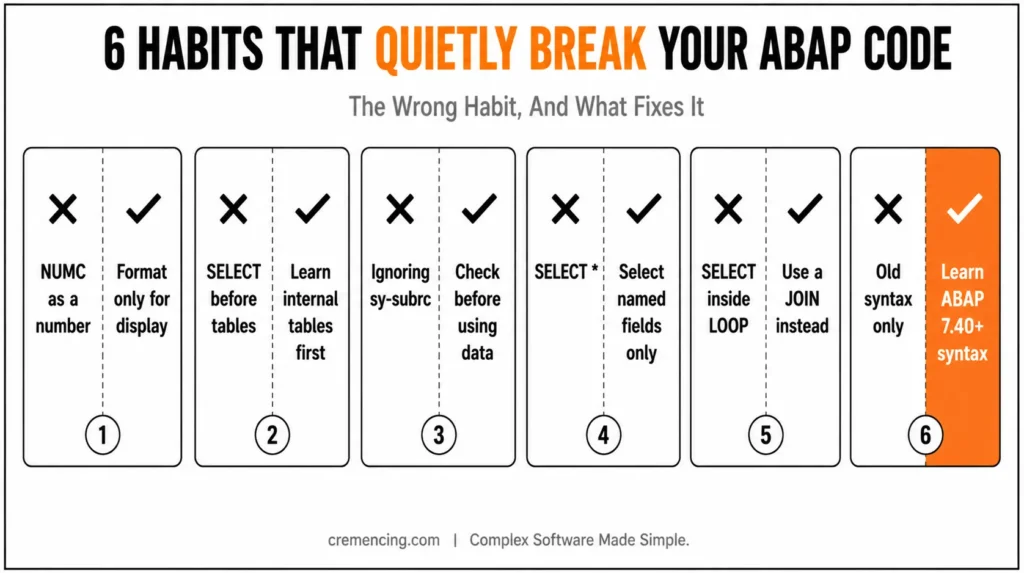
Mistake 1 — Treating NUMC Like a Real Number
Beginners see NUMC and assume it behaves like an integer. That assumption breaks when identifiers have leading zeros. Use numeric types for calculation, then format values into NUMC only when you need a SAP-style identifier.
REPORT z_abap_basic_numc_wrong.
DATA lv_order TYPE numc10. ” NUMC stores numeric text, not a true integer
lv_order = ‘0000000123’. ” Leading zeros are part of the stored text
lv_order = lv_order + 1. ” Implicit conversion can hide logic errors
WRITE: / lv_order. Output may look correct but the habit is unsafe
Correct it by separating calculation from formatting.
REPORT z_abap_basic_numc_right.
DATA lv_counter TYPE i. ” Integer type for arithmetic
DATA lv_order TYPE numc10. “NUMC only for the formatted identifier
lv_counter = 123. ” Store the calculation value as a number
lv_counter = lv_counter + 1. ” Arithmetic stays explicit and readable
lv_order = |{ lv_counter WIDTH = 10 PAD = ‘0’ }|. ” Format to 10 digits
WRITE: / lv_order. ” Expected output: 0000000124
This is one of the most important SAP ABAP programming basics rules: use the right type for the operation, not only the field display. In S/4HANA systems, material numbers and business identifiers may also have conversion exits, so never guess the technical type from the screen value.
Mistake 2 — Learning SELECT Before Internal Tables
Many beginners write a SELECT and only later ask why INTO TABLE matters. That order confuses. Learn internal tables first because most multi-row database results land there.
REPORT z_abap_basic_itab.
TYPES: BEGIN OF ty_carrier,
carrid TYPE scarr-carrid, ” Airline carrier ID from demo table SCARR
carrname TYPE scarr-carrname, ” Airline carrier name
currcode TYPE scarr-currcode, ” Currency code
END OF ty_carrier.
DATA lt_carriers TYPE STANDARD TABLE OF ty_carrier WITH EMPTY KEY. ” Result table
DATA ls_carrier TYPE ty_carrier. ” Work area
ls_carrier-carrid = ‘LH’. ” Demo carrier ID
ls_carrier-carrname = ‘Lufthansa’. ” Demo carrier name
ls_carrier-currcode = ‘EUR’. ” Demo currency
APPEND ls_carrier TO lt_carriers. ” Add one row to the internal table
LOOP AT lt_carriers INTO ls_carrier. ” Copy each row into the work area
WRITE: / ls_carrier-carrid, ls_carrier-carrname, ls_carrier-currcode.
ENDLOOP.
Now the SELECT version makes sense because the database result fills the same kind of target.
REPORT z_abap_basic_select.
SELECT carrid, carrname, currcode
FROM scarr
INTO TABLE @DATA(lt_carriers) ” ABAP 7.40+ inline declaration
UP TO 10 ROWS. ” Limit test output
IF sy-subrc <> 0. ” Check whether the SELECT returned rows
MESSAGE ‘No carrier data found’ TYPE ‘I’.
RETURN. ” Stop the report if no data exists
ENDIF.
LOOP AT lt_carriers ASSIGNING FIELD-SYMBOL(<carrier>). ” Avoid row copy
WRITE: / <carrier>-carrid, <carrier>-carrname, <carrier>-currcode.
ENDLOOP.
In ECC 6.0, old syntax without @DATA may still appear. In SAP NetWeaver 7.40+ and S/4HANA, modern Open SQL uses escaped host variables with @. In ABAP Cloud, replace direct table reads with released CDS entities where required.
Mistake 3 — Ignoring SY-SUBRC
sy-subrc is a system field that stores the return code after many ABAP operations. Beginners often ignore it because the program is still active. That creates false confidence.
REPORT z_abap_basic_subrc_wrong.
DATA lt_numbers TYPE STANDARD TABLE OF i WITH EMPTY KEY. ” Integer table
DATA lv_number TYPE i. ” Result value
APPEND 10 TO lt_numbers. ” Add one test value
APPEND 20 TO lt_numbers. ” Add another test value
READ TABLE lt_numbers INTO lv_number INDEX 5. ” Index 5 does not exist
WRITE: / lv_number. ” Wrong habit: prints initial value 0 without warning
Fix it by checking the return code before using the value.
REPORT z_abap_basic_subrc_right.
DATA lt_numbers TYPE STANDARD TABLE OF i WITH EMPTY KEY. ” Integer table
DATA lv_number TYPE i. ” Result value
APPEND 10 TO lt_numbers. ” Add one test value
APPEND 20 TO lt_numbers. ” Add another test value
READ TABLE lt_numbers INTO lv_number INDEX 5. ” Try to read missing row
IF sy-subrc = 0. 0″ means the row was found
WRITE: / lv_number. ” Use the value only after success
ELSE.
WRITE: / ‘No row found at index 5’. ” Clear message for the failed read
ENDIF.
Modern ABAP gives alternatives, but the rule stays the same: never use data that you failed to read. In ABAP programming basics, this single habit prevents many silent errors.
Mistake 4 — Using SELECT * in Beginner Code
SELECT * looks harmless in a small demo. In production, it pulls fields the program does not need. That increases memory usage in the ABAP work process and makes the result structure depend on the full database table layout.
REPORT z_abap_basic_select_star_wrong.
SELECT *
FROM scarr
INTO TABLE @DATA(lt_carriers)
UP TO 10 ROWS. ” Reads all fields, even fields the report never uses
LOOP AT lt_carriers ASSIGNING FIELD-SYMBOL(<carrier>).
WRITE: / <carrier>-carrid, <carrier>-carrname.
ENDLOOP.
Fix it by selecting only required columns.
REPORT z_abap_basic_select_fields_right.
SELECT carrid, carrname
FROM scarr
INTO TABLE @DATA(lt_carriers)
UP TO 10 ROWS. ” Reads only the fields used below
LOOP AT lt_carriers ASSIGNING FIELD-SYMBOL(<carrier>).
WRITE: / <carrier>-carrid, <carrier>-carrname.
ENDLOOP.
This matters more in S/4HANA because many business views expose wide structures and calculated fields. The correct ABAP programming fundamentals rule is simple: read what you use, then prove it in the debugger.Explore this 7-step learning path to understand the fundamentals and start your SAP development journey with confidence.
Mistake 5—Writing SELECT Inside LOOP
A beginner may read header data, loop over it, and run a second SELECT for every row. That pattern causes repeated database roundtrips. The fix is to collect keys, read the dependent data once, then join or read from an internal table.
REPORT z_abap_basic_select_loop_wrong.
SELECT carrid, carrname
FROM scarr
INTO TABLE @DATA(lt_carriers)
UP TO 10 ROWS.
LOOP AT lt_carriers ASSIGNING FIELD-SYMBOL(<carrier>).
SELECT SINGLE connid
FROM spfli
INTO @DATA(lv_connid)
WHERE carrid = @<carrier>-carrid. ” Repeats database access per loop row
WRITE: / <carrier>-carrid, lv_connid.
ENDLOOP.
For small demo tables this still runs, which is why beginners miss the problem. On large business tables, repeated database calls become visible in ST05. ST05 is the SQL Trace transaction; developers use it to record database access and find expensive SQL patterns.
A better beginner fix is to use a join when the data belongs together.
REPORT z_abap_basic_join_right.
SELECT scarr~carrid,
scarr~carrname,
spfli~connid
FROM scarr
INNER JOIN spfli
ON spfli~carrid = scarr~carrid
INTO TABLE @DATA(lt_result)
UP TO 20 ROWS. ” One database request for related data
LOOP AT lt_result ASSIGNING FIELD-SYMBOL(<row>).
WRITE: / <row>-carrid, <row>-carrname, <row>-connid.
ENDLOOP.
This is where an ABAP programming tutorial should connect syntax to runtime behaviour. The database can combine related rows in one request, while a SELECT inside a loop sends many requests from ABAP to the database layer.
Mistake 6 — Copying Old Syntax Without Learning Modern ABAP
Old ABAP syntax still appears in ECC systems and custom code. You need to read it. But if you write only old-style code in S/4HANA projects, your code will not match current development standards.
REPORT z_abap_basic_old_syntax.
DATA: lv_text TYPE string,
lt_text TYPE STANDARD TABLE OF string,
lv_line TYPE string.
lv_text = ‘ABAP’.
APPEND lv_text TO lt_text.
READ TABLE lt_text INTO lv_line INDEX 1.
IF sy-subrc = 0.
WRITE: / lv_line.
ENDIF.
The modern version uses inline declarations and table expressions where they make sense.
REPORT z_abap_basic_new_syntax.
DATA(lt_text) = VALUE string_table( ( `ABAP` ) ). “ABAP 7.40+ constructor expression
IF line_exists(lt_text[1]). “Check before direct access
DATA(lv_line) = lt_text[ 1 ]. ” Read the first row after the guard
WRITE: / lv_line.
ENDIF.
Use old syntax to understand legacy ECC code. Use modern syntax for new S/4HANA development when your release supports it. In ABAP Cloud, modern syntax and released object usage are the normal baseline.
Debugger Check for Every Example
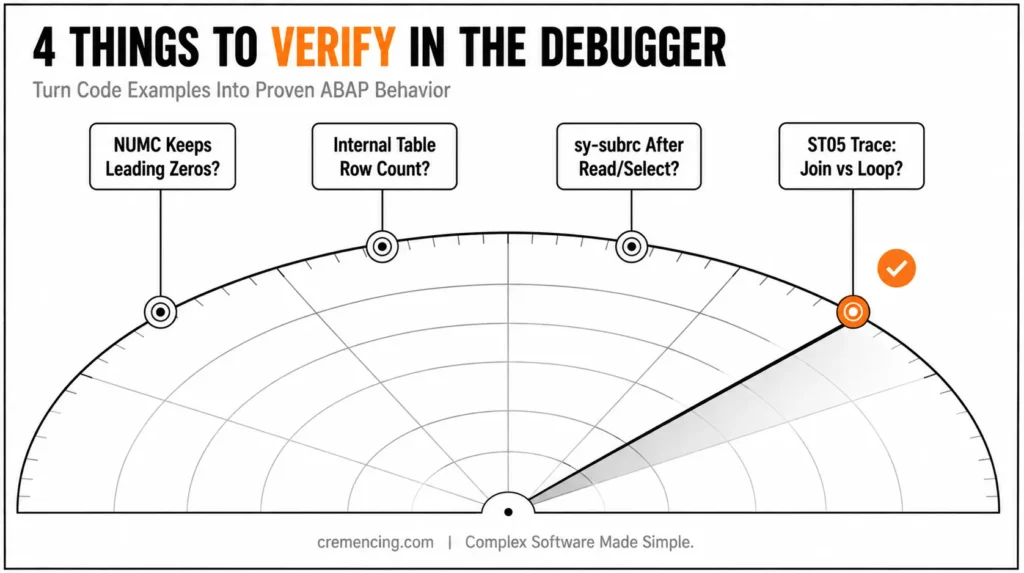
Use /h in the SAP GUI command field before executing a report to start the ABAP debugger. The debugger lets you inspect variable values, internal table rows, and sy-subrc after each statement. In Eclipse ADT, set a breakpoint on the statement, run the program, and inspect variables in the Debug perspective.
For these examples, check four things. First, verify whether NUMC values keep leading zeros. Second, inspect internal table row counts after APPEND or SELECT. Third, watch sy-subrc after READ TABLE and SELECT. Fourth, compare ST05 traces for a join versus a SELECT inside a LOOP.
That validation step turns ABAP programming examples into real learning. You don’t only read the code; you prove how ABAP behaves in your release.
When to Use It vs. Alternatives
Use these ABAP programming basic rules when you write reports, read legacy code, debug custom programs, or prepare for S/4HANA development. They also apply when a functional consultant needs to understand why a report returns wrong data. The release changes the allowed tools, but the fundamentals still matter.
| Topic | Classic ECC / On-Premise ABAP | S/4HANA On-Premise | ABAP Cloud |
|---|---|---|---|
| Development model | Classic ABAP remains common | Classic + modern ABAP depending on system/release | Cloud-restricted ABAP development model |
| Database access | Open SQL and existing custom code | Modern ABAP SQL, CDS, released APIs as appropriate | Released APIs/CDS entities and cloud-compatible objects |
| Legacy syntax | Important for maintenance | Still encountered in custom code | Prefer supported modern/cloud syntax |
| UI/output | Reports and ALV remain relevant | ALV can still be relevant; Fiori is also common | RAP/Fiori are common patterns, but select technology by use case |
| Object access | Project/system rules determine access | Check clean-core and release strategy | Released objects/APIs are central |
| Main beginner risk | Copying legacy patterns blindly | Treating S/4HANA like ECC | Assuming classic ABAP access rules still apply |
Classic vs Modern ABAP
Classic ABAP still matters because many companies run custom ECC and S/4HANA on-premise code. You’ll see function modules, includes, user exits, selection screens, and ALV reports. Don’t reject those topics if your project landscape depends on them.
Modern ABAP also matters because S/4HANA and SAP BTP development expect newer syntax, classes, CDS, and RAP. The safest path is not old versus new. Learn classic syntax to read existing systems, then write modern ABAP where your release and project rules allow it.
Conclusion
ABAP programming basics are not only beginner theory. They decide whether your code reads the right data, checks failed operations, uses the right type, and survives release changes from ECC to S/4HANA. Weak basics create bugs that are hard to spot because ABAP often lets the program activate even when the logic is wrong.
Fix the habits early. Use modern syntax wherever your release supports it, learn internal tables before Open SQL, check sy-subrc, and separate identifiers from numbers. Your reports are made simpler to debug, your database reads are made simpler to trace, and your code is made safer to maintain by these small rules. The next step you take should be actual rather than theoretical. Open a test report in Eclipse ADT or SE38, run each example, set a breakpoint, and examine the variables after each significant statement.
Pay attention to how typed fields behave in contrast to the screen value, how sy-subrc changes, and how internal tables fill up. For ECC and S/4HANA on-premise work, continue with ALV reports, BADIs, BAPIs, and Open SQL performance checks. Start with these fundamentals and move on to CDS views, RAP, service bindings, and released APIs for SAP BTP ABAP Environment or ABAP Cloud. Once these fundamentals feel natural, they become normal ABAP development and no longer appear to be separate skills
Frequently Asked Questions
1. What does SY-SUBRC mean after READ TABLE?
SY-SUBRC tells you whether READ TABLE found a matching row. A value of 0 means success in the common case. Other values depend on the table type and comparison result. This belongs in every ABAP programming tutorial for beginners because missing the check causes silent logic errors.
2. Can I SELECT from an internal table in ABAP?
Yes, modern ABAP supports SQL-like access to internal tables in specific releases, but beginners should first learn normal internal table operations. Start with LOOP, READ TABLE, line_exists, and table expressions. That path builds stronger SAP ABAP programming basics before advanced syntax.
3. How do I write ABAP 7.4 new syntax for LOOP and READ?
Use inline declarations, field symbols, table expressions, and predicate functions where they improve clarity. For example, replace some READ TABLE … sy-subrc existence checks with line_exists. Still learn the old form because ECC custom code often uses it. [INTERNAL LINK: ABAP new syntax examples → ABAP 7.40 Syntax for Beginners]
4. What is an internal table in ABAP?
An internal table stores multiple rows in ABAP memory during program execution. A report often fills it with SELECT, processes it with LOOP, and displays it through WRITE or ALV. Understanding internal tables is one of the main ABAP programming fundamentals.
5. What are ABAP programming basics?
ABAP Programming Basics includes data types, variables, internal tables, Open SQL, loops, conditions, classes, system fields, and debugging. For S/4HANA, add modern ABAP syntax and CDS awareness. For ABAP Cloud, add released APIs and RAP basics after the core language.
References
SAP ABAP Keyword Documentation




