

Introduction
Most SAP BTP credit waste comes down to one thing: nobody is watching the meter between billing cycles. Idle development environments, over-provisioned service instances, and chatty integrations quietly burn through allocated credits long before anyone notices a problem. By the time the invoice arrives, teams have already committed the spending and have little opportunity to reduce it.
This isn’t a pricing-model flaw. BTP’s consumption-based model is genuinely fair; you pay for what you use. The problem is visibility. Most organizations run BTP the way they ran on-premises systems: provision it, leave it running, and check in only when something breaks or a bill looks off. That approach works for fixed-cost ERP. It doesn’t work for consumption-based cloud services, where every idle hour and every unnecessary API call has a direct, running cost attached.
This guide walks through where SAP BTP credits actually go in 2026 and the seven practical steps to get ahead of the waste — without slowing down the teams building on the platform.
What SAP BTP Credits Are and Why Do They Get Wasted?
SAP BTP uses consumption-based pricing for its credits. Instead of paying set licensing charges, you pay according to your actual usage, including compute power, storage, integrations, APIs, and other services. At first, this appears to be efficient and equitable because you only pay for what you use. However, the dilemma starts as soon as active usage management is not in place.
Most organizations have numerous teams that implement services on their own. Moreover, teams often lack centralized tracking, which makes it difficult to see overall consumption in one place. Consequently, teams must manage costs across multiple sources, making overall spending harder to control.
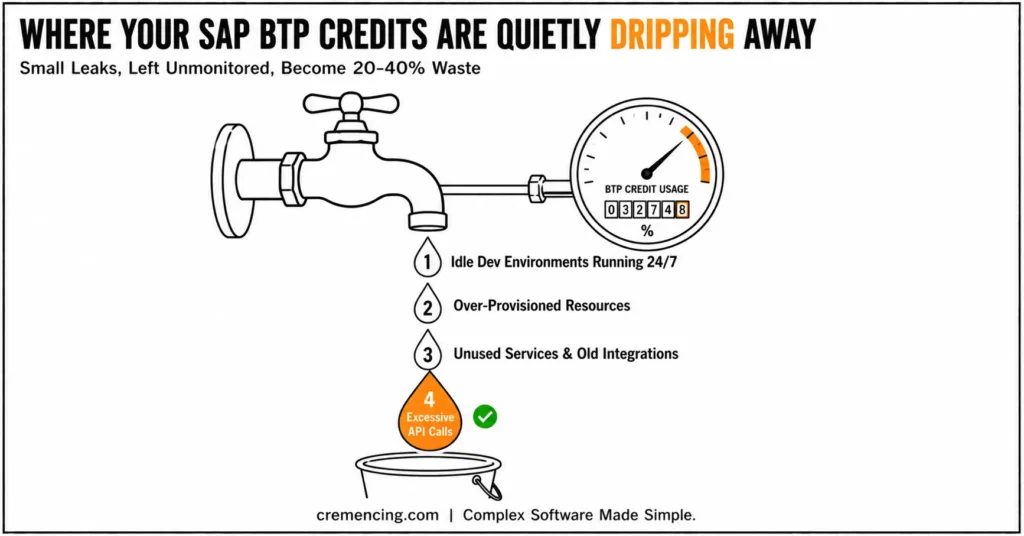
Another factor that often goes unnoticed is development environments. For example, teams often leave these systems running continuously, even when they do not actually use them. As a result, these systems can silently consume a significant portion of the available credits over time.
Similarly, APIs and integrations can contribute to unnecessary costs. When they are poorly designed or overused, they can generate unnecessary calls and data transfers. Consequently, even minor inefficiencies can lead to significant cost increases at scale.
Furthermore, unused services, outdated integrations, test applications, and inactive APIs may remain running in the background. Although these resources are often overlooked, they continue consuming credits day after day.
Common SAP BTP Cost Drivers vs. Mitigation Actions
| Cost Driver | Why It Wastes Credits | Mitigation |
|---|---|---|
| Idle dev/test environments | Left running 24/7 regardless of actual usage | Scheduled shutdowns; scale to zero on Kyma |
| Over-provisioned service instances | Sized for peak load “just in case” | Start small, right-size based on real usage data |
| Chatty/unoptimized integrations | Excess API calls and payload size drive per-call billing | Batch calls, compress payloads, cache where possible |
| Orphaned services & test apps | Never decommissioned after a project ends | Quarterly service audits tied to a decommission checklist |
| Decentralized provisioning | No single view of consumption across teams | Centralized cost and Usage Management dashboard + budget alerts |
How to save money on SAP BTP Credits.
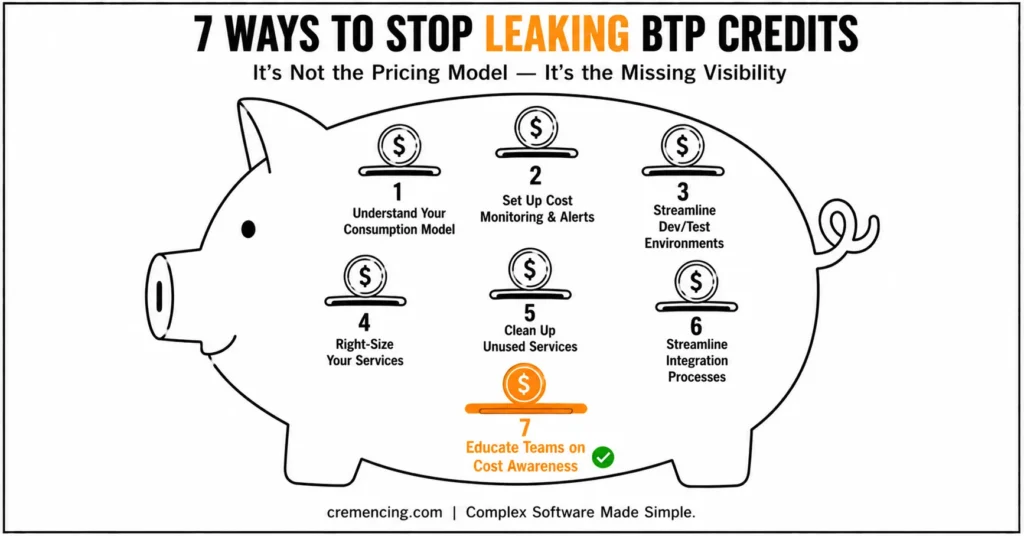
Step 1: Make Sense of Your Consumption Model.
You must know where the costs are originating before you can attempt to cut them. The cost of SAP BTP depends on various factors, such as the type of services, the duration of running services, API calls, and data storage. All these add different values towards your total consumption.
However, this is a step that is bypassed by many companies, and they go directly to optimization. That normally results in guesswork rather than actual savings. Take some time to check your usage dashboards. Determine the most credit-consuming services and the reasons. It is based on this clarity that all the cost-saving decisions that follow are made.
Step 2: Set Up Cost Monitoring and Alerts
What you cannot see, you cannot control.
One of the most effective tools to manage SAP BTP costs is real-time monitoring. It provides you with instant access to the usage of credits in your environment. By establishing budget levels and setting alerts, you will be able to notice odd spikes as they happen. This enables teams to take action before costs are an issue.
Unless alerted to it, overspending usually goes unnoticed until the end of the billing cycle, when it is too late to remedy it.
Step 3: Streamline Development and Testing Environments.
The development environments are a necessity, but it is also one of the largest contributors of concealed waste.
Such systems do not necessarily have to operate 24/7. However, in most organizations, they do. Closing down idle working environments when they are not working can also bring about a lot of consumption reduction. Even the simplest changes in scheduling can result in significant savings.
Another useful method is to use smaller sizes of instances to take the test. Not all the tasks need full-scale resources. Eliminating unwarranted duplication of environments will also help in keeping costs within reach.
Step 4: Right-size your services.
A typical practice in the cloud is over-provisioning. In order to prevent performance risks, teams end up allocating more resources than they require.
This might seem like a safe strategy, but it will result in credits being wasted. Another approach that is more appropriate is to begin small and grow over time. Keep track of actual consumption and allocate resources according to actual demand.
Periodic reviews of your performance ensure that your system is efficient and does not spend a lot of money.
Step 5: Clean Up Unused Services.
With time, unused services start to build up.
This category includes old integration flows, dormant APIs, and test applications that teams never deleted. Although these resources may seem insignificant individually, together they can create continuous background consumption. Therefore, teams should conduct frequent audits to identify and remove unnecessary services before they continue consuming credits.
This is among the quickest methods to recover the credits squandered without affecting performance.
Step 6: Streamline Integration Processes.
Integration flows can be underestimated as a cost factor.
As a matter of fact, they may consume a significant amount of SAP BTP credits, particularly in complex settings. One of the steps is to reduce unnecessary API calls. Each call is resource-consuming, and poor designs compound the effect.
Efficient data formats and the removal of redundant integrations are other measures that minimize consumption. Furthermore, even minor advances in integration design can result in perceptible cost savings at scale.
Step 7: Educate Teams about Cost Awareness.
Price problems cannot be resolved through technology alone; people also play a significant role. Developers and business users make daily decisions that directly affect credit consumption. Therefore, when teams understand the cost implications of their actions, they can make more informed decisions and manage BTP credits more effectively.
Efficient code compliance, resource utilization and optimization programs in a period of time can considerably help in minimizing waste. Companies that instill the culture of cost awareness in their organizations usually record long-term gains in terms of efficiency and expenditure.
Conclusion
Saving money on SAP BTP credits in 2026 isn’t about rationing usage or slowing teams down; it’s about knowing, at any point in the billing cycle, exactly where credits are going and why. The seven steps above, from mapping your consumption model to building cost awareness into daily development habits, work together as a governance layer, not a one-time cleanup.
Run the audit checklist above against your own account this week. Most organizations find their biggest leak in one of two places: idle non-production environments or integrations nobody has reviewed since they were built. Fix those two first, and the rest of the governance work gets noticeably easier to sustain.
The companies that achieve success with SAP BTP are not the ones which spend the least- they are the ones which know precisely where their credits go and how to manage them effectively.
Frequently Asked Questions
How do you utilize SAP BTP credits?
Cloud services can be computed to run and pay-as-you-go, using different innovations. RHT SAP BTP credits (hereafter referred to as TV model): computing power, storage, APIs, integrations, and development environments.
How do I plan for lower SAP BTP costs in 2026?
Continuously monitoring usage in real time, shutting down idle environments, right-sizing resources, removing unnecessary services, and optimising integrations can all help reduce SAP BTP spending.
SAP Business Technology Platform Cost Driver?
Long-running development environments, excessive number of API calls, over-provisioned resources, and unmanaged integration flows are few of the biggest cost drivers in SAP BTP.
How can monitoring help in reducing SAP BTP cost and spending?
It allows you to view your credit consumption directly in real time, so any unusual spikes can be detected early and overspending is avoided before the billing cycle closes.
Does SAP BTP Cost and Usage Management update in real time?
It provides near-real-time visibility into consumption at the global account and subaccount level, which is enough to catch abnormal spikes well before a billing cycle closes, though there can be a short reporting lag depending on the service.
What’s the difference between SAP BTP credits and pay-as-you-go billing?
Credits are pre-purchased consumption allowances drawn down as services are used; pay-as-you-go bills directly for actual consumption without a pre-purchased pool. Many enterprise accounts run on credits specifically to get predictable budgeting with usage-based flexibility underneath.
Can an idle SAP BTP subaccount still consume credits?
Yes, subscriptions and provisioned service instances can continue to accrue cost even with no active workload, unless they’re explicitly unsubscribed, stopped, or scaled to zero.
How often should teams audit SAP BTP service usage?
A quarterly audit cadence is a reasonable baseline for most organizations; teams with fast-changing integration landscapes or frequent project turnover may benefit from a monthly review instead.




