

Introduction
A lot of developers become excited about learning SAP BTP until they reach their first application and how to build it partway through. Many tutorials explain the concepts to you, but not how things are connected in a real project. That confuses and wastes time, as well as resulting in half-finished applications.
You can create an SAP BTP account, open the cockpit, and still have no clear idea what to build next. The harder part of a real BTP project is connecting the pieces: choosing the runtime, modelling the application, exposing services, connecting the UI, handling authentication and destinations, and deploying the result without creating an architecture that becomes difficult to maintain.
That is where this SAP BTP tutorial takes a different approach. Instead of treating CAP, SAP HANA Cloud, SAPUI5, integration, and deployment as separate features, it follows an end-to-end application path and explains where each component fits.
The main path in this guide uses SAP BTP Cloud Foundry with CAP for application development. We will also point out where Kyma or ABAP Environment changes the architecture. By the end, you should understand not only how to build an application, but also which BTP components you actually need and which ones you can leave out.
Most SAP BTP tutorials do not validate the feature; they suggest that you learn it, but they should also provide guidance on how to build something and tell whether it is production grade or just for learning purposes. Even seasoned devs are left scratching their heads if that clarity does not exist.
What Is SAP BTP Tutorial and Why Is It Important
A SAP BTP Tutorial is a structured way to learn how to use the SAP Business Technology Platform for application development through real-world scenarios.
An effective tutorial would not look like your usual tutorial but rather;
- End-to-end application development
- Integration with SAP services
- Deployment and scalability
What You Will Learn Through a SAP BTP Tutorial?
CAP (Cloud Application Programming Model)
Used for backend services
SAP HANA Cloud
Storage and management system for your data.
SAP Fiori / UI5
Frontend for user interaction
Integration Services
Connect external and SAP systems
A good SAP BTP development tutorial explores how these components interact with each other, not in isolation. If you are comparing the development approaches and languages available across SAP BTP, see our guide to SAP BTP development languages and the mistakes developers commonly make when choosing a stack.
How SAP BTP Tutorial Works
More than just a brief overview of SAP BTP, an SAP BTP tutorial should help developers build applications from the ground up and avoid getting stuck on technical implementations. It should not just target individual features but the entire development lifecycle: from setting up the environment and building apps to integrating systems, testing functionality, and deploying solutions in a successful manner.
A great tutorial not only imparts knowledge about a particular technology stack but also guides how to solve the problems developers often encounter, like authentication, connectivity issues, deployment errors, and application scaling, helping developers to transition from concepts learned into building production-ready solutions effectively.
Step 1 — Setting up your SAP BTP environment
Set up Your Development Environment
- Create an SAP BTP account
- Configure subaccounts and spaces
- Enable required services
Tip:
Use guided setup tools to minimize configuration errors.
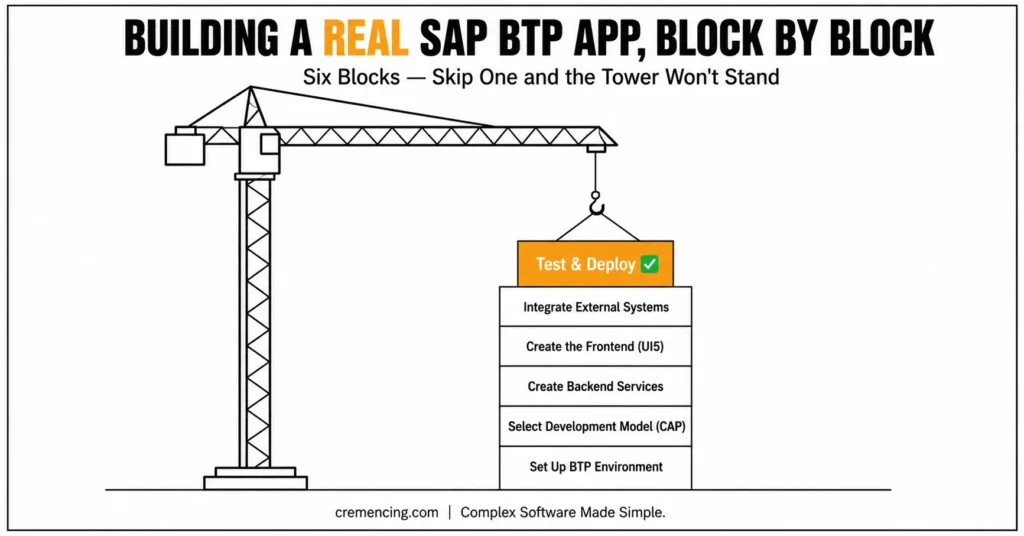
Step 2 – Select the Suitable Development Model
Most real projects use CAP.
- Node. js or Java-based backend
- Service-oriented architecture
- Built-in support for OData
SAP BTP Development Training Path. Along with HANA Cloud, this is an integral part of any SAP BTP development training path. For more insights, read our blog on SAP BTP Application Development.
| BTP option | Best fit | Typical development approach | Key consideration |
|---|---|---|---|
| Cloud Foundry | Business applications and services | CAP, Node.js, Java, Python and other supported approaches | Managed PaaS application runtime |
| Kyma | Cloud-native extensions, microservices and functions | CAP, containers, Functions, Kubernetes tooling | Kubernetes-based runtime and operations |
| ABAP Environment | ABAP-based cloud extensions and applications | ABAP Cloud | Cloud ABAP development model |
Step 3 – Create Backend Services
Create your data model and services.
- Create entities using CDS
- Expose APIs
- Implement business logic
Design with scale and cleanliness in focus.
Step 4 — Creating the Frontend
Use SAPUI5 or Fiori.
- Create a responsive UI
- Bind data to backend services
- Handle user interactions
This step connects everything.
Step 5- GitHub Integration
Real applications require integration.
- Connect APIs
- Use SAP Integration Suite
- Handle authentication
This is where most people get bogged down.
Step 6 – Test and Deploy
Before deployment:
- Test functionality
- Validate performance
- Fix errors
Deploy to:
- SAP BTP Cloud Foundry
- SAP Fiori Launchpad
Advantages & Return On Investment
The SAP BTP Tutorial Online Training is structured in such a way that it gives results.
Faster Learning
With guided steps, developers finish projects 30–50% faster.
Real Project Readiness
You not only learn theoretically, but you also build production-ready apps.
Improved Productivity
It saves time in confusion and debugging.
Career Growth
SAP BTP skills have immense applicability in various industries.
Better Understanding of Architecture
Then you get to see how services work together in real systems.
Faults and Good Practices
Common Mistakes
- Making only tutorials without building real projects
Following along with a tutorial gives a false sense of mastery. You recognize the steps when someone else lays them out, but that’s different from being able to design a solution from scratch when requirements are unclear. - Skipping architecture understanding
Copying code without understanding why services are connected the way they are means you can’t adapt when your use case doesn’t match the tutorial exactly — which, in real projects, it never fully does. - Ignoring integration challenges
Tutorials usually isolate one service at a time. Real BTP projects require multiple services (like Cloud Foundry, Kyma, SAP HANA Cloud, Integration Suite) to talk to each other, and that’s where most unexpected problems show up. - Not testing under real conditions — Code that works with three sample records often breaks under production load, concurrent access, or messy real-world data. Skipping load testing and edge-case testing means problems surface for the first time in production the worst place to find them.
- Neglecting security from the start — Authentication and authorization are often bolted on at the end instead of designed in from day one, leading to rushed, fragile security implementations.
- Not version-controlling configuration — Treating environment configs, service bindings, and deployment settings as an afterthought makes it hard to reproduce, roll back, or debug issues later.
Best Practices
- Build small but complete applications — A small end-to-end project teaches you far more than a large, unfinished one. Completeness forces you to deal with the parts tutorials skip: error handling, config, and deployment.
- Focus on end-to-end workflows — Practice taking a feature from user request to deployed, working solution, not just the “interesting” middle part.
- Use official SAP tools and documentation — Official docs, SAP Discovery Center, and SAP Business Application Studio stay current with platform changes, unlike many third-party tutorials that go stale quickly.
- Practice consistently — Regular, smaller efforts build durable skill better than occasional deep dives. Consistency also keeps you current as BTP services evolve.
- Document your own learnings and gotchas — Keeping notes on issues you’ve personally hit (and how you solved them) becomes a faster, more relevant reference than generic tutorials.
- Engage with the SAP community — Forums like the SAP Community, Stack Overflow, and SAP-specific Slack/Discord groups often surface real-world problems and solutions that documentation hasn’t caught up to yet.
What Most SAP BTP Tutorials Don’t Tell You
Most SAP BTP tutorials focus on features: how to spin up a service, call an API, or deploy a sample app. What they rarely cover is what happens after the tutorial ends, when you’re building something real. Here’s what tends to get left out.
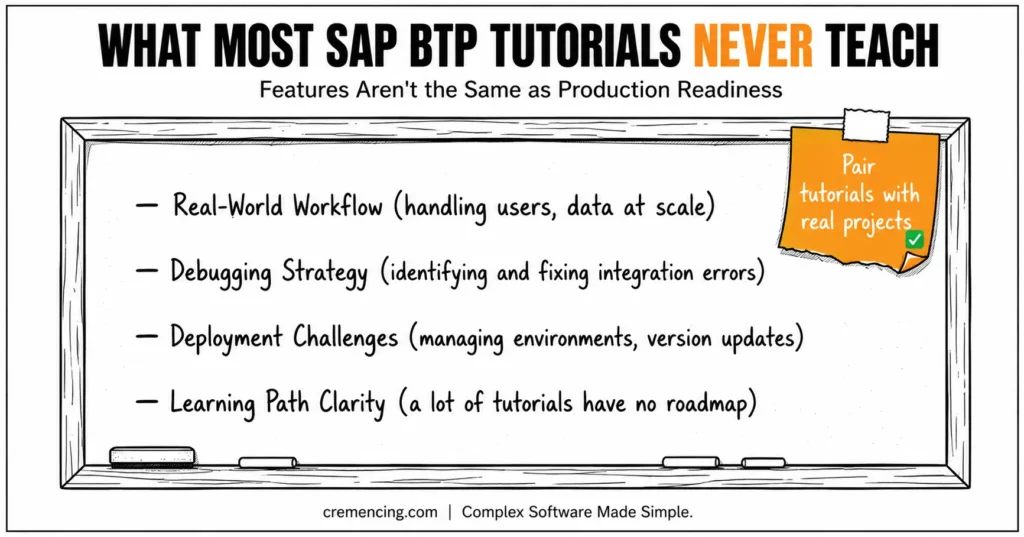
1. Real-World Workflow: Tutorials use clean, single-user demo data. Production doesn’t. You need to know how to:
- Design for concurrent users and role-based access
- Handle large or messy datasets without performance falling apart
- Build workflows that survive edge cases, not just the happy path
2. Debugging Strategy Sample projects rarely break, so tutorials rarely teach you how to fix things when they do. In practice, you need to:
- Read BTP logs and traces efficiently (Application Logging, Cloud Logging services)
- Isolate whether an issue is in your code, a connected service, or the integration layer
- Diagnose failures across multi-service architectures, not just one app
3. Deployment Challenges Getting something running locally is the easy part. Tutorials skip:
- Managing dev, test, and production environments consistently
- Handling version upgrades and service deprecations without breaking existing apps
- CI/CD pipelines and multi-tenant deployment considerations
4. A Clear Learning Path Perhaps the biggest gap: most tutorials are one-off pieces, not part of a sequence. There’s no roadmap from “hello world” to production-ready skills.
The fix: pair scattered tutorials with a structured SAP BTP development course or a well-sequenced training video series. Structured learning fills in the workflow, debugging, and deployment knowledge that individual tutorials assume you’ll figure out on your own and gives you a path instead of a pile of disconnected demos.
Conclusion
Building an SAP BTP application becomes much easier when you stop treating BTP services as isolated features and design the application as one connected system.
Start by choosing the right runtime. For the main path in this tutorial, Cloud Foundry provides the application runtime, CAP structures the backend, HANA Cloud can provide persistence, SAPUI5 or Fiori elements can provide the user interface, and destinations can handle backend connectivity. Each component has a defined responsibility.
The important distinction is between a tutorial that successfully demonstrates an application and an application that is truly ready for production. Therefore, before calling the project complete, it’s essential to validate authentication, authorization, and integration. Additionally, deployment configuration, logging, performance, and operational requirements must all be checked. Only then can a project be considered genuinely production-ready.
That is the real value of an SAP BTP tutorial: not simply getting an application to run once, but understanding the architecture well enough to build, troubleshoot, and deploy the next application without starting from scratch.
Begin your SAP BTP journey where the new adventure of applications is just a click away. If your backend work involves SAP-specific development rather than CAP, compare this approach with our guide on ABAP programming basics.
FAQs
What is SAP BTP Tutorial?
A SAP BTP Tutorial is a guide for developers building applications on top of SAP Business Technology Platform to do so step-by-step.
Do I need programming experience?
Familiarity with JavaScript or Java is good to have.
How to learn SAP BTP?
Training combines tutorials and hands-on, task-oriented training.
Are SAP BTP courses worth it?
A structured SAP BTP development training-oriented course can cover topics in less time and produce job-ready professionals.
What is the difference between SAPUI5 and SAP Fiori?
SAPUI5 is a technology for developing web user interfaces, while SAP Fiori describes SAP’s user-experience design system and application experience. Fiori elements provides a metadata-driven approach for suitable applications.
What are SAP BTP destinations used for?
Destinations provide configured endpoints and connectivity information that applications and BTP services can use to reach backend systems and APIs.
Does deploying an SAP BTP application mean it is production-ready?
No. Deployment confirms that the application can run in its target environment. Production readiness also requires validation of security, authorization, performance, observability, resilience, deployment processes, and operational support.




