

Introduction
SAP BTP applications usually do not fail simply because the app was poorly coded. They fail when the architecture does not account for what happens after the application starts communicating with other systems, processing real data, and running automated processes.
That distinction matters for SAP teams building extensions around S/4HANA, integrating third-party services, or automating business workflows on BTP. An application can work correctly in development and still encounter authentication failures, unexpected payloads, slow dependencies, retry problems, or incomplete error handling in production.
Moreover, the real engineering challenge is therefore bigger than SAP BTP application development itself. The application has to survive integration boundaries, automation failures, production workloads, and ongoing operations.
This guide focuses on those failure points and the architecture, testing, error handling, connectivity, and monitoring practices that make BTP applications more resilient after go-live.
SAP BTP Application Development: What Is
What is SAP BTP Application Development? SAP BTP application development is the process of developing, extending, and integrating applications on top of SAP Business Technology Platform.
It enables organizations to:
- Develop cloud-native applications
- Integrate SAP and non-SAP systems
- Automate business processes
- Extend existing SAP solutions
This includes areas such as
- Application development and integration in SAP BTP
- App development & automation with SAP BTP
- SAP BTP mobile application development
Developers can use tools like:
- SAP Business Application Studio
- CAP (Cloud Application Programming Model)
- SAP UI5 for frontend development
BTP application development in modern-day enterprises, however, goes beyond just writing code. It is about building architectures that scale, connecting systems and processes efficiently.
Stepwise app development approach on SAP BTP
Step-by-step: Understanding sap btp application development and its common pitfalls.
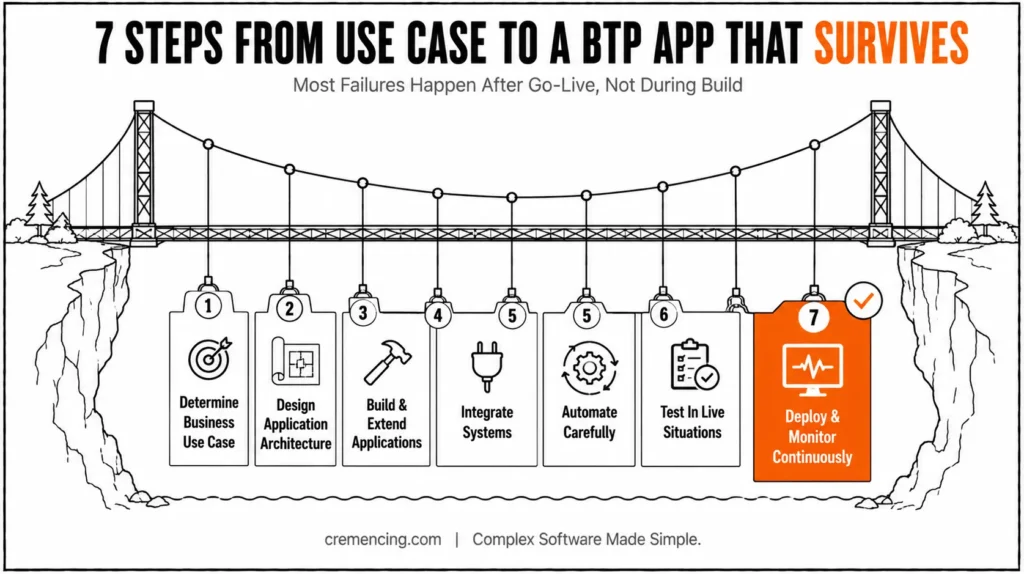
Step 1 – Determining Business Use Case
Start by identifying:
- The problem the application solves
- Target users and workflows
- Integration requirements
Applications get complicated and start to become unmanageable without a defined use case.
Step 2 – Design Application Architecture
Choose the right architecture:
- CAP-based services
- Microservices approach
- API-driven design
A robust architecture guarantees scalability as well as flexibility.
Step 3 – Constructing and Expanding Applications
SAP offers development tools that utilise the following steps to create applications.
- Backend logic using CAP or ABAP
- Frontend using SAP UI5
- Extensions for existing SAP systems
SAP BTP app development is practical here.
Step 4 — Integrate Systems
Integration failures often occur at the boundary between the application and the system it depends on. A successful API call in a development environment does not prove that the production connection, authentication method, payload structure, timeout behavior, and failure handling are correct.
Integration is a critical phase.
- Connect SAP and non-SAP systems
- Use APIs and integration services
- Ensure data consistency
In practice, an SAP BTP application connecting to an on-premises SAP system may use SAP Cloud Connector together with BTP Connectivity and Destination services. Destinations centralize connection configuration, while Cloud Connector provides controlled connectivity from BTP to on-premise.
Step 5: Are you ready to automate?
Automation should be designed with failure paths as carefully as the successful path. In SAP Build Process Automation, uncaught errors can fail an automation execution, while explicit error handling can prevent expected business or technical failures from becoming uncontrolled execution failures.
While automation increases efficiency, it also creates complications.
- Use workflow services
- Automate approvals and processes
- Monitor execution
These fall in line with SAP BTP application development and automation strategies.
| Failure point | What breaks | What to validate before go-live |
|---|---|---|
| API dependency | Timeout, unexpected response, rate limit | Timeout, retry and error behaviour |
| Data contract | Missing/changed fields, type mismatch | Schema and mapping validation |
| Authentication | Expired/incorrect credentials or certificates | OAuth/destination configuration and renewal process |
| On-premise connectivity | Cloud Connector route/access issue | Connectivity and access-control testing |
| Automation | Uncaught business/technical error | Explicit error paths and retry rules |
| Production load | Slow queries or excessive requests | Load and performance testing |
| Operations | Failure goes unnoticed | Logs, alerts and operational ownership |
Step 6 – Test in Live Situations
Testing should include:
- High data volume
- Real user behavior
- Integration dependencies
The majority of the time, this step gets skipped, and that is where people often fail.
Step 7 – Deployment and monitoring
After deployment:
- Monitor performance
- Track errors
- Optimize continuously
This ensures long-term success. However, if you need a practical build sequence, our SAP BTP Tutorial walks you through application development from architecture through deployment.
Creating Applications Using SAP BTP: Benefits and ROI
When deployed in the right way, SAP BTP brings real business value.
Key Benefits
- Reduce development time by 30–40%
- Enable faster integration across systems
- Improve scalability and flexibility
- Support real-time data processing
Operational Benefits
- Streamlined workflows
- Reduced manual effort
- Improved system reliability
Business Impact
- Faster time to market
- Better customer experience
- Increased innovation capability
- Lower long-term maintenance cost
Best practices in the SAP BTP application environment lead to a higher ROI along with system performance for an organization. For teams choosing between CAP, Node.js and Java, however the technology decision also affects integration boundaries, deployment, and production behavior.
Why Applications Do Not Survive after Integration & Automation
This is the most important part in SAP BTP application development.
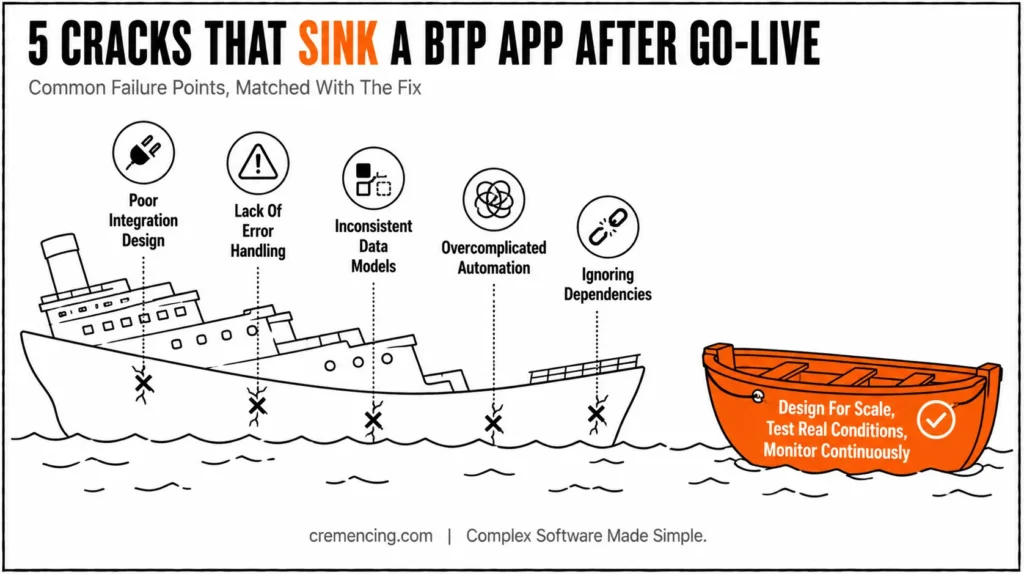
Common Failure Points
- Poor integration design
- Lack of error handling
- Inconsistent data models
- Overcomplicated automation workflows
- Ignoring system dependencies
Real Issue
Many teams are only focused on building applications but fail to consider their behavior once integrated.
For example:
- APIs fail under load
- Data mismatches break workflows
- Automation loops create system errors
These issues lead to:
- Performance degradation
- User dissatisfaction
- Increased maintenance effort
Avoiding Mistakes and Knowing the Etiquette
Understanding mistakes helps prevent failure.
Common Mistakes
- Designing applications without scalability
- Ignoring integration complexity
- Over-automating processes
- Not testing real-world scenarios
- Lack of monitoring after deployment
Best Practices
- Start designing for scale from the beginning
- Use modular architecture
- Implement strong error handling
- Test under realistic conditions
- Monitor continuously
Any developer, whether as sap btp application developer at Accenture or in any similar environment, must follow such steps to ensure that we ship stable solutions.
The Real Reason Why Most BTP Apps Go Bust After Going Live
The majority of the content is about development, but with less focus on post-deployment challenges.
The true challenge is not developing the product; it is managing its lifecycle.
What Most Teams Miss
- Continuous monitoring strategies
- Performance optimization after deployment
- Handling integration failures proactively
Advanced Insight
What successful SAP BTP implementations have in common:
- Designing for failure scenarios
- Real-time monitoring of system behavior
- Continuously improving application performance
The Real Reason Why Most BTP Apps Go Bust After Going Live
Monitoring the application alone is not enough. A BTP application can report healthy while a dependency is returning errors, a destination is misconfigured, an integration flow is failing, or an automated process is accumulating failed executions.
A useful production model is to monitor four layers:
| Layer | What to monitor | Typical failure |
|---|---|---|
| Application | Errors, response time, resource behavior | Runtime exception |
| Connectivity | Destinations, authentication, Cloud Connector routes | Connection failure |
| Integration | Messages, mappings, downstream responses | Payload/API failure |
| Automation | Job status, errors, retries, execution duration | Failed workflow |
SAP BTP provides application-level logging for Cloud Foundry applications, while SAP’s current documentation points toward Cloud Logging as the next-generation observability direction.
The important point is not simply to collect logs. Teams need enough operational context to determine where a transaction failed and whether the failure originated in the application, connectivity layer, integration layer, or automation process.
Conclusion
SAP BTP application development does not end when the application successfully deploys. Ultimately, the real test begins when the application has to communicate with production systems, process unpredictable data, execute automated processes, and recover from failures.
The strongest designs treat integration, connectivity, automation, testing, and observability as part of the application architecture—not as operational tasks added after development.
Before go-live, first validate the complete transaction path: application → dependency → integration → automation → monitoring. In addition, test not only the successful flow but also the failure paths. For example, check authentication, timeouts, data contracts, retries, and downstream availability. At the same time, confirm that each component can handle failures properly and, as a result, recover without breaking the overall transaction.
The objective is not merely to create applications but to make sure they operate consistently in real environments. For more insights, read our blog on SAP BTP Tutorial
FAQ Section
What is SAP BTP Application Development?
All concepts behind building and integrating applications using SAP Business Technology Platform.
Why are BTP applications failing integration?
They were poorly designed, untested, and complex to integrate.
What Is SAP BTP Application Development Certification?
It is a qualification that validates skills on developing applications with SAP BTP.
How to learn SAP BTP application development?
However, you can follow a SAP BTP application development tutorial or structured training programs.
What causes SAP BTP applications to fail after integration?
Common causes include weak error handling, incorrect connectivity configuration, inconsistent data contracts, dependency failures, insufficient testing, and poor production observability.
How do I troubleshoot an SAP BTP application that works in development but fails in production?
Start by tracing the failing transaction across the application, destination/authentication layer, integration dependency, and downstream SAP or non-SAP system. Then inspect application and integration logs for the failure point.
How does SAP Cloud Connector affect SAP BTP application reliability?
For applicable on-premises scenarios, Cloud Connector provides controlled connectivity between BTP applications and on-premises resources. Its configuration and access controls therefore become part of the application’s production dependency chain.




