
Introduction
The safest S/4HANA extension is not automatically the one built on SAP BTP, and keeping code inside S/4HANA does not automatically violate Clean Core. The decision depends on coupling, released extension points, transaction requirements, latency, lifecycle ownership, and how independently the extension needs to evolve.
Most teams get their Clean Core S/4HANA extensibility strategy wrong, not because the concept is hard, but because they treat “in-app or side-by-side” as a one-time checkbox instead of a decision they’ll make repeatedly. As a result, skipping that discipline early means the first “successful” customization gives false confidence that doesn’t survive the next upgrade cycle.
In fact, that gap between “it runs on my machine” and “it runs as an enterprise service on BTP” is exactly where most CAP tutorials stop and where most production incidents start. This walkthrough, however, closes that gap: a CAP Node.js build on SAP BTP structured the way an enterprise team would actually ship it, from data modelling through deployment, with the steps most tutorials skip called out explicitly.
Choosing Between Embedded ABAP and SAP BTP for S/4HANA Extensions
SAP S/4HANA Clean Core strategy mandates strict separation of custom code from the core ERP, forcing development teams to evaluate where extensions should execute. In-app extensibility via Developer Extensibility (embedded ABAP using released ABAP artifacts and RAP) handles tight coupling, such as custom business logic and UI adaptations directly co-located with SAP data.
Conversely, side-by-side extensibility on SAP Business Technology Platform (BTP) isolates heavy computations, external integrations, and consumer-facing apps to prevent core performance degradation. The central tension for enterprise architects involves avoiding legacy implicit enhancements while ensuring side-by-side extensions do not introduce unnecessary latency or cross-network transactional overhead. Balancing these extension tiers depends directly on latency requirements, transactional integrity, and the S/4HANA deployment model.
CAP Node.js on SAP BTP
The SAP Cloud Application Programming Model (CAP) simplifies the development of enterprise applications on SAP BTP, which can be done with Java or Node.js. At the design level, CAP is a structured programming model that enforces best practices without having to manually handle infrastructure.
Core Concept Breakdown
Every Clean Core extensibility decision comes down to one question: does this customization need to live inside S/4HANA, or can it run independently on BTP? Get it wrong in either direction, and you pay for it later: for instance, over-extend in-app, and you inherit upgrade risk; similarly, push everything side-by-side, and you take on integration latency and a second stack to maintain.
| Criterion | In-App Extensibility | Side-by-Side Extensibility |
|---|---|---|
| Where it runs | Inside S/4HANA (key-user tools / restricted developer extensibility) | On SAP BTP, decoupled from the core system |
| Upgrade impact | Low, if built on released extension points | None fully isolated from core upgrades |
| Skillset needed | ABAP RAP / key-user tools | CAP, Node.js/Java, Fiori/UI5 |
| Best for | Small, tightly coupled UI/logic extensions | Complex, long-lived, or cross-system custom logic |
| Governance risk | Higher if legacy (non-released) APIs are used | Lower, but adds integration/latency overhead |
In practice, the deciding factor is rarely “which is better”; it’s which constraint you can least afford to break. If, for example, the customization touches a released extension point and stays at the UI or field layer, in-app almost always wins on total cost.
On the other hand, if it needs custom logic that has to survive independently of S/4HANA’s release cycle, a pricing engine, a cross-system orchestration layer, or anything with its own SLA, then side-by-side is the only option that doesn’t quietly become technical debt at the next upgrade.
When In-App Extensibility Is the Better Clean Core Decision
Side-by-side architecture should not be used merely because BTP is available. Therefore, if a requirement must participate directly in an S/4HANA business transaction, depends heavily on local business semantics, and has a supported extension point, keeping the logic close to S/4HANA can be the cleaner solution.
Examples include:
- Adding a business field to an extensible standard application
- Changing supported field behavior
- Adding validation through an explicitly released BAdI
- Extending a released CDS model
- Implementing lifecycle-stable ABAP logic through developer extensibility
Moving small transactional logic to BTP can add network calls, authentication, failure handling, monitoring, API dependencies, and distributed transaction concerns without delivering a meaningful architectural benefit.
The deciding factor should be whether SAP provides a released extension mechanism that satisfies the requirement.
Three Decisions SAP Teams Commonly Get Wrong
1. Moving every custom requirement to BTP
This can technically protect the ERP runtime from custom code while creating unnecessary distributed-system complexity.
A five-line validation that has a released local extension point rarely needs a standalone cloud service.
2. Calling all in-system ABAP “dirty core”
That ignores SAP’s developer-extensibility model. Furthermore, ABAP Cloud and released APIs exist specifically to support lifecycle-stable, cloud-ready custom development within supported S/4HANA environments.
3. Assuming side-by-side automatically removes upgrade risk
The application may be physically decoupled, but it still has contracts with S/4HANA. API deprecation, event schemas, authorizations, identity flows, connectivity, and integration behavior all require lifecycle management.
A clean architecture reduces coupling. It does not eliminate dependencies.
SAP BTP step-by-step tutorial on CAP with Node.js
This section shows how to develop enterprise applications from the ground up with CAP.
Step 1: Create a Project Folder and Add Source Code to It
The first step towards Enterprise development is to have a standard toolchain.
- Install required components:
- Node.js (LTS version)
- SAP CAP Development Kit
- VS Code (recommended)
- Cloud Foundry CLI
Install CAP globally:
Install the CDN Toolkit: npm install -g @sap/cds-dk
This will allow for consistency of CAP project creation between teams. These criteria are the fastest way to make a Clean Core S/4HANA extensibility call with confidence.
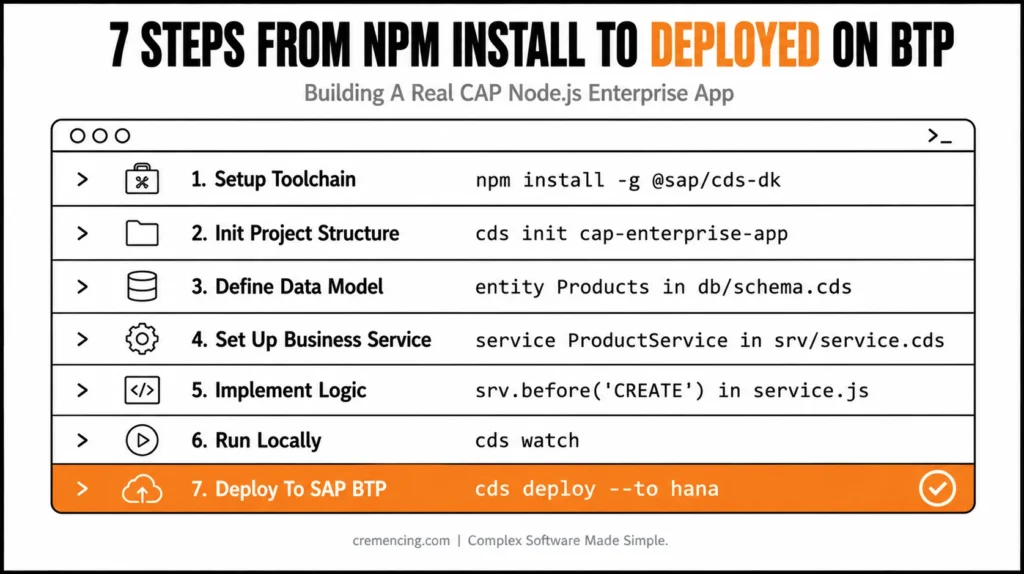
Step 2: Set up CAP Project Structure
- Develop a structured enterprise project:
- cds init cap-enterprise-app
- cd cap-enterprise-app
- npm install
Standard CAP architecture:
app/ → UI layer (optionally)
db/ → Data models (CDS)
srv/ → Business services
This separation is similar to enterprise application layering.
Step 3: Define Enterprise Data Model (CDS)
Inside db/schema.cds:
entity Products {
key ID : UUID;
name : String(100);
price : Decimal(10,2);
currency : String(5);
}
It is a real enterprise data structure, properly typed and scalable, and is modeled as a CDS.
Step 4: Step up Business Services
Inside srv/service.cds:
service ProductService
{
DB can be used as a projection of the entity Products.
Products;
}
This layer serves as a secure API that can be used by the enterprise.
Step 5: Implement Business Logic (Node.js)
Inside srv/service.js:
module.exports = (srv) => {
srv.before(‘CREATE’, ‘Products’, (req) => {
if (!req.data.currency) {
req.data.currency = ‘USD’;
}
});
srv.after(‘READ’, ‘Products’, (data) => {
data.forEach(p => p.price = Number(p.price));
});
};
It is where the real enterprise logic is implemented (validation, transformation, and governance).
Step 6: Run Application Locally
cds watch
This will allow live reload development, which means you can get faster iteration in enterprise development cycles.
Step 7: Deploy to SAP BTP
Deploy using Cloud Foundry:
cf login
cds deploy –to hana
This connects your CAP application to the runtime services of SAP BTP that are provided by SAP BTP Documentation. Clean Core S/4HANA extensibility isn’t a one-time checkbox; it’s a decision you’ll revisit constantly.
Business benefits & return on investment of CAP Node.js on SAP BTP
This is due to the fact that CAP is efficient and scalable and, as a result, popular in an enterprise environment.
Key Business Benefits
- Reduces product development time by up to 30 to 50%
- Substantially decreases the backend complexity
- Improves system maintainability
- Enables “out-of-the-box” SAP integration (S/4HANA, Fiori, APIs)
- Supports cloud-native scalability
Enterprise ROI Analysis
| Area | Impact |
| Development Speed | +40% faster delivery |
| Maintenance Effort | -35% reduction |
| Integration Complexity | -50% simplified |
| Deployment Efficiency | 100% Automated on SAP BTP. |
CAP directly helps to lower the engineering overhead and, consequently, shorten the time to market for enterprise applications.
Things to avoid and practices to avoid
These are some common errors that students make in CAP projects.
- Overengineering CDS models
- Business rules and data types in combination.
- Skipping over SAP security levels (roles & scopes)
- Poor service decomposition
- Hardcoding environment configurations
Enterprise CAP Development:
- Ensure that CDS models are domain-focused and minimal.
- Distinguish between the concerns handled by the various service handlers.
- Make use of environment-based configuration management.
- Follow service structuring that’s designed for microservices.
- Optimize for usage patterns on SAP HANA
What Most Tutorials Miss
Most of the CAP tutorials are related to CRUD applications. In enterprise environments, a lot more depth is required.
Standard tutorials have gaps in:
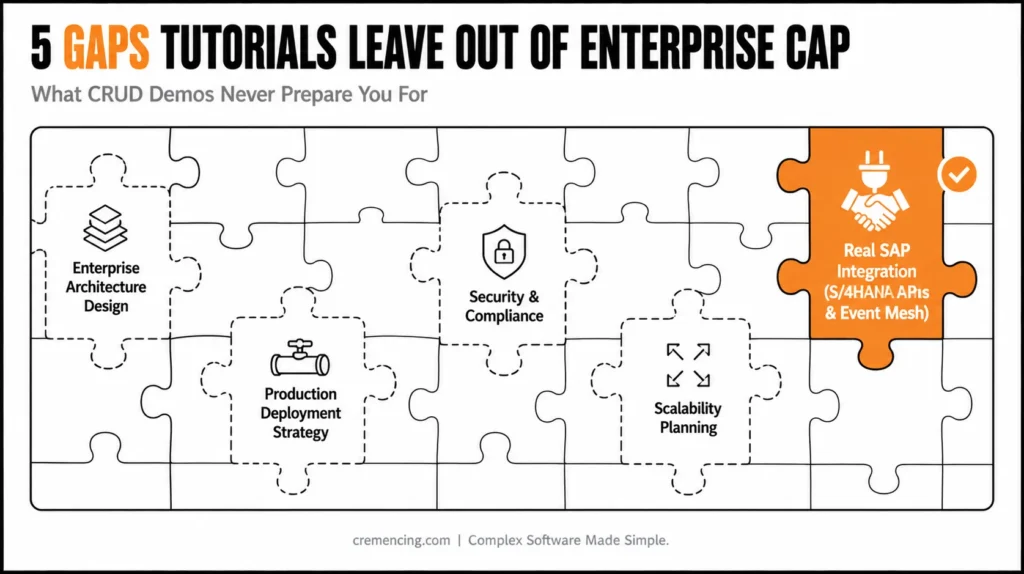
1. Enterprise Architecture Design
- Domain-driven design (DDD)
- Layered service architecture
- Event-driven patterns
2. Production Deployment Strategy
- Multi-environment CI/CD pipelines
- Blue-green deployment of SAP BTP
3. Security & Compliance
- Role-based access control (RBAC)
- Integrations with OAuth2 and JWT
- SAP authorization concepts
4. Scalability Planning
- Stateless service design
- SAP BTP horizontal scaling
5. Real SAP Integration
- SAP S/4HANA APIs can be used in two different ways:
- Event Mesh integration
- Business workflow orchestration
This is to differentiate between the tutorial level and the enterprise-class CAP architecture.
Conclusion
The in-app vs. side-by-side call isn’t a one-time checkbox; rather, it’s a decision you’ll make repeatedly, customization by customization, for as long as you’re on S/4HANA. In practice, default to in-app wherever a released extension point exists; however, reach for side-by-side only when the logic genuinely needs to outlive the core system’s release cycle. When you get this right, Clean Core stays a discipline you barely notice.
Get it wrong a few dozen times, and you’ve quietly rebuilt the same custom-code sprawl. Clean Core was meant to prevent this, which is exactly why managing custom code post-migration is the next thing worth getting right, not an afterthought.
But CAP is not only a development concept; it’s a standardized enterprise architecture model for SAP cloud applications. To take the next step, consider developing multi-layered CAP systems, domain modelling, integration with security, and deployment strategies with SAP BTP. Clean Core isn’t a one-time migration decision—it’s an ongoing discipline. Once you’ve drawn the line on what stays in-app vs side-by-side, the real work is managing custom code post-migration so it doesn’t quietly pile up again.
FAQs
1. What is Clean Core in SAP S/4HANA?
Clean Core is SAP’s principle of keeping the S/4HANA core system free of custom modifications, so upgrades don’t break custom code. In practice, it means routing every customization through either in-app extensibility (released extension points inside S/4HANA) or side-by-side extensibility (a separate app on SAP BTP), rather than modifying the core directly.
2. What counts as “in-app” extensibility under Clean Core S/4HANA extensibility rules?
In-app extensibility covers customizations built inside S/4HANA using SAP-released tools key-user extensibility (custom fields, custom logic via the Fiori “Custom Fields” app) or developer extensibility via ABAP RAP, as long as they only touch released APIs and extension points.
3. What is side-by-side extensibility, and when should I use it?
Side-by-side extensibility means building customisation entirely outside S/4HANA, typically on SAP BTP using CAP, Java, or low-code tools. It’s the right call when logic needs to survive independently of the core’s release cycle — for example, a pricing engine, a cross-system orchestration layer, or anything with its own SLA.
4. Does choosing side-by-side always mean using CAP?
No. CAP (the Cloud Application Programming Model) is SAP’s recommended framework for side-by-side extensibility, but it’s not mandatory teams can also build BTP extensions in plain Java or use low-code tools like SAP Build. CAP is favored because it standardizes data modeling and service exposure in a way that’s easier to govern at scale.
5. Can existing custom ABAP code stay in-app under Clean Core, or does it have to move?
It depends on what the code touches. If it only uses released APIs and extension points, it can generally stay in-app, often migrated to ABAP RAP. If it modifies core objects directly or relies on non-released (classic) enhancements, SAP’s guidance is to move it to a released alternative or re-platform it as a side-by-side extension.
6. What happens to non-released (classic) BAdIs and enhancements under Clean Core?
They’re technically still functional in most cases, but SAP doesn’t guarantee their stability across upgrades. Continuing to build on them accumulates exactly the technical debt Clean Core is meant to prevent; the safer path is migrating them to released extension points or side-by-side wherever possible.
7. How does Clean Core S/4HANA extensibility differ between public cloud and private cloud/on-premise?
S/4HANA Cloud Public Edition strictly enforces released extension points only; no classic enhancements are available. Private Cloud and On-Premise editions still technically allow classic ABAP customization, but SAP’s roadmap and support model increasingly push toward the same released-API-only approach, so treating Public Cloud rules as the target state avoids rework later.
8. What’s a released API or extension point, and how do I check if one exists?
A released API or extension point is one SAP has explicitly committed to keeping stable across upgrades. You can check availability through the SAP Business Accelerator Hub (formerly API Business Hub) or the Extensibility section of the SAP Help Portal for your specific S/4HANA edition.
9. How does the in-app vs. side-by-side decision affect S/4HANA upgrade cycles?
In-app extensions built on released extension points typically upgrade cleanly with the core, since SAP maintains backward compatibility for them. Side-by-side extensions are fully isolated, so they’re immune to core upgrade disruption entirely but they add their own maintenance and versioning burden as a separate system.
10. Is the in-app vs. side-by-side decision made once per project or per customization?
Per customization. It’s a recurring decision you’ll make every time a new extensibility need comes up, not a single architectural choice made at project kickoff which is why having a consistent decision framework (like the criteria table above) matters more than picking one approach as a blanket policy.





2 Responses