

Introduction
SAP system integration connects ERP, CRM, financial platforms, and external applications so they can exchange data and support connected business processes. Without reliable integration, however, small gaps between these systems can gradually lead to outdated data, slower workflows, and errors that eventually affect critical operations.
Initially, these issues may go unnoticed. However, once they begin affecting key processes, orders can be disrupted, reports can become inaccurate, and systems may stop working together effectively. As a result, problems that appear minor at first can eventually create significant operational challenges.
Everything works together: SAP system integration connects applications, data, and workflows so they can operate as one coSystem integration connects applications, data, and workflows so they can operate as one connected environment. This article explains how integration architecture works, why businesses depend on connected systems, and how to prevent integration problems from developing into serious system failures.
SAP Integration Architecture: Common Errors and Best Practices
What is SAP integration?
Integration refers to the broader practice of connecting applications, systems, data, and business processes, while the platform provides the tools and services needed to manage these connections.
Integration is needed to ensure that:
- Information flows automatically among systems.
- Processes stay aligned
- Say that integration can enable real-time or asynchronous data exchange depending on the selected architecture and integration pattern.
Essential elements of SAP integration:
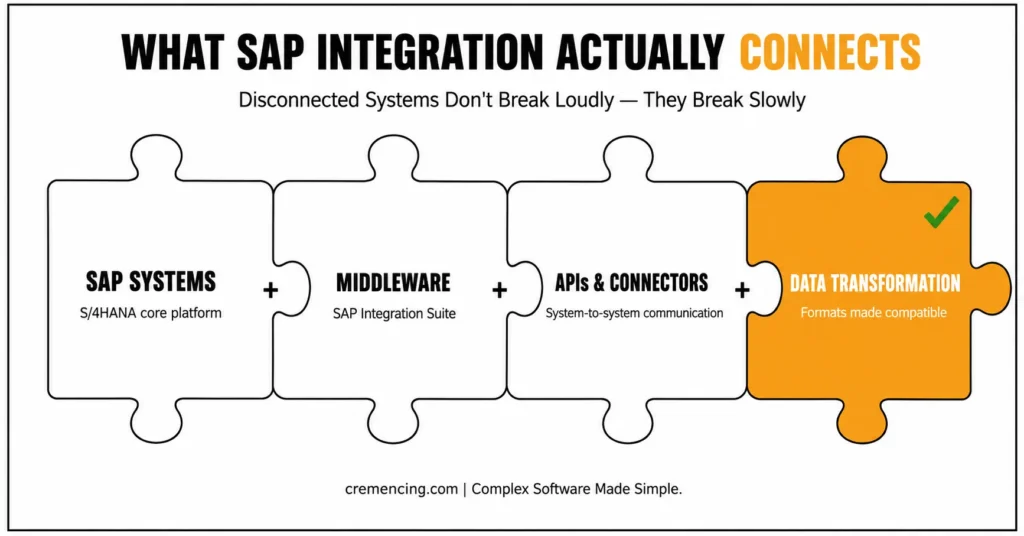
SAP Integration has several layers that collaborate:
- SAP Systems: Fundamental platforms such as SAP S/4HANA.
- Middleware: Applications such as SAP Integration Suite.
- APIs and Connectors: Facilitate inter-system communication.
- Data Transformation: Translates data into formats that can be used.
SAP’s integration platform brings together process integration, API management, event-driven architecture, B2B connectivity, and SAP-to-non-SAP application connectivity in one suite.
Why It Matters:
Systems are independent without integration. This leads to:
- Data duplication
- Manual processes
- Delayed decision-making
Integration will guarantee efficiency and accuracy throughout the business. Knowledge of the mechanism of integration assists in avoiding typical problems.
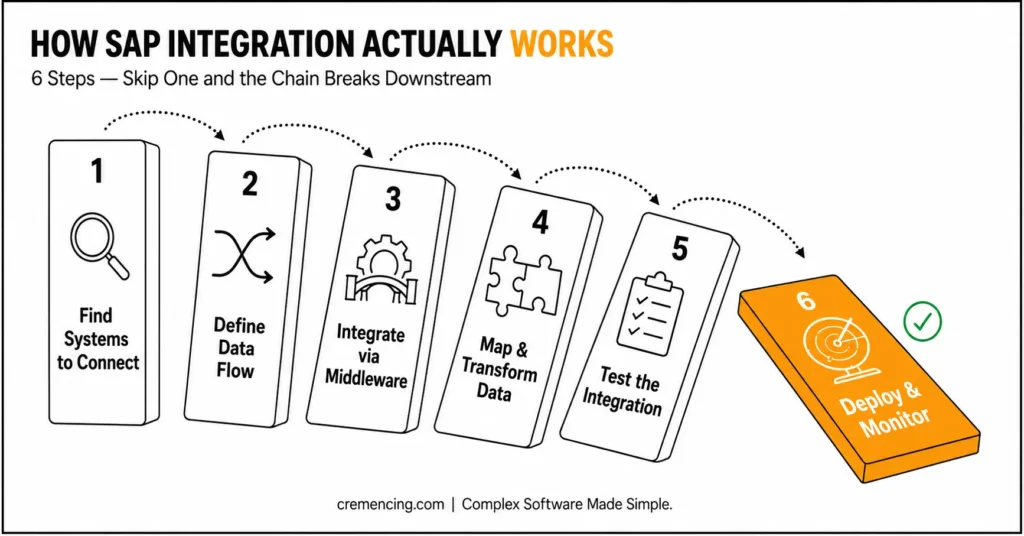
Step 1- Find Systems to Connect
The first one is determining what to integrate.
Examples include:
- CRM systems with SAP ERP.
- Finance systems, including reporting tools.
- External APIs to internal applications.
Avoid confusion by clear identification.
Step 2 – Specify Data Flow
Once systems are known, define the data movement.
- What information should be disseminated?
- Frequency of updates.
- What is the origin of this system?
This measure provides uniformity.
Step 3- Integrate with Middleware
Middleware is an interface between systems.
- SAP Integration Suite
- API management tools
It takes care of communication and simplifies things.
Step 4- Map and Transform Data
Various systems have different formats.
- Convert data structures
- Map fields correctly
- Ensure compatibility
Mistakes are caused by poor mapping.
Step 5 – Test integration
Before deployment:
- Validate data accuracy
- Check system responses
- Simulate real scenarios
Testing helps to avoid failures in the future.
Step 6 – Deploy and Monitor
After deployment:
- Monitor system performance
- Track errors
- Optimize continuously
A majority of the problems occur post-deployment.
ROI and benefits of SAP Integration
Companies using SAP integration can significantly improve their business processes when it is implemented effectively.
Improved Efficiency:
Manual work is minimized as processes are automated. Minutes are used to complete tasks that took hours.
Better Data Accuracy:
Real-time synchronization minimizes errors and maintains the similarity of data in systems.
Faster Decision-Making:
Business decisions are made faster and better as access to accurate data is available.
Cost Reduction:
Automation saves on operational expenses and lowers human error.
Scalability:
Growth can be accommodated through integrated systems.
ROI Snapshot
| Area | Impact |
| Process Speed | Faster processing through automation and reduced manual intervention. |
| Error Reduction | Considerable reduction in labor mistakes. |
| Cost Savings | Lower operational expenses |
| Productivity | Higher team efficiency |
Typical errors and best practices
SAP system integration is manageable for many businesses, but preventable errors can still lead to unnecessary complexity and failures. Cloud Integration vs. SAP Integration Suite provides more context.
Common Mistakes:
- Lack of a strategy of integrating systems is one of the greatest mistakes. This creates a problem of inconsistent flow of data and confusion.
- The other problem is inadequate data mapping. In cases of improper alignment of fields, cross-system errors arise.
- Testing is also disregarded by some businesses because they think that everything will be okay once it is deployed. This usually causes system failures.
Best Practices:
- Begin with a well-defined integration strategy. Specify systems, data flow, and desired results.
- Reliable middleware should be used to ease connections.
- Test comprehensively before deployment. This minimizes risks and provides stability.
- Monitor continuously. Integration cannot be a single task – it is a process that should be optimized continuously.
SAP Data Integration: Where Businesses Usually Struggle
The majority of materials explain the concept, but they do not address what happens when something goes wrong.
Hidden System Failures:
The problems of integration tend to be obscured until they impact vital processes. Minor delays may cause a significant breakdown of operations.
Complexity Enhances With Time:
Integration increases with the increase in business. Layers of difficulty are added with new systems, APIs, and workflows.
Dependency Risks:
In the event of interdependence among systems, a breakdown of one system may affect the whole process.
Real-World Challenges:
- Processing of big data.
- Managing multiple integrations
- Sustained performance when loaded.
Being aware of these challenges enables businesses to be better prepared.
When your systems are becoming slow, or the data is not matching, then it is not necessarily a tool problem; it is probably an integration problem. Begin examining your integration plan before minor concerns can get out of control and become significant failures.
Conclusion:
Any business with multiple systems needs to know what is referred to as “SAP integration.” Unless integrated properly, minor problems become significant failures, which impact operations and decision-making.
It links systems and enhances efficiency and the flow of data throughout the organization. With proper planning, eliminating typical pitfalls, and putting real-world problems into consideration, businesses can construct solid and extensible systems.
It becomes difficult when organizations treat every interface as an isolated connection instead of designing the landscape as a system of dependencies. A reliable approach starts with the business interaction: determine which systems need to communicate, whether the process requires synchronous or asynchronous behaviour, what data transformation is required, and what should happen when a dependent system fails.
Since Yoast is specifically flagging density, don’t simply replace every occurrence with another exact-match variation that contains the keyphrase. The goal is to make the article read naturally while keeping the focus keyphrase in the most strategically important positions.
FAQ Section
- What does “SAP integration” mean?
SAP connects systems and applications to ensure the effective flow of data and alignment of business processes. - What is the purpose of SAP integration for businesses?
It enhances performance, minimizes mistakes, and makes systems collaborate with each other. - What would occur in the absence of SAP integration?
The systems work independently and cause a lack of consistency in data and operational problems. - What are the tools of SAP integration?
Most teams rely on a dedicated integration platform alongside API management tools. - Does SAP System integration prove to be challenging?
It may be complicated, yet with the right planning and equipment, it will be easy to handle. - What is SAP Integration Suite?
SAP Integration Suite is SAP’s enterprise integration platform as a service for connecting applications, data, APIs, processes, and events across SAP, non-SAP, cloud, on-premises, and hybrid environments.





One Response