
Introduction:
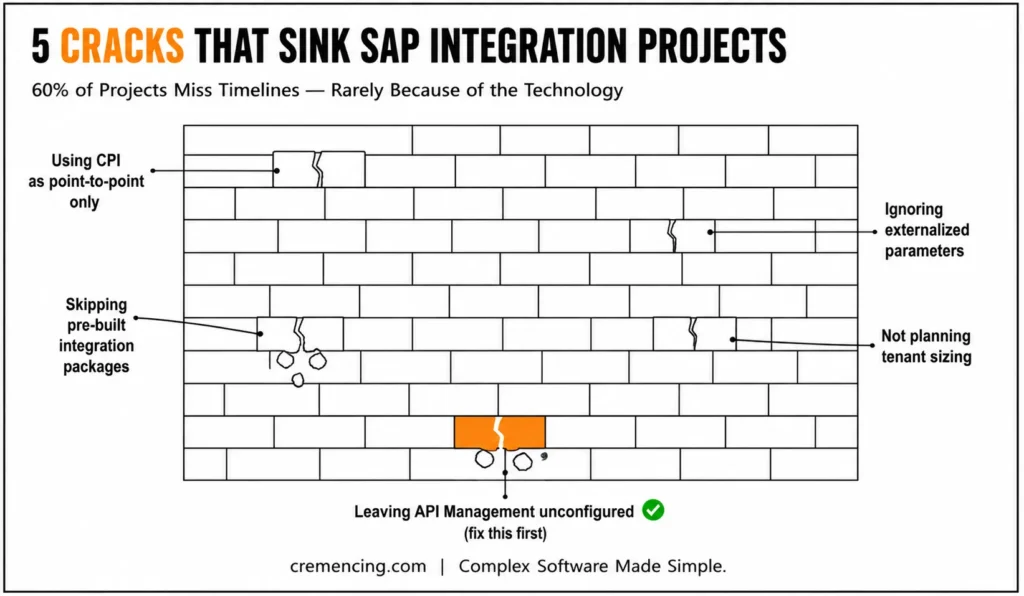
In fact, more than 60 percent of SAP integration suite projects exceed their timelines or do not deliver the expected outcomes. The technology is rarely the reason. It is how teams use it.
Skip the governance layer on an SAP Integration Suite rollout, and the cost doesn’t show up on day one — it shows up twelve months later, when nobody can explain what half the iFlows in production actually do, two teams have quietly built the same mapping logic twice, and every environment move means manually re-entering credentials because nothing was externalized.
None of that is a platform limitation. SAP Integration Suite is built to handle far more than point-to-point connections — API management, B2B mapping automation, event-driven architecture — but most teams only ever touch the CPI layer and treat the rest as optional. This guide breaks down exactly where that gap costs teams the most, and the specific habits that separate integration programs that stay maintainable from ones that quietly become unmanageable.
SAP Integration Suite Governance
According to SAP documentation, treating SAP Integration Suite as a full enterprise platform rather than a basic point-to-point tool requires an established Integration Center of Excellence (iCoE). Without central governance, projects suffer from redundant mapping logic, unexternalized environment parameters, and fragmented deployment practices. Deploying native capabilities like API Management, Integration Advisor, and specialized adapters alongside Cloud Integration ensures structured lifecycle management and automated B2B mapping. Enforcing early exception subprocesses and monitoring message throughput via operational dashboards prevents downstream production errors. Implementing standardized naming conventions, environment externalization, and reusable design patterns maintains platform scalability while mitigating long-term operational complexity across hybrid SAP enterprise architectures.
What Is SAP Integration Suite
SAP Integration Suite is a cloud integration platform that connects applications, data, and processes across hybrid and cloud environments in the SAP Business Technology Platform. Most developers know it because of its best-known functionality: SAP Cloud Platform Integration (CPI). However, CPI is only a piece of the much more ambitious suite.
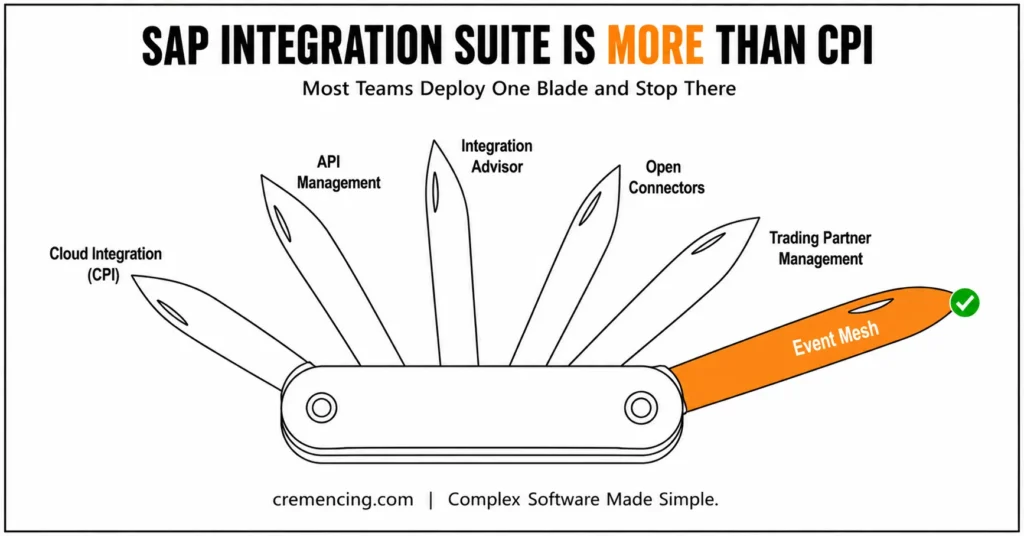
The full platform includes:
| Capability | What It Does |
| Cloud Integration (CPI) | For cloud and on-premise systems to connect via iFlows |
| API Management | Enterprise-grade API publishing, governance, and protection |
| Integration Advisor | B2B Messaging Template Development with ML Recommendations |
| Open Connectors | 170+ pre-built connectors to other third-party apps |
| Trading Partner Management | Leads B2B Partnership Management and Agreements |
| Event Mesh | Allows Event-driven architecture across SAP systems |
The majority of teams will deploy CPI, and that’s it. The teams that gain actual value leverage the complete stack according to what their architecture really requires.
Inside View into SAP Integration in Practice
Step 1: Map Your Integration Architecture First
High-performing teams are gonna draw out all the systems that need to connect, what data format is in there, and what triggers it before they touch the platform. Teams that skip this step end up building iFlows that run fine in test and fail in production.
Step 2: Select the Right Adapter Per Connection
The SAP Integration Suite has more than 50 adapters. Finding ways to create a SOAP-based service using REST Adapter, when it is meant for tasks, Java file,/Predefined adapters, and HTML. You see a purpose-built adapter yet defaulting to HTTP, SOAP, or such services. Correct use of the SFTP adapter takes care of retry logic and file sequencing for you almost seamlessly. That takes days to debug if you’re building that manually in a generic HTTP flow.
Step 3: Build iFlows with Error Handling from Day One
Most teams add error handling only when something breaks. Top teams build exception subprocesses, dead letter queues, and alert configurations within the iFlow before you write any mapping. This single habit kills 70 percent of production incidents.
Step 4: Integration Advisor For B2B Scenarios
Integration Advisor uses machine learning to propose mappings based on your message structures for EDI or B2B message formats. Teams that create these mappings from scratch have reported spending 3X as long on B2B projects as teams using this native capability.
Step 5: Monitor With Operations Cockpit And Not Only Logs
This allows us to display real-time operations information such as processing, fail rates, and message throughput. The cockpit surfaces patterns that teams that only monitor at the log level would miss instantly. We have the ability to create dashboards for each integration scenario from day one.
For more insights, read our blog on SAP Integration Governance
SAP Integration Suite Ownership
SAP Integration Suite goes far beyond system connectivity when implemented correctly.
| Outcome | What Teams Actually See |
| Faster integration delivery | 40% to well, up to 60%-Emptying time because of pre-building adapters. |
| Lower maintenance cost | Incident response time is reduced with centralized monitoring |
| Better compliance | Audit risk is reduced by built-in security policies and API governance |
| Scalability without rework | Cloud-native architecture scales without the need to redesign flows |
| Faster B2B onboarding | Partner onboarding time with the Integration Advisor cuts from weeks to days |
Not the teams with that top dollar are the most effective, but those who see the strongest ROI. They treat SAP Integration Suite as a platform to architect, not as a tool to configure.
Common Mistakes Teams Make with SAP Cloud Platform Integration
Mistakes that routinely show up in struggling projects:
- Mistake 1 — Using CPI as a Point-to-Point Tool
CPI is designed for more sophisticated orchestration. By only using it for direct A to B connections, teams lose out on the routing/mapping/transformation capabilities that make the platform cost worth paying. - Mistake 2 — If you ignore externalized parameters
Hardcoding everything inside iFlows with URLs, credentials, and system values makes it a manual editing task for every environment move. Externalized parameters support one-click environment switching. - Error three — neglecting integration packages
SAP and its companions post many pre-packaged (additionally known as packaged capability) integrations inside the SAP Business Accelerator Hub. Many teams build the functionality from first principles, without confirming if there is an existing package that solves their use case. - Mistake 4 — Not Talking Tenant Sizes
Many teams deploy without speaking to their SAP account team about message volume, peak loads, and tenant sizing. At go-live, this results in throttling and performance issues. - Mistake 5 — Not configuring API Management
Teams expose APIs via API Management but do not configure rate limiting, authentication policies, and analytics. This leaves security holes and no visibility into who is consuming their services.
- Point-to-point only → add routing/mapping/transformation logic
- Hardcoded credentials/URLs → externalize as parameters
- Building from scratch → check SAP Business Accelerator Hub for existing packages first
- No tenant sizing conversation → confirm message volume/peak load with SAP account team before go-live
- API exposed with no policy → configure rate limiting, auth, and analytics before go-live
The Integration Strategy Layer Most Teams Skip Entirely
That is the gap that most of the SAP integration content never addresses.
Most of the documentation is for how to build flows. Almost nothing tells us how to rule over them. High-performing teams undergo the formation of an Integration Center of Excellence (iCoE), making sure to define:
- Naming conventions for every iFlow, package, and artifact
- Policies against reusing the same logic twice
- Prohibition of unreviewed changes from reaching production using change management processes
- The performance benchmarks that every new iFlow should meet before deployment
- Documentation standards that allow the team members to read through any flow
Even technically perfect flows that you can run through tools become a maintenance nightmare within 12 months without this layer. The teams that manage to scale SAP Integration Suite in order without mayhem are those who treat governance as a built-in feature, not an afterthought.
Conclusion
SAP Integration Suite is not a plug-and-play tool. It is an enterprise integration platform that incentivizes teams to discover its full rainbow of capabilities, design wisely with governance in mind, and plug-in nacelles instead of building from scratch.
The pattern across every mistake in this guide is the same: SAP Integration Suite gets treated as a tool to configure once and move on from, not a platform to architect deliberately. Point-to-point flows, hardcoded parameters, unreviewed iFlows reaching production, tenant sizing left out of the conversation — none of these are technology failures. They’re the predictable cost of skipping the architecture and governance work up front. The fix isn’t a bigger team or a longer timeline; it’s building the habits in this guide — mapping architecture first, choosing adapters deliberately, handling errors from day one, and standing up an iCoE — before the integration layer grows past the point where anyone can safely change it.
FAQ
Q1: What is the difference between SAP Integration Suite and SAP Cloud Platform Integration?
SAP Cloud Platform Integration is one of the capabilities in SAP Integration Suite. One of them is API Management, Integration Advisor, Open Connectors, and others in this bundle! CPI is message-based integration and the full suite covers the entire integration lifecycle.
Q2: Where can we find official SAP Integration Suite documentation?
SAP Integration Suite – sap.com. It contains end-to-end configuration instructions of all the capabilities i.e., CPI, API management, and Integration Advisor.
Q3: Did SAP Integration Suite target small and mid-size companies?
Yes. The licensing model at SAP is also tiered, which means that the platform is also available to smaller businesses. Ready-to-use packages and low-code iFlow builder reduce the technical barrier to entry to much smaller teams.
Q4: What is the fastest time we can complete a typical SAP Integration Suite project?
Simple integrations based on out-of-the-box packages can be live in a couple of days, depending on what you want to integrate with. A complex integration program that includes enterprise-wide strategies will take between 3 months and 9 months, depending on the volumes of data, the number of systems involved, and governance requirements.
Q5: Can the non-SAP systems be connected with SAP Integration Suite?
Yes. Open Connectors can speed up the process by providing pre-connectedness to over 170 other non-SAP applications, such as Salesforce, ServiceNow, Workday, and Microsoft systems. In that way, it will make a handy central integration platform even in a heterogeneous technology environment.
Q6: How does SAP Integration Suite handle security for sensitive data?
SAP Integration Suite uses encryption, secure authentication protocols, and role-based access controls to protect data both in transit and at rest. Additionally, it complies with industry security standards, ensuring sensitive business data remains protected throughout the integration process.
Q7: What skills does a team need to work effectively with SAP Integration Suite?
Teams typically need a strong understanding of iFlow design, adapter configuration, and basic integration architecture principles. Moreover, familiarity with API management and error-handling best practices significantly improves project outcomes, especially for complex, enterprise-scale integrations.
Q8: Can SAP Integration Suite be used for real-time data synchronization?
Yes, SAP Integration Suite supports real-time integration through event-driven architecture and API-based communication. As a result, businesses can achieve near-instant data synchronization across connected systems, rather than relying solely on batch processing.
Q9: What is the role of an Integration Center of Excellence (iCoE) in SAP Integration Suite projects?
An iCoE establishes governance standards, naming conventions, and reusable design patterns for integration projects. Consequently, it prevents integration sprawl and ensures that flows remain maintainable and scalable as the organization grows.
Q10: How does SAP Integration Suite compare to building custom point-to-point integrations?
Unlike custom point-to-point integrations, SAP Integration Suite offers pre-built adapters, reusable templates, and centralized monitoring. Therefore, it significantly reduces development time and long-term maintenance effort compared to building and maintaining custom connections individually.
Reference
SAP Integration Suite — Official Documentation




