

Introduction
A team lead waits for approval while three colleagues track the same project in separate spreadsheets. Meanwhile, the data they need already sits in SAP, but nobody has configured it for teamwork. Teams on SAP S/4HANA or SAP ECC often use their SAP apps in the default setup, so approvals, tasks, and project views stay scattered.
Most guides list SAP apps for teams without explaining the configuration that makes them useful. SAP also offers collaboration features, such as sharing live app data in Microsoft Teams, that many teams overlook. This article therefore presents six SAP apps for teams and shows project managers, consultants, and IT leaders how to configure them.
Why Teams Struggle Without Configured SAP Apps
Team work crosses roles, because one deliverable depends on approvers, project managers, HR, and the people who do the work. Without configured SAP apps, teams fill the gaps with spreadsheets, email threads, and status meetings, and each manual step adds delay and risk. As a result, nobody sees the same status, and decisions wait for the next meeting.
The available tools depend on the SAP release. For instance, SAP S/4HANA offers SAP Fiori apps for tasks, projects, HR self-service, and analytics, and most scenarios start from the SAP Fiori launchpad. SAP ECC systems can run selected apps through a front-end server, but several newer apps and in-app workflow features require SAP S/4HANA, so teams should check app availability before they plan changes.
Operations teams face a similar pattern, and our guide covers the production, maintenance, and quality side. This article instead concentrates on shared teamwork, namely approvals, tasks, projects, and collaboration.
6 SAP Apps for Teams and What They Do
The six areas below cover the main parts of shared teamwork, from approvals to reporting. The table summarizes the SAP component, example apps, and team benefit of each area.
| Area | SAP Component | Example Apps or Tools | Team Benefit |
|---|---|---|---|
| Workflow and approvals | SAP Flexible Workflow, SAP Business Workflow | Manage Workflows, My Inbox | Fewer approval delays |
| Task apps | SAP Fiori My Inbox, SAP Task Center | My Inbox, SAP Task Center | One list for pending work |
| Project tracking | SAP Project System | Project overview apps, Project Cost Overview | Clear deadlines and costs |
| Process automation | SAP Build Process Automation | Workflow, business rules, RPA, process visibility | Less manual rework |
| Self-service | SAP Fiori HR apps or SAP SuccessFactors | My Leave Requests, My Timesheet, Approve Leave Requests | Fewer routine HR requests |
| Reporting and analytics | Embedded analytics, SAP Analytics Cloud | KPI tiles, analytical apps | Faster, evidence-based decisions |
Here’s How Teams Are More Productive With These SAP Apps
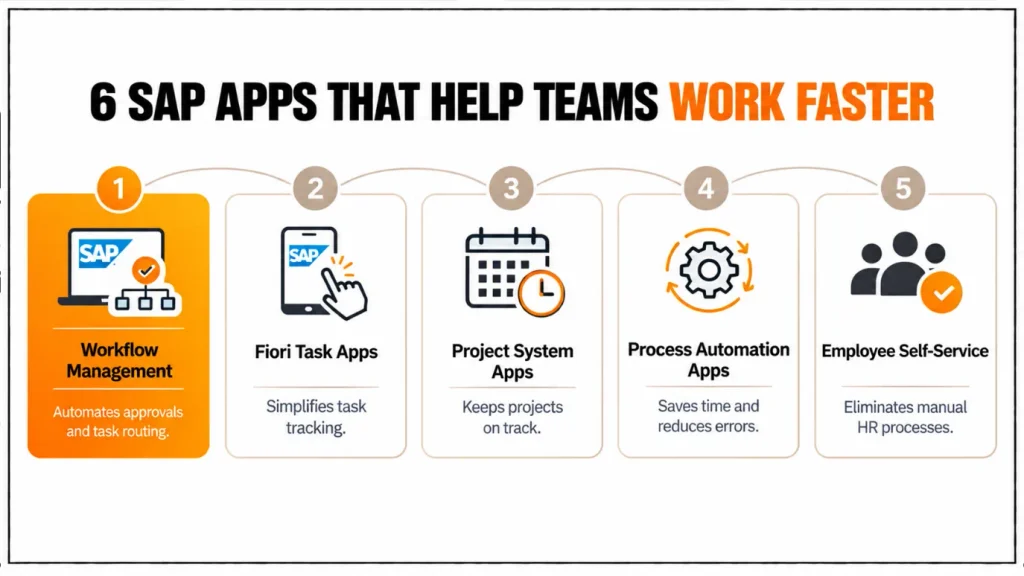
1. Workflow and Approvals
Workflow apps route approvals and tasks through the right people in the right order, so teams stop chasing decisions by email. In SAP S/4HANA, SAP flexible workflow lets teams configure approval rules in SAP Fiori apps without ABAP development, and SAP Business Workflow remains available for custom processes in SAP ECC and SAP S/4HANA.
However, faster approvals depend on design. For example, value thresholds can route low-value requests to one approver, escalation rules can alert a manager when a request waits too long, and substitutes cover absent approvers. As a result, approvers see only the decisions that need them, and requesters see the status of every request without asking.
2. SAP Fiori Task Apps
SAP Fiori task apps give each team member one place to see pending work. For example, managers approve leave requests from the My Inbox app without leaving it. Moreover, SAP Task Center extends this idea across systems and offers intelligent recommendations for task decisions in SAP Build Process Automation.
Task apps also support notifications and mobile access, so remote team members act on pending items outside the office. However, notification volume needs control, because teams that receive every event soon ignore all of them. Therefore, administrators should keep only notifications that need a decision or signal a deadline.
3. SAP Project System (PS) Apps
SAP Project System structures projects with work breakdown structure (WBS) elements, networks, activities, and milestones, and SAP Fiori overview apps show each element in one list. In SAP S/4HANA, apps for project definitions, WBS elements, networks, activities, milestones, and material components offer the functions of the classic overview transactions CN42, CN43, CN46, CN47, CN53, and CN52. As a result, project managers filter by status or date and open the related element directly.
Cost control completes the picture. The Project Cost Overview and Project Cost Line Items apps, introduced with SAP S/4HANA 2022 FPS1 for private cloud and on-premise systems, show actual and planned costs along the project hierarchy, with planned values from table ACDOCP and actual values from the universal journal (ACDOCA). Therefore, financial controllers and project managers work from the same numbers, and cost overruns appear earlier.
Access depends on roles. It lists the business role for each app under implementation information, so administrators can assign the right role instead of guessing.
4. SAP Build Process Automation
SAP Build Process Automation on SAP BTP combines workflow, business rules, process visibility, and robotic process automation (RPA) in one service. It replaces SAP Workflow Management and SAP Intelligent RPA, which SAP retired, so new automation projects should start there. Consequently, teams automate repetitive tasks such as data entry and report downloads, and they keep decision logic in business rules instead of code.
Existing workflows built in SAP Business Application Studio can move to the new service, whereas business rules and process visibility scenarios need import and redeployment. Therefore, teams that still use SAP Workflow Management should plan the transition as a small project with testing and not as a simple switch. Process visibility then adds a team-level benefit, because it gives real-time insight into process status and performance.
5. Employee and Manager Self-Service
Self-service apps let employees handle HR tasks themselves and let managers decide in one place. In SAP S/4HANA, the SAP Fiori apps My Leave Requests, My Timesheet, and My Overtime Requests let employees submit requests on desktop or mobile, and managers approve them from My Inbox. As a result, HR specialists spend less time on routine entries, and employees see the status of their requests.
Release choices also affect this area. When teams convert from SAP ECC to SAP S/4HANA, HCM apps move to SAP SuccessFactors or to SAP HCM for SAP S/4HANA, and some customers keep the compatibility pack for HCM as an interim step while they plan the move to SAP SuccessFactors. Therefore, teams should decide on the HR target model before they rebuild self-service apps.
6. Reporting and Analytics Apps
Reporting apps give teams the same current view of work. Embedded analytics in SAP S/4HANA reads transactional data directly, so KPI tiles, analytical apps, and overview pages show the current status of tasks, orders, projects, and costs instead of last night’s extract. SAP Analytics Cloud adds cross-system dashboards when a team needs data from several sources.
Dashboards help only when they show decisions. For example, a project team can track overdue tasks, milestone slippage, and cost against plan, and each tile should open the app where the user can act. Moreover, metric definitions need agreement before the build, because teams that calculate “overdue” differently debate numbers instead of work.
How SAP Apps Support Team Collaboration in Microsoft Teams
Teams often leave SAP to discuss a record, and this context switch slows decisions. SAP S/4HANA integrates with Microsoft Teams through the Share function, which offers three options, namely Share as Chat, Share as Tab, and Share as Card. Moreover, apps built with SAP Fiori elements, such as list report, object page, and overview page apps, inherit the Share menu.
Share as Chat posts a direct link to the app in a Teams conversation, Share as Tab displays the app in a Teams tab, and Share as Card opens the collaborative stage view so colleagues interact with the data while they chat. For example, one colleague can ask another to remove a delivery block on an order, and both work on the same record.
Release and setup details matter. SAP S/4HANA Cloud Public Edition introduced Share as Chat in release 2302, Share as Tab in 2308, and Share as Card in 2402. On-premise and private cloud systems, in contrast, enable the integration through the launchpad plug-in COLLABORATION_MSTEAMS and a configuration property. However, SAP documented restrictions for the 2023 release, namely no support on mobile devices and tablets and no support for apps that use SAP GUI for HTML.
For more insights, read our blog: 5 SAP Apps for Operation.
How to Get the Most Out of SAP Apps for Teams
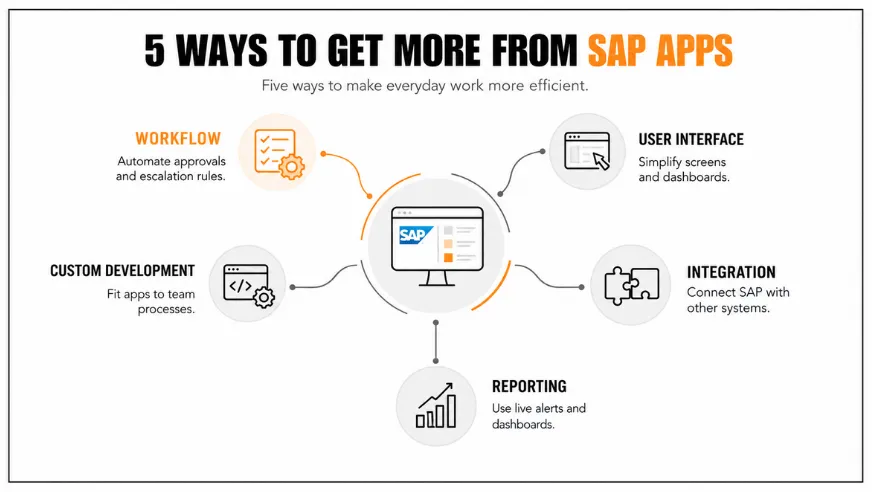
Teams should configure the apps around the team and not around the module. Role-based spaces and pages let administrators build one start page per team, with the inbox, project overview apps, leave approvals, and a few KPI tiles, so members find everything in one place. Mobile access then helps remote members act on pending items without a laptop.
Workflow rules deserve a workshop with the team that uses them. Approval thresholds, escalation timers, and substitutes should reflect how work really flows, and a short review with team leads usually removes steps that nobody remembers adding. Moreover, notification settings need the same review, because teams ignore alerts that do not require action.
Finally, teams should connect the apps to the tools they already use. and released APIs exchange data with email, CRM, and other systems of record, so team members avoid double entry. Custom development fits where standard apps stop, and side-by-side extensions on SAP BTP keep the SAP core clean while they add team-specific screens or rules. nies to make SAP apps work for their workforce, getting work done quickly without additional intervention. Let us enable your teams to achieve more with SAP Apps for Teams.
Validation and Best Practices
Each app needs a baseline and a target. For example, teams can measure approval cycle time, the number of overdue tasks, project milestone slippage, HR requests per employee, and the time to produce a weekly status report. Moreover, workflow logs, project reports, and launchpad usage data already contain most of these figures.
Rollout needs testing with real team profiles. A quality system with the final roles shows missing authorizations and missing tiles before go-live, and a pilot team gives feedback that the project can address before the wider rollout. In addition, a named owner for each app keeps the configuration current after the first release.
Security and governance deserve attention as well. Workflow agents, automation bots, and integration users need minimum authorizations, and a role concept that keeps creation and approval apart supports Therefore, security checks belong in every pilot and every release test.
Common Mistakes
The most frequent mistake is to deploy all six apps at once, because teams then face many new screens and give up on the ones that need effort. Another is to automate a broken process, so the workflow repeats the same delay faster. Teams also assume that SAP Workflow Management still exists, although SAP retired it and replaced it with SAP Build Process Automation.
Finally, many projects measure activity and not outcome, for example, the number of apps released instead of faster approvals. In addition, they skip training for managers, who then keep approving by email. Short role-based sessions and one measurable target per team prevent both problems.
Conclusion
SAP apps for teams reduce delay when approvals, tasks, projects, automation, self-service, and reporting work together and match how the team actually works. The six apps in this article remove manual follow-ups, give
Looking ahead, SAP is consolidating workflow, rules, RPA, and AI in SAP Build Process Automation and extending collaboration between SAP S/4HANA and Microsoft Teams, so teams with clean roles and clear process ownership adopt these capabilities faster. Cremencing.com helps teams configure these apps and build for the gaps that standard apps leave.
FAQs
How to Get the Most Out of SAP Apps for Teams
Teams should configure the apps around the team and not around the module. Role-based spaces and pages let administrators build one start page per team, with the inbox, project overview apps, leave approvals, and a few KPI tiles, so members find everything in one place. Mobile access then helps remote members act on pending items without a laptop.
2. Which SAP apps help teams complete tasks faster?
Workflow and approval apps, My Inbox, SAP Project System apps, SAP Build Process Automation, self-service apps, and analytics apps help most. Start with the app that addresses the longest measured delay, such as slow approvals or scattered project status, and add the others in phases as the team adopts them.
3. What replaced SAP Workflow Management?
SAP Build Process Automation replaced SAP Workflow Management, which SAP retired together with SAP Intelligent RPA. It combines workflow, business rules, process visibility, and RPA on SAP BTP. Existing workflows can move to it, but business rules and process visibility scenarios need import and redeployment.
4. Can SAP S/4HANA share data with Microsoft Teams?
Yes. The Share function in apps built with SAP Fiori elements offers Share as Chat, Share as Tab, and Share as Card for Microsoft Teams. Administrators enable it through the communications arrangement in SAP S/4HANA Cloud or the launchpad plug-in in on-premise systems, and SAP lists restrictions for mobile devices and SAP GUI for HTML apps.
5. Which SAP apps support project tracking
SAP Project System apps support project tracking in SAP S/4HANA. Overview apps list project definitions, WBS elements, networks, activities, milestones, and components, and the Project Cost Overview app shows actual and planned costs along the project hierarchy. Access depends on business roles listed in the SAP Fiori apps reference library.
6. Does SAP offer employee self-service apps?
Yes. In SAP S/4HANA, SAP Fiori apps such as My Leave Requests, My Timesheet, and Approve Leave Requests cover employee and manager self-service. During a conversion from SAP ECC, HCM apps move to SAP SuccessFactors or SAP HCM for SAP S/4HANA, so teams should decide the HR target model early.
7. How can teams measure the impact of SAP apps?
Measure a baseline before each change and compare it afterward, using approval cycle time, overdue tasks, milestone slippage, HR requests per employee, and time spent on status reports. Workflow logs, project reports, and launchpad usage data supply most of the numbers, and a four- to six-week comparison usually shows a trend.
8. When do SAP apps for teams need custom development?
Teams need custom development when standard apps cannot express a team-specific rule, screen, or integration, for example, a multi-criteria approval path or a combined team dashboard. They should use configuration first, then build side-by-side extensions on SAP BTP through released interfaces, so the SAP core stays clean and upgrade-safe.




