
Manual document processing continues to create bottlenecks across finance, procurement, and shared service operations. Teams still spend time reviewing invoices, entering supplier information, validating document fields, and correcting errors before transactions can move forward. As document volumes increase, these manual steps can slow SAP business processes and increase the risk of inconsistent data.
SAP AI Document Information Extraction addresses this challenge by using AI to identify and extract structured information from business documents. The extracted data can then support downstream SAP processes, reducing repetitive data entry while giving teams more time to focus on validation, exceptions, and higher-value work.
This article explores 7 ways SAP AI Document Information Extraction can automate manual business processes, including invoice processing, data capture, document validation, and workflow automation. It also explains where these capabilities fit within SAP environments and how organizations can use them to build more efficient document-driven processes.
Why Manual Document Processing Still Creates SAP Business Delays
Enterprise processes generate thousands of documents every day.
Examples include:
- Supplier invoices
- Purchase orders
- Delivery documents
- Contracts
- Business forms
- Financial statements
Traditionally, employees review these documents manually and enter important information into SAP systems.
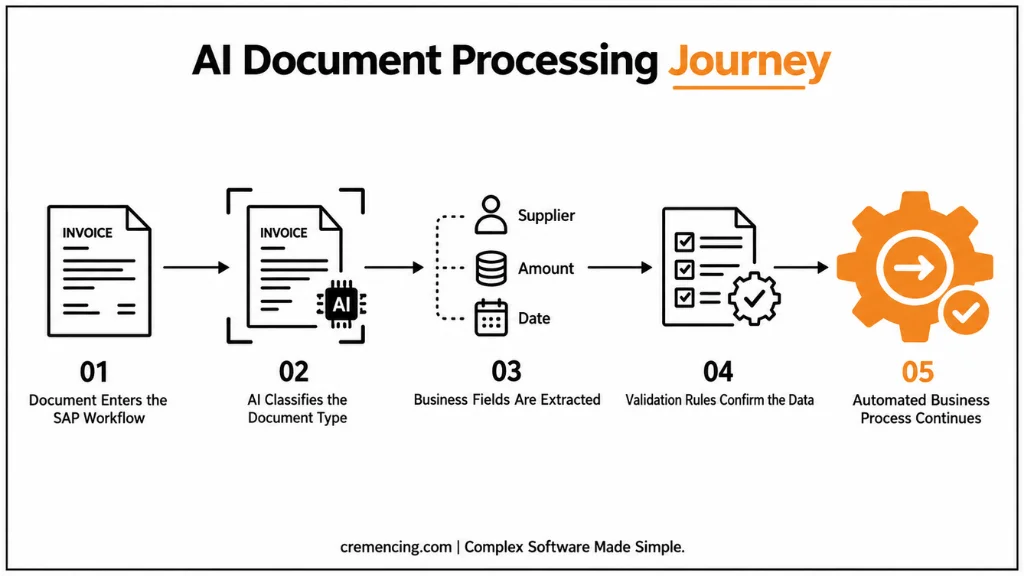
A typical process looks like:
Document received → Employee reviews content → Data entered into SAP → Validation performed → Process continues
This approach works for smaller volumes.
However, enterprise organizations often process thousands or millions of documents.
Manual processing creates several challenges:
- Longer processing times
- Data entry mistakes
- Higher operational effort
- Delayed approvals
- Limited process visibility
The problem is not the availability of business data.
The problem is extracting useful information from unstructured documents.
A PDF invoice may contain:
- Supplier information
- Invoice number
- Payment terms
- Tax details
- Line items
Humans can understand this information quickly.Traditional systems often require predefined fields and manual mapping. This is where artificial intelligence changes the approach.
What Is SAP AI Business Services Document Processing and Why It Matters?
SAP AI Business Services Document capabilities are designed to help organizations automatically process business documents using artificial intelligence.
Instead of relying only on manual extraction, AI models analyze documents and identify important information.
For example:
A supplier invoice arrives as a PDF.
SAP AI Document Information Extraction can identify:
- Supplier name
- Invoice date
- Invoice amount
- Purchase order references
- Line item information
The extracted information can then support downstream business processes. The goal is not simply reading documents. The goal is connecting document intelligence with enterprise workflows.
Understanding SAP AI Document Information Extraction
SAP AI Document Information Extraction is one of the key capabilities within SAP’s AI Business Services ecosystem.
It helps organizations process documents by combining:
- Optical character recognition (OCR)
- Machine learning models
- Document classification
- Data extraction capabilities
- Business process integration
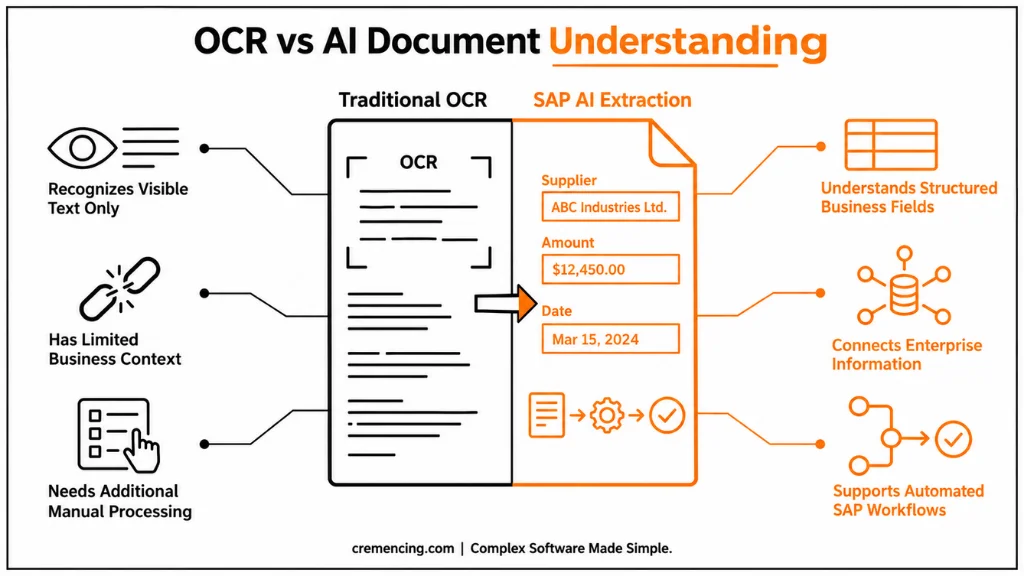
Traditional OCR systems mainly convert images into text. AI-based extraction goes further. It understands document structure and identifies business-relevant information.
For example:
A traditional OCR solution may extract:
“Invoice Number: 45892”
An AI document service understands:
Invoice Number = 45892
and connects that information to the correct business process.
Why SAP AI Business Services Are Different From Traditional Document Automation
Many document automation solutions focus only on extracting text. However, SAP AI Business Services focus on business scenarios. Enterprise documents are connected with processes.
An invoice is not just a document.
It is connected with:
- Purchase orders
- Goods receipts
- Vendor payments
- Financial accounting
A delivery document affects:
- Logistics processes
- Inventory management
- Supply chain operations
This business context makes document intelligence more valuable. SAP AI Business Services help organizations move from manual document handling
to:
AI-supported business process automation.
How SAP AI Document Information Extraction Works Behind the Scenes
SAP AI Document Information Extraction follows a process that combines document analysis, AI models, and business integration. The general flow includes several stages.
1. Document Upload and Classification
The process begins when a document enters the system.
Examples:
- PDF invoice
- Scanned document
- Business form
- Purchase-related document
The AI service first identifies the document type.
For example:
Is this:
- An invoice?
- A purchase order?
- A delivery document?
Document classification helps the system apply the correct extraction model.
2. Information Extraction
After classification, AI models analyze the document content.
The system identifies relevant fields.
For an invoice, these may include:
- Supplier details
- Invoice amount
- Currency
- Date
- Tax information
The extraction process reduces the need for manual data entry.
3. Validation and Business Processing
Extracted information must still follow business rules.
For example:
An invoice amount may need to match:
- Purchase order value
- Goods receipt information
- Approval requirements
AI improves extraction, but business validation remains important.This combination creates reliable automation.
SAP AI Business Services Architecture With SAP BTP
SAP Business Technology Platform provides the foundation for many SAP AI scenarios.
SAP BTP supports:
- Integration
- Application development
- Data management
- AI services
A typical document intelligence flow looks like this:
| Layer | Purpose |
| Business Document Source | Provides invoices, forms, and business documents |
| SAP AI Business Services | Extracts and analyzes document information |
| SAP BTP AI Services | Provides platform capabilities and integration |
| SAP Business Applications | Uses extracted information in business processes |
This architecture allows organizations to connect AI capabilities with existing SAP workflows.
Why Organizations Are Moving Toward SAP Automation With AI
Businesses are not adopting AI only because of technology trends.
They are solving operational challenges.
Document-heavy processes create:
- Processing delays
- Manual workload
- Compliance risks
- Limited scalability
SAP automation with AI helps organizations focus employees on higher-value activities.
Instead of manually reviewing every document, teams can spend more time on:
- Exception handling
- Process improvement
- Business analysis
The objective is not removing human involvement. The objective is improving how humans work with enterprise systems.
7 Ways SAP AI Document Information Extraction Can Automate Business Processes
SAP customers generate large volumes of documents every day.The challenge is not receiving documents. The challenge is processing them accurately and quickly.
Manual document handling creates unnecessary workload because employees spend time reviewing, entering, and validating information that AI systems can assist with.
SAP AI Document Information Extraction helps organizations automate these activities by identifying important information from documents and connecting extracted data with business workflows.
Below are seven practical ways organizations can use this capability.
1. Automating Invoice Processing and Accounts Payable Operations
Invoice processing is one of the most common document-heavy processes in enterprises.
A typical accounts payable team handles:
- Supplier invoices
- Tax information
- Payment details
- Purchase order references
Without automation, employees manually review invoices and enter data into SAP systems. This creates delays and increases the possibility of errors.
With SAP AI Document Information Extraction, organizations can automatically identify invoice information such as:
- Supplier name
- Invoice number
- Invoice date
- Total amount
- Tax values
- Line items
The extracted information can support invoice workflows in SAP environments.
For example:
A supplier sends a PDF invoice.
- The AI service extracts the required fields.
- The information moves into the validation process.
- The finance team reviews exceptions instead of manually entering every document.
- This allows finance teams to focus on business decisions rather than repetitive data entry.
2. Improving Purchase Order and Document Matching
Procurement processes depend on accurate document relationships.
A purchase order connects with:
- Supplier invoices
- Delivery documents
- Goods receipts
Manual matching becomes difficult when organizations process thousands of transactions. SAP AI Business Services Document Processing can support these activities by extracting relevant information from procurement documents.
For example:
An invoice contains a purchase order reference. The AI service identifies the reference number. The system can use this information during validation. This improves visibility across procurement processes. Instead of employees searching documents manually, AI helps connect information faster.
3. Automating Supplier Document Management
Suppliers often provide different types of documents.
Examples include:
- Registration forms
- Compliance documents
- Certificates
- Banking information
Each document may contain important business information. Manual review creates delays, especially when organizations work with many suppliers.SAP AI Business Services can help classify and extract information from supplier-related documents.
For example:
A supplier submits a compliance certificate.
The AI service identifies:
- Supplier details
- Document type
- Validity information
- Important dates
The extracted information can support supplier management processes.
4. Accelerating Contract and Business Document Analysis
Contracts contain valuable business information but often require significant manual review.
Important details may include:
- Contract dates
- Payment conditions
- Renewal information
- Business terms
AI document processing helps organizations identify relevant information faster. Instead of manually searching through every document, teams can use extracted information to support contract management activities.
For example:
A legal or procurement team needs to identify contracts approaching renewal. AI-powered document analysis can help locate relevant information more efficiently. This improves visibility without replacing human review.
5. Improving Data Accuracy Across SAP Processes
Manual data entry creates risks.
A small mistake in a document field can affect downstream processes.
Examples:
Incorrect invoice amount:
→ Incorrect payment processing
Incorrect supplier information:
→ Vendor management issues
Incorrect document references:
→ Processing delays
SAP AI Document Information Extraction reduces these risks by automatically identifying information from source documents.
However, organizations should still include validation rules. AI improves extraction. Business rules ensure accuracy. Together, they create more reliable document processing.
6. Creating Intelligent Workflow Automation
Document processing becomes more valuable when connected with workflows.
Extracting information is only the first step. The real value comes from triggering business actions.
For example:
An invoice is received.
AI extracts invoice details. The workflow checks approval requirements. The responsible person receives the approval request. The process continues automatically. This connects AI capabilities with actual business operations.
SAP AI Business Services help organizations move from document extraction toward intelligent process automation.
7. Supporting Faster Business Decisions With Document Intelligence
Documents contain business knowledge. However, organizations often struggle to use that information effectively. AI document processing helps convert unstructured documents into structured business information.
This allows teams to make decisions using better information.
Examples:
Finance teams can identify invoice patterns. Procurement teams can analyze supplier information. Operations teams can access document-based insights faster. The goal is creating an enterprise environment where documents become usable business data.
SAP AI Document Information Extraction vs Traditional OCR
Traditional OCR technology mainly converts images into readable text.
AI document processing goes further.
| Capability | Traditional OCR | SAP AI Document Information Extraction |
| Text recognition | Extracts visible text | Extracts and understands document fields |
| Business context | Limited | Designed for business scenarios |
| Document classification | Basic | AI-based classification |
| Workflow connection | Requires additional logic | Designed for SAP process integration |
Implementation Considerations Before Using SAP AI Document Services
Organizations should prepare before introducing AI document automation. The technology works best when teams understand their business processes.
Identify High-Value Document Processes
Not every document requires AI automation.
Start with processes where:
- Document volume is high
- Manual effort is significant
- Errors create business impact
Common starting points include:
- Invoice processing
- Supplier documents
- Purchase-related documents
Prepare Document Quality
AI performance depends on document quality.
Organizations should review:
- Document formats
- Scanning quality
- Data consistency
- Document variations
Poor-quality documents can reduce extraction accuracy.
Define Validation Rules
AI extraction should work together with business controls.
Organizations should define:
- Required fields
- Approval rules
- Exception handling
- Human review steps
The best automation combines AI speed with business validation.
Connect AI With Existing SAP Processes
Document automation creates value when it connects with business workflows.
Teams should consider:
- SAP S/4HANA processes
- SAP BTP extensions
- Integration requirements
- Security considerations
The objective is not creating another document tool. The objective is improving existing SAP operations.
Conclusion
SAP AI Business Services Document capabilities are changing how organizations handle document-heavy business processes. Instead of relying on manual extraction and repetitive data entry, companies can use AI to identify important information, connect documents with workflows, and improve operational efficiency. By reducing manual document handling, SAP teams can help business users focus more on exception management, analysis, and higher-value activities.
The biggest value comes when SAP AI Document Information Extraction works together with SAP S/4HANA, SAP BTP AI services, and existing business processes. Organizations that combine AI automation with proper validation and governance can create faster, more accurate, and more intelligent document-driven operations.
As enterprises continue moving toward intelligent business processes, document automation will become an important part of SAP transformation strategies. The organizations that successfully adopt SAP AI Business Services will not only automate individual tasks but also create connected workflows where documents become valuable business information. By combining AI capabilities with trusted SAP data and process knowledge, companies can improve decision-making, increase scalability, and build a stronger foundation for future AI-driven operations.
Frequently Asked Questions
1. What is SAP AI Business Services Document Processing?
SAP AI Business Services Document processing helps organizations extract information from business documents using artificial intelligence.
It analyzes documents such as invoices, forms, and business records to identify important fields and support automated workflows. Instead of relying completely on manual data entry, organizations can use AI-based extraction to improve document processing efficiency.
2. What is SAP AI Document Information Extraction used for?
SAP AI Document Information Extraction is used to identify and extract relevant information from business documents.
Common use cases include invoice processing, supplier document handling, purchase order processing, and contract analysis. It helps organizations convert unstructured documents into structured information that can support SAP business processes.
3. How does SAP AI Business Services improve invoice processing?
SAP AI Business Services improve invoice processing by automatically identifying important invoice information such as supplier details, amounts, dates, and reference numbers.
The extracted data can support validation and approval workflows, reducing manual entry effort. Organizations can combine AI extraction with SAP finance processes to create more efficient accounts payable operations.
4. Can SAP AI Document Information Extraction work with SAP S/4HANA?
Yes, SAP AI Document Information Extraction can support SAP S/4HANA scenarios where organizations need intelligent document processing.
The exact integration approach depends on the SAP landscape, release, and business process requirements. Many organizations connect AI capabilities with SAP S/4HANA Cloud and SAP BTP-based solutions.
5. What is the role of SAP BTP AI services in document processing?
SAP BTP AI services provide the platform capabilities needed to connect AI functionality with enterprise applications.
They support integration, application development, and extension scenarios. For document processing, SAP BTP helps organizations connect AI extraction capabilities with existing SAP workflows and business applications.
6. How is SAP Document Information Extraction different from OCR?
SAP Document Information Extraction goes beyond basic OCR by understanding document structure and identifying business-related information.
Traditional OCR mainly converts images into text. SAP AI document capabilities analyze the meaning of extracted information and connect it with business processes such as finance, procurement, and supplier management.
7. What documents can SAP AI Business Services process?
SAP AI Business Services can support different types of business documents depending on the configured scenario.
Common examples include invoices, purchase-related documents, forms, and supplier documents. Organizations should evaluate their specific document types and business requirements before implementation.
8. How can companies start using SAP AI Business Services Document solutions?
Companies should begin by identifying document-heavy processes where manual work creates delays or errors.
A practical approach is starting with high-volume processes such as invoice processing, preparing document quality standards, defining validation rules, and connecting AI capabilities with SAP workflows.
References
SAP AI Business Services Documentation
Document Information Extraction Documentation
Business Technology Platform Documentation





7 Responses