
Introduction
SAP BTP development rarely slows down because a developer cannot write the code. More often, the friction comes from everything around the code: the wrong development environment, unnecessary extensions, inconsistent Git practices, unclear service dependencies, manual deployment, or a stack chosen without considering how the application will run in production.
SAP BTP development tools are the tools, frameworks, and services used to build, test, and deploy applications on SAP Business Technology Platform. Moreover, they help developers work more efficiently throughout the development process. Choosing the right tools can affect development speed, application performance, testing, deployment, and the ability to support real-world projects. Therefore, understanding these tools and how they work together is important for building reliable SAP BTP applications.
This is why choosing SAP BTP development tools should not mean installing every SAP tool available. Instead, the productive approach is to build a toolchain around the application scenario, then connect development, source control, services, testing, and deployment into one repeatable workflow.
Choosing the Right SAP BTP Development Environment
For CAP projects, BAS is particularly relevant because SAP identifies it as the recommended development environment for CAP. For Fiori/UI5 development, teams can use BAS or VS Code with SAP Fiori tools depending on their workflow and project requirements.
The productive setup therefore starts with the application scenario, not with a predetermined IDE. The developer should first identify the application model, runtime, integration requirements, database needs, and deployment target. The selected development environment should then provide the tooling required for that scenario.
The Importance of SAP BTP Development Tools
SAP BTP development tools are the tools, frameworks, and services used to build, test, and deploy applications on SAP Business Technology Platform. Moreover, they help developers work more efficiently throughout the development process. Choosing the right tools can affect development speed, application performance, testing, deployment, and the ability to support real-world projects. Therefore, understanding these tools and how they work together is important for building reliable SAP BTP applications.
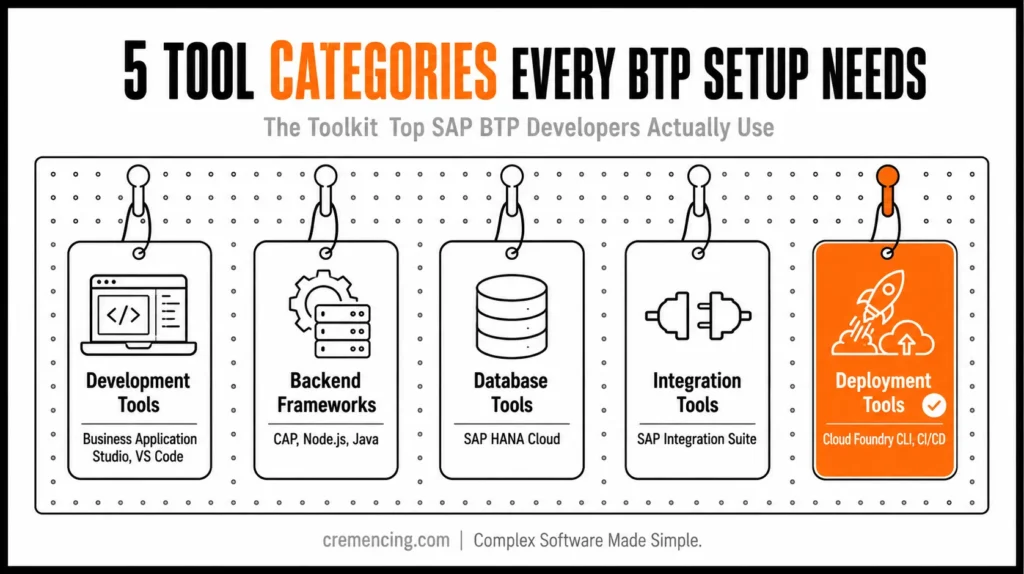
SAP BTP Development Tools
Development Tools
- SAP Business Application Studio
- Solutions for VS Code
Backend Frameworks
- Cloud Application Programming Model (CAP)
- Node. js
- Java
Database Tools
- SAP HANA Cloud
Integration Tools
- SAP Integration Suite
Deployment Tools
- Cloud Foundry CLI
- CI/CD pipelines
A well-organized SAP BTP development tools setup will enable these parts to operate together perfectly.
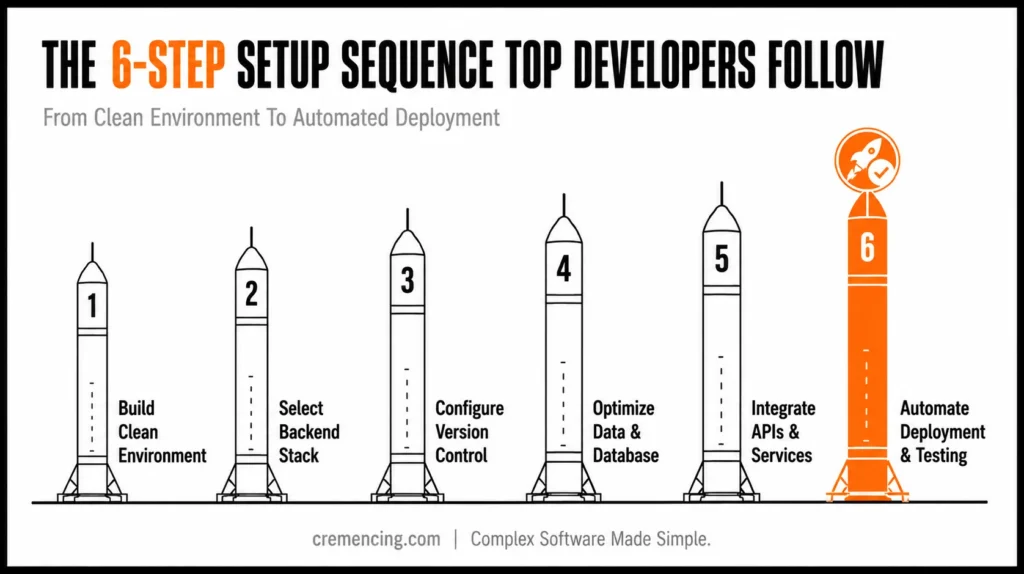
SAP Experts Set Development Tools
Step 1 is to build a clean development environment
The right SAP BTP development environment is where your foundation lies.
- Use SAP Business Application Studio
- Configure workspaces properly
- Install required extensions
Key Tip:
This is why choosing SAP BTP development tools should not mean installing every SAP tool available. Instead, developers should build a toolchain around the application scenario and then connect development, source control, services, testing, and deployment into one repeatable workflow.
Step 2—Select a Suitable Backend Stack
Leading developers choose tools based on project requirements.
- CAP for rapid development
- Node.js for flexibility
- Java for enterprise-scale systems
This choice has consequences for performance and scalability.
Step 3 — Configure Version Control and Collaboration
Efficient teams use:
- Git repositories
- Branching strategies
- Code reviews
This makes it easier to maintain and clean code. If the development stack is poorly structured, the problem usually appears later as architectural or production issues.
Step 4 — Optimizing the Data and Database Tools
- Use SAP HANA Cloud effectively
- Optimize queries
- Structure data models properly
Bad data at least stagnates the entire process.
Step 5—Integrate APIs and External Services
Real projects require integration.
- Use SAP Integration Suite
- Manage APIs efficiently
- Secure connections
This is the step that binds your application with real-world business systems.
Step 6 — Automate Deployment and Testing
Top developers automate repetitive tasks.
- CI/CD pipelines
- Automated testing
- Continuous monitoring
It accelerates delivery and decreases manual errors.
BAS vs VS Code for SAP BTP Development
SAP Business Application Studio provides cloud-hosted, scenario-specific development environments through dev spaces. These spaces include tools and runtimes appropriate to the selected development scenario.
Visual Studio Code provides a local desktop development environment. For SAP Fiori development, SAP provides SAP Fiori tools as an extension pack for VS Code. Additionally, SAP supports connecting VS Code directly to BAS dev spaces, allowing teams to combine the local VS Code experience with cloud-hosted BAS environments.
The choice should therefore be based on project requirements and team workflow rather than the assumption that one IDE is universally better. For teams choosing CAP, Node.js, or Java, the language stack should be selected according to the application’s architecture and production requirements.
Benefits & ROI of Using Correct SAP BTP Development Tools
Implementation of optimized SAP BTP development tools results to tangible improvements.
Faster Development Speed
- Reduce development time by 30–40%
- Automate repetitive tasks
Better Code Quality
- Structured workflows resulting in fewer bugs
- Improved maintainability
Higher Productivity
- Formulation has become a routine for most builders
- More effective use of debugging tools
Lower Costs
- Efficient tools reduce cloud usage
- Faster delivery reduces project costs
Improved Scalability
- Apps handle growth without breaking
- Easier to expand features
Common Mistake + Best Practices
Common Mistakes
- Excessive tools are deployed without integration
- Ignoring environment setup
- Not optimizing database queries
- Manual deployment processes
- Lack of version control
Best Practices
- Only have what you need by keeping it simple and focused
- Standardize your development environment
- Automate wherever possible
- Regularly update tools
- Follow consistent workflows
Why Most Developers Get It Wrong on SAP BTP Development Tools
Many developers approach SAP BTP development tools as separate products. They learn one tool for coding, another for testing, and another for deployment without understanding how they fit together. As a result, they may know what each tool does but still struggle to build and deliver a complete application.
The real challenge is not learning every SAP BTP tool. Instead, developers need to understand how the tools work together throughout the development process. For example, a developer may use SAP Business Application Studio or VS Code to write code, Git to manage changes, SAP HANA Cloud to store data, and SAP Cloud Transport Management to move the application between environments. At the same time, testing and monitoring tools help ensure the application works correctly before it reaches production.
Missing Insight 1: Workflow Integration
Tools only have power when they are connected.
- Need compatibility between backend + frontend + database
- Integration reduces errors
Missing Insight 2: Tools Impact Performance
Bad choice of tool leads to slow development.
- Heavy tools increase load time
- Inefficient setups reduce productivity
Insight 3: A Real Developer Setup is Missing
Top developers use:
- Minimal tools
- Automated workflows
- Clean environments
Not complex, overloaded systems.
Insight 4: Continuous Improvement Is Missing
Your setup should evolve.
- Remove unused tools
- Upgrade regularly
- Optimize workflows
When the application needs to connect SAP and non-SAP systems, the development setup also has to account for the integration layer.
Conclusion
A productive SAP BTP development environment is not defined by the number of tools installed. It is defined by how well those tools support the application’s actual lifecycle.
The right setup starts with the development scenario. BAS provides scenario-specific cloud dev spaces, VS Code with SAP Fiori tools supports local Fiori/UI5 development, and ABAP Cloud follows its own ADT-based development model. From there, Git, BTP services, database components, connectivity, testing, and deployment need to form a consistent workflow.
The biggest improvement is therefore not simply adding another development tool. It is removing unnecessary tooling, standardizing the environment, automating repeatable work, and making the path from source code to deployed application predictable.
Before calling the setup productive, first verify the development environment, framework, service dependencies, Git workflow, testing strategy, deployment process, and production transport path. In this way, you can move beyond a collection of SAP BTP tools and build a development toolchain that can support a real project.
We help you eliminate bottlenecks and drive mobile SAP BTP development smoothly by optimizing your SAP BTP development tools and building a clean SAP BTP development environment. For more insights, read our blog on SAP BTP Mistakes
Be part of the SAP Community platform, start handling your setup today, and experience within a couple of hours how fast and confidently you can build SAP applications.
Are you looking to get things done rapidly and develop quality SAP applications? But you should first solve your dev setup and thereafter start using the right tools consistently.
FAQ Section
Do SAP BTP developers need Git?
Git is not a BTP runtime requirement, but it is an important development and collaboration tool for maintaining source code, branches, reviews, and deployment workflows.
Is SAP HANA Cloud a development tool?
SAP HANA Cloud is a cloud database/service. It should be treated as part of the application’s data layer rather than classified alongside IDEs and command-line development tools.
Can SAP BTP applications connect to on-premise SAP systems?
Yes, depending on the architecture and required services. SAP documents connectivity options for integrating BTP applications with on-premises systems.
What should a productive SAP BTP development setup include?
At minimum, define the development environment, application framework, Git strategy, required BTP services, connectivity, database architecture, testing approach, deployment method, CI/CD process, and production transport strategy.
What is the best tool for doing development in SAP BTP?
SAP Business Application Studio is a very popular development environment.
What is a SAP BTP development environment?
It is basically the tools, services, and configurations you set up for your work.
Do I need all SAP BTP tools?
Definitely NOT (Use relevant tools for your project only)
What can I do to my SAP BTP workflow to improve it?
The tools are there to be optimized; tasks could be automated, and best practices should be followed.





One Response