
Introduction
Most SAP performance postmortems end with a technical root cause: a lock contention pattern, a batch job scheduled wrong, or a memory ceiling hit during peak load. That root cause is usually real. It’s also usually not the actual story. Strong SAP Business-IT alignment helps ensure that your SAP environment continues to support business priorities while technology decisions remain aligned with operational needs.
The technical trigger is the last domino, not the first one. The first domino fell months earlier, when a business process changed and nobody updated the SAP configuration built around the old version of that process. The system didn’t break. It just started running a process it was never actually designed for, and it kept doing that, invisibly, until load finally exposed the gap.
That’s the pattern this post walks through: not “SAP performance problems,” but the business-IT alignment gaps that cause them, why those gaps are structurally hard to see from inside IT, and the five-step cycle that keeps alignment from drifting in the first place.
How SAP Business-IT Alignment Prevents Hidden Performance Bottlenecks
System performance degradations in SAP environments often stem from misalignment between operational business processes and underlying technical configurations rather than pure infrastructure constraints. When enterprise business units execute uncoordinated process variations such as unthrottled bulk posting, concurrent high-volume batch jobs during peak transactional hours, or suboptimal master data setups, they trigger database lock contention, memory saturation, and severe Work Process bottlenecking.
SAP technical documentation highlights that resolving these silent performance drops requires mapping real-time operational workflows to technical runtime behaviors using tools like SAP Signavio and SAP LeanIX. By continuously aligning business process design with system capacity limits, IT organizations prevent unexpected resource starvation and maintain predictable transaction throughput.
SAP Business-IT Alignment
SAP Business-IT alignment is a systematic balancing of the business strategy with IT implementation for businesses that have adopted SAP.
It ensures that:
- IT systems reflect business priorities
- SAP processes support operational goals
- Technology investments generate tangible value for your business
- Business strategy changes are reflected in system design
In practice, this gap shows up in a recognizable sequence. A business unit changes a process, say, consolidating three regional approval workflows into one without a corresponding SAP workflow update. For weeks, users route around it manually. The manual routing becomes the unofficial process. Six months later, a batch job tuned for the old approval volume starts queuing during peak hours, and the resulting performance ticket gets diagnosed purely as a technical issue because by then the process change that caused it is old news and nobody connects the two.
However, alignment is not fixed in time. It must continuously adapt to the following:
- Market changes
- Organizational restructuring
- Process evolution
- Technology upgrades
In practice, organizations can monitor this synchronization rather than discover problems after the fact. For example, SAP Solution Manager’s Business Process Monitoring, SAP Signavio for process mining, and SAP Focused Insights dashboards can help identify early warning signs such as rising process cycle times, increasing manual workarounds, or reporting mismatches.
As a result, teams can address these issues before they develop into the kind of silent drift described below. Performance degradation starts as soon as this synchronization breaks, even if the systems seem stable.
Common SAP Business-IT Alignment Mistakes and How to Avoid Them
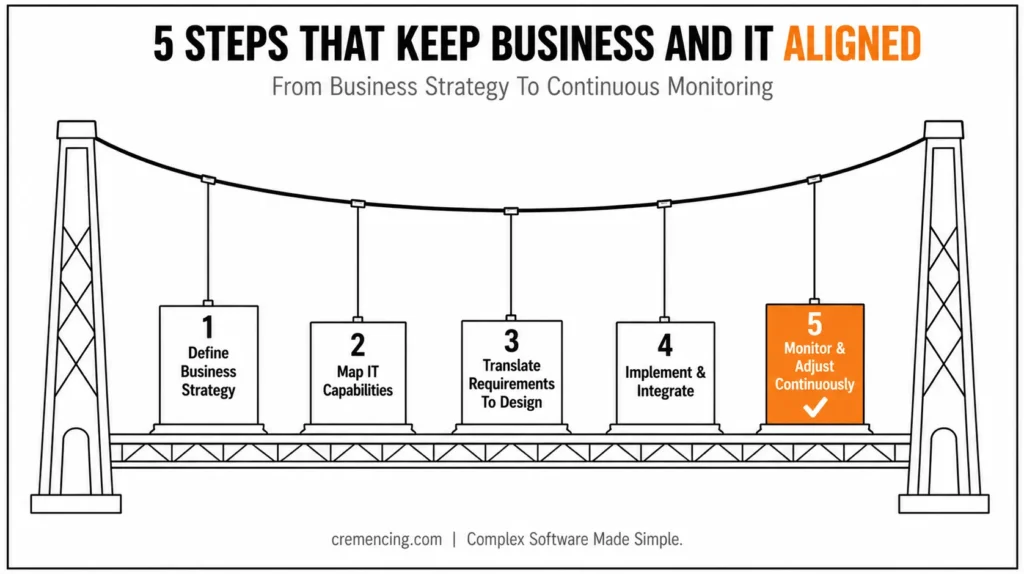
The 5-Step Alignment Cycle
- Define Business Strategy for SAP Business-IT Alignment (targets, compliance, transformation priorities)
- Map IT capability against those requirements
- Translate requirements into SAP design (highest misinterpretation risk)
- Implement and integrate
- Monitor continuously post-go-live this step is where most organizations stop
Step 1 — Define Business Strategy H3:
The first step is to identify business objectives.
Key elements include:
- Revenue and growth targets
- Operational efficiency goals
- Compliance requirements
- Digital transformation priorities
This milestone defines what needs to be supported by IT.
Step 2 – Map IT Capabilities for SAP Business-IT Alignment
If SAP systems can meet the demands of the business, IT teams assess.
This includes:
- Existing SAP architecture assessment
- System capability review
- Integration landscape analysis
Gap identification begins here.
Step 3 —Translate Requirements for SAP Business-IT Alignment
SAP Applications are determined and configured based on business needs.
This involves:
- Process mapping in SAP modules
- Functional design creation
- Technical specification development
This is where the misinterpretation usually starts.
Step 4 —Implement and Integrate SAP for Business-IT Alignment
IT executes the SAP changes.
Includes:
- System configuration
- Development and customization
- Integration with external systems
At this point in time, minor perturbations can lead to alignment divergence over the long haul.
Step 5 — Continuously Monitor SAP Business-IT Alignment
After go-live, alignment will need to be maintained.
Key activities:
- Performance monitoring
- User feedback analysis
- Process optimization
- System enhancements
Alignment decays over time unless you take this step.
| Drift Signal | Looks Like (to IT) | Actually Means |
|---|---|---|
| Rising manual workarounds | User training gap | The process changed, but the SAP config didn’t |
| Reporting mismatches | Data quality issue | Business definition and system logic diverged |
| Growing “temporary” exceptions | One-off requests | Formal workflow no longer fits real usage |
| Batch/report runtime creeping up | Infrastructure sizing issue | Volume assumptions from original design are stale |
Quick Reference: 5 Steps for SAP Business-IT Alignment
1. Review Business Goals
Understand your current business priorities and strategic changes.
2. Assess SAP Processes
Check whether your existing SAP processes still support those goals.
3. Identify Alignment Gaps
Find process delays, manual workarounds, reporting issues, and other gaps.
4. Realign SAP Capabilities
Update processes, integrations, or SAP solutions where necessary.
5. Monitor Continuously
Regularly review performance and business requirements to maintain alignment.
Benefits & ROI of SAP Business-IT Alignment
SAP Business-IT Alignment – An Enterprise Value Multiplier
Operational Performance Gains
- 25–45% improvement in process efficiency
- Faster decision-making cycles
- Reduced system rework
Financial Impact
- A decrease of 20–30% on IT rework expenditure
- Lower operational waste
- Improved ROI on SAP investments
Strategic Benefits
- Better business agility
- Faster transformation execution
- Improved cross-functional collaboration
| Area | Misaligned SAP | Aligned SAP |
| Performance | Inconsistent | Predictable |
| Cost | High rework | Optimized investment |
| Delivery | Delayed outcomes | Faster execution |
Common Mistakes and How to Avoid Them
Common Mistakes
- Treating alignment as a one-time project
- IT is operating in a silo from business functions
- Poor requirement translation
- Lack of continuous feedback loops
- Over-customization of SAP systems
Best Practices
- Establish continuous alignment governance
- Involve business users in SAP lifecycle decisions
- Standardize requirement-to-design mapping
- Monitor performance post-implementation
- Maintain cross-functional SAP governance boards
Why SAP Business-IT Alignment Breaks Silently
Each of these individually looks tolerable: one workaround, one bypassed workflow step, one delayed config update. None of them triggers an incident on its own. That’s precisely why the drift is silent: there’s no single event a monitoring threshold would catch, only an accumulation that becomes visible once it crosses a performance ceiling. Much enterprise content assumes that alignment failure stems from bad planning.
This is a genuinely larger point to be made:
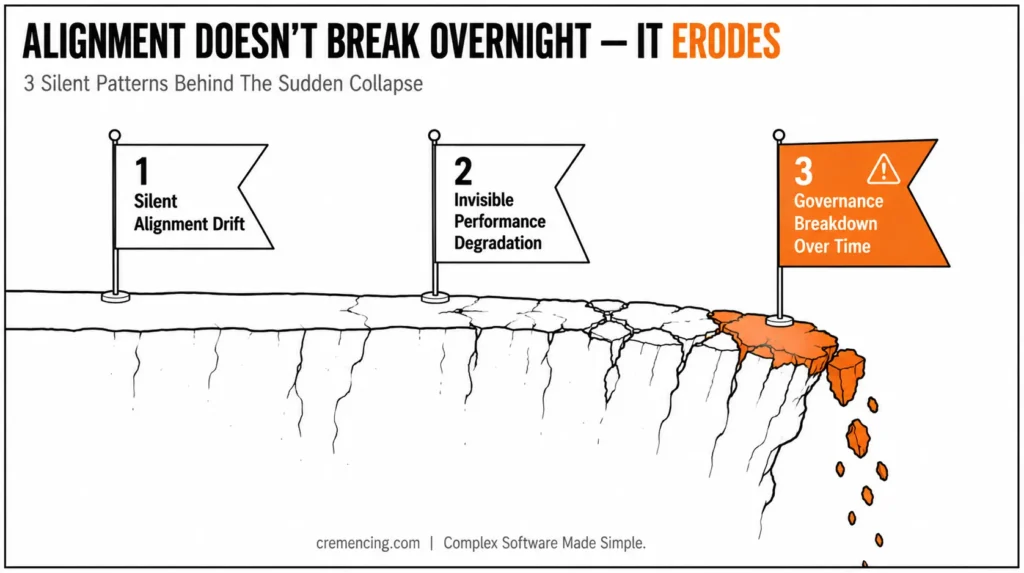
Silent alignment drift
Even in a “disorganized” state, SAP systems can perform better at go-live.
- The evolution of Business Policies is typically much faster than IT updates
- Processes change, but SAP configurations are static
- Temporary workarounds become permanent
- Teams bypass formal SAP workflows
Invisible performance degradation
- Small delays accumulate across workflows
- Reporting mismatches appear gradually
- Integration latency increases unnoticed
Governance breakdown over time
- Functional: After go-live, business-IT handover occurs very rarely
- Feedback loops weaken
- This leads to reactive rather than proactive decision-making
Key insight:
SAP business-IT alignment does not die overnight. Performance collapses without warning after it erodes slowly.
Conclusion
The pattern behind most “unexplained” SAP performance issues is the one this post has walked through: alignment doesn’t fail at a single moment it erodes step by step as business priorities move faster than the systems built to support them. By the time it shows up as a performance ticket, the actual cause is usually months old and several small workarounds deep.
The organizations that avoid this aren’t running more sophisticated SAP landscapes. They’re the ones that treat Step 5 — continuous monitoring and adjustment as a permanent operating discipline instead of a phase that ends at go-live.
If your environment is already showing the drift signals covered above rising rework, inconsistent performance, growing workarounds that’s a governance signal first, and a technical one second.
If your SAP environment is showing the drift symptoms covered above rising rework, inconsistent performance, and growing workarounds it’s worth treating them as a governance signal, not just a technical one.
Moreover, if your current approach no longer fits your business needs, it may be time to realign your SAP strategy and review the capabilities you still rely on, including those covered in our SAP Solution Manager capabilities guide.
FAQ
What is SAP Business-IT Alignment?
It is the procedure of making certain that SAP systems and IT execution enable your business strategy and operational objectives.
What causes the break in SAP Business-IT Alignment?
It crumbles under changing business needs, ineffective communication, and no ongoing governance.
How can I improve the SAP Alignment?
By way of continuous collaboration, governance frameworks, and system enhancements.
Symptoms of SAP not being aligned properly
Pocketing delays, irregular reporting, inefficiencies in the system, and rising rework.
Is SAP alignment a one-off exercise?
These are not a one-time effort but, instead, must evolve with changing business needs.
How is Business-IT alignment different from IT governance?
Governance sets the rules and decision rights; alignment is the ongoing outcome of whether those rules actually keep business priorities and system design in sync.
Can SAP Signavio or Solution Manager detect alignment drift automatically? These tools can surface symptoms: process cycle time changes, workaround frequency, reporting mismatches, but interpreting them as alignment drift still requires human review against current business priorities.
How often should alignment be reviewed?
Most organizations that avoid silent drift build it into a recurring cadence (often quarterly) rather than only revisiting it during major projects or go-lives.
Does over-customization always indicate misalignment?
Not necessarily, but heavy customization to work around a process gap is one of the more common signs that IT design has drifted from current business need.
Who should own Business-IT alignment inside an organization?
Most mature governance models assign this to a cross-functional board rather than IT alone, since misalignment is as often a business-side communication failure as a technical one.





2 Responses