

Introduction
SAP Compatibility Packs do not simply disappear when their usage rights expire. For enterprises running SAP S/4HANA, the bigger concern is what happens to the business processes, custom ABAP, integrations, and legacy dependencies that still rely on affected Compatibility Pack functionality. With the final transition deadline for most S/4HANA on-premises Compatibility Packs now passed, companies need to identify these dependencies and plan the appropriate replacement before they create upgrade, compliance, or modernization risks.
For most S/4HANA on-premises Compatibility Packs, SAP moved the final usage-right deadline to May 31, 2026. That date has now passed. However, the rules are not identical for every compatibility pack or deployment model. SAP has also documented extended treatment for selected functionality, while cloud-subscription environments can follow different usage-right arrangements.
That makes the real problem dependency visibility. An enterprise can complete an S/4HANA migration and still carry legacy functionality into production through custom code, interfaces, business processes, and operational procedures. This guide explains how to identify those dependencies, separate actual Compatibility Pack exposure from general SAP technical debt, and plan the appropriate replacement before the dependency becomes an upgrade or compliance problem.
What Are SAP Compatibility Packs Expired?
After the applicable Compatibility Pack usage-right deadline, customers must verify whether they are still authorized to use the affected functionality and transition to the applicable SAP-recommended alternative.
| Situation | What to verify | Recommended action |
|---|---|---|
| S/4HANA on-premise + affected CP | Exact CP item and usage-right deadline | Confirm current authorization and replacement. |
| Selected CS / LE-TRA / PP-PI scope | Whether the item falls under the documented extension | Verify applicable 2030 treatment. |
| S/4HANA Cloud / Private Edition | Contract and current SAP usage—right terms | Do not automatically apply the on-premises deadline. |
| CP installed but unused | Actual relevance/usage | Validate before investing in remediation. |
| Custom code depends on CP | Program, enhancement, interface, and process dependencies | Remediate the CP and dependent custom logic together. |
| Replacement already implemented | Business process and regression status | Validate and formally retire the legacy dependency |
These packs were created to help enterprises update smoothly by having previous ECC functions temporarily be operational in S/4HANA. However, SAP does not provide the level of support, patching, and long-term stability assurance over time.
This leads to:
- Lesser support for the legacy business functions
- Increased reliance on deprecated modules
- Increasing SAP legacy module decommissioning risk
- Higher dependency on custom workarounds
Simply put, the system still works but becomes structurally weak.
SAP Compatibility Packs Expired: Risk Growth
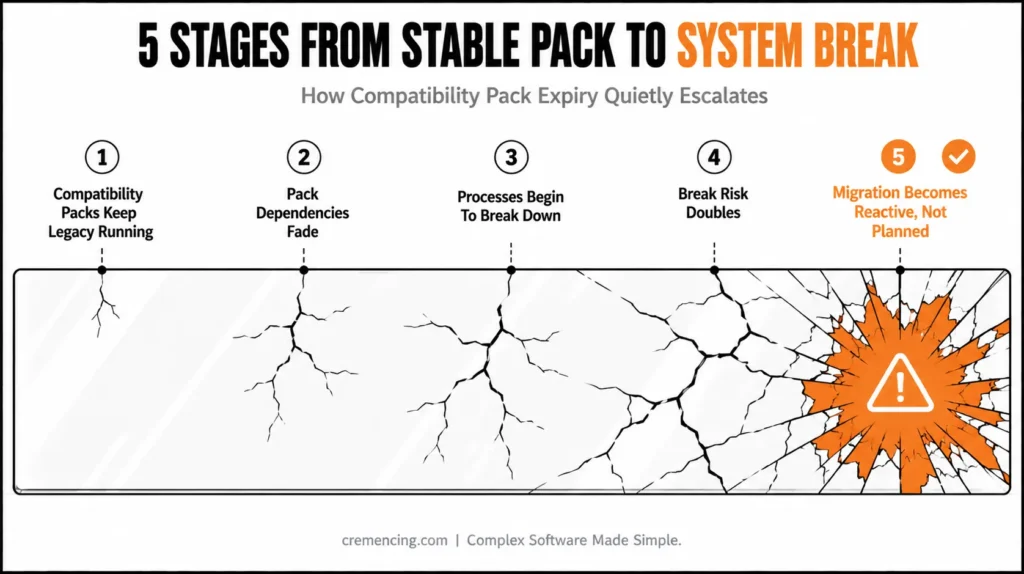
Step 1: Compatibility Packs Keep Legacy Running
Not surprisingly, so many of the companies are still running their ECC-style processes in S/4HANA. Such practice leads to S/4HANA migration gaps as early as possible.
How to Identify Compatibility Pack Dependencies
Confirm Actual Usage, Not Just Installation
Finding a compatibility pack in the landscape does not automatically prove that business processes are actively using it.
Start by identifying the relevant CP items from the latest Compatibility Scope Matrix. Then, check your system to confirm whether your organization actively uses those items. SAP’s current guidance describes using the relevant Compatibility Pack checks and reviewing usage data to determine which items are relevant.
Then map each active item to:
- The business process that uses it
- The SAP application component involved
- Custom ABAP programs, enhancements, or interfaces touching the process
- External systems consuming or supplying the data
- Batch jobs and background processing
- User-facing transactions or applications
- The SAP-recommended replacement
- The target date for remediation
This distinction matters because an installed component with no relevant usage should not receive the same remediation priority as a Compatibility Pack function embedded in a critical order-to-cash, procure-to-pay, transportation, manufacturing, or finance process.
Trace the Dependency Chain
For every active CP item, document the complete transaction path:
Business process → S/4HANA functionality → custom code → API/interface → external system → downstream process
The goal is to find dependencies that are not obvious from the Compatibility Pack itself. For example, replacing a legacy function may require changes to a custom ABAP program, an interface mapping, a scheduled job, and the downstream application’s data contract.
Separate CP Exposure From General Technical Debt
Not every old SAP object is a Compatibility Pack dependency.
Create separate classifications for:
- Active Compatibility Pack usage
- Custom code dependent on CP functionality
- Legacy functionality with no CP dependency
- Unused or obsolete objects
- Already-remediated functionality
This prevents the remediation program from becoming an uncontrolled custom-code cleanup project. For organizations carrying large amounts of custom ABAP into S/4HANA, this dependency analysis should also become part of a structured custom-code lifecycle process.
Step 2: Pack Dependencies Fade
Interop and custom code make use of compatibility layers behind the scenes. These create invisible SAP ECC dependency issues.
Step 3: Begins to break down the processes
SAP ends support; small changes begin to break the system.
Step 4: Break Risk Doubles
The greater technical risk is that an unresolved dependency can complicate future upgrades, regression testing, integrations, or replacement work. A compatibility pack deadline should therefore trigger dependency analysis rather than an assumption that the system will suddenly fail.
Step 5: Migration Becomes Reactive, Not Planned
A lot of organisations end up rushing into emergency fixes instead of following a well-structured transformation plan. As a result, teams may have to replace affected functionality, update custom ABAP, and adjust integrations under tight deadlines. Moreover, these last-minute changes can increase testing pressure and make it harder to protect critical business processes.
Compatibility Pack Expiry: Business Impact and ROI Risks
The financial impact of compatibility pack expiry or degradation is frequently overestimated.
The business impact depends on how deeply the affected functionality is embedded in custom code, interfaces, business processes, testing, and downstream systems. The highest costs often come from remediation, regression testing, integration changes, and accelerated migration work.
These problems create lasting SAP S/4HANA compatibility risks that have a direct impact on ROI.
Hidden cost drivers:
- Emergency patching cycles
- Rework of integration layers
- Extended downtime during upgrades
- Higher consulting dependency
Mistakes After Packs Expire
Over-relying on compatibility packs
They are fully embraced by enterprises as permanent solutions rather than temporary bridges.
Ignoring dependency mapping
Most teams just scratch the surface of SAP ECC dependency issues across modules.
Delaying the cleanup of legacy modules
Legacy functionality remains active for much longer than it really needs to be.
No visibility into technical debt
SAP technical dependency failure risk goes unnoticed as teams build in the background
Poor upgrade sequencing
Without due system rationalization, migration takes place.
What Guides Miss About Expired Packs
Compatibility Pack dependencies can remain hidden until an upgrade, replacement project, integration change, or usage-right deadline forces the enterprise to address them.
What is usually ignored:
- Cross-module dependencies are self-explanatory in most domains (though hidden sometimes), but finance- or logistics-related concepts fall into the domain of the common knowledge module, regardless of how long you have trained and gained industrial expertise.
- Impact of custom ABAP code that is still dependent on ECC Logic
- Interface chains relying on stale APIs
- Testing the gaps between S/4HANA and legacy processes
- Limited visibility of technical debt that has existed for quite a long time
This is where the majority of migration gaps for SAP S/4HANA actually come.
Even a successful migration can be unstable without this layer addressed.
If your SAP landscape still uses affected Compatibility Pack functionality, you should identify the specific CP items, usage patterns, dependencies, and applicable replacement options before making further upgrade or transformation decisions
Its structured review today can become a potential SAP system break risk tomorrow. A broader S/4HANA migration plan should therefore address technical debt alongside functional replacement work.
Reduce SAP Compatibility Pack Expired Risk
Step 1: Find Active Compatibility Pack Usage
Search for all modules that are still using ECC logic.
Step 2: Analyze Dependency Chains
Know where the legacy functions are still hooked into core processes.
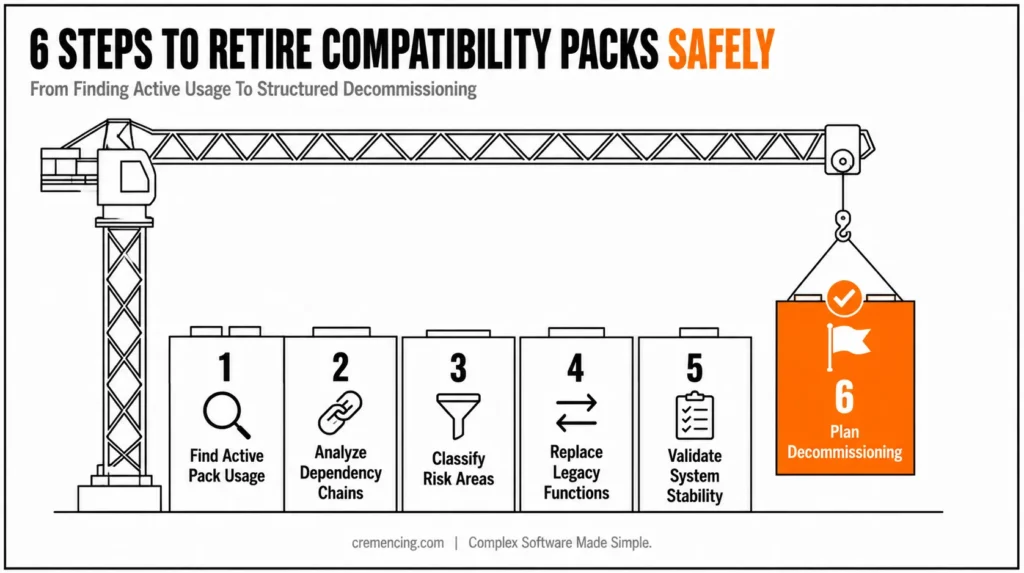
Step 3: Classify Pack Risk Areas
Separate critical vs. non-critical dependencies.
Step 4: Replace Legacy Functions
Use S/4HANA standard functionalities wherever you can.
Step 5: Validate System Stability
Perform regression testing over a time period of all impacted flows.
Step 6: Plan Decommissioning in a Structured Manner H3
Gradually retire compatibility dependencies.
Benefits of Fixing Expired Packs
By dealing with the threat posed by expired SAP Compatibility Packs early on, you can achieve measurable benefits:
Addressing Compatibility Pack dependencies early can reduce remediation surprises, improve upgrade planning, and give teams more time to test replacement functionality. And most importantly, it mitigates the hidden risk of your SAP technical dependencies failing before they start. Compatibility Pack remediation should be treated as one part of the wider S/4HANA migration and modernization roadmap rather than as an isolated cleanup task.
Conclusion
SAP Compatibility Pack expiry should not be treated as a countdown to an automatic system failure. The real task is to determine which Compatibility Pack functionality your S/4HANA landscape actually uses, whether the applicable usage rights have expired, and what business and technical dependencies remain around that functionality.
For most affected S/4HANA on-premise Compatibility Packs, the final transition date was May 31, 2026. However, selected functionality has different treatment, and cloud-subscription environments can follow different usage-right arrangements. That is why a blanket “all Compatibility Packs are expired” approach can lead to the wrong remediation plan.
The practical response is straightforward: identify the CP items, verify actual usage, map custom ABAP and integration dependencies, confirm the applicable SAP replacement, test the complete business process, and then retire the legacy dependency.
The enterprises that handle this work systematically gain something more valuable than simply meeting a deadline: they remove hidden dependencies before those dependencies complicate the next S/4HANA upgrade, modernization project, or clean-core initiative.
FAQ
1. What happens when SAP Compatibility Packs expire?
The key issue is the expiration of the applicable usage rights for affected Compatibility Pack functionality. Customers should verify the specific CP item, deployment model, and current SAP terms rather than assume that the software will immediately stop running.
2. Did SAP Compatibility Packs expire on December 31, 2025?
For most affected S/4HANA on-premise Compatibility Packs, December 31, 2025 was the original deadline. SAP subsequently announced a final transition period extending the deadline to May 31, 2026.
3. Is May 31, 2026 the deadline for every Compatibility Pack?
No. SAP has documented extended usage rights for selected Customer Service, Transportation, and Production Planning for Process Industries functionality through 2030. The exact CP item must be checked against the current Compatibility Scope Matrix.
4. Do Compatibility Pack expiry rules apply to SAP ECC?
No. Compatibility Packs are a concept associated with certain classic SAP ERP functionality running within SAP S/4HANA. ECC should not automatically be treated as subject to the S/4HANA Compatibility Pack usage-right deadline.
5. How can I check whether my S/4HANA system uses Compatibility Packs?
Use the current SAP Compatibility Pack analysis guidance and identify the CP items that are actually relevant to your system. SAP’s current guidance describes reviewing usage data and relevance information for the identified items.
6. Can Compatibility Pack functionality still technically work after the deadline?
Technical availability and legal authorization are different questions. A system may not automatically stop executing the functionality simply because the usage-right date has passed, but the enterprise must verify whether continued use is authorized under its applicable SAP terms.
7. What should companies replace Compatibility Packs with?
The replacement depends on the specific Compatibility Pack item. SAP’s Compatibility Scope Matrix provides the relevant way-forward information and recommended alternatives for affected functionality.
8. Do Compatibility Packs affect custom ABAP code?
They can. Custom ABAP may call, extend, or depend on processes and interfaces associated with legacy functionality. Therefore, CP remediation should include dependency analysis of custom code rather than treating the replacement as a purely functional configuration task.





One Response