
Introduction
SAP BTP applications rarely fail in production because a developer cannot make CAP, Node.js, or Java work individually. The bigger problem appears when those technologies meet real production conditions: high request volumes, database-heavy services, external integrations, authentication dependencies, runtime upgrades, and failures between services.
That is where a development setup that looked stable can expose architectural weaknesses. An OData service may return far more data than the client needs. A CAP handler may make unnecessary database calls. A Node.js service and Java service may each work correctly while their interaction creates avoidable latency. Meanwhile, a dependency or runtime mismatch can turn a routine deployment into a production incident.
Choosing CAP Node.js vs CAP Java
CAP supports both Node.js and Java, so the decision should not be reduced to “Node.js for simple applications and Java for complex ones.” SAP describes both as supported CAP runtimes and recommends Java and Node.js for CAP development in the Cloud Foundry environment
| Decision factor | CAP Node.js | CAP Java |
|---|---|---|
| Primary languages | JavaScript / TypeScript | Java |
| CAP runtime | Node.js | Java |
| Best fit | Teams standardized on JS/TS and Node.js | Teams standardized on Java/Spring |
| IDE options | VS Code, SAP Business Application Studio | VS Code, SAP Business Application Studio, IntelliJ |
| OData V2 | Supported | Supported |
| OData V4 | Supported | Supported |
| REST consumption | Supported | Not supported in the same CAP consumption feature according to current CAP documentation |
| Runtime considerations | Node.js version must match CAP requirements | JDK, Maven, Spring Boot and CAP versions must align. |
Production rule:
Pick one primary runtime for a service unless there is a clear architectural reason to introduce another runtime. If both are used across an application landscape, define ownership, API boundaries, deployment standards, dependency management, and observability consistently.
SAP BTP Development Language & The Stack Explained
SAP BTP Development Language is one (but not narrowly). This is a set of technologies for building Enterprise Applications on SAP Business Technology Platform.
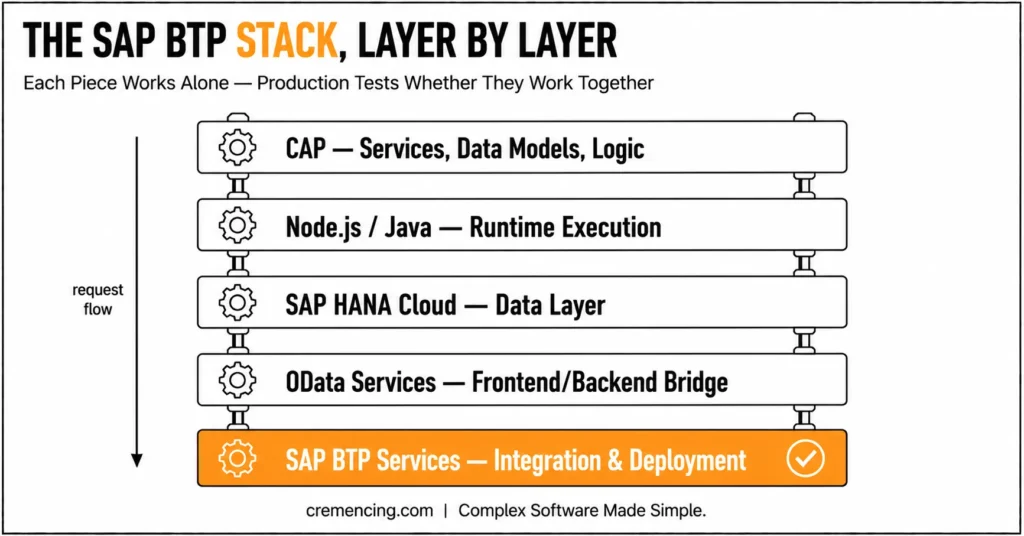
Core Stack Components
CAP (Cloud Application Programming Model)
Everything that deals with: services, data models, and business logic
Node.js and Java
Low-level runtimes that deal with the application logic
SAP HANA Cloud
A layer to save and manage data, also known as a database
OData Services
Message communication layer between frontend and backend
SAP BTP Services
Integration, authentication, and deployment tools
How the Stack Works Together
- CAP defines the application structure
- Node. Business logic: It is executed using JavaScript or Java
- OData: OData exposes data for the frontend apps
- They take care of the deployment and integration in cloud services
If this flow is not managed, production problems will start to crop up.Developers working with SAP BTP often need to understand where different technologies fit. Learn more about ABAP vs Java for SAP development and how both impact SAP careers.
How SAP BTP Development Language Works in Projects
Step 1—Designing the CAP-based Architecture
Start with a clear architecture.
- Define entities using CDS
- Structure services logically
- Separate concerns properly
Key Insight:
Architecture that is poor causes us to have scaling problems later.
Step 2 – Node. js and Java
Each runtime serves different needs.
- Node. js for rapid development
- Java for complex enterprise logic
Mistake to avoid:
When you mix the two without clear boundaries, there is confusion.
Step 3: Using SAP HANA Cloud to Manage Data
Data handling is critical.
- Optimize database queries
- Structure relationships properly
- Avoid redundant data calls
Real issue:
Performance can go south in production due to slow queries.
Step 4 — Exposing Services Using OData
OData connects the frontend and backend.
- Define clean APIs
- Use filtering and pagination
- Avoid unnecessary data exposure
Step 5 — Connecting SAP and Outward-facing Services
Real applications require integration.
- Connect SAP S/4HANA
- Use SAP Integration Suite
- Secure APIs
Risk:
Mediocre integration results in breakdowns across systems.
Step 6 – Deployment and Monitoring
Deploy using SAP BTP tools.
- Cloud Foundry deployment
- Logging and monitoring
- Performance tracking
Key Insight:
Deployment is where most issues arise, not the other way around.
Benefits & ROI: Correct Usage of BTP Development Language
Choosing the right BTP development language is about more than selecting Node.js or Java. The real value comes from matching the runtime with the application’s workload, team expertise, integration requirements, and production architecture. When these decisions are aligned, organizations can reduce unnecessary complexity while making applications easier to maintain, monitor, and scale.
Faster and More Predictable Performance
- Reduce unnecessary processing: Well-designed CAP services can minimize redundant database queries, API calls, and application-side processing.
- Improve response times: Efficient OData queries, appropriate filtering, pagination, and smaller payloads can help reduce latency.
- Support scalability: A suitable runtime and service architecture can help applications handle increasing workloads more consistently.
- Avoid performance assumptions: Node.js is not automatically faster than Java, and Java is not automatically better for complex workloads. Performance depends on the application design, workload, database access, and integration pattern.
- Improve troubleshooting: Consistent runtime and deployment practices make it easier to identify whether a performance issue originates in the application, database, or downstream service.
- Lower operational overhead: A clear language and runtime strategy can reduce unnecessary technology variation, making development, testing, deployment, and maintenance more manageable.
The key takeaway: the ROI comes from using the right runtime within a well-designed BTP architecture, not from choosing a programming language in isolation.
Common SAP BTP Development Language Mistakes and Best Practices
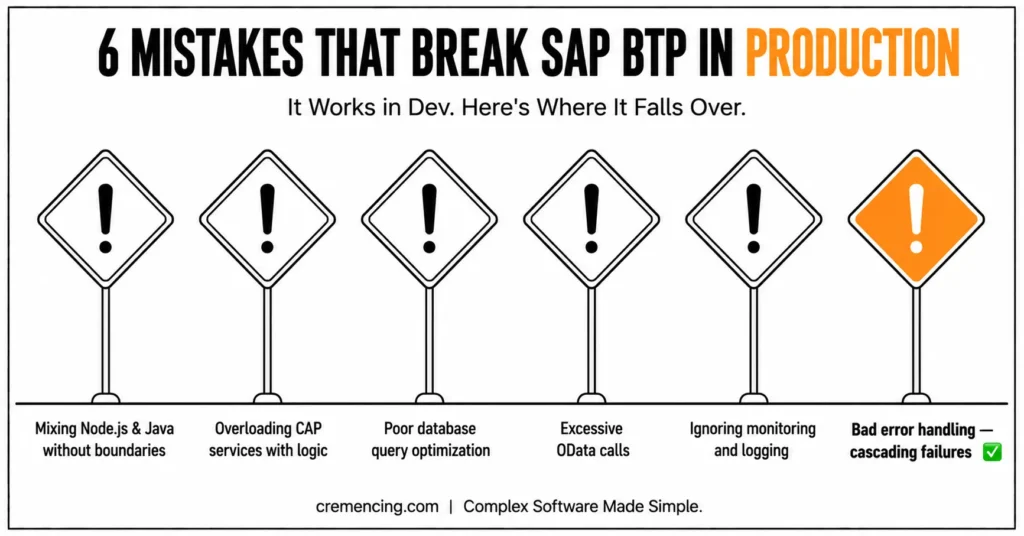
Common Mistakes
- Mixing Node. Unmistakably designless js and Java
- Overloading CAP services with logic
- Poor database query optimization
- Excessive OData calls
- Ignoring monitoring and logging
Best Practices
- Define clear architecture before coding
- CAP : Make Use of This CAP Correctly for Service Design
- Optimize database performance early
- Batch request and limit the number of API calls
- Implement monitoring from the start
Things Most Guides Never Mention About SAP BTP Stack
The vast majority of tutorials explain about components alone but there is no one teaching about how they react together in production.
Real Production Behavior
- Services interact differently under load
- Latency increases with multiple integrations
Failure Scenarios
- The entire system may be affected due to a single service failure
- Bad error handling causes cascading problems
Cross-Technology Challenges
- Node. But js and java are have been treated differently, process-wise
- It is increasingly challenging to maintain data consistency
Performance Bottlenecks
- Database queries
- API calls
- Integration delays
Conclusion
CAP applications on SAP BTP become production-ready when teams stop treating the runtime, database, APIs, and integrations as isolated components. The important decision is not simply whether Node.js or Java is “better,” but whether the chosen runtime, service boundaries, dependencies, and integrations fit the application’s operational requirements.
The biggest production risks usually appear at the boundaries: excessive OData traffic, unnecessary database calls, slow downstream services, unclear Node.js/Java ownership, and configuration differences between development and production. Address those areas early, and the CAP architecture becomes much easier to operate and scale.
For current CAP projects, version alignment also matters. CAP Node.js 10 and CAP Java 5 have specific runtime requirements, so teams should validate Node.js, JDK, CAP, and dependency versions before deployment. Once the architecture is defined, the next step is validating the development practices that can quietly create production problems
FAQ
What is SAP BTP Development Language?
Eventually, it is a mix of CAP (Cloud Application Programming Model), Node. To develop SAP applications, cloud services, Java, and JavaScript are used.
What Made SAP BTP Apps Fail in Production?
Most of the time, it fails due to bad integrations, performance issues, and weak architectural design.
Should I Use Node.js or Java in SAP BTP?
Both are useful. Select based on the project and complexity factors.
What is CAP in SAP BTP?
The Cloud Application Programming Model (CAP) is a model that defines data models (fields), services, and functions on top of the SAP applications.
Does CAP support OData V4?
Yes. Current CAP documentation lists OData V4 support for both Node.js and Java.
What Node.js version does current CAP require?
For CAP Node.js 10, Node.js 22 is the minimum supported version, while Node.js 24 is recommended.
What JDK does CAP Java 5 require?
CAP Java 5 requires JDK 21 or later, with JDK 25 recommended according to the current version information.
How do I prepare a CAP application for production?
Validate runtime and dependency versions, review database and OData performance, test integrations, configure authentication and connectivity, and establish logging and monitoring before production deployment.




