

Introduction
Building applications at the speed of business is a challenge for many companies, and this SAP Build Apps Guide is here to help. Traditional development is gradual, dependent on skilled developers, and does not lend itself well to accelerating innovation. However, this industry needs to move faster, and knowing how to accelerate development has now become a critical priority.
Companies switching to SAP Build Apps aren’t doing it because low-code is trendy — they’re doing it because traditional development can’t keep up with how fast the business actually needs apps built. Where a custom-coded internal tool might take a development team six to eight weeks — requirements, sprints, QA cycles — SAP Build Apps compresses that into days, using a visual builder instead of a codebase, without cutting SAP teams out of the process.
That speed is the headline reason companies are moving, but it’s not the only one. This guide breaks down what SAP Build Apps actually is, how the six-step build process works end to end, and — just as important — where it doesn’t fit, so you’re not the team that finds out the hard way three months into a project that needed traditional development instead.
This SAP Build Apps Guide walks you through what SAP Build Application Platform is and how it works, step by step as well as the real reasons companies are moving on to it now. It also shows you how it affects productivity, cost, and scalability.
Empirical Evidence for Enterprise Low-Code Adoption
Recent Gartner data indicates that 75% of new enterprise applications are now built using low-code platforms, up from under 25% in 2020. Furthermore, independent Forrester studies demonstrate that enterprises deploying low-code solutions across cloud platforms achieve average ROI gains exceeding 200% with payback periods under eight months. Within the SAP ecosystem, organizations leveraging SAP Business Technology Platform (BTP) tools reduce core development cycle times by up to 60% while mitigating legacy code maintenance costs. Lastly, IT benchmarks confirm that over 80% of active low-code users now originate from non-IT business units, driving scalable digital transformation without straining engineering resources.
SAP Build Apps Guide: What It Is and Why It Matters
SAP Build Application Platform is one of the platforms that enables low-code/no-code development and application creation without complex coding.
This is a part of SAP Business Technology Platform, and essentially, it aims to simplify the way you build apps no matter if you’re a developer or a non-developer.
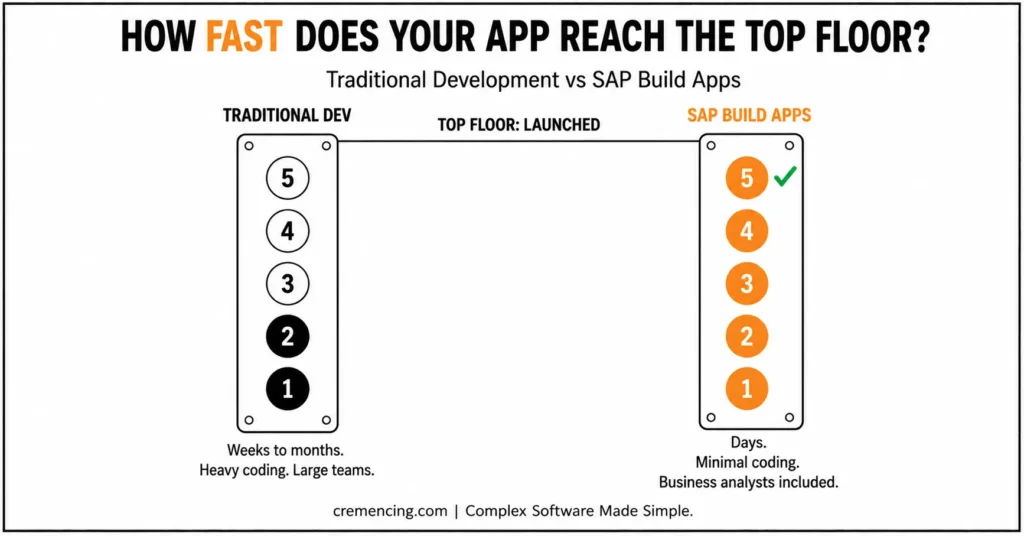
Traditional Development vs SAP Build Apps
| Aspect | Traditional Development | SAP Build Apps |
|---|---|---|
| Coding Requirement | Heavy coding, skilled developers needed | Minimal to no coding required |
| Development Time | Weeks to months | Days |
| Team Dependency | Requires large development teams | Business analysts and non-developers can contribute |
| Cost | Higher due to developer resources | Lower development and maintenance costs |
| Flexibility | Highly customizable, but complex | Best for small to medium apps; hybrid approach for complex systems |
| Integration | Manual API and system integration | Built-in integration with SAP systems and APIs |
| User Adoption | Longer learning curve | Faster adoption due to visual, drag-and-drop interface |
| Deployment Speed | Slower, multiple testing cycles | Faster cross-platform deployment |
SAP Build Apps Guide: Key Features
- Visual drag-and-drop interface
- Pre-built components and templates
- Integration with SAP systems
- Real-time data connectivity
- Cross-platform deployment
Who Uses SAP Build Apps: A Guide to the Right Audience
- Business analysts building internal tools
- Developers accelerating development
- Businesses weaning away from using large dev teams
SAP Build Apps Guide: Why It Matters for Your Business
It can take weeks or months to develop traditionally. With SAP Build Apps:
- Apps can be built in days
- Teams respond more quickly to meeting their business objectives
- Development bottlenecks are reduced
SAP Build Apps Guide: Step-by-Step Process
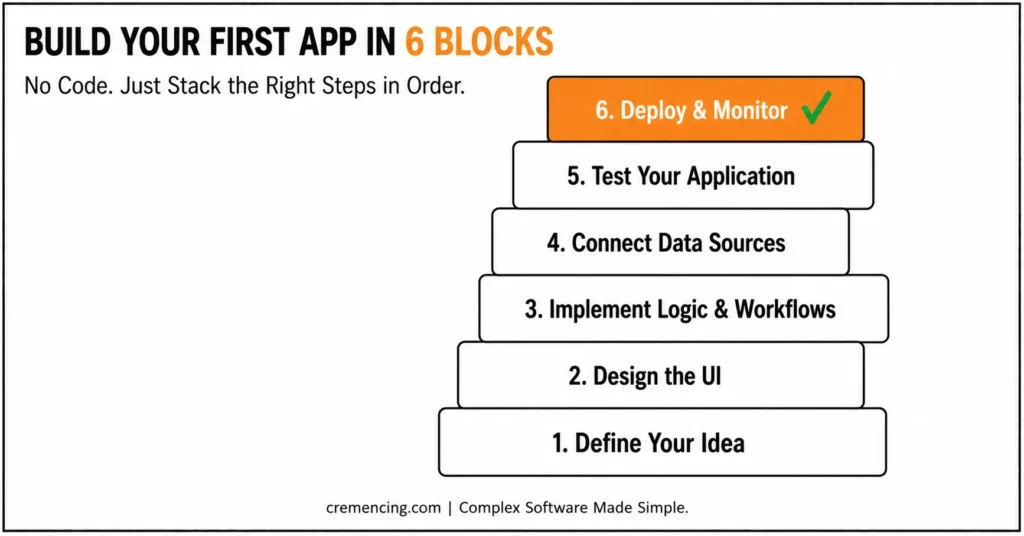
Step 1 — Your Idea
How to Start Building an App: Identify What Problem Your App Will Solve
- Define user needs
- Identify required features
- Plan basic workflows
Clear planning reduces rework later.
AP Build Apps’ visual builder works on a canvas where components (buttons, lists, forms, containers) are dragged directly onto a responsive layout grid. Layouts auto-adjust for web and mobile without separate design work.
Step 2 — User Interface Designing H3
Use the visual builder.
- Drag and drop UI elements
- Customize layouts
- Create responsive designs
No coding is needed at this point.
Step 03 – Implement Logic and Workflows
Define how the app behaves.
- Use visual logic flows
- Set conditions and actions
- Automate processes
This replaces traditional coding logic.
Logic is built using the platform’s visual “Logic Canvas” — condition-based flows (if/then) and reusable flow functions replace what would otherwise be backend code.
Step 4 – Connect Data Sources Source: H3
SAP Build Application Platform needs to connect with:
- SAP systems
- APIs
- Databases
It allows your app to work with the real data.
Connections typically go through SAP BTP destinations or OData services for SAP backend systems, alongside REST API connectors for third-party data. A mismatched data model here is the most common source of late-stage bugs.
Step 5 — Test Your Application
Before deployment:
- Test user interactions
- Validate data flows
- Fix errors
Testing ensures smooth performance.
Step 6 – Deploy And Monitor
Deploy your app to users.
- Publish to cloud
- Monitor usage
- Update when needed
This completes the development cycle.
SAP Build Apps — 6-Step Build Process at a Glance
- Define the problem & user needs
- Design UI (drag-and-drop, responsive)
- Build logic & workflows (visual, no-code)
- Connect data sources (SAP systems, APIs, DBs)
- Test (interactions, data flow, errors)
- Deploy & monitor (cloud publish, usage tracking)
SAP Build Apps Guide: Benefits & ROI
Companies moving to the SAP Build Application Platform are in demand.
Faster Development Time
- Reduce development time by 50–70%
- Launch apps quickly
Lower Development Costs
- Fewer developers required
- Reduced coding effort
Increased Productivity
- Not waiting for IT, but building apps in teams
- Faster decision-making
Better Business Agility
- Quickly adapt to changing needs
- Build and update apps rapidly
Improved Collaboration
- Partnership between business and IT teams
- Clear workflows and shared understanding
SAP Build Apps Guide: Common Mistakes and Ways to Avoid Them
Common Mistakes
- Building apps without clear requirements
- Overcomplicating workflows
- Ignoring data structure
- Skipping testing
- Overuse of out-of-the-box templates
Best Practices
- Start with simple applications
- Focus on user experience
- Optimize workflows
- Test continuously
- Use integrations wisely
What SAP Build Apps Guides Are Missing
Furthermore, there are plenty of guides that tell you how to use the tool, but very few tell you how to use it in an actual business environment.
SAP Build Apps Guide: When Not to Use It
Not every project is suitable.
- Older types of development may be required for complex backend logic
- Large-scale systems need hybrid approaches
Missing Insight 2: Governance and Control
Without proper control:
- Apps can become unmanageable
- Data inconsistencies may occur
Missing Insight 3: Performance Considerations
High performance is not always a hallmark of low-code.
- Optimize workflows
- Avoid unnecessary logic
Missing Insight 4: Integration Strategy
The applications need to integrate with the systems that are already in place.
- Plan integrations early
- Ensure data consistency
For more insight, read our blog on SAP Build App Example
Conclusion: Your Complete SAP Build Apps Guide
SAP Build Apps is essentially changing the way you build applications to make it fast, easy, and democratized as part of SAP’s strategy. As a result, rapid development cycles and reduced costs and productivity is generating interest, leading to companies switching over.
This SAP Build Apps Guide shows you how it works and the most effective practices to use them so that in a couple of moments, you start creating applications that solve your business flow instead of writing code for hours.
Leverage SAP Build Application Platform to simplify your SAP systems work and deliver faster intelligence, and stay relevant in the market. For more insight, read our blog on SAP Build App Tutorial
FAQ Section
SAP Build Apps is What?
This enables rapid application development using low-code or no-code tools and is called SAP Build Apps.
Is Coding Required for SAP Build Apps?
No. This is for developers & non-developers.
Is SAP Build Apps able to integrate with SAP Systems?
It does Yes integrate with SAP and other 3rd party systems
Are Large Applications Fit for SAP Build Apps?
Best for small to medium apps but can work with other tools in larger systems.
How Long Will It Take to Build the App?
You can probably come up with a simple app within days, but something complex would take some time.
Does SAP Build Apps require any prior coding knowledge?
Generally, no prior coding knowledge is required to get started. However, having a basic understanding of app logic can certainly help when building more complex workflows. Therefore, both technical and non-technical users can benefit from this SAP Build Apps Guide, regardless of their background.
Can SAP Build Apps be used for customer-facing applications?
Yes, in fact, many organizations use it for both internal tools and customer-facing applications. Nevertheless, performance and scalability should be carefully evaluated before deploying customer-facing apps. As a result, thorough testing is strongly recommended, as outlined earlier in this SAP Build Apps Guide.
How does SAP Build Apps compare to traditional development in terms of scalability?
Initially, SAP Build Apps is best suited for small to medium-sized applications. Meanwhile, traditional development still offers greater control for highly complex, large-scale systems. Consequently, many businesses adopt a hybrid approach, combining both methods to balance speed and scalability.
What kind of support is available for teams new to SAP Build Apps?
Fortunately, SAP provides extensive documentation, community forums, and training resources to support new users. Additionally, this SAP Build Apps Guide covers the essential steps to help teams get started quickly. Ultimately, combining official resources with structured guidance accelerates the learning curve significantly.
Is SAP Build Apps a good long-term investment for growing businesses?
Overall, yes, since it reduces development costs and speeds up time-to-market. Furthermore, as business needs evolve, the platform allows teams to quickly adapt and scale their applications. Therefore, for companies focused on agility and efficiency, this SAP Build Apps Guide highlights why it remains a smart long-term choice.




