
There is a lot of time spent in transferring information from SAP to ServiceNow, and that is an unnecessary burden for support teams. Details are manually copied, ticket statuses get out of sync, and multiple teams may be working on the same ticket but on different versions of the issue.
This typically occurs when organizations integrate SAP and ServiceNow without establishing clear workflow ownership, integration rules, and data ownership. In SAP S/4HANA environments and enterprise IT service management landscapes, disconnected workflows can delay handling of incidents and limit visibility into operations.
The SAP ServiceNow Integration provides a way to synchronize relevant information between SAP applications and ServiceNow workflows to help organizations put these processes together. This article outlines the concepts behind designing an integration strategy that minimizes manual tasks and enhances support collaboration for enterprises.
Why SAP and ServiceNow Workflows Become Bottlenecked
Many enterprises use SAP and ServiceNow because each platform manages different operational requirements.
SAP systems typically support business processes such as
- Finance operations
- Procurement activities
- Supply chain processes
- Enterprise applications
- Business-critical transactions
ServiceNow is commonly used for:
- IT service management
- Incident management
- Request handling
- Change management
- Service operations
The challenge appears when these platforms operate independently.
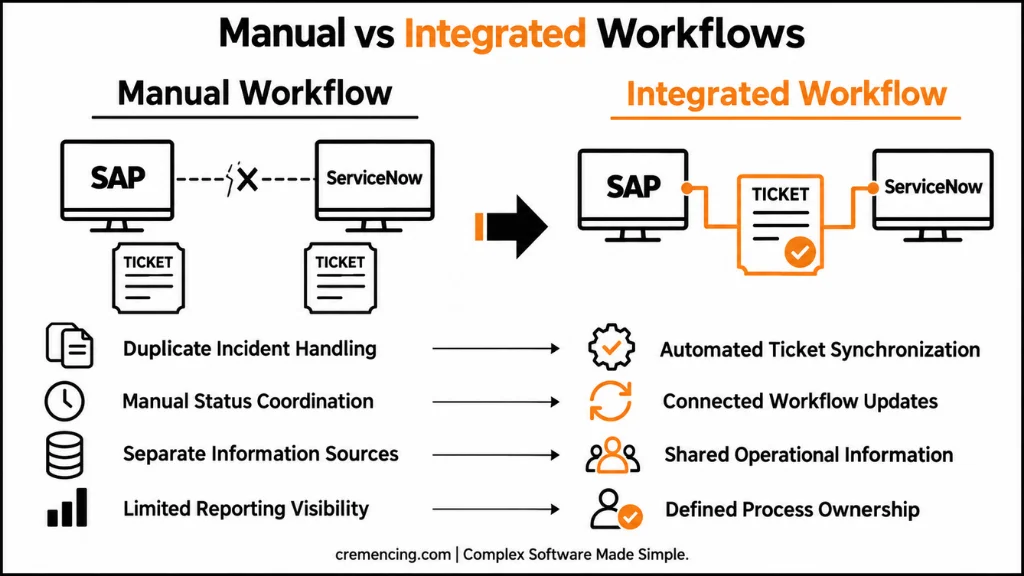
For example, an employee reports an SAP application issue through ServiceNow. The service desk creates an incident record, but the SAP support team may need to create another record inside its own support process. Without integration, both teams maintain separate information, which increases manual coordination.
Over time, this creates operational issues:
- Duplicate incident records
- Different ticket statuses
- Manual updates between teams
- Longer resolution cycles
- Limited reporting accuracy
The problem is not the existence of multiple enterprise platforms. Large organizations often need different systems for different purposes. The problem is that disconnected workflows make teams spend time maintaining information instead of resolving business issues.
A well-designed SAP ServiceNow Integration approach connects these processes while keeping each platform responsible for the activities it manages best.
The Common Mistake Organizations Make During SAP ServiceNow Integration
A frequent mistake is approaching integration as only a technical connection between two platforms. Teams often begin by discussing APIs, connectors, and data exchange methods before defining how the business process should operate after integration.
A successful SAP ServiceNow integration requires clear decisions about:
- Which system owns the incident lifecycle
- Which platform manages user communication
- Which fields should synchronize
- How status changes should be mapped
- Who handles integration failures
For example, an organization may decide that ServiceNow manages the service desk interaction while SAP Solution Manager ITSM manages technical SAP support activities. In another scenario, ServiceNow may remain the primary ITSM platform while SAP receives selected incident information for application support.
Without these decisions, synchronization rules can create conflicts between systems. If both platforms attempt to control the same ticket status or priority information, automated updates may overwrite important changes or create inconsistent records. Integration should therefore support a defined operating model rather than simply move data between systems.
Why SAP ServiceNow Integration Is Important for Enterprise IT Operations
Modern SAP landscapes are rarely isolated environments.
Organizations may operate:
- SAP S/4HANA Cloud applications
- SAP S/4HANA on-premise systems
- SAP BTP extensions
- SAP Fiori applications
- External enterprise platforms
At the same time, IT operations teams may manage service workflows through ServiceNow.
Without integration, support processes become fragmented.
A single business issue may involve:
- End users reporting problems
- Service desk teams managing tickets
- SAP functional consultants analyzing processes
- SAP Basis teams checking system behaviour
- Development teams implementing corrections
Each team requires accurate information to complete its responsibilities.
SAP ServiceNow Integration creates a connected workflow where information moves between teams without requiring repeated manual entry.
Business Benefits of SAP ServiceNow Integration
A properly designed integration provides improvements across support operations.
Improved Incident Management
SAP incident management integration allows teams to synchronize relevant ticket information between SAP and ServiceNow. Instead of manually recreating incidents, organizations can automatically transfer important details such as:
- Description
- Priority
- Assignment information
- Status updates
- Resolution notes
This reduces administrative effort and helps support teams work from consistent information.
Better Operational Visibility
When SAP and ServiceNow workflows are connected, managers gain clearer visibility into support activities.
They can analyze:
- Open incidents
- Resolution progress
- Team workload
- Recurring application issues
This improves decision-making because reporting is based on connected operational data instead of separate system records.
Reduced Manual Workflow Activities
Manual ticket handling creates unnecessary workload for support teams.
Integration automation can reduce activities such as:
- Copying incident information
- Updating ticket status manually
- Sending repeated notifications
- Checking multiple systems for updates
The objective is not removing human involvement. SAP experts still need to analyze complex incidents and make business decisions. The objective is reducing repetitive administrative work.
How SAP ServiceNow Integration Architecture Works
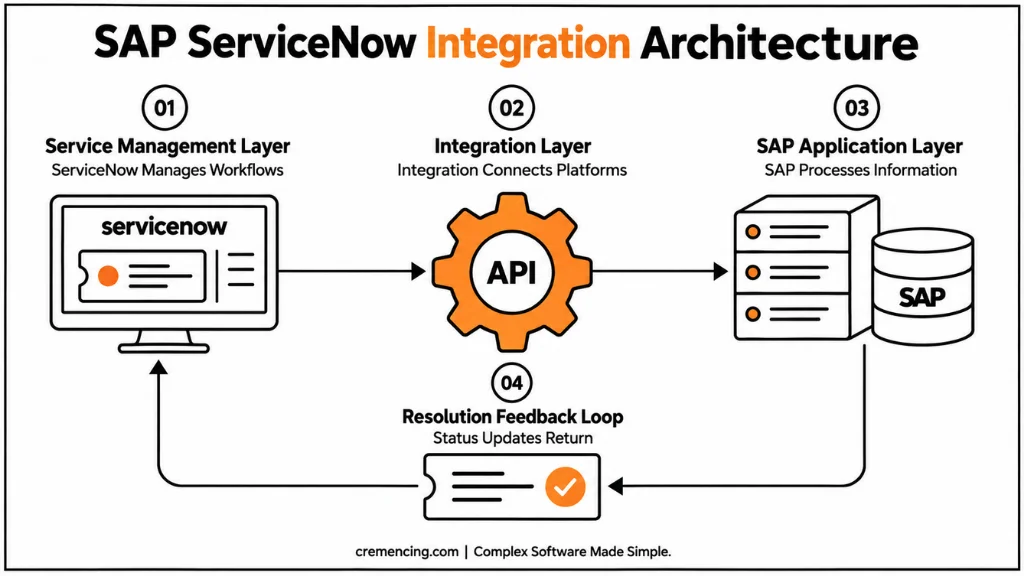
A successful SAP ServiceNow Integration requires more than a direct connection between two applications. Enterprise environments usually contain multiple SAP systems, security requirements, workflow rules, and data ownership models that determine how information should move between platforms.
A typical integration architecture contains three major layers:
- Service Management Layer
ServiceNow manages IT service workflows such as incident creation, user requests, approvals, and communication with business users.
- Integration Layer
The integration layer manages communication between ServiceNow and SAP systems. It handles activities such as data transformation, authentication, error handling, and message routing.
- SAP Application Layer
SAP systems such as SAP S/4HANA, SAP Solution Manager, or SAP BTP-based applications process the technical and business information received from ServiceNow.
A simplified integration flow looks like this:
ServiceNow Incident
↓
Integration Platform / Connector
↓
SAP System
↓
Technical Processing and Resolution
↓
Status Update Back to ServiceNow
The integration layer is important because SAP and ServiceNow do not always use identical data structures.
For example, ServiceNow may use an incident priority model based on impact and urgency, while SAP ITSM processes may use different priority classifications. The integration must translate these values correctly so both systems maintain consistent information.
Role of SAP BTP in SAP ServiceNow Integration
SAP Business Technology Platform can play an important role when organizations require flexible integration between SAP applications and external platforms.
SAP BTP provides capabilities for:
- Integration development
- API management
- Application extensions
- Data connectivity
- Workflow automation
For organizations using SAP S/4HANA Cloud or hybrid SAP landscapes, SAP BTP can act as an integration layer between SAP and ServiceNow.
For example:
A company may use ServiceNow for enterprise IT service management while SAP S/4HANA Cloud manages business operations. SAP BTP can help connect these systems by handling communication, security requirements, and data transformation. The advantage of using an integration layer is that SAP and ServiceNow remain independent systems while still participating in connected workflows.
This approach is especially useful when organizations have multiple integrations beyond ServiceNow, such as external applications, partner platforms, or additional cloud services.
Understanding ServiceNow SAP Integration Hub and ServiceNow SAP Integration Spoke
ServiceNow provides integration capabilities that help connect enterprise applications with its workflow platform.
The ServiceNow SAP Integration Hub approach focuses on connecting SAP systems with ServiceNow processes through predefined integration capabilities and workflows.
Organizations can use these capabilities to support scenarios such as:
- Incident synchronization
- User information exchange
- Asset information sharing
- Business process automation
The ServiceNow SAP Integration Spoke provides reusable integration actions that help ServiceNow communicate with SAP systems.
A spoke-based approach allows organizations to create integration workflows without developing every connection manually from the beginning.
However, the technical configuration alone does not guarantee successful integration.
Teams still need to define:
- Which SAP objects should be synchronized
- Which ServiceNow records require SAP information
- How errors should be handled
- Which system owns each business process
The integration technology enables communication, but process design determines whether the integration delivers operational value.
Common SAP ServiceNow Integration Use Cases
Organizations implement SAP and ServiceNow integration for different operational scenarios depending on their support model.
1. SAP Incident Management Integration
Incident management is one of the most common integration scenarios. Many organizations use ServiceNow as the central service desk platform while SAP teams manage application-level investigation. Without integration, support agents may manually create duplicate SAP incidents after receiving user requests.
With SAP incident management integration, relevant information can move automatically between systems.
A typical process:
A user reports an issue in ServiceNow. The incident information is transferred to the SAP support process. SAP consultants investigate the issue. Resolution details are synchronized back to ServiceNow. This reduces manual updates and provides better visibility for both technical teams and business users.
2. SAP Change Management Integration
SAP changes often require structured approvals and controlled deployment processes. ServiceNow may manage enterprise change requests, while SAP teams manage technical implementation activities.
Integration helps connect these activities.
For example:
- A change request is approved in ServiceNow.
- The SAP team receives the required information.
SAP transport activities are completed according to SAP change procedures. The implementation status is updated back into the service management workflow. This creates better alignment between IT governance and SAP delivery processes.
3. SAP Configuration and Asset Information Synchronization
Large enterprises need accurate information about their systems and technical assets. ServiceNow maintains configuration information through its Configuration Management Database (CMDB). SAP environments contain important application and system information.
Integration can help synchronize relevant configuration information between platforms.However, organizations should carefully define what information should be shared. Synchronizing unnecessary data increases maintenance effort and can create inconsistent records.
4. SAP Workflow Automation With ServiceNow
Organizations often use ServiceNow workflows to automate approvals, notifications, and service processes.
Connecting SAP with ServiceNow extends this automation capability.
Examples include:
- SAP access requests
- User provisioning workflows
- Business approval processes
- Application support requests
The integration allows users to interact with a consistent service process while SAP systems continue managing business transactions.
SAP ServiceNow Integration vs. Manual Workflow Management
| Area | Manual SAP-ServiceNow Process | Integrated SAP-ServiceNow Workflow |
| Incident creation | Teams recreate information manually. | Relevant ticket data is synchronized automatically. |
| Status updates | Users update multiple systems separately. | Changes can flow between connected platforms. |
| Reporting | Data exists in separate systems | Operational information is easier to analyze |
| Support coordination | Teams depend on manual communication. | Workflows provide better visibility |
The goal of integration is not to eliminate all manual activities. Complex SAP issues still require expert analysis. Instead, integration removes repetitive administrative tasks and allows teams to focus on resolving business-impacting problems.
Common Mistakes That Create SAP ServiceNow Integration Problems
SAP ServiceNow integration projects often fail because organizations focus on connecting systems but do not spend enough time designing the operating model behind the connection.
The technology can successfully transfer data between SAP and ServiceNow, but unclear processes can still create workflow problems.
The following mistakes commonly reduce the value of integration projects.
Mistake 1: Synchronizing Every Available Data Field
A common approach is attempting to synchronise as much information as possible between SAP and ServiceNow.
However, transferring unnecessary data increases complexity.
Teams may create:
- Duplicate records
- Conflicting updates
- Higher maintenance effort
- Difficult troubleshooting scenarios
A better approach is identifying which information supports the business process.
For example, an incident integration may only require:
- Incident description
- Priority
- Assignment information
- Status
- Resolution details
Additional data should only be synchronized when there is a clear operational requirement.
Mistake 2: Not Defining the System of Record
SAP and ServiceNow should not compete for ownership of the same process. Before integration begins, organizations should define which platform controls specific activities.
For example:
ServiceNow may manage:
- User communication
- Service requests
- Enterprise incident tracking
SAP systems may manage:
- Application-level investigation
- Business process analysis
- Technical resolution activities
Without this separation, automated updates can create conflicts because both platforms may attempt to control the same information.
Mistake 3: Ignoring Status and Priority Mapping
SAP and ServiceNow often use different workflow structures. A ServiceNow incident status such as “Resolved” may not directly match an SAP support status. Similarly, priority models may differ between platforms. If teams do not define mapping rules, reporting accuracy can suffer.
A successful integration requires agreed rules for:
- Status conversion
- Priority translation
- Assignment handling
- Closure conditions
Mistake 4: Treating Integration as a One-Time Project
SAP ServiceNow integration requires ongoing management.
Enterprise systems change over time.
Organizations may introduce:
- New SAP applications
- Updated workflows
- Additional ServiceNow processes
- New security requirements
Integration monitoring and governance should continue after implementation. Regular reviews help ensure that synchronization rules still support business requirements.
Conclusion
With SAP ServiceNow Integration, organizations can connect enterprise applications and service management workflows without having to coordinate manually between teams. The real value is in establishing transparent ownership models, data mapping, and managed data synchronization between SAP systems and ServiceNow processes.
In many ways, connected workflows will be of growing importance as SAP landscapes keep growing and expanding into cloud platforms and integrated enterprise applications. Those that see integration as a business process improvement effort rather than merely a technical link can minimize support bottlenecks, increase operational visibility, and build more efficient IT service operations.
Frequently Asked Questions
What is SAP ServiceNow Integration?
SAP ServiceNow Integration provides a seamless exchange of information between business systems and IT service management processes. It is designed to ensure that incidents, requests, changes and operational information are synchronized and minimizes manual updates between SAP teams and service desk teams.
What is the reason companies use integration between SAP and ServiceNow?
To minimize workflow delays due to disconnected support processes, companies are integrating SAP with ServiceNow. A ServiceNow SAP integration approach enables information to be exchanged automatically, more incidents to be seen and tracked in ServiceNow, and SAP to be used with accurate information to support the incident without having to recreate the incident.
How does SAP ServiceNow Integration work?
SAP ServiceNow Integration usually involves an API, a connector, or a platform that facilitates the exchange of data and information between the two systems. While SAP and ServiceNow still manage their business processes, the integration layer takes care of authentication, data transformation, and message processing.
ServiceNow SAP Integration Hub?
ServiceNow SAP Integration Hub offers integration capabilities that can be used to integrate SAP systems with ServiceNow workflows. It is used to enable information exchange between SAP applications and ServiceNow processes such as incident management, workflow automation and enterprise service operations, among others.
What are the advantages of SAP ITSM integration?
The integration of SAP ITSM enables organizations to link service management workflows to the processes of the SAP application support. It provides better visibility of incidents, fewer manual tickets and assists teams to coordinate resolution actions across enterprise applications and IT service management systems.
References
SAP Integration Suite Documentation
Business Technology Platform Documentation
Solution Manager IT Service Management





3 Responses