
Introduction
A Fiori TCode provides a direct way to launch or manage SAP applications and Fiori-related functions, making it useful for SAP users, developers, and administrators working with SAP GUI and the Fiori Launchpad. However, not every Fiori-related transaction serves the same purpose, and SAP has replaced some older transactions with newer Launchpad administration tools.
The problem is that many guides still treat every Fiori-related T-code as part of the same adHowever, not every Fiori-related transaction serves the same purpose, and SAP has replaced some older transactions with newer Launchpad administration tools.
The problem is that many guides still treat every Fiori-related T-code as part of the same administration model. As a result, SAP administrators and developers often struggle to understand how these transactions fit across SAP GUI, Fiori Launchpad, OData services, roles, catalogues, and newer spaces-and-pages designs.
Administration model. As a result, SAP administrators and developers often struggle to understand how these transactions fit across SAP GUI, Fiori Launchpad, OData services, roles, catalogues, and newer spaces-and-pages designs.
This guide focuses on the transaction codes that still have practical value, what each one actually does, and where older tools such as the classic Launchpad Designer no longer represent SAP’s current direction. The goal is not simply to memorize T-codes. It is to understand which transaction belongs to navigation, authorization, service administration, or Launchpad content management—and which ones require a release or deployment-model qualification.
What Is a Fiori TCode in SAP?
A Fiori-related T-code is not a separate type of transaction. Instead, this standard SAP transaction launches an application or helps administrators perform a specific task within the Fiori environment.
For example, /UI2/FLP starts the Fiori Launchpad in supported ABAP-based environments, while PFCG is used to maintain roles and authorizations. Other transactions support service administration or Launchpad content management. SAP also uses transaction codes as technical identifiers for applications in the Launchpad; for SAPUI5 Fiori apps, the transaction code often corresponds to the SAP Fiori ID.
We should also notice that while Fiori has a web-based experience, the backend configuration still heavily depends on SAP GUI. This is the reason why knowing Fiori TCode in SAP GUI still matters for administrators, consultants, and developers.
These TCodes are used for:
- Launching the Fiori Launchpad
- Managing catalogues, tiles, and groups
- Configuring user roles and authorizations
- Monitoring and troubleshooting app behaviour
| T-Code / Tool | Primary purpose | Current relevance | Main qualification |
|---|---|---|---|
/UI2/FLP | Start Fiori Launchpad | Current in supported ABAP-based environments | Deployment/release dependent |
PFCG | Roles and authorizations | Current | Used for role/catalog authorization administration |
/UI2/FLPAM | Launchpad app/content administration | Current | Current S/4HANA Launchpad administration |
/UI2/FLPCM_CUST | Business-catalog content management | Current | Current S/4HANA administration |
/IWFND/MAINT_SERVICE | OData service administration | Current in applicable Gateway/on-premise scenarios | Not a universal Cloud Public Edition transaction |
SICF | ICF service administration | Current in applicable ABAP/on-premise scenarios | Activate only required services |
/UI2/FLPD | Classic Launchpad Designer | Deprecated | Do not present as the default current tool |
Fiori TCode for Launching the Fiori Launchpad
Some of the key TCodes are:
- /UI2/FLP – Launch Fiori Launchpad
- /UI2/FLPD – Launchpad Designer
- /UI2/FLPCM – Fiori Content Manager
- SICF – Activate services
- /IWFND/MAINT_SERVICE – Manage OData services
SAP also provides the Fiori Launchpad Content Manager for maintaining business catalogue content, with /UI2/FLPCM_CUST used for customer-specific changes. These T-codes help SAP teams maintain and manage the Fiori ecosystem in modern S/4HANA environments, particularly when working with Fiori administration and configuration. If you are moving users from the classic SAP interface into Fiori, see our guide on how to launch SAP GUI from SAP Fiori for the reverse navigation scenario.
Navigation and Access in Fiori T-Codes Step by Step
Step-by-step learning on the usage of Fiori TCode can help users in this context, as it enhances one’s speed and accuracy while navigating through SAP systems.
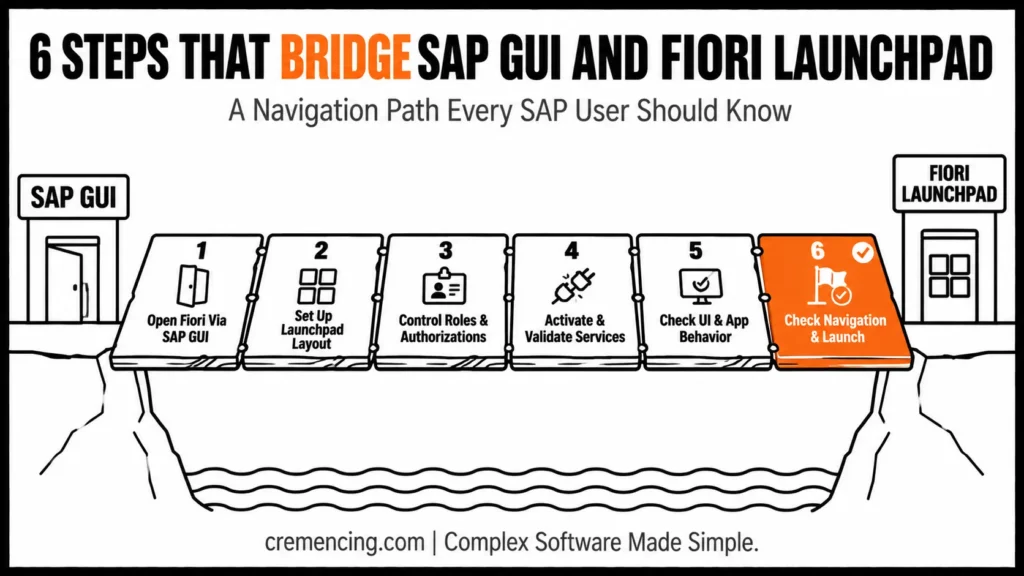
Step 1 – Open Fiori using SAP GUI
SAP GUI is the most frequently utilized entry point.
Enter /UI2/FLP
This will launch the Fiori Launchpad in a browser
This is a common approach as a standard Fiori t-code from the GUI.
It helps them to access the Fiori apps without any manual screen navigation.
Step 2 – Set up Your Launchpad Layout
To manage how apps appear:
- Use /UI2/FLPD
- Customize groups and catalogs
- Assign tiles based on roles
This step affects the user experience and accessibility directly.
Step 3. How to control roles and authorizations
It controls security and access through:
- PFCG for role assignment
- Catalog and group mapping
This is exactly where Fiori Tcodes for security comes into play!
Role design is very important, or users will not see the right apps.
Step 4– Services Activation and Validation
Many Fiori applications depend on backend services such as OData services, while the exact technical dependencies vary by app. Use the SAP Fiori apps reference documentation to verify the services and components required for a specific application.
- Activate OData Services -> /IWFND/MAINT_SERVICE
- Check SICF for service activation
These steps help ensure apps work correctly.
Step 5 – Check the UI and App Behavior
UI5 components are used by Fiori apps.
- Identify and check dependencies in the UI5 apps library
- Check performance and loading times
This way, you will ensure a smooth user experience.
Step 6 – Check Navigation and Launch
Finally:
- Launch apps from Fiori Launchpad
- Validate navigation paths
- Test end-to-end scenarios
Thus, the Fiori t-code launch process is done, and everything works as expected.
Why Use Fiori TCodes—Benefits and ROI
This is your overview on how to use Fiori T-Codes effectively across organizations for measurable improvements.
Key Benefits
- Reducing unnecessary navigation steps by giving users role-appropriate access to frequently used applications.
- Make it easier to get to commonly used applications
- Improve troubleshooting efficiency
- Enable faster system configuration
Operational Benefits
- Reduced dependency on manual navigation
- Faster issue resolution
- Improved user experience
Business Impact
- Increased user productivity
- Faster onboarding for new employees
- Higher adoption of SAP Fiori
- Lower training and support costs
Improved efficiency and system usability often come to organizations using TCodes as the integration between SAP GUI and Fiori navigation.
Frequent Errors to Avoid When Using Fiori TCodes
A lot of them actually stem from an incorrect understanding of Fiori TCodes.
Common Mistakes
- SAP GUI & Fiori are being considered as different systems
- Using incorrect or outdated TCodes
- Ignoring role-based access design
- Skipping backend service validation
- Overlooking security configurations
These mistakes lead to:
- Missing apps
- Access errors
- Poor user experience
Best Practices
- Always validate TCodes before use
- Align roles with business processes
- Test apps in real scenarios
- Monitor performance regularly
- Implement proper authorization controls
For example, administrators should carefully manage Fiori TCodes for security and grant users only the permissions they need.
Why Does It Still Feel Like Navigation Is Complex?
Common discussions around navigation are either naming a TCode or two, while missing the real issue: the complexity of navigation.
T-codes are not maxed out; there is no shortage. It is how you use them in the design of your system.
What Most Teams Miss
- Discrepancy between roles and the infant’s applications
- Overloaded launchpads with unnecessary tiles
- Lack of Seamless Transition between SAP GUI and Fiori
Deeper Insight
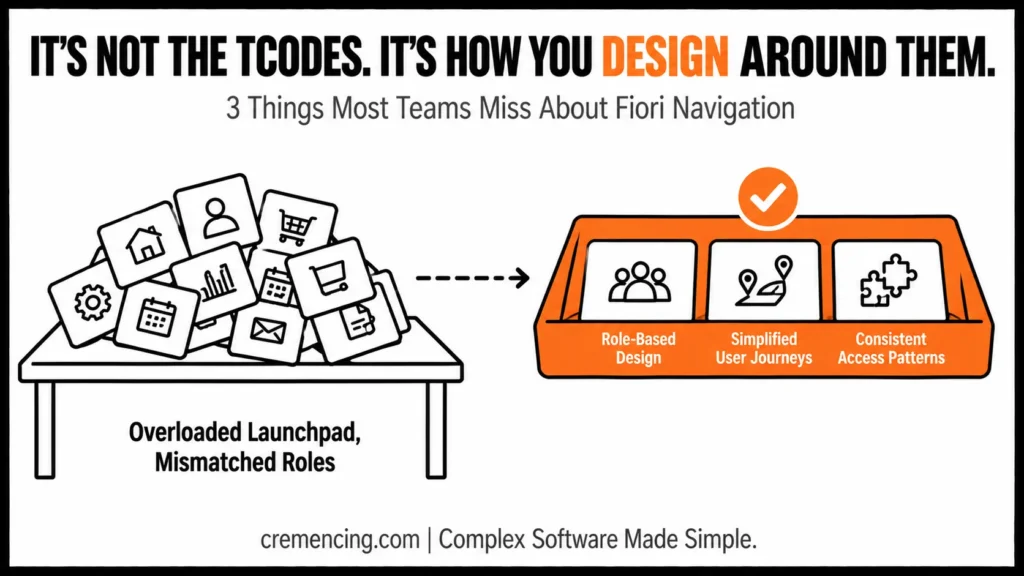
Successful organizations focus on:
- Role-based navigation design
- Simplified user journeys
- Consistent access patterns
They don’t configure Fiori; they configure it with user behavior in mind.
Resolve confusion and drive adoption of the overall system. Tips on optimizing SAP Fiori navigation and configuration?
Alignment of Fiori environment designs with actual business requirements is what our experts assist you with. Reach out to enhance your SAP user experience.
Conclusion
Therefore, knowing the right Fiori TCode is less about memorizing transactions and more about understanding which tool fits the task and SAP release. More importantly, the key skill is understanding what each transaction controls and whether it belongs to your specific SAP release and deployment model.
For everyday Launchpad access, /UI2/FLP remains an important transaction in supported ABAP-based environments. However, for administration, the landscape has moved beyond the classic Launchpad Designer. Instead, current S/4HANA documentation points administrators toward tools such as /UI2/FLPAM, /UI2/FLPCM_CUST, and PFCG, while /IWFND/MAINT_SERVICE and SICF remain relevant for applicable service-administration scenarios.
As a result, that distinction makes troubleshooting much more structured. Instead of assuming that a missing Fiori app is a Launchpad problem, check the user’s role, catalogue, target mapping, application dependencies, services, and authorisations in sequence.
Ultimately, the goal is not to replace SAP GUI with a collection of Fiori shortcuts. It is to give each user the right application, through the right Launchpad content, with the right authorization and the fewest unnecessary navigation steps.
FAQ
What is a Fiori TCode in SAP?
This t-code is used with Fiori apps, managed and accessed from SAP GUI.
How to Start Fiori from SAP GUI?
Fiori Launchpad OPEN the TCode /UI2/FLP.
What is Fiori TCode/UI2/FLP?
/UI2/FLP is the SAP GUI transaction code used to launch the SAP Fiori Launchpad in a browser.
It provides users with a role-based, tile-driven interface to access Fiori apps.
What is the difference between a Fiori app ID and a transaction code?
A Fiori app ID identifies the application, while a transaction code is the technical identifier used to launch or represent an application in the SAP system. For SAPUI5 Fiori apps, the transaction code often corresponds to the Fiori ID.
Is /UI2/FLPD still recommended for SAP Fiori?
No. SAP’s current documentation identifies the classic Launchpad Designer functionality as deprecated and points administrators toward newer tools such as /UI2/FLPAM and /UI2/FLPCM_CUST.
What T-code is used to maintain SAP Fiori roles?
PFCG is used to maintain authorization roles and assign relevant business catalogs and authorizations to users.
What is /UI2/FLPAM used for?
/UI2/FLPAM The Launchpad App Manager is used for relevant Launchpad applications and technical-content administration in current SAP environments.




