
Introduction
Every hour an admin spends guessing which T-code fixes a broken launchpad tile is an hour of downtime users feel directly — missing apps, blocked workflows, support tickets stacking up. Most SAP Fiori guides describe individual transactions in isolation, but they rarely explain how launchpad configuration, role assignment, backend services, and error logs actually connect during a real incident.
That gap is what turns a five-minute fix into an afternoon of trial and error. This SAP Fiori TCode guide closes it: a structured, step-by-step reference for managing catalogues, resolving errors, and keeping your Fiori environment stable — built around how admins actually troubleshoot, not just what each transaction does in isolation.
SAP Fiori Administration Tools
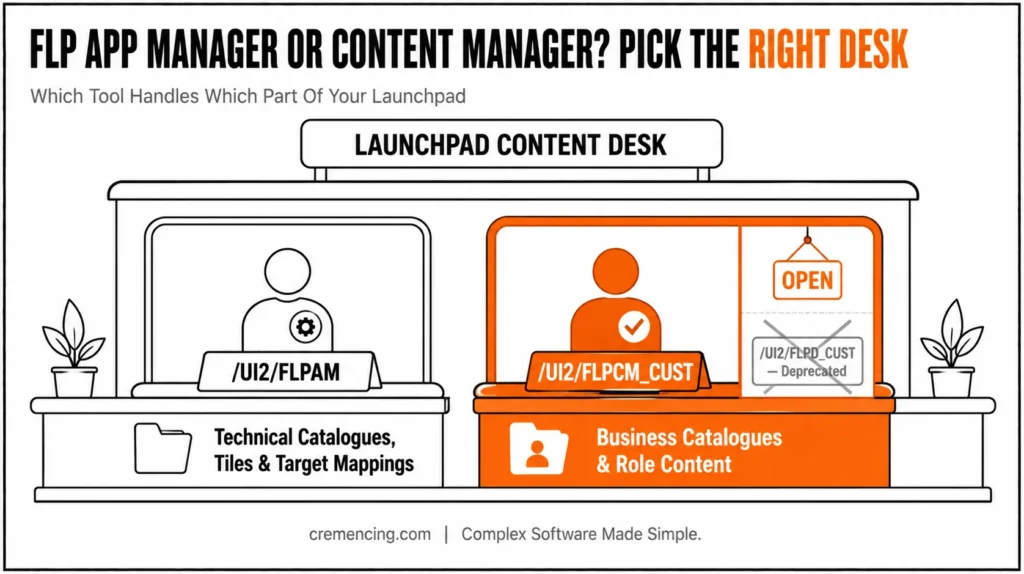
Essentially, modern SAP Fiori administration requires transitioning from legacy utilities to specialized GUI transaction codes for launchpad content and service governance. Specifically, content creation relies on the SAP Fiori Launchpad App Manager (/UI2/FLPAM) for maintaining technical catalogs, tiles, and target mappings; additionally, it relies on the SAP Fiori Launchpad Content Manager (/UI2/FLPCM_CUST) for managing business catalogs, and furthermore, on role assignments via transaction PFCG.
Meanwhile, OData and ICF service activation are handled through /IWFND/MAINT_SERVICE and SICF, respectively. Consequently, when app tiles fail or fail to render, administrators diagnose frontend and backend operational issues using SAP Gateway error logs (/IWFND/ERROR_LOG and /IWBEP/ERROR_LOG); in conjunction with this, they also rely on ABAP runtime dump analysis (ST22) to pinpoint the root cause.
What Is a SAP Fiori TCode Guide & Its Benefits
Simply, SAP Fiori tcodes are transaction codes that help you to manage and configure SAP Fiori applications, launchpad settings, and backend services using SAP GUI.
Although Fiori has modernized the presentation layer, admins still perform all administrative functions through SAP GUI. It is one of the main reasons for system administrators and SAP consultants to know how to properly use these T-codes.
Some of the major functions of SAP Fiori T-Codes are as follows:
- Launching the Fiori Launchpad
- Managing catalogues and groups
- Assigning roles and authorizations
- Activating OData services
- Monitoring and resolving errors
Some commonly used T-codes include:
- /UI2/FLP – Launch Fiori Launchpad
- /UI2/FLPD – Launchpad Designer
- /UI2/FLPCM – Fiori Content Manager
- /IWFND/ERROR_LOG – Error log monitoring
- PFCG – Role management
If the launchpad issue involves a custom application rather than SAP-delivered content, review how the app, OData service, semantic navigation, catalog, and role fit together before changing the configuration.
SAP Fiori TCode Guide for Catalogue Management
This SAP Fiori TCode Guide provides a practical approach for administrators who need to manage launchpad content, roles, services, and troubleshooting tasks.
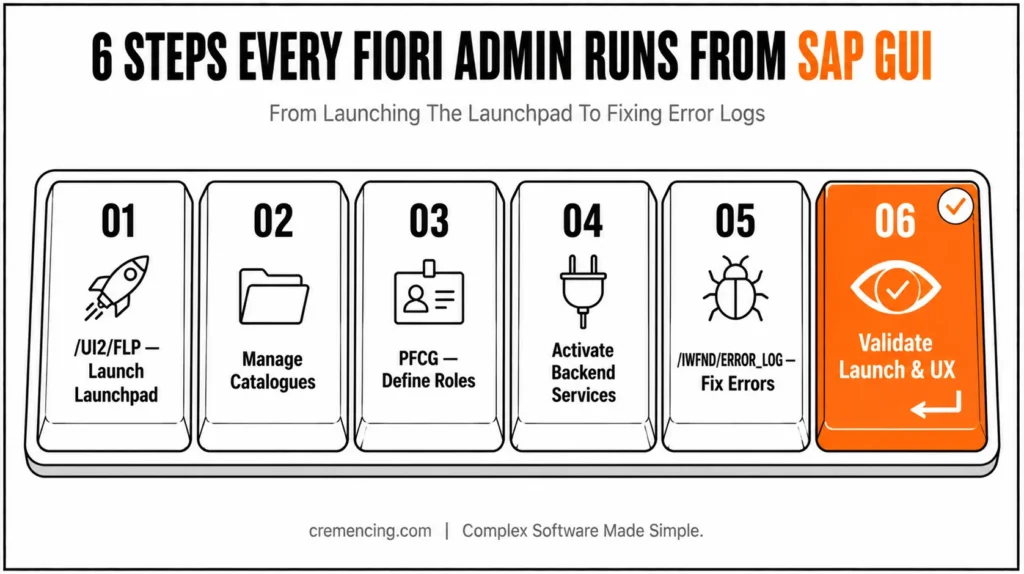
Step 1—SAP Fiori TCode Guide Step 1 — Launch Fiori Launchpad from SAP GUI
From the GUI, use the standard SAP Fiori T-code.
Enter /UI2/FLP
This will open the Fiori Launchpad in a browser
Step 2 – SAP Fiori TCode Guide Step 2 – Handle the Launchpad Catalogues
Catalogues determine what apps the users can access.
Use:
- Use
/UI2/FLPAMfor technical catalog/app descriptor content and relevant tile/target-mapping administration. - Use
/UI2/FLPCM_CUSTfor business catalogues and role-related content. - Use Manage Launchpad Spaces and Manage Launchpad Pages for the current launchpad layout.
- Use
PFCGto assign catalogues, spaces, and pages to authorization roles where applicable.
Tasks include:
- Creating catalogs
- Assigning tiles
- Organizing groups
That is where the t-code Fiori catalogue plays a very important role.
Step 3 – Define Roles and Permissions
Use PFCG to assign roles.
- Map catalogues to roles
- Assign roles to users
- Validate authorization objects
Without proper role configuration, users will not see apps in the launchpad.
Step 4 – SAP Fiori TCode Guide Step 4 – Enable Backend Services
Backend services are the basis on which Fiori apps reside.
Use:
- /IWFND/MAINT_SERVICE to activate OData services
- SICF to activate ICF services
This makes sure that apps can work properly in a Fiori T-code launchpad environment.
Step 5 – View and Fix Error Logs
Fiori administration has a lot to do with error handling.
Use:
- /IWFND/ERROR_LOG to view errors
- ST22 for ABAP dumps
- SMICM for connectivity issues
These tools can pinpoint issues related to:
- Missing services
- Authorization failures
- Data inconsistencies
This is why SAP Fiori TCode error log management became so widely used.
Step 6 – Validate Launch & User Experience
After configuration:
- Test app access from the launchpad
- Validate role-based visibility
- Check performance and response time
This concludes the Steps for SAP Fiori t-code launch process.
SAP Fiori TCode Guide: Which Administration Tool Should You Use?
| Tool | Primary purpose | Current status | Typical use |
|---|---|---|---|
/UI2/FLP | Launch Fiori Launchpad | Current | Access/testing |
/UI2/FLPAM | Launchpad App Manager | Current | Technical catalogues, app descriptor items, tiles/target mappings |
/UI2/FLPCM_CUST | Client-specific Content Manager | Current | Business catalogues and role content |
/UI2/FLPD_CUST | Launchpad Designer | Deprecated for important functions | Legacy/remaining designer scenarios |
PFCG | Authorization roles | Current | Assign catalogs/spaces/pages and maintain roles |
/IWFND/MAINT_SERVICE | Gateway OData service administration | Scenario-dependent | Register/activate applicable OData services |
/IWFND/ERROR_LOG | Gateway frontend error log | Current | Diagnose OData request errors |
/IWBEP/ERROR_LOG | Gateway backend error log | Current | Diagnose backend service-processing errors |
SAP explicitly documents the replacement of important Launchpad Designer functionality by FLP App Manager and Content Manager. Before changing launchpad content, it also helps to understand how SAP Fiori apps, catalogues, roles, and implementation information connect across the broader Fiori ecosystem.
ROI and Benefits of Following This SAP Fiori TCode Guide
As a result, making use of SAP Fiori t-codes comes in handy not just for technical efficiency but business value as well.
Key Benefits
- Automatic Time Consumption Reduction up to 40% on Troubleshooting
- Improve system stability
- Enable faster issue resolution
- Simplify launchpad configuration
Operational Benefits
- Better control over app access
- Faster deployment of new apps
- Reduced dependency on manual processes
Business Impact
- Improved user productivity
- Reduced downtime
- Better system adoption
- Lower support costs
With the right SAP Fiori T-code list, organizations can manage their Fiori environments efficiently. Admins managing catalogues should also be familiar with the SAP Fiori ecosystem and how apps, launchpad login, and the library actually connect.
SAP Fiori TCode Guide: Avoiding Common Mistakes
Wrong use of T-codes results in a lot of issues.
Common Mistakes
- Not activating required OData services
- Incorrect role and catalog assignments
- Ignoring error logs
- Using outdated configuration methods
- Validation of changes in real scenarios has not been done
These mistakes often result in:
- Missing apps in Launchpad
- Access errors
- Performance issues
Best Practices
- Always validate backend services
- T-codes must be used to perform each of the tasks
- Monitor logs regularly
- Implement role-based access
- Test changes before deployment
Therefore, the Fiori Launchpad Designer T-code should be used carefully to avoid misconfiguring the launchpad.
SAP Fiori TCode Guide: Why Errors Still Take Too Long to Resolve
Few guides cover configuration, with little mention of error handling.
Setting up in the Fiori administration is not the real challenge; troubleshooting is.
What Most Teams Miss
- Proactive monitoring of error logs
- Frontend and Backend troubleshooting integration
- Focus on the root cause rather than the symptoms
Advanced Insight
Efficient administrators focus on:
- Identifying error patterns
- Automating monitoring processes
- Log-based system characterization to make better designs
This results in reduced system downtime and enhanced reliability.
Our experts can help you optimize your Fiori configurations, enhance performance, and minimize downtimes. Reach out to us to optimize your SAP Fiori landscape.
Conclusion
SAP Fiori Tcode or Transaction Code to enhance your SAP FIORI environment. This SAP Fiori T-code guide
enables you to exert control over everything ranging from launchpad configuration to the resolution of errors.
That’s why this step-by-step method can help admins save troubleshooting time and improve both user experience and availability through reliable performance.
Therefore, the SAP Fiori TCode Guide approach is simple: identify the administration layer, choose the appropriate transaction, validate the configuration, and use the relevant logs when troubleshooting.
FAQs
Q1: What exactly is SAP Fiori TCode?
Essentially, SAP Fiori TCode is a transaction code used within SAP GUI to manage Fiori apps, catalogues, roles, and configurations.
Q2: What is the TCode for Fiori Launchpad?
Simply put, /UI2/FLP is used to open the SAP Fiori Launchpad. Therefore, admins can access the entire launchpad through this single transaction.
Q3: Which T-codes are used for catalogue management?
Typically, /UI2/FLPCM and /UI2/FLPD are used to manage Fiori catalogues and groups. Additionally, these tools allow admins to organize apps into the correct catalogues efficiently.
Q4: How do you check Fiori error logs?
To troubleshoot errors effectively, /IWFND/ERROR_LOG is used. Consequently, admins can quickly identify backend service issues before they escalate.
Q5: Which T-code is used for role management in Fiori?
For this purpose, PFCG is used to create and manage roles and authorizations. Without proper role configuration, however, apps will not appear in the launchpad at all.
Q6: Why is the SAP Fiori T-code guide important?
Overall, this guide helps admins manage configurations, resolve errors quickly, and control user access efficiently. As a result, troubleshooting time is significantly reduced.
Q7: What is /UI2/FLPCM_CUST used for?
Specifically, /UI2/FLPCM_CUST is the client-specific SAP Fiori Launchpad Content Manager transaction. Furthermore, it is used for client-dependent administration of launchpad content, including business catalogues and role-related content.
Q8: What replaced important SAP Fiori Launchpad Designer functions?
According to SAP documentation, the Launchpad App Manager (/UI2/FLPAM) and Launchpad Content Manager (/UI2/FLPCM_CUST) have replaced key Launchpad Designer functions. Nevertheless, the exact replacement depends on whether the task involves technical catalogues, app descriptor items, tiles, target mappings, or business catalogues.
Q9: Why is enabling backend services so important?
Since Fiori apps depend entirely on backend services, activating these services correctly is a fundamental requirement. Otherwise, apps will not function properly in the launchpad, even if catalogues and roles are configured correctly.
Q10: What should admins validate after completing configuration?
Finally, once the launchpad has been launched, admins should validate app visibility, navigation, and overall user experience. In this way, any residual issues can be caught before they reach production.
Resources
SAP Fiori Overview (Official)
Fiori Launchpad Guide
AP Gateway Error Log




