
Introduction
The SAP Solution Manager has been a decades-old powerhouse of enterprise application management, shepherding companies through system monitoring and project management, as well as compliance.
Nevertheless, as SAP Cloud ALM gains momentum and SAP is indicating the gradual phase-out of Solution Manager, most IT teams are now weighing a Solution Manager Cloud Migration without being sure what platform to switch to. Making the wrong decision may result in wasted resources, integration issues, and operational inefficiencies being missed.
A detailed breakdown of the 2027 Solution Manager deadline
In this paper, we will compare SAP Cloud ALM and Solution Manager in the year 2026, their strengths, weaknesses, and long-term feasibility. You will find out the way each platform deals with system monitoring, deployment, testing, and lifecycle management.
We also give practical steps to transition or optimize your ALM strategy, discuss ROI, frequent mistakes, and opportunities competitors are often overlooking. At the end of it, your group will have a solid roadmap to choose the appropriate platform to the current and future needs of your organization.
Navigating the SAP ALM Transition
SAP Cloud ALM and SAP Solution Manager represent a fundamental shift in application lifecycle management (ALM) strategies for enterprise IT landscapes. Solution Manager 7.2 continues to provide deep customization and governance for legacy on-premises environments, but mainstream support ends in late 2027.
Cloud ALM, by contrast, serves as the cloud-native successor, engineered for simplified deployment, seamless DevOps integration, and lower infrastructure overhead across S/4HANA and hybrid cloud setups.
Because configurations and historical data do not migrate directly between the two architectures, organizations must evaluate their cloud roadmap early, balancing Solution Manager’s complex audit capabilities against Cloud ALM’s automated, low-maintenance operational lifecycle.
SAP Cloud ALM vs Solution Manager Cloud Migration
SAP Cloud ALM is a cloud-based Application Lifecycle Management system designed to support SAP S/4HANA and other SAP solutions on the cloud. The main objective is simplicity, agile and complete integration with SAP cloud services.
SAP Solution Manager, in turn, is the old on-premise ALM solution that offers rich functionality in monitoring, testing and managing SAP landscapes, including hybrid and on-premise environments.
Understanding this contrast is the first step before planning a Solution Manager Cloud Migration, since the two platforms differ significantly in deployment, monitoring, and long-term support.
| Feature | SAP Cloud ALM | SAP Solution Manager |
| Deployment | Cloud-native | On-premise or hybrid |
| Target Systems | Cloud (S/4HANA Cloud, SAP SaaS) | On-premise and hybrid |
| Monitoring | Simplified, automated | Detailed, highly configurable |
| Upgrades & Maintenance | Automatic SAP-managed | Manual, involves IT work. |
| Customization | Restricted to functionality built into it. | Highly customizable |
| Integration with DevOps | Native cloud integration | Requires additional setup |
The decision will be based on the IT strategy, cloud adoption, and availability of resources in your organization.
Solution Manager Cloud Migration Steps
Step 1 – Evaluate Current Landscape.
- List all of the SAP systems, modules, and integrations.
- Determine business processes and workflows that are critical to the business.
- Determine which systems are moving to the cloud
Step 2 – Assess Feature Requirements.
- Compare monitoring, project management and test automation requirements.
- Take into account the magnitude of customizations and governance policies.
- Include cloud preparedness and DevOps integration.
Step 3 – Find Platform Viability.
- SAP Cloud ALM: ideal for cloud-first, S/4HANA-centric environments
- Solution Manager: appropriate to legacy, hybrid environments.
- Detect out-of-date or less supported functionality.
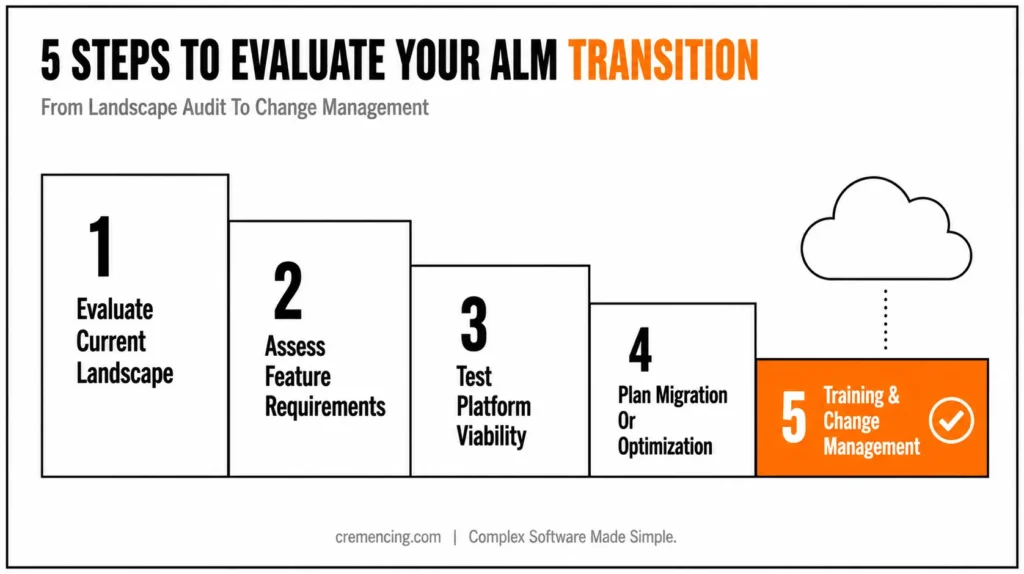
Step 4 – Plan Migration or Optimization.
- In the case of Cloud ALM, move key processes stage by stage.
- In case of Solution Manager: remove unnecessary functionalities and strategize eventual migration.
- Roll back and document risk mitigation strategies.
Step 5 – Training and Change Management.
- Train IT staff and business users on the new platform.
- Revise the policies of governance and monitoring.
- Institute continuous review to streamline ALM practices.
Solution Manager Cloud Migration: ROI
The correct platform choice can have quantifiable benefits:
SAP Cloud ALM:
- Less overhead in operations because of automated updates.
- Quicker time-to-value when it comes to cloud projects.
- Reduced the detection time of errors in simplified system monitoring.
SAP Solution Manager:
- Large on-premise monitoring and processes.
- Complete access to customizations and work processes.
- Keeps legacy systems that are vital to the operations of the present day.
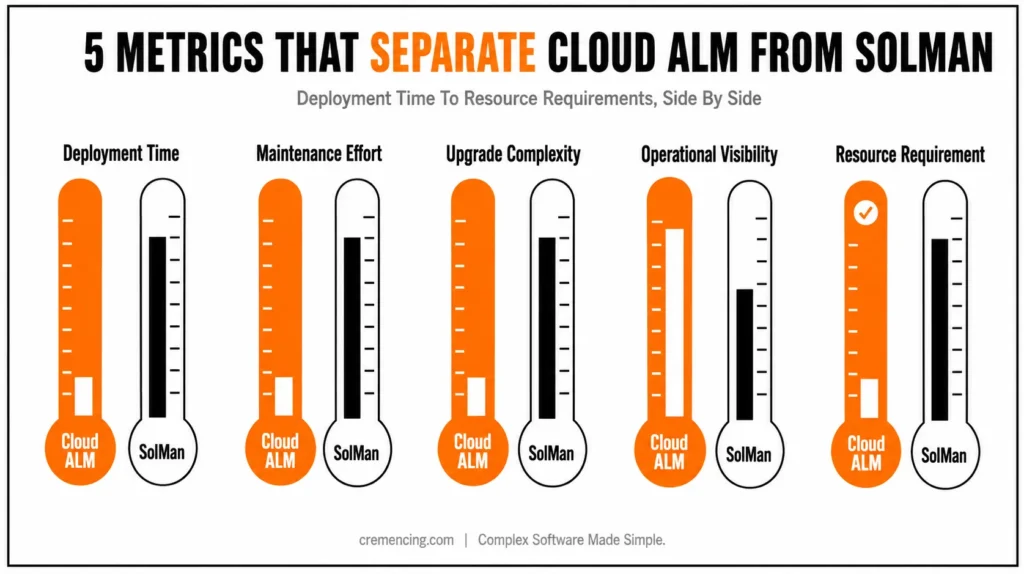
| Metric | SAP Cloud ALM | SAP Solution Manager | ROI Impact |
| Deployment Time | 1–2 weeks | 2–6 months | Cloud is 3-4 times quicker. |
| Maintenance Effort | Low | High | 50–70% effort reduction |
| Upgrade Complexity | Automatic | Manual | Cloud reduces downtime |
| Operational Visibility | Simplified dashboards | Detailed, complex | Cloud enhances real-time understanding. |
| Resource Requirement | Fewer IT staff | More IT staff | Cloud helps to save on personnel expenses. |
The strategic transition would save time and money and would help be in line with the SAP long-term cloud roadmap.
Solution Manager Cloud Migration Mistakes
Common Mistakes
- Movement without determining dependencies of hybrid systems.
- Suppose that Cloud ALM can reproduce all of the Solution Manager features.
- Underdetermining the staff training and governance requirements.
- Overlooking integration with DevOps pipelines
Best Practices:
- Carry out a complete systems and process audit before migration.
- Focus on high-impact processes to be initially transitioned.
- Give systematic training to IT teams.
- Institute monitoring policies to both existing and migrated systems.
- Adopt a gradual change to reduce operational disturbances.
Solution Manager Cloud Migration: Missed Opportunities
Many organizations only consider the compliance and feature comparison, but not the opportunities, such as:
- Improved DevOps Integration: Cloud ALM can be used to enhance modern CI/CD pipelines, compared to Solution Manager.
- Real-Time analytics: Cloud-native dashboards can give real-time information on system performance.
- Future-Proofing: Cloud ALM will meet the demands of SAP in its road to S/4HANA Cloud.
Through such opportunities, organizations will save on the expenses incurred on a long-term basis, increase the efficiency of their operations, and accelerate the digital transformation.
Conclusion
The decision in favor of using SAP Cloud ALM or Solution Manager is not a matter of choice anymore, but rather a strategic choice that impacts on the operational efficiency, compliance, and readiness to digital transformation. Although robust, Solution Manager is already being phased out and needs a lot of maintenance and customization. Cloud ALM, on the other hand, is a more modern cloud-native platform that makes monitoring easier, integrates well with DevOps, aligns with the 2026 roadmap of SAP.
A clear understanding of what the system will need, what processes are important and what the migration strategy will be? That can be guaranteed to your team to ensure that the transition will be successful without a lot of disruption. The operation efficiencies that are inaccessible to the legacy systems can be unlocked by exploiting the capabilities of Cloud ALM in terms of advanced analytics and real-time monitoring capabilities.
It is now high time to begin testing your ALM plan so that you can keep up with the SAP roadmap, as well as to future-proof your enterprise systems.
Frequently Asked Questions.
Q1: Does SAP Solution Manager support in 2026?
Yes, but SAP is gradually eliminating the basic functions and focusing on cloud-based solutions like Cloud ALM.
Q2: Is it possible to deal with hybrid systems using SAP Cloud ALM?
Yes, but also maximizes the features to the cloud-first environment; complex workflows on-premises may require more tools.
Q3: In which platform does the DevOps integration fare better?
DevOps, including CI/CD, automated deployment monitoring, etc. are intrinsically enabled by SAP Cloud ALM.
Q4: How long is the average time of a normal migration of Solution Manager to Cloud ALM?
Depending on the complexity of the system, phased migration may take 6-12 months.
Q5: Is it advisable to have both platforms operating at the same time?
In hybrid environments, the temporary requirement to operate both of them may arise, although it is not recommended to rely on Solution Manager for longer.
Q6: What happens to existing Solution Manager data after migration to Cloud ALM?
Historical data typically stays in Solution Manager unless specifically migrated, so most organizations archive it rather than transfer everything. Cloud ALM starts fresh, focusing on active monitoring and current projects going forward.
Q7: Does Solution Manager Cloud Migration require downtime for critical systems?
Not necessarily, since a phased migration approach lets you run both platforms in parallel during the transition. Critical systems can continue operating on Solution Manager until their specific processes are validated on Cloud ALM.
Q8: Can smaller SAP teams handle a Solution Manager Cloud Migration without external consultants?
Yes, particularly for simpler S/4HANA Cloud environments with fewer customizations and integrations. Larger, more complex hybrid landscapes, however, often benefit from experienced migration support.
Q9: How does Solution Manager Cloud Migration affect existing compliance and audit processes?
Compliance workflows need to be re-mapped to Cloud ALM’s simplified structure, since it doesn’t fully replicate Solution Manager’s audit depth. Organizations in regulated industries should review this gap carefully before finalizing their migration plan.
Q10: Is there a cost difference between maintaining Solution Manager versus completing a Cloud Migration?
Cloud ALM generally reduces long-term costs through automated updates and fewer required IT staff. Solution Manager, in contrast, carries ongoing maintenance and customization costs that tend to increase over time.




