

Introduction
Teams don’t fail at SAP Fiori because the apps are bad instead, they fail because nobody put a number on what “just browsing the library” actually costs. For example, a mid-size manufacturing client we worked with had six functional leads independently searching the SAP Fiori Apps Library for the same set of procurement apps over three weeks. As a result, each arrived at a different shortlist, and only then did anyone realize there was no owner for the decision. This isn’t a training problem. Rather, it’s the predictable outcome of treating a 3,000+ app catalog like a search engine instead of a selection process.
The Fiori Apps Library itself isn’t the bottleneck; it’s comprehensive, well-documented, and free to browse. The bottleneck is that most organizations skip straight to searching without first defining what “right” means for their business processes, their release (ECC vs. S/4HANA on-prem vs. cloud), and their user roles. The result: delayed go-lives, apps activated and never adopted, and rework when the “wrong” app turns out to lack a required OData service or enhancement pack.
This guide walks through why that gap exists and gives you a repeatable process, not just a tour of the library’s search filters for turning thousands of available apps into the handful your business actually needs.
What Are SAP Fiori Library Apps
Add real navigation and filter detail. Currently, this section only lists categories of information the library provides, with no mention of how to actually use it:
The public reference is the SAP Fiori Apps Reference Library (fioriappslibrary.hana.ondemand.com), and it’s filterable by:
Implementation Information — front-end/back-end component versions and required OData services, listed per app on its detail page. SAP Fiori library apps – All the SAP Fiori apps in the SAP Fiori apps library
Line of Business (Finance, Procurement, Sales, HR, etc.)
Application Type — Transactional, Analytical, or Fact Sheet (see comparison table below)
Platform — SAP S/4HANA (with release/feature-pack selector) or SAP Business Suite (ECC)
This consolidative platform offers extensive details on:
- App functionality and purpose
- Technical requirements
- SAP systems supported (including ECC and S/4HANA)
- Implementation details
- Configuration steps
The SAP Fiori App library reference guides technical and functional teams.
| App Type | Purpose | Typical Use | Example |
|---|---|---|---|
| Transactional | Create, change, or process a business object | Order entry, approvals, master data maintenance | Manage Purchase Orders |
| Analytical | Real-time KPIs and drill-down insight | Monitoring, exception-based decision-making | Overdue Receivables |
| Fact Sheet | Contextual 360° view of an object and its relationships | Research / lookup before acting elsewhere | Customer Fact Sheet |
Apps can be broadly categorized into several types:
- Transactional apps for business operations
- Reporting and insights with analytical apps
- Fact sheet apps to enhance data visibility
There are also dedicated libraries for particular modules, like the following:
- SAP MDG Fiori apps library
- SAP TM Fiori apps library
These variations add complexity but also create flexibility.
Step-by-Step Process to Find Your Apps in the Library
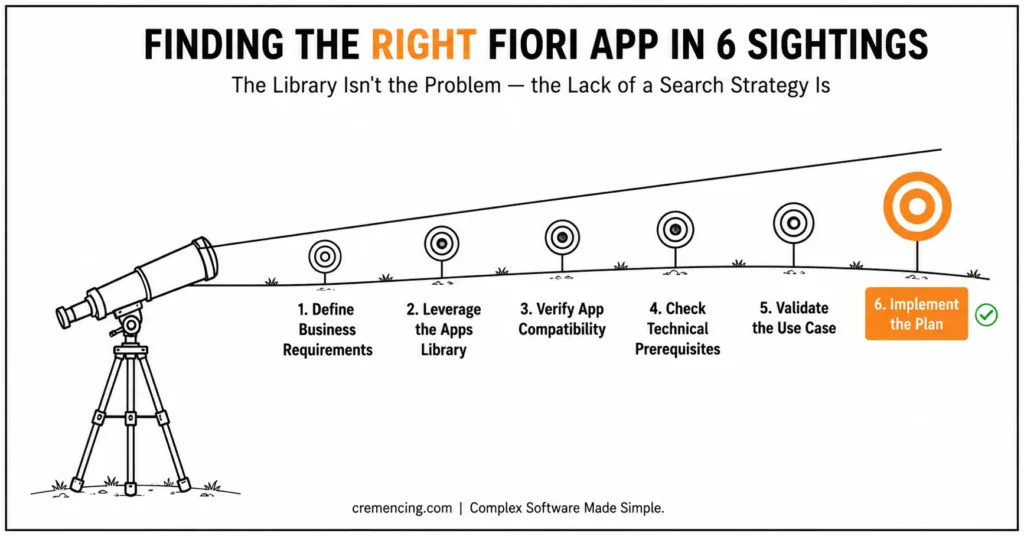
Step 1 – Define Business Requirements
Start by identifying:
- Business processes that need improvement
- User roles and responsibilities
- Key operational challenges
Clarity is key — without it, choosing an app becomes a haphazard endeavor.
Step 2 – Leverage SAP Fiori Apps Library
Visit the demo or live Fiori application library.
Search using:
- Business role
- Application type
- SAP module
This narrows it down to relevant apps.
Step 3 – Verify App Compatibility
Verify whether the app supports:
- SAP ECC or S/4HANA systems
- Required enhancement packs
- Backend configurations
This is run by organizations still running SAP ECC. Verify whether the app supports SAP ECC or S/4HANA systems, required enhancement packs, and backend configurations
Step 4 – Check Technical Prerequisites
Each app includes:
- Required components
- UI5 dependencies (per UI5 apps library)
- OData services
Not doing so results in failures to implement.
Step 5 — Validate Use Case
One, make sure that the app solves a real business problem.
For example:
- My Inbox Phone app for workflow approvals
- Finance apps for reporting
Do not choose apps based solely on features.
Step 6 — Implementing the Plan
Once selected:
- Configure backend services
- Activate required components
- Test functionality
Proper planning reduces rework.
Advantages and ROI of Implementing SAP Fiori Library Applications
Measurable outcomes are achieved by leveraging SAP Fiori library apps.
Key Benefits
- Increase the productivity of users by up to 30–40%
- Simplify complex SAP transactions
- Intuitive interfaces look and feel user-friendly
- Reduce training time
Business Impact
- Faster decision-making
- Improved process efficiency
- Better adoption of SAP systems
- Reduced operational errors
Organizations that use the Fiori apps library in a strategic manner receive a higher return on their SAP investment.
Pitfalls of SAP Fiori Apps Library
Too many teams suffer from easily avoidable errors.
Common Mistakes
- Choosing apps without a clear understanding of the business need
- Disregarding SAP ECC Compatibility
- Not reviewing technical dependencies
- Overloading users with unnecessary apps
- Skipping testing and validation
Best Practices
- Ensure app selection is aligned to business objectives
- Validate technical requirements early
- Use role-based app deployment
- Focus on user experience
- Continuously optimize app usage
Avoiding these common pitfalls leads to a smoother deployment.
Where Most Teams Lag Behind
Most teams stop optimizing the moment go-live is over, but app selection isn’t a one-time decision it’s a cycle that needs revisiting every release. SAP provides usage analytics inside the Fiori Launchpad itself (via the Manage Launchpad Spaces and Pages app and back-end usage logs) that show exactly which activated apps are being opened and which are sitting unused.
In practice, reviewing this data quarterly, not just at go-live, lets you retire apps nobody adopted, catch role assignments that never got cleaned up after a reorg, and spot gaps where a business process changed but the app mapping didn’t. As a result, teams that build this review into their release cycle can avoid the slow app sprawl that makes the next selection process even harder than the last one.
The Real Problem
The problem is not with the library itself — it’s that there is no structured selection strategy.
What Competitors Miss
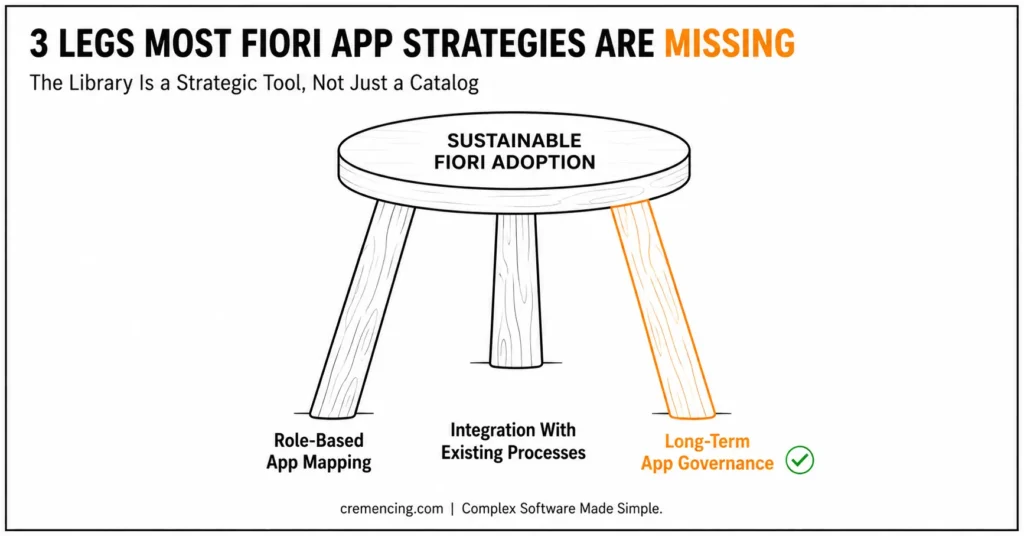
- Role-based app mapping
- Integration with existing processes
- Long-term app governance
Key Insight
You will see how successful organizations consider SAP Fiori apps library not just a catalog but rather a strategic tool.
They focus on:
- Business outcomes
- User adoption
- Continuous optimization
It gives you better results. Our professionals will help you find, implement, and optimize Fiori applications based on real business cases.
Conclusion
The SAP Fiori Apps Library was never the hard part a filterable catalogue of thousands of apps is, by definition, comprehensive. What’s hard is that most teams treat browsing it as the whole job, when it’s really just step two of six. Skip the business-requirements step, and you’ll find plenty of apps that technically work and solve nothing. Skip the compatibility and prerequisite checks, and you’ll activate apps that fail in your actual landscape.
The organizations that get this right don’t search the library less they search it with a defined role matrix, a release scope, and a validation step already in hand. That’s the difference between finding an app and finding the right one.
If you take a step-by-step approach, along with identifying requirements, validation, and avoiding pitfalls, this will help drive you to better success in bringing value from SAP Fiori. The challenge is not simply finding apps it’s finding the right ones.
FAQ Section
What is the SAP Fiori apps library?
It is basically a central place to offer information to users on available SAP Fiori applications.
SAP Fiori Apps would not be used with ECC?
So, yes some apps are there for ECC according to the system configuration.
How to find the Fiori application library demo?
SAP offers accessible demo environments and the official platform for online access.
What is the SAP Fiori app library reference?
It is the documentation that guides users on how to use app features and where the requirements are.
Is there a difference between the Fiori Apps Library and the Fiori Launchpad?
Yes, the Apps Library is a reference/research tool for discovering and evaluating apps before implementation; the Launchpad is the actual runtime environment end users log into to launch the apps you’ve activated.
How often is the SAP Fiori Apps Library updated?
SAP updates it continuously as new apps ship, particularly with each S/4HANA Cloud quarterly release and on-prem feature pack.
Do I need a business catalog for every Fiori app I activate?
Yes every app is assigned to a business catalog, which is then added to a business role via PFCG; apps can’t be launched without this assignment.
Can business users access the Fiori Apps Library directly, or is it for IT only?
It’s public and free to browse, so business stakeholders can review candidate apps themselves though technical validation (OData services, enhancement packs) still needs IT involvement.
What’s the difference between a demo app and a live app in the library?
The library’s “Try Out” links open a sandboxed demo using sample data; the live app only becomes available in your system once the underlying business catalog and role are activated and assigned.




