Introduction
Today, enterprise systems are not just stand-alone applications but are cloud-based, API-driven, and tightly coupled to financial, supply chain, and analytics processes. But most Node.js developers are at a loss when it comes to moving from basic backend development to SAP-grade enterprise. This CAP Node.js tutorial for SAP BTP is built to close exactly that gap — with a systematic, hands-on approach.
You will see how the SAP Cloud Application Programming Model (CAP) provides standardised backend development, how to execute business logic with Node.js, and how scalable deployment in the cloud is achieved by using SAP Business Technology Platform (SAP BTP) in an SAP-based enterprise application.
Building CAP Applications on BTP
The SAP Cloud Application Programming Model (CAP) streamlines enterprise development by decoupling core domain modeling from runtime business logic. Core Data Services (CDS) define data structures and service projections, while custom event handlers written in Node.js execute transactional validations and transformations.
Local development relies on SQLite and live-reloading toolchains for rapid iteration. Deploying the application to SAP Business Technology Platform (SAP BTP) via Cloud Foundry seamlessly binds these service handlers to enterprise-grade SAP HANA persistence and enterprise integration services.
CAP Node.js on SAP BTP
Before diving into this CAP Node.js tutorial, it helps to understand what CAP actually is. The SAP Cloud Application Programming Model (CAP) is a framework that makes developing enterprise applications on SAP BTP simpler, leveraging either Java or Node.js.
CAP is a structured programming model that enforces best practices by design, instead of handling infrastructure manually.
Core Concepts Behind This CAP Node.js Tutorial
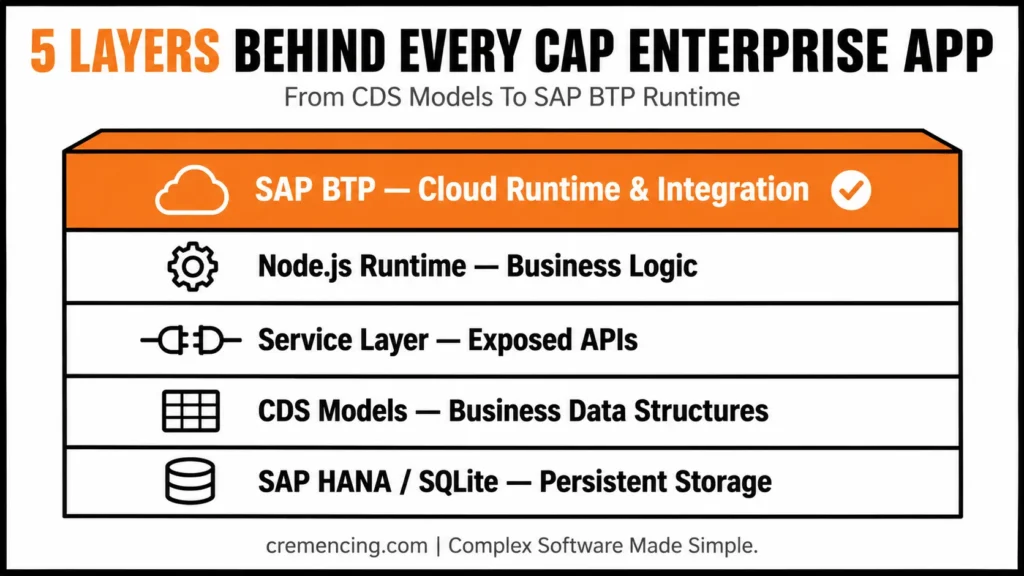
| Layer | The role of Enterprise Architecture in the enterprise. |
| CDS Models | Create business data structures |
| Service Layer | Expose APIs and Business Services |
| Node.js Runtime | Executes business logic |
| SAP HANA / SQLite | Persistent data storage |
| SAP BTP | Cloud runtimes and integration layers |
CAP is not only a framework, it is an architectural standard for SAP cloud applications.
SAP BTP step-by-step CAP Node.js Tutorial
This section of the CAP Node.js tutorial shows how to develop enterprise applications from the ground up.
Step 1 – Create Project Folder and Add Source Code to it
The first step towards Enterprise development is to have a standard tool chain.
Install required components:
Node.js (LTS version)
SAP CAP Development Kit
VS Code (recommended)
Cloud Foundry CLI
Install CAP globally:
npm install -g @sap/cds-dk
This will allow for consistency of CAP project creation between teams.
Step 2: Set up CAP Project Structure
Develop a structured enterprise project:
cds init cap-enterprise-app
cd cap-enterprise-app
npm install
Standard CAP architecture:
app/ → UI layer (optionally)
db/ → Data models (CDS)
srv/ → Business services
This separation is similar to enterprise application layering — a structure this CAP Node.js tutorial follows throughout.
Step 3 – Define Enterprise Data Model (CDS)
Inside db/schema.cds:
entity Products {
key ID : UUID;
name : String(100);
price : Decimal(10,2);
currency : String(5);
}
This is a real enterprise data structure with proper typing and scalability considerations — the kind of foundation any solid CAP Node.js tutorial should teach before moving to business logic.
Step 4 – Step up Business Services
Inside srv/service.cds:
service ProductService {
You can project entity Products onto db.Products;
}
This layer provides secure APIs to be consumed by the enterprise.
Step 5 – Implement Business Logic (Node.js)
Inside srv/service.js:
module.exports = (srv) => {
srv.before(‘CREATE’, ‘Products’, (req) => {
if (!req.data.currency) {
req.data.currency = ‘USD’;
}
});
srv.after(‘READ’, ‘Products’, (data) => {
data.forEach(p => p.price = Number(p.price));
});
};
This is where real enterprise logic is applied (validation, transformation and governance) — the core of what makes this a practical Node.js tutorial rather than just theory.
Step 6 – Run Application Locally
cds watch
This will allow live reload development, which means you can get faster iteration in enterprise development cycles.
Step 7 – Deploy to SAP BTP.
Deploy using Cloud Foundry:
cf login
cds deploy –to hana
This final step of the CAP Node.js tutorial links your application to the runtime services of SAP BTP offered by SAP BTP Documentation.
CAP Node.js Tutorial — Command Cheat Sheet
npm install -g @sap/cds-dk       # Install CAP CLI
cds init cap-enterprise-app      # Create project
npm install                       # Install dependencies
cds watch                         # Run locally with live reload
cf login                          # Authenticate to Cloud Foundry
cds deploy --to hana              # Deploy DB artifacts to HANA
Business Benefits & ROI of CAP Node.js on SAP BTP
Following this CAP Node.js tutorial approach pays off in measurable ways — CAP is efficient and scalable, which makes it popular in enterprise settings.
Key Business Benefits
Shortens product development time by 30-50%
Substantially decreases the backend complexity
Improves system maintainability
Supports out-of-the-box SAP integration (S/4HANA, Fiori, APIs)
Supports cloud-native scalability
CAP Node.js Tutorial: Enterprise ROI Analysis
| Area | Impact |
| Development Speed | +40% faster delivery |
| Maintenance Effort | -35% reduction |
| Integration Complexity | -50% simplified |
| Deployment Efficiency | Completely automated with SAP BTP |
CAP directly helps to lower the engineering overhead, and consequently, shorten the time to market for enterprise applications.
Common Mistakes in This CAP Node.js Tutorial to Avoid
Even after following a CAP Node.js tutorial step by step, developers commonly run into these mistakes in CAP projects.
Overengineering CDS models
Combining business rules and data types.
Skipping over SAP security levels (roles & scopes)
Poor service decomposition
Hardcoding environment configurations
CAP Node.js Tutorial Best Practices for Enterprise Development
- Keep the CDS models domain focused and minimal.
- Clearly separate concerns between service handlers.
- Make use of environment-based configuration management.
- Follow service structuring that’s designed for microservices.
- Optimize for patterns of usage on SAP HANA
What Most CAP Node.js Tutorials Miss
Most CAP tutorials — including basic Node.js tutorial content — only show how to build CRUD applications. For enterprise environments, much more depth is needed.
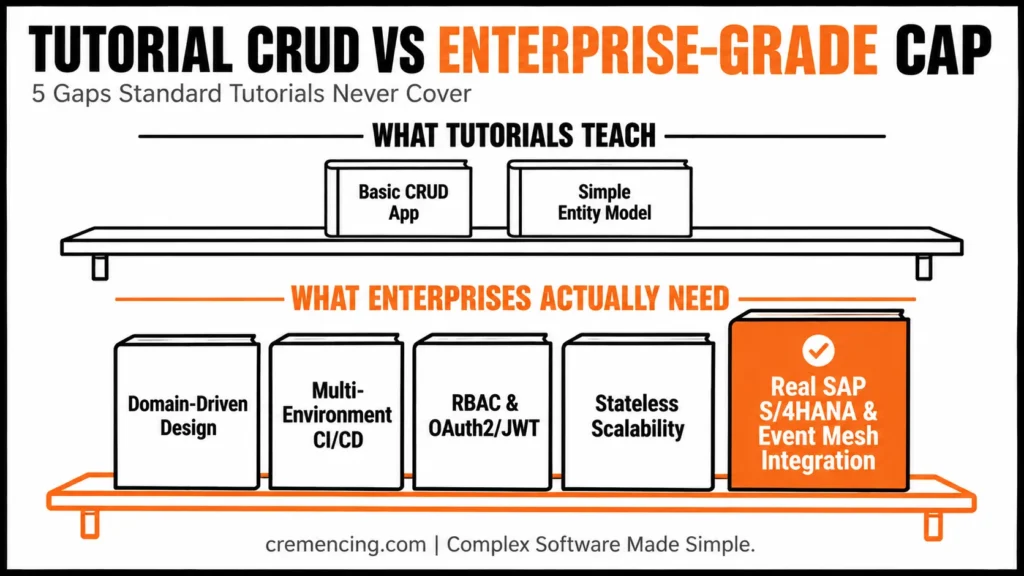
Gaps in Standard Tutorials:
1. Enterprise Architecture Design
Domain-driven design (DDD)
Layered service architecture
Event-driven patterns
2. Production Deployment Strategy
Multi-environment CI/CD pipelines
Blue-green deployment of SAP BTP.
3. Security & Compliance
Role-based access control (RBAC)
Integrations with OAuth2 and JWT.
SAP authorization concepts
4. Scalability Planning
Stateless service design
Scaling horizontally on SAP BTP
5. Real SAP Integration
SAP S/4HANA API usage
Event Mesh integration
Business workflow orchestration — and once your CAP services start talking to SAP systems, you’ll likely run into the same integration friction points covered in 10 Groovy Scripts for SAP CPI That Solve Real Integration Problems Quickly.
This is to differentiate between the tutorial level and the enterprise-class CAP architecture.
Conclusion
This CAP Node.js tutorial for SAP BTP showed enterprise applications structured, developed, and deployed in a modern cloud-native way.
You learned:
Understanding what CAP views as enterprise architecture.
How business logic is executed in Node.js.
Ways to deploy it in a scalable fashion with the help of SAP BTP.
Why real-world systems are more complex than CRUD design.
FAQ
1. What is CAP in SAP BTP?
Essentially, CAP is a framework for enterprise application development that standardizes backend development on SAP BTP — the exact approach this CAP Node.js tutorial follows. In addition, it supports both Java and Node.js as programming languages. Therefore, teams get a consistent architecture regardless of which language they choose.
2. Why use Node.js in CAP?
Basically, Node.js offers a lightweight and scalable runtime for executing backend business logic. Moreover, it integrates smoothly with CAP’s service layer and CDS models. As a result, developers can build and iterate faster than with heavier runtimes.
3. Can CAP be used in an enterprise scenario?
Yes, indeed, CAP is specifically designed for enterprise-scale systems. Furthermore, it enforces best practices around data modeling, service structuring, and security by design. Consequently, it holds up well even as application complexity grows.
4. What database does CAP use?
Typically, CAP uses SAP HANA as its primary database in production environments. However, for local development, SQLite is used instead to simplify setup. Thus, developers can prototype quickly before moving to a full HANA deployment.
5. What are the differences between CAP and ABAP?
Generally speaking, ABAP is mostly used with traditional, on-premise SAP ERP systems. In contrast, CAP is cloud-native and built for modern, API-driven architectures. Overall, the two serve different eras and use cases of SAP development.
6. How long does it take to learn CAP Node.js development?
Naturally, this depends on prior experience with Node.js and SAP concepts. Nevertheless, most developers can build a working CAP application within a few days of hands-on practice. Over time, however, mastering enterprise-grade patterns like security and scalability takes longer.
7. Is CAP suitable for production deployments, not just prototypes?
Absolutely, CAP is built with production use in mind, not only demos. Additionally, it supports CI/CD pipelines, role-based access control, and scalable deployment on SAP BTP. Hence, it’s a reliable choice for real enterprise applications.
8. What is the biggest mistake developers make when starting with CAP?
Often, developers overengineer their CDS models early on, adding unnecessary complexity. Alternatively, some skip SAP security layers entirely, assuming they can add them later. Either way, these shortcuts tend to create larger problems as the project scales.
9. Does CAP require deep SAP knowledge to get started?
Not necessarily, since CAP abstracts away much of the underlying SAP infrastructure complexity. That said, a basic understanding of SAP BTP and CDS concepts definitely helps. Eventually, as projects grow, familiarity with SAP-specific integration patterns becomes more important.
10. How does CAP handle integration with other SAP systems?
Specifically, CAP supports integration with SAP S/4HANA APIs, Event Mesh, and business workflows. Meanwhile, developers often rely on tools like SAP Integration Suite for more complex scenarios. Ultimately, this makes CAP a strong fit for connected, enterprise-wide architectures.