Introdution
This is exactly the mistake made by most SAP projects. They plan for SAP Integration Suite, get provided a CPI tenant, and think they’re utilizing the entire platform. A few months later, they wonder why their API management is a nightmare, B2B onboarding takes weeks or months, and their integration architecture does not have any governance layer.
The difference between SAP Integration Suite and CPI is not something a beginner in integration will make a mistake about. This happens even within seasoned teams, across huge corporations, and in projects with significant budgets behind them.
This guide will teach you precisely what differentiates these two things, how they relate to each other, which one your project really requires, and the exact decision framework that leading integration software architects utilize when committing to a direction. At the end, you will know exactly what you are buying, where you are building upon, and what risk implies if got it wrong.
What are SAP Integration Suite and CPI?
When we compare SAP Integration Suite vs CPI, it should be understood what each one is in its very basic form.
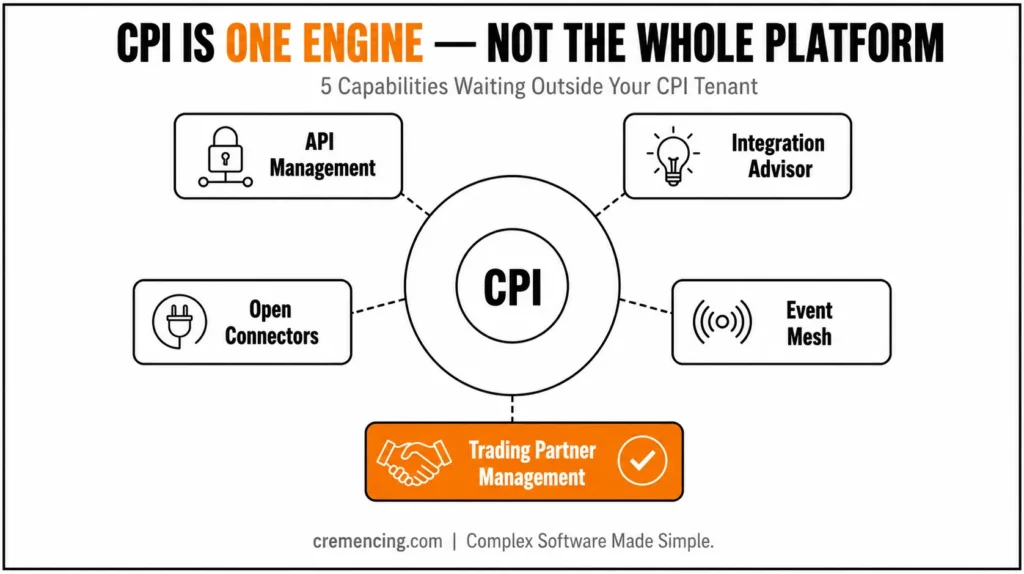
SAP Cloud Platform Integration (CPI) is a cloud-based middleware service that provides the capability to process messages from different systems and route them accordingly. It defines a collection of integration flows, referred to as iFlows, which are used to determine how data travels from one system to another. CPI is the execution engine — this is where the real work of processing messages takes place.
CPI really lives in the larger SAP Integration Suite, which is the entire integration platform. Treat it like the full product and then assume CPI is one of its key engines.
| Capability | What It Does |
| CPI Only | iFlow Based Message Processing — Integration connects, transforms, and routes data between systems |
| Core Feature: API Management | A wide variety of capabilities to publish, secure, monitor and govern APIs exposed to internal and external consumers |
| Integration Advisor | Machine learning-based message mapping proposal making to reduce manual mapping time for B2B messages — Not Available |
| Open Connectors | Out-of-the-box connectors with 170+ third-party apps like Salesforce, Workday, and ServiceNow — Not Available |
| Event Mesh | Real-time event-driven architecture & async messaging across SAP and non-SAP systems — Not Available |
| Trading Partner Management | Deals with B2B partner profiles, agreements, and EDI transactions at one place — Not Available |
| Pre-built Integration Packages | Be able to deploy integration templates from SAP Business Accelerator Hub — Available |
The short version: SAP Integration Suite is a part of every CPI tenant, but activating SAP Integration Suite does not mean using everything it has.
Uses of SAP Integration Suite and CPI Together in Real Projects
Step 1 — Understand the SAP CPI Integration Suite Capability Layer Model
SAP Integration Suite is a layered architecture. CPI is at the center of it all, focusing on message-based integration. Surrounding it are specialized capabilities that manage APIs, events, B2B messages, and third-party connectors. In real enterprise projects, you usually require more than one layer to work together.
Step 2 — Analyze the Actual Need of Your Work
Not every project requires the complete toolset. If your project involves no external partners and exposes no APIs, you may only need CPI for a simple ERP-to-ERP sync. However, once you add external API consumers, B2B partners, or non-SAP SaaS applications, you need the Integration Suite capabilities to process them appropriately.
Before you even make a decision, ask these four questions:
- Do you expose or manage APIs outside of your organization?
- Are your B2B partners EDI or standardized message format users?
- Need to connect 5+ non-SAP applications?
- Do you need event-driven architecture between systems?
If any of the above answers is Yes, then CPI alone cannot help.
Step 3 — License and Activate the Appropriate Capabilities
SAP licenses Integration Suite (free and paid capabilities) as a platform, but you activate individual capabilities separately through the BTP cockpit. Numerous teams buy the suite license and never turn on API Management or Integration Advisor, as no one informed them that those capabilities exist and require manual activation.
Step 4 — Alert Processes with Full Suite Design
After you know what capabilities you need, design your integration architecture to use those capabilities together.
Real-world pattern example:
- CPI manages all external system-to-system message flows
- API Management tools control all traffic to external-facing APIs
- All EDI/B2B message mappings are handled with Integration Advisor
- All third-party SaaS connectivity is managed with Open Connectors
- Built on an event-driven architecture, Event Mesh powers all scenarios requiring asynchrony
Teams that design this way from the beginning produce a cleaner, more maintainable integration landscape than teams that bolt on capabilities.
Step 5 — Govern Each Capability With Strong Ownership
The largest operational failure in suite-level deployments is assigning all capabilities to a single team. Per-capability ownership assignment is explicit in high-performing teams:
- API Management — owned by the API team
- CPI — owned by the integration team
- Integration Advisor — owned by the B2B team
This avoids configuration conflicts and speeds up troubleshooting. Find out more.
Benefits Offered by Choosing the Right One to Business and ROI
Making the right choice at the beginning of a project in SAP Integration Suite vs CPI impacts project outcomes.
| Decision | Outcome |
| Only CPI when you needed the whole suite | Cumulative costs of API gaps, manual workarounds, and rework |
| All-in-one without an activation plan | Bill for unused features, poor platform ROI |
| Day 1 enabled the right capabilities | Faster delivery, lower maintenance, cleaner architecture |
| Suite with a governance model | Reduction in incidents of integration by 40–60% |
Choosing correctly results in shorter go-live timelines, fewer production incidents, and a scalable greenfield integration landscape.
Common SAP CPI Integration Suite Mistakes Teams Make
- Mistake 1 — CPI is the Integration Suite
CPI is one service. Integration Suite is the platform. Conflating them misses out on powerful capabilities. - Mistake 2 — Starting without reviewing the activation checklist
SAP Integration Suite capabilities are NOT all activated by default. Teams find the required capabilities inactive, causing unnecessary delays. - Mistake 3 — Reducing Cost with CPI-only, Then Paying More Later
Retrofitting API Management later costs more than activating it upfront. - Mistake 4 — Leaving the Integration Advisor aside
Building EDI mappings manually without Integration Advisor can take 3–4 times longer. - Error 5 — No strategy for monitoring across capabilities
Each capability has its own monitoring tools. Lack of a unified strategy creates visibility blind spots.
The SAP CPI Integration Suite Decision Framework Your Competitors Never Show You
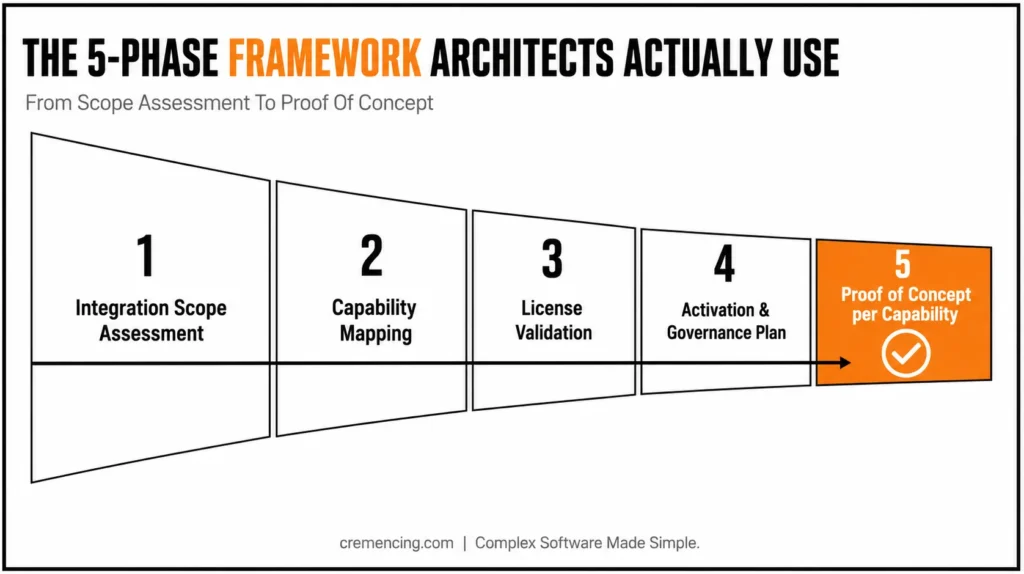
Most content ends with definitions, but integration architects follow a decision framework:
- Phase 1 — Integration Scope Assessment
Capture every system, data format, trigger, and external party before opening the BTP cockpit. - Phase 2 — Capability Mapping
Map each integration scenario to the best-suited capability. Avoid defaulting everything to CPI. - Phase 3 — License Validation
Confirm your license scope with the SAP account team. Don’t develop features out of scope. - Phase 4 — Activation and Governance Plan
Specify who will activate, own, and govern before development begins. - Phase 5 — Proof of Concept per Capability
Run tests to reveal technical limitations early and cost-effectively.
Following this framework produces cleaner integrations, on-time delivery, and avoids costly rework.
CONCLUSION
Confusion between SAP Integration Suite vs CPI is common and costly. CPI is the message processing engine; SAP Integration Suite is the full platform. Using capabilities correctly from the start is a business decision affecting cost, schedule, and long-term maintainability.
High-performing teams evaluate integration boundaries, activate appropriate functionalities, and govern the platform from the beginning.
Unsure whether to go for CPI only or SAP Integration Suite full stack? Map your scenarios to relevant capabilities at scale. [Use our free Integration Scope Checklist] [Download the Free Checklist]
FAQ
Q1: Is CPI replaced by SAP Integration Suite?
CPI is not replaced. It was rebranded as Cloud Integration under SAP Integration Suite. The main feature remains, but now part of the larger suite.
Q2: Do I have to acquire SAP Integration Suite if I just use CPI?
Technically, CPI is part of SAP Integration Suite. If only system message-based integration is required, additional suite features may not be needed.
Q3: What is the difference in pricing of CPI vs SAP Integration Suite?
SAP Integration Suite includes various service plans. CPI capabilities are in the base plan; advanced capabilities may require higher-tier plans. Always confirm with your SAP account executive.
Q4: If I start with CPI, can I add IS capabilities later?
Yes, but retrofitting is costlier than planning correctly from the start.
Q5: Where will I find SAP Integration Suite documentation?
Visit SAP Integration Suite documentation for CPI, API Management, Integration Advisor, etc.
6. Can SAP Integration Suite and CPI be used with a hybrid landscape (cloud + on-premise)?
Yes, absolutely. SAP Integration Suite supports both cloud-to-cloud and cloud-to-on-premise integration scenarios through the Cloud Connector. Therefore, hybrid landscapes are a common and well-supported use case, not an edge case.
7. How long does it typically take to activate additional Integration Suite capabilities?
Generally, activation itself takes minutes through the BTP cockpit. However, the real time investment goes into planning governance, ownership, and integration design around the newly activated capability.
8. Is API Management mandatory for every SAP Integration Suite project?
Not necessarily. If your project has no external API consumers and doesn’t expose APIs beyond internal systems, API Management may not be needed immediately. That said, most growing landscapes eventually require it.
9. Can smaller teams manage multiple Integration Suite capabilities without dedicated owners per capability?
It’s possible, but not ideal. Smaller teams often assign one person to oversee multiple capabilities instead of separate teams. Even so, clear ownership boundaries — even within one person’s responsibilities — still help avoid configuration conflicts.
10. What is the biggest sign a project has outgrown CPI-only integration?
Typically, the clearest sign is when B2B partner onboarding, external API exposure, or third-party SaaS connections start appearing in project requirements. At that point, CPI alone can no longer handle the scope efficiently.