
Introduction
SAP Build Apps is a tool that has many first-time users; however struggle to begin. The setup process seems vague, access steps are murky, and a lot of tutorials move straight past necessary details. So instead of building something, people spend hours trying to figure out how to start.
While the SAP Build Apps free version eliminates cost as a barrier, it does not prevent confusion. What really matters is knowing how to use it, configure it properly, and start building your first app with it, know that like the back of his hand.
The biggest obstacle to finishing your first SAP Build Apps project often comes before you ever open the builder. You need to choose the right BTP account type, find the correct entitlement, and understand what “free” really means. Is it free forever, or does it expire after 90 days?
Get that setup wrong, and you could spend more time troubleshooting account provisioning than building your app. This guide walks IT managers and developers through the current SAP Build Apps setup process, explains what the free options include and exclude, and shows how to go from zero access to a working first app without the usual detours.
Why SAP Build Apps Free Edition Matters
SAP Build Apps Free Edition is a free-to-use version of SAP’s no/low-code service that enables application development without coding.
It is designed for:
- Beginners exploring app development
- Developers testing ideas quickly
- Businesses building simple internal tools
It has some resource limits, which make it different from paid ones, but still enough for you to build and test real applications.
Key Capabilities
- Visual drag-and-drop interface
- Pre-built components
- Integration with APIs
- Cloud-based deployment
Free vs Paid Version Comparison
| Feature | Free Edition | Paid Version |
| Cost | Free | Subscription-based |
| App Complexity | Basic to medium | Advanced |
| Integrations | Limited | Full access |
| Deployment | Basic | Enterprise-ready |
| Support | Community | Enterprise support |
The free tier is perfect for learning and building your first applications.
How SAP Build Apps Free Edition Works
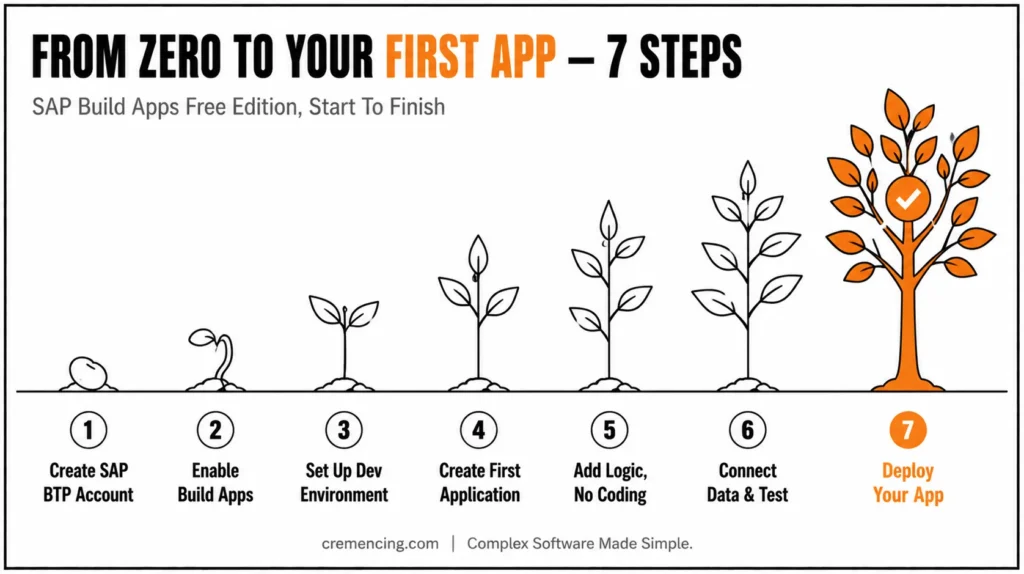
Step 1 — Create your SAP BTP Account
Before signing up, decide which account type actually matches your situation, because SAP now splits this into two distinct paths:
Existing customer or partner organization: use the BTP Free Tier option inside your organization’s global account via the Cockpit — this is the ongoing, no-expiry option, but it’s provisioned by whoever administers your org’s BTP subaccount, not through individual self-signup.
Individual, evaluating on your own: use SAP BTP Trial free, but time-boxed (SAP has applied a 90-day limit to several free-tier/trial services), no credit card required, scoped to a single trial global account.
Step 2 – SAP Build Apps
Once inside SAP BTP:
- Navigate to services
- Search for SAP Build Apps
- Enable the free edition
This operation turns on your development environment.
Step 3 — Set up the Development Environment
It helps in making things easier down the road.
- Open SAP Build Apps studio
- Create a new project
- Configure workspace
This becomes your working area.
Step 4 — Create Your First Application
Start with a simple layout.
- Add input fields
- Use buttons and text elements
- Arrange components visually
Focus on clarity and usability.
Step 5 – Sign In Logic No Coding Required
Define app behavior utilizing visual logic.
- Create actions for buttons
- Add conditions
- Connect workflows
This replaces traditional coding.
Step 6 – Join Data and Verify
To make your app functional:
- Connect APIs or sample data
- Test user interactions
- Fix errors
Testing ensures everything works correctly.
Step 7 — Deploy Your First App
Once ready:
- Publish your app
- Share access
- Monitor usage
So now you have an application working. For more insights, read our blog on SAP Build app examples.
How SAP Build Apps Free Edition Works
- Confirm account type: individual → BTP Trial; org/partner → BTP Free Tier via Cockpit
- Create BTP account and verify email
- In Cockpit: Subaccount → Service Marketplace → SAP Build Apps → Create instance
- Open Build Apps studio → New project
- Add UI components → wire up logic flows (no code)
- Connect a data source or sample API → test interactions
- Publish → share access → monitor from Cockpit
Benefits and ROI of Using SAP Build Apps Free Edition
You have far greater benefits now that you are using the SAP Build Apps Free Version as opposed to any other deployment experience from a beginner and small team point of view.
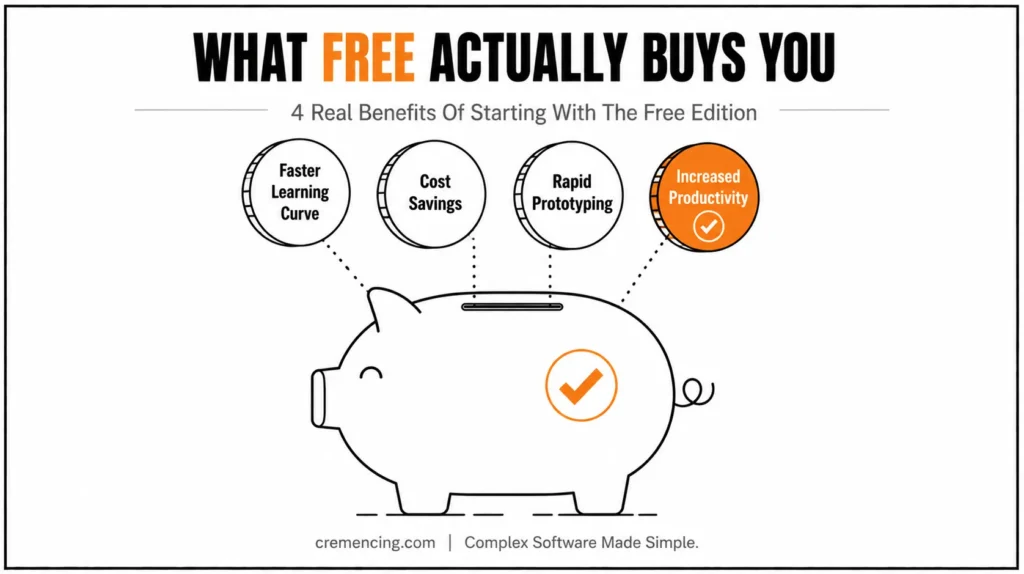
Faster Learning Curve
It allows you to build apps in hours instead of weeks. The learning curve for most users is under a few days.
Cost Savings
This brings you the Freemium Model, so no initial costs are making it open for individuals and start-ups. It allows hiring fewer developers in the first stages
Rapid Prototyping
Ideas can become working prototypes in a matter of days. It allows running tests and validating concepts before investing significantly.
Increased Productivity
Less learning of programming and more working on building solutions to solve real-world problems.
Real-World Application Building
You can build apps that, even with limitations:
- Collect data
- Automate workflows
- Display dashboards
Common Pitfalls and Dos and Don’ts
Most new gamblers have problems not due to the fact that the platform is challenging, yet due to the fact that they take it on incorrectly.
Common Mistakes
Building a complex app too soon is one of the common mistakes. The beginners often try to use the advanced-level features without learning the basics. This results in the familiar confusion and frustration.
Skipping critical setup is another biggie. It is important to set up the environment correctly, since small mistakes can turn into issues at the end. Some users also ignore testing. On that, they deploy the app but don’t test how it works in real life. Read the complete guide on SAP Build App Certification
Best Practices
Build a small application to address one issue. This builds confidence and understanding.
Keep your design clean. Do not add unnecessary elements that make the interface more complex. For every small change, test your app. This allows you to detect problems early on.
Do not just drop elements on the screen; focus more on what connects them and how they work together. Many tutorials tell you how to get into the platform, but they neglect what happens after.
Real Setup Challenges
Account onboarding and service activation are common points of friction for many users. Often these details are omitted in guides, which leads to surprises at the start.
Limits of Free Edition
The free version has restrictions. If users are unaware of these limitations, they may demand features that will not be offered.
Building Beyond Basic Apps
Beginner tutorials are generally about simple apps. No guidance here on how to scale/improve the applications over time.
Transition to Paid Version
How often you should upgrade is mostly up to you. For longer-term development, you should know at what point in the life cycle of your app it outgrows the free edition.
Conclusion
The gap between “free” and “frictionless” in SAP Build Apps isn’t the app builder — it’s the account setup most guides skip past. Once you know whether you’re on BTP Trial or Free Tier, and what that actually caps you at, the seven steps from account creation to a deployed first app are genuinely fast. The free edition won’t carry a production rollout, but it’s more than enough to prove out a real internal tool before anyone signs off on a paid plan and knowing exactly when you’ll outgrow it is the difference between a smooth upgrade and a surprise one.
While you are free to start building applications without code, SAP Build Apps Free Edition opens the door. With a clear setup process and straightforward projects, you can transition from beginner to complete app builder in no time! The key is not only accessing the platform, but utilizing it properly. After understanding the basics, you can jump directly to applications and code that address the issue.
FAQ Section
What is SAP Build Apps Free Edition?
It is a free edition from SAP on its low-code platform, which helps users to create applications without the need for coding.
Is SAP Build Apps Free Edition Really Free?
It is free but has some restrictions compared to paid versions.
Do I need a credit card to use SAP Build Apps Free Edition?
It depends on how you access SAP Build Apps. SAP BTP trial accounts typically do not require a credit card, while Free Tier access is managed separately through an SAP BTP account.
How long can I use SAP Build Apps Free Edition?
The duration depends on whether you are using an SAP BTP trial account or a Free Tier environment. Trial access is time-limited, while Free Tier services have different usage and entitlement rules.
Can I move an app built with the free edition to production?
Yes, an app created with SAP Build Apps can generally move toward a production environment. However, production use may require the appropriate SAP Build Apps licensing, subscriptions, and SAP BTP services.
What happens to my app when my free trial expires?
When an SAP BTP trial expires, access to the trial environment and its services can be affected. Before the trial ends, review SAP’s current retention rules and move any app or data you need to retain to an appropriate paid or supported environment.
Can SAP Build Apps Free Edition connect to an on-premise SAP system?
Potentially, yes. Connecting SAP Build Apps to an on-premises SAP system may require additional SAP BTP services and connectivity components, such as SAP Cloud Connector. These requirements may not be included in the free trial or Free Tier entitlement.
Is SAP Build Apps the same as SAP Build?
No. SAP Build is the broader low-code and business application development portfolio. SAP Build Apps is one component of that portfolio, alongside products such as SAP Build Process Automation and SAP Build Work Zone.




