

Introduction
Groovy Identity in SAP CPI rarely fails because the logic is wrong — it fails because of how SAP CPI handles identity and authorization context during execution, a layer most developers never explicitly test until it breaks in production.
The script passes in design mode. It passes in testing. Then it hits a generic authorization error against a real downstream system, and there’s no obvious line of code to blame, because the problem isn’t in the logic — it’s in the identity context the script is quietly running under.
This guide covers exactly what Groovy Identity in SAP CPI actually is, where identity blocks come from, and the concrete steps to handle credentials, propagation, and authentication correctly so your integrations stop failing for reasons that have nothing to do with your code.
Securing API Credentials via SAP CPI SecureStoreService
In SAP Cloud Integration (CPI), hardcoding credentials within Groovy scripts exposes sensitive data and causes integration failures during credential rotations or environment migrations. To enforce secure authentication standards, developers retrieve alias-based security materials dynamically at runtime using the SecureStoreService API (com.sap.it.api.securestore.SecureStoreService).
By fetching instance-specific user credentials or secure tokens programmatically, the script separates business logic from sensitive authorization data. This architecture ensures that security artifacts remain managed strictly within the CPI Security Material cockpit, allowing seamless credential updates without requiring redeployments of the integration flow.
Implementing this pattern mitigates authorization mismatches, safeguards API keys across deployment pipelines, and prevents silent runtime failures caused by exposed or static authentication headers.
What Is Groovy Identity in SAP CPI?
SAP CPI Groovy Identity is not an explanation of user credentials, moreover, role and authorization context in the Groovy script when it is executing inside the integration flow.
All the scripts running in SAP CPI run within a specific identity context, which defines:
- What resources the script can handle
- What APIs or endpoints it is allowed to call
- A method to switch between systems using middleware
This identity may not always be equal to the logged-in user.
Furthermore, it often depends on:
- Technical users
- OAuth credentials
- Security material configured in CPI
- Integration flow runtime context
User identity blocks occur when:
- Required credentials are inaccessible to the script
- Authorization is missing or restricted
- No assembly identity propagation configuration
These problems result in run-time errors, however, that are difficult to debug as they relate to security rather than logic.
Groovy Identity in SAP CPI: Stepwise Process to Deal with User Identity Blocks
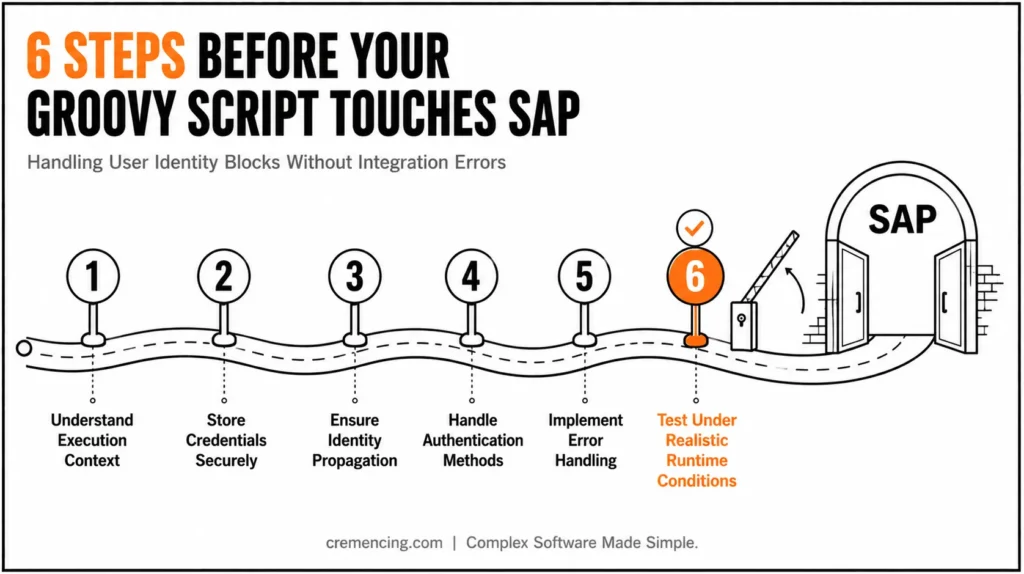
Step 1 — Grasp the Execution Context
Identify before writing any Groovy script:
- What is the identity executing the script (technical user or system user)
- What permissions are assigned
- What APIs or systems are being accessed
Therefore, this should minimize confusion on later identity mismatches.
Step 2 — Store Credentials Securely (Security Material)
Do not hardcode credentials in your Groovy scripts.
- User credentials
- API keys
- Certificates
These can be safely accessed in your script to keep proper identity handling.
In practice, this means retrieving credentials through the SecureStoreService API rather than embedding them directly: def secureStorageService = new com.sap.it.api.securestore.SecureStoreService(); def credential = secureStorageService.getUserCredential('MyCredentialAlias'); This keeps credentials out of script source entirely, so they can be rotated without redeploying the integration flow.
Step 3 — Ensure Proper Identity Propagation
Make sure identity propagation is set correctly, especially if you are integrating with more than one system.
This allows:
- Cross-system user identity
- Authorization to remain consistent
- Secure communication between endpoints
As a result, requests may be rejected by downstream systems.
Step 4 — Handle Authentication Methods Properly
Different integrations need different types of authentication:
- Basic authentication
- OAuth 2.0
- Client certificates
Your Groovy script should comply with the established authentication method.
One of the most common areas for identity errors are related to mismatches between what the script thinks is actually happening, and what authentication collected.
| Method | Best For | Common Pitfall |
|---|---|---|
| Basic Authentication | Simple, low-risk internal integrations | Credentials exposed if not stored securely |
| OAuth 2.0 | Systems requiring token-based, scoped access | Token expiry not handled in script logic |
| Client Certificates | High-security, mutual-trust integrations | Certificate rotation breaking silent failures |
Step 5 — Implementing Error Handling For Identity Failures
Identity problems usually leave no clues or return ambiguous error messages.
Improve visibility by:
- Logging authentication failures
- Capturing response codes
- Adding fallback handling where possible
This makes debugging quick and more reliable.
Step 6 — Testing Under Realistic Runtime Conditions
Only testing in design mode is inadequate.
Validate your script:
- In the runtime environment
- With actual credentials
- Across different user roles
That is what your identity handling should work with in real life.
Benefits & ROI of Proper Groovy Identity Handling
Now, proper mutual TLS and Groovy imitation management is significantly more than avoiding bugs; it can also tighten the safety posture, boost performance, and streamline ops.
Key Benefits
- Reduced integration failures
- Avoid runtime failures due to identity-related mistakes
- Faster debugging
- No longer log in as many different users for testing
- Improved security compliance
- Deny hardcoded credentials and secure access
- Consistent system communication
- Try out authentication across all the systems it connects to
- Better scalability
Your identity handling is reliable for complex integrations
ROI Impact
- Decreased debugging time by up to 40%
- Lower risk of production failures
- Faster deployment cycles
- Improved system reliability and trust
This resulted in huge time and cost savings for enterprises that are executing multiple integrations.
Identity Handling Checklist
- Execution context identified before writing script logic
- Credentials pulled from security material, never hardcoded
- Identity propagation configured for multi-system integrations
- Script logic matches the actual authentication method in use
- Error handling logs authentication failures clearly
- Tested with real credentials in runtime, not just design mode
Mistakes to Avoid When Working with Groovy Identity in SAP CPI
SAP CPI – Identity is something that even experienced teams make fatal mistakes with.
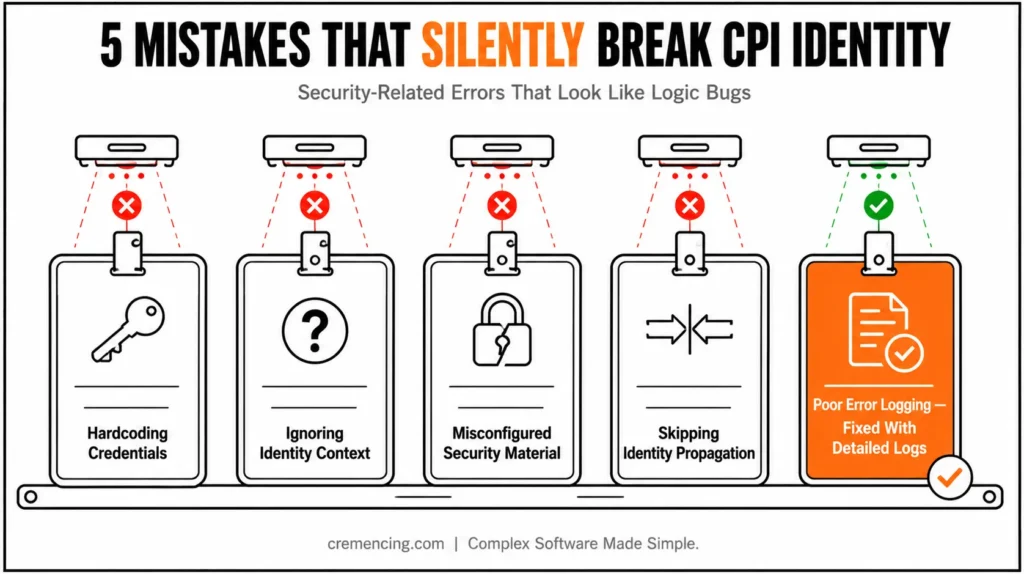
Mistake #1: Hardcoding Credentials
It is a security threat and breaks when credentials change.
Mistake #2: Ignoring Identity Context
This leads to failures: relying on the same user under which the script runs across environments.
Mistake #3: Misconfigured Security Material
Scripts cannot access required credentials due to incorrect setup.
Mistake #4: Skipping Identity Propagation
This results in authentication errors on mutual systems.
Mistake #5: Poor Error Logging
When there are no logs to verify that things succeeded or failed in the frontend, identity issues become hard to troubleshoot.
Best Practices
- Always use secure credential storage
- Validate identity across environments
- Match script logic to the authentication method
- Implement detailed logging
- Regularly audit access permissions
Identity Issues Still Break SAP CPI Integrations
Much of this stuff explains what identity is — but not why it always never works in practice.
The actual problem is the lack of alignment among development, security, and integration design.
What Most Teams Miss
- No standard identity handling framework
- No documentation for authentication flows
- Lack of joint functions between devs and security
- No testing strategy to address identity scenarios
What High-Performing Teams Do Differently
- Define identity handling standards upfront
- Centralize credential management
- Align security and integration architecture
- Testing identity scenarios in deployment pipelines
Result:
They don’t simply correct identity mistakes; they stop them altogether
Are you experiencing identity-related errors in SAP CPI?
We design secure, scalable integration architectures with appropriate identity management and authentication considerations across business scenarios.
Conclusion
SAP CPI Groovy Identity allows secure and error-free interactions.
Forgetting the identity handling results in failing scripts, security flaws, and a lot of wasted time for debugging. Having a grasp of execution context, employing safe credential storage, and introducing appropriate identity propagation can clear away the majority of identity-level problems.
Ramps that identity handling to your integration strategy (not an afterthought) are the real advantage. That’s how you create integrations that are functional but secure and scalable as well. For more insights, read the Groovy IDE for SAP CPI
FAQ — SAP CPI Groovy Identity
What are the user identity block errors in SAP CPI?
These are usually symptoms of the missing permissions, incorrect authentication configuration or failed identity propagation across systems.
Can Groovy scripts read the secure credentials in SAP CPI?
Yes. Enable Scripts to access credentials in security material for secure and compliant Authentication.
Identity Propagation in SAP CPI: What is it?
It is the act of propagating user identity across systems, which allows consistent authorization to happen in all connected systems.
How can I troubleshoot identity problems in Groovy scripts?
Logging, authentication configuration verification, and testing of the code in runtime environments with real credentials are suggestions for better security.
Can you store credentials in Groovy scripts?
The answer is No. Credentials must be always securely stored in SAP CPI security material and not hardcoded in scripts.
What causes Groovy scripts to fail silently in SAP CPI without a clear error message?
Typically, this happens when identity context is mismatched rather than the script logic itself being wrong. Consequently, the script appears to run fine while quietly failing at the authorization layer.
Should identity handling be tested only in design mode before deployment?
No, definitely not — design mode alone rarely reflects real runtime conditions. Instead, testing must include actual runtime execution with real credentials to catch identity issues early.
Why do identity errors often go unnoticed until production?
Largely, because development environments frequently use simplified or shared credentials that mask real authorization gaps. As a result, these issues only surface once multiple systems and real user contexts come into play.
Does every integration in SAP CPI require the same authentication method?
Not at all — different integrations typically require different authentication methods depending on the connected system. Therefore, scripts must be written to match the specific method in use, rather than assuming one size fits all.
Is identity propagation only necessary for single-system integrations?
No, quite the opposite — identity propagation becomes essential specifically when multiple systems are involved. Otherwise, downstream systems may reject requests due to inconsistent or missing authorization context.




