

Introduction
Building an app usually sounds like it needs a dev team, months of work, and serious coding skills. However, SAP Build Apps changes that — essentially, you can build a real, functioning application with zero code.
Still, seeing features listed isn’t the same as seeing a real app built. Therefore, here are 7 working SAP Build Apps examples, from an inventory manager to a customer feedback tool, each one showing exactly how it’s put together.
Unfortunately, the issue is that the majority of tutorials remain theoretical. Indeed, they talk about features but seldom, if ever, show real-life things. Consequently, without seeing any real use cases, there is little understanding of what can really be done.
In short, SAP Build Apps Examples show how real projects are being built. Specifically, it covers seven real-world use cases, how they work, and how you can create some of these solutions. So, you have an idea, but how do you realize it? By the end of this article, you can see how simple it is to create them as a functional application without written code.
SAP Build Apps Pattern
Paragraph Building enterprise-grade applications using SAP Build Apps relies on a standardized, low-code development workflow rather than static templates.
The core execution pattern starts with defining specific business requirements, followed by visually designing drag-and-drop user interfaces, configuring client-side logic flows, and establishing data entity bindings.
Integration with backend enterprise systems occurs seamlessly via OData services or SAP BTP Destination configurations.
By validating application logic and data integration through iterative testing environments prior to production deployment, business units can swiftly transition initial conceptual prototypes into secure, scalable operational tools tailored to specific organizational workflows.
Why SAP Build Apps Examples Matter, and What Are They
Essentially, SAP Build Apps Examples are examples of actual applications developed on SAP’s low-code platform. They show the integration of features in real-world problem-solving.
Examples include
- How apps are structured
- How workflows are designed
- How data is connected
- How users type with the system
Why Examples Are Important
- To understand real use cases, you
- Show practical implementation
- Reduce learning confusion
- Get some inspiration for your apps
Ultimately, seeing concrete projects quickens the learning process and makes it more efficient. For more insight, read our blog on SAP Build App Free Edition
SAP Build Apps In Action: Real World Examples
Naturally, the process of response becomes clearer when you follow a format.
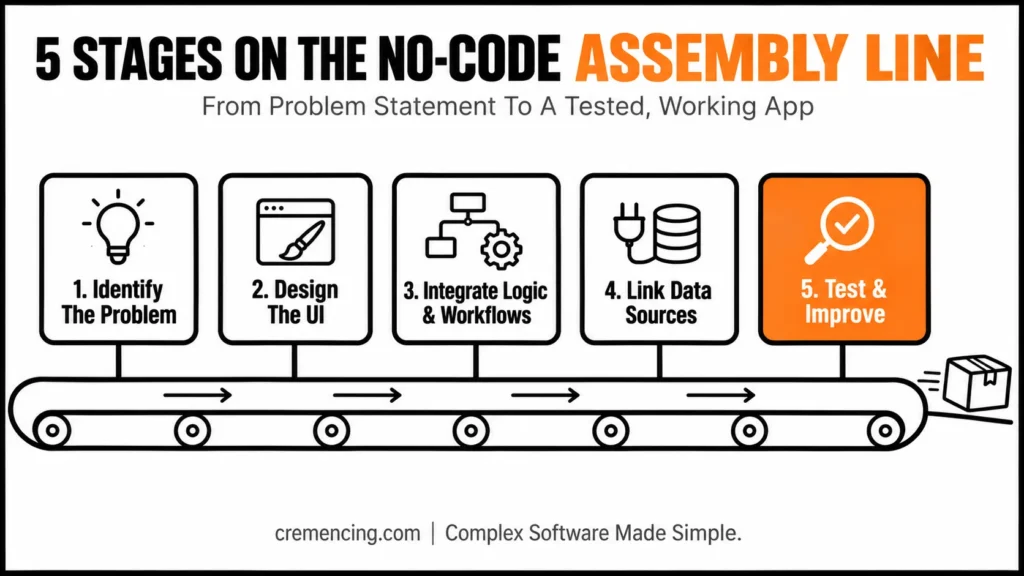
Step 1 – SAP Build Apps Examples: Identify the Problem to Solve
First and foremost, every application begins with a problem.
Examples:
- Tracking employee attendance
- Additionally, managing inventory
- Finally, handling customer requests
Proper objectives help into app designing.
Step 2 – SAP Build Apps Examples: Design the UI
Next, apply SAP Build Apps visual builder.
- First, create forms and dashboards
- Then, add buttons and input fields
- Finally, keep layouts simple
Good design improves usability.
Step 3 – SAP Build Apps Examples: Integrate Logic & Workflows
Define how the app behaves.
- Set actions for user inputs
- Automate processes
- Train using visual logic rather than code
Step 4 — SAP Build Apps Examples: Link Data Sources
Connectivity to data makes apps more useful.
- SAP systems
- APIs
- Databases
Step 5 – SAP Build Apps Examples: Test and Improve
- Check functionality
- Fix errors
- Improve user experience
| App Type | Best For | Core Features |
|---|---|---|
| Employee Attendance | HR teams tracking check-in/out | Time tracking, reports, notifications |
| Inventory Management | Warehouse/stock teams | Item updates, quantity tracking, low-stock alerts |
| Customer Feedback | Support/CX teams | Forms, ratings, data visualization |
| Expense Tracking | Finance/ops teams | Expense entry, categorization, reports |
| Task Management | Project teams | Task lists, status updates, notifications |
| Service Request | Internal/customer support | Request submission, status tracking |
| Sales Dashboard | Sales/leadership | Charts, real-time data, performance tracking |
7 Examples of SAP Build Apps You Can Create
Employee Attendance App
Tracks employee check-in and check-out.
Features:
- Time tracking
- Reports
- Notifications
Inventory Management App
Helps manage stock levels.
Features:
- Add/update items
- Track quantities
- Alerts for low stock
Customer Feedback App
Collects and analyzes feedback.
Features:
- Forms
- Rating system
- Data visualization
Expense Tracking App
Manages business expenses.
Features:
- Add expenses
- Categorize spending
- Generate reports
Task Management App
Organizes tasks and workflows.
Features:
- Task lists
- Status updates
- Notifications
Service Request App
Handles customer or internal requests.
Features:
- Request submission
- Status tracking
- Notifications
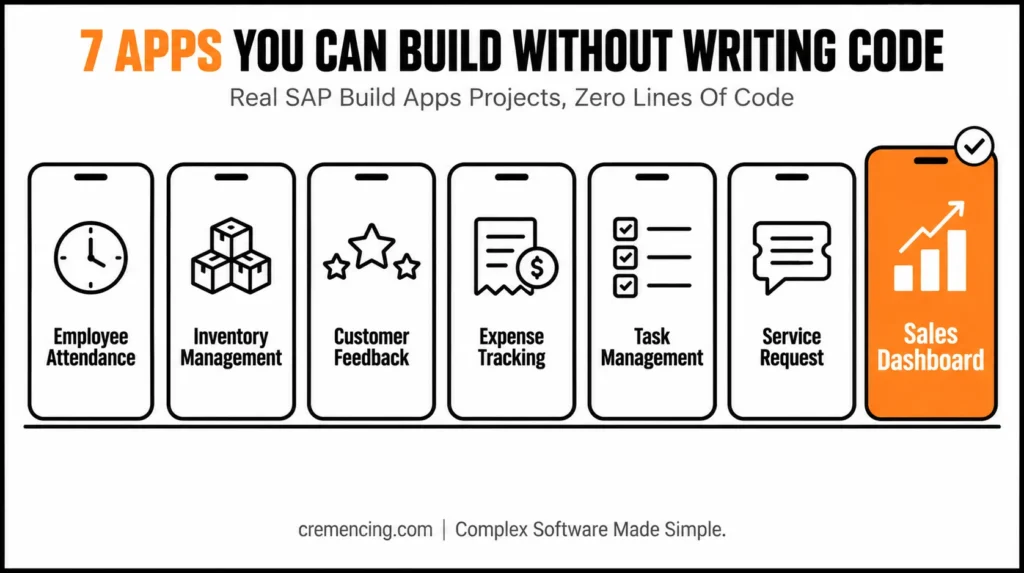
Sales Dashboard App
Displays sales data.
Features:
- Charts and analytics
- Real-time data
- Performance tracking
Ultimately, this SAP Build Apps Examples shows how different business challenges could be solved without writing a single line of code. For more, read our blog on SAP Build App Tutorial
Benefits & ROI of Using SAP Build Apps Examples
That’s why learning through real applications is so rewarding.
Faster Learning
- First, understand concepts 40–60% faster
- Additionally, learn by doing
Better Application Design
- Avoid common mistakes
- Follow proven structures
Increased Productivity
- Build apps quickly
- Reduce trial and error
Lower Development Costs
- Eliminate the need for large teams to develop
- Less coding effort
Faster Deployment
- Release applications within days versus weeks
For more insights, read our blog on SAP Build App Business App Faster
Before You Build: Quick Checklist
- Problem clearly defined (not just “make an app”)
- UI kept simple — forms/dashboards, not overengineered
- Logic mapped out before touching the visual builder
- Data source (SAP system, API, or database) identified upfront
- Testing plan in place before calling it done
SAP Build Apps Examples: Common Mistakes and Solutions
Common Mistakes
- Copying examples without understanding
- Building overly complex apps
- Ignoring user experience
- Skipping testing
- Poor data structure
Best Practices
- Start simple
- Focus on solving one problem
- Improve gradually
- Test frequently
- Keep workflows clean
Most Examples of SAP Build Apps do not Provide
Unfortunately, most examples are simple apps and do not reflect real-world obstacles.
Missing Insight 1: Scaling Applications
As apps grow: However
- First, data increases
- Consequently, performance becomes critical
Missing Insight 2: Integration Strategy
Additionally, apps must connect with:
- SAP systems
- External tools
Missing Insight 3: Business Impact
Furthermore, examples rarely show:
- ROI
- Cost savings
- Productivity improvements
Missing Insight 4: User Adoption
Without user adoption, even the simplest of apps fail.
- Focus on usability
- Provide clear workflows
Conclusion
These 7 SAP Build Apps examples show the same pattern repeating: identify a real problem, design a simple interface, wire up the logic, connect your data, and test before you call it done.
That pattern matters more than any single example, since it’s what lets you adapt these ideas to a problem specific to your own team rather than just copying a template.
Pick one example that matches a problem you actually have, build it step by step, and resist the urge to make it complex before it needs to be — that’s how these apps go from tutorial exercises to tools people actually use.
FAQ Section
Q1: What exactly are SAP Build Apps examples?
Essentially, they are real applications developed using SAP Build Apps to solve genuine business problems. Therefore, they show practical implementation rather than just theoretical features.
Q2: Can beginners use these examples to learn app building?
Absolutely — in fact, since no coding is required, these examples are specifically beginner-friendly. As a result, anyone can follow along regardless of technical background.
Q3: How long does it take to build an app using these examples?
Typically, some basic apps can be built in just a few hours or a single day. Naturally, however, the timeline still depends on the app’s complexity and the features involved.
Q4: Do these example apps connect to real data sources?
Yes, indeed — they can connect to APIs, databases, and SAP systems. Consequently, this makes them genuinely functional rather than just visual demonstrations.
Q5: Are SAP Build Apps examples suitable for real business use, not just learning?
Definitely — in fact, they are commonly used for internal tools and everyday business applications. So, beyond being a learning resource, they can serve as legitimate starting points for real projects.
Q6: What’s the biggest mistake beginners make when using these examples?
Often, beginners copy examples without truly understanding how they work. Consequently, this leads to apps that break or behave unpredictably once modified.
Q7: Do these examples show how to scale an app for larger use?
Generally, no — most examples are simple by design and therefore don’t reflect real-world challenges like performance or growing data volumes. As such, scaling considerations usually need to be learned separately.
Q8: Should I try to build a complex app right away using these examples?
No, ideally you should start simple and focus on solving just one problem first. From there, you can then gradually improve and expand your app as your confidence grows.
Q9: Do these examples explain the business impact or ROI of building an app?
Not usually — most examples focus on functionality rather than outcomes like cost savings or productivity gains. Therefore, evaluating business impact typically becomes a separate, ongoing exercise.
Q10: What’s the best way to start using these SAP Build Apps examples?
First, choose just one project from the list that matches a real problem you want to solve. Then, build it step-by-step, test frequently, and improve gradually rather than trying to perfect everything at once.




