

Introduction to SAP Fiori Benefits
Many teams judge SAP Fiori by its look and miss where the business value comes from. However, the look is only the visible layer of role-based design, task-focused apps, and a shared entry point. Companies that move to SAP S/4HANA often keep SAP GUI as the main interface, so users face long learning curves and slow task execution. Most SAP Fiori benefits appear only when teams design roles, launchpad content, and apps deliberately, because a default rollout reproduces the old transaction menu. This article therefore explains six SAP Fiori benefits, compares SAP Fiori with SAP GUI, and shows SAP architects, consultants, and IT managers what to check before rollout.
Quick Verdict: SAP Fiori Benefits Compared With SAP GUI
SAP Fiori is SAP’s design system and user experience for business applications. It combines role-based apps, the SAP Fiori launchpad, and development frameworks. These include SAPUI5 and SAP Fiori elements.
SAP introduced Fiori in 2013 as an initiative to re-imagine business software. It followed a mobile-first approach for frequently used business use cases. As a result, the same principles apply across web apps and SAP Fiori elements apps. They also apply to mobile entry points.
SAP Fiori delivers the greatest gains when users repeat business tasks every day. Common examples include approvals, order handling, and period-end checks. The design follows five principles: role-based, adaptive, simple, coherent, and delightful. Therefore, the benefits depend less on technology alone. They depend more on how well teams translate business roles into apps. Effective launchpad content also helps users access the right tasks quickly.
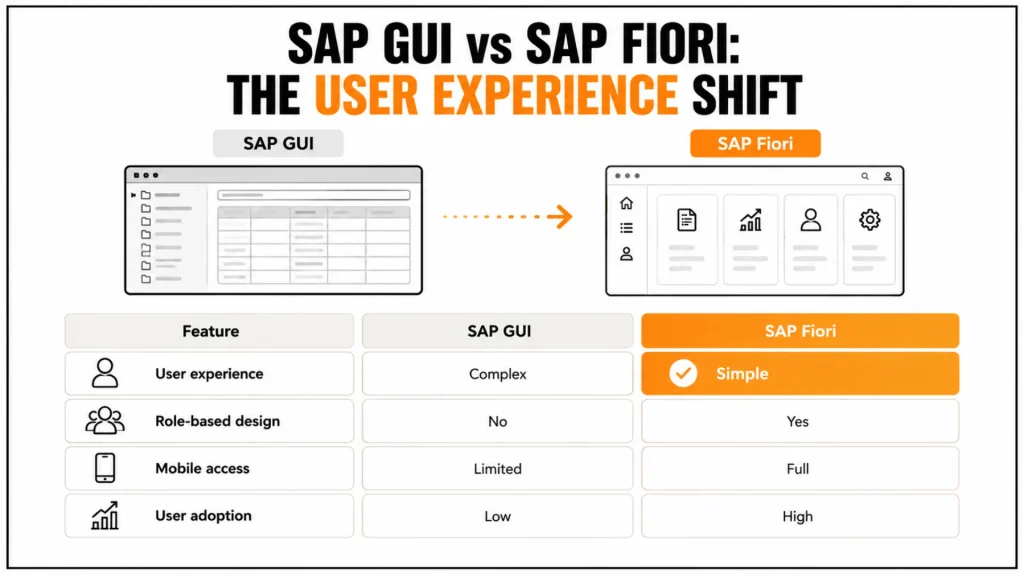
The table compares the two interfaces on the aspects that matter most for daily work.
| Aspect | SAP GUI | SAP Fiori |
|---|---|---|
| Design principle | Transaction-based screens with many fields | Role-based, task-focused apps |
| Navigation | Menu paths and transaction codes | Launchpad with spaces, pages, and enterprise search |
| Devices | Desktop client, or SAP GUI for HTML in the browser | Responsive web apps for desktop, tablet, and phone browsers |
| Personalization | Mostly user menus and favorites | Role-based pages plus personal favorites and settings |
| Extensibility | Classic enhancements and modifications | Key user extensibility, adaptation, and side-by-side extensions |
| Innovation access | Classic transactions with fewer new capabilities | New apps, embedded analytics, enterprise search, and AI assistance such as Joule |
SAP Fiori does not replace every transaction on day one. SAP GUI for HTML tiles in the launchpad let teams run both interfaces side by side, so a rollout can move role by role while power users keep access to classic transactions.saction codes.
Why SAP GUI Limits Business Value
Traditional SAP screens expose every field and function that a transaction offers, so occasional users search for the right fields and make avoidable mistakes. Navigation depends on menu paths and transaction codes, which new employees must learn before they can work productively. As a result, training takes longer, and managers and approvers often avoid the system and ask colleagues to enter data instead.
The classic interface also fragments access to information. A buyer who needs stock, open orders, and supplier performance opens several transactions in several sessions, and each transaction returns its own view of the data. Consequently, users build spreadsheets to combine results, and these spreadsheets age quickly.
6 SAP Fiori Benefits for Business
1. Better User Experience Through Role-Based Design
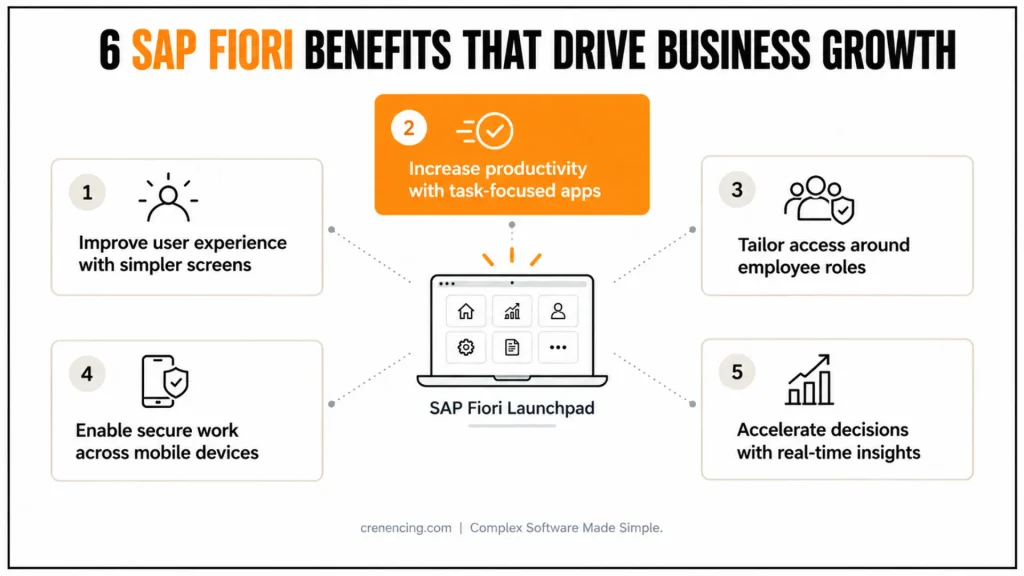
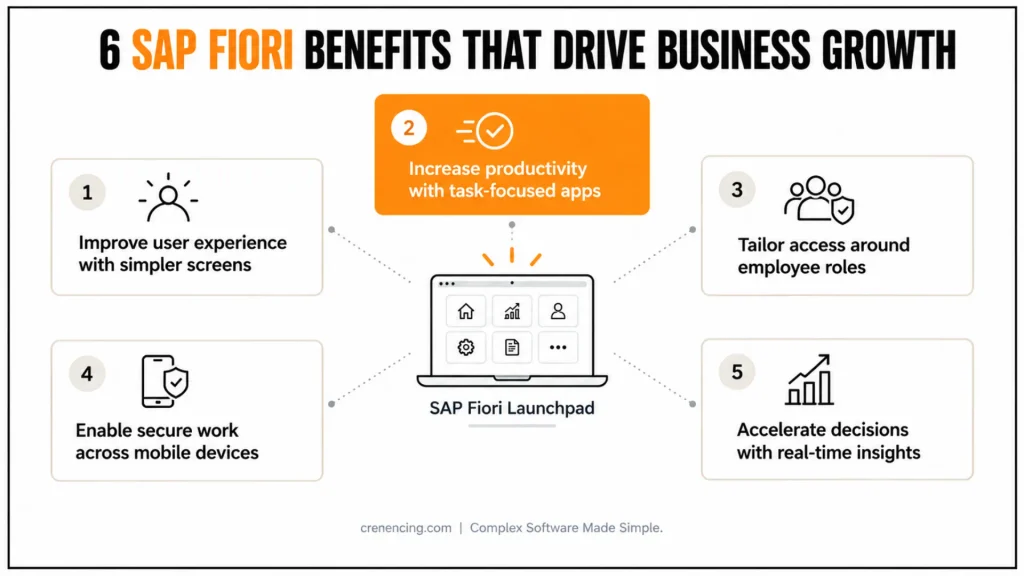
SAP Fiori follows five design principles, namely role-based, adaptive, simple, coherent, and delightful, and these principles shape every standard app. Simple screens reduce confusion because they show only the fields that support a task, and coherent patterns mean that a user who knows one app recognizes the controls in the next. In addition, the launchpad provides one shell with search, notifications, and personalization, so users find apps without remembering transaction codes.
The business effect shows in everyday work. For example, a purchasing clerk who opens an app for purchase orders sees open items, status, and the next action, and does not need to know which transaction holds each field. Therefore, faster task completion and fewer input errors follow from design, and not from additional training alone.
2. Higher Productivity Through Task-Focused Apps
SAP Fiori apps break monolithic transactions into role-based, task-focused apps, which reduces clicks and screen changes. List and object page apps built with SAP Fiori elements provide filters, saved variants, and spreadsheet export in the same pattern, so users apply one skill across many processes. Moreover, approvals reach the where approvers decide without opening the source transaction.
However, productivity gains need measurement. Teams should compare approval cycle time, clicks per task, and support tickets before and after a rollout for one role, because general statements about productivity do not convince finance or operations leaders. A pilot with a purchasing or approval role often provides the first reliable numbers.
3. Role-Based Access and Personalization
Business catalogs group apps, business roles assign those catalogs to users, and spaces and pages arrange the apps into a start page for each role, so users see only what they need. Newer releases also support merging spaces and pages for complex roles and hiding unauthorized tiles automatically, and SAP S/4HANA 2025 adds the option to hide empty spaces and pages. Users then add personal favorites and settings on top of the role-based layout.
Role-based design also improves control, because the launchpad content and the back-end authorizations work together. A visible tile does not grant access, and a correct authorization does not create a tile, so security teams should test both layers with real role profiles. Moreover, a role concept that keeps creation and approval apart supports productivity.
4. Device Flexibility
SAP Fiori web apps use a responsive and adaptive design, so the same app runs in the browser on desktop and mobile devices without a separate installation. Approvers can therefore act on requests while they travel, and field teams can use the same app logic as office staff. For mobile access to the launchpad, SAP Mobile Start provides a mobile entry point that uses the same Horizon design language.
However, device flexibility has limits. Some specialized transactions still run through SAP GUI for HTML and work less well on small screens, and remote access needs identity, network, and device policies. Therefore, teams should define which tasks belong on mobile, for example approvals, notifications, and status checks, and should protect access with single sign-on and multi-factor authentication.
5. Faster Decision-Making Through Real-Time Analytics
SAP S/4HANA runs analytical queries on the same data model as transactions. SAP Fiori can therefore show KPI tiles, analytical cards, and overview pages with current data. This avoids relying on data from a nightly extract.
Managers can see overdue items, stock coverage, or open invoices on the launchpad. They can then open the related app with one click. Consequently, they respond to issues earlier. They also base decisions on one version of the data.
Enterprise search further supports this speed. SAP S/4HANA 2025 provides more than 350 search models. CDS view-based models now outnumber the classic models. Users can therefore find business objects with type-ahead and relevance ranking.
In addition, AI-assisted search with natural language entered beta in SAP S/4HANA Cloud Public Edition 2502.
6. Higher Adoption and Lower Training Effort
SAP systems are complex, so a simpler interface can help occasional users. These users include managers, approvers, and employees who submit requests. Role-based pages reduce training to the apps each user needs. A consistent design also means new apps need less explanation.
As a result, organizations can shorten training and encourage consistent system use. This supports the data quality that reporting depends on.
However, adoption still requires active management. A rollout plan should name user groups and define start dates. It should also provide role-based training in a quality system with realistic data. Teams should track the share of daily tasks completed in SAP Fiori apps.
Our guide to explains the five barriers that teams commonly face.
How SAP Fiori Supports RISE with SAP
In RISE with SAP, SAP Fiori is the standard user interface. The cloud-first model assumes standard processes and released extension points. SAP Fiori supports these goals through role-based apps. These apps encourage standard process flows and keep customization visible in the launchpad.
Moreover, a central launchpad on SAP Build Work Zone supports a unified experience. SAP Mobile Start also provides mobile access. Together, they give users a consistent experience across different entry points.
Release differences also matter. SAP S/4HANA Cloud Public Edition makes spaces and pages the default for new systems. On-premise and private cloud systems require a planned move to the new launchpad tooling.
For example, SAP S/4HANA 2025 redirects the Belize and Blue Crystal themes to Horizon after an upgrade. Custom themes based on these themes also require migration.
What Is New in SAP Fiori for SAP S/4HANA 2025
Recent releases focus on administration, AI, and design consistency. SAP S/4HANA 2025 adds role-based launchpad configuration parameters through transaction /UI2/FLP_PROF_CONF. It also extends the Launchpad Content Aggregator (/UI2/FLPCA) to include layouts. In addition, /UI2/FLPCA_USER provides user-level views.
Meanwhile, SAP is deprecating the launchpad designer. SAP points customers toward newer tools, such as Manage Launchpad Spaces and Manage Launchpad Pages.
On the user side, the Horizon theme is now the current SAP theme family. My Home provides a personal start page. Joule also appears across SAP Start, SAP Mobile Start, and SAP S/4HANA Cloud.
Therefore, teams planning an SAP S/4HANA 2025 upgrade should review their custom themes and launchpad content. They should also assess Joule readiness. Finally, teams should test search and navigation with real user roles, including managers and executives.
Implementation Considerations
rchitecture decides rollout effort. SAP Fiori apps run in the browser and call OData services, which CDS views or RAP business objects back, and the launchpad hosts the apps, search, and notifications. SAP S/4HANA commonly uses an embedded front-end server, whereas SAP ECC landscapes typically need a separate one, so the landscape design should come first. Teams should also check app availability for their release in the before they plan the scope.
Security, performance, and governance need explicit design. Business roles control what users see and back-end authorizations control what they can do, so teams should test both with real profiles. Moreover, teams should avoid thethat slow adoption, such as overloaded launchpad layouts and forms without validation.
A phased rollout works best. Start with roles that run repetitive tasks, such as purchasers, approvers, and finance controllers, and measure cycle time and support tickets before and after. Keep SAP GUI for HTML tiles available for transactions without an app, and retire them as replacements arrive. Finally, review launchpad usage each quarter and add new apps from each release.
Common Mistakes
The most frequent mistake is a default rollout that copies the old transaction menu into tiles, because users then face hundreds of tiles and no clear start. Another is to measure success by the number of apps deployed and not by the share of work that users complete in them, so the project reports progress without business effect. Teams also skip authorization testing with real roles, which leaves users without tiles on the first day.
Finally, some organizations remove SAP GUI access too early, so power users create workarounds, and others ignore release changes, so themes and launchpad content break after an upgrade. A phased plan and a regression test of launchpad content after each release avoid both problems.
Conclusion
SAP Fiori benefits come from a role-based design that shows each user the right apps, from task-focused apps that reduce clicks, and from a launchpad that brings search, notifications, analytics, and mobile access together. Compared with SAP GUI, SAP Fiori lowers training effort, supports adoption, and gives managers current data, provided that teams design roles, content, and security deliberately.
Looking ahead, SAP builds new capabilities, including Joule, AI-assisted search, and the Horizon design language, into the SAP Fiori launchpad, so organizations with clean roles and standard processes adopt them faster. Cremencing.com supports this work with and launchpad design for SAP S/4HANA and RISE with SAP programs.
FAQs
1. What are the main SAP Fiori benefits?
The main SAP Fiori benefits are a role-based user experience, task-focused apps that reduce clicks, personalized launchpad content, access from desktop and mobile browsers, real-time analytics, and higher adoption of SAP S/4HANA. These benefits depend on well-designed roles, launchpad content, and apps.
2. Why does SAP Fiori matter for businesses?
SAP Fiori matters because it turns complex SAP transactions into role-based, task-focused apps that users understand quickly. This reduces training effort, supports consistent system use, and gives managers current data in one launchpad, so the investment in SAP S/4HANA reaches more users and shows more business value.
3. Is SAP Fiori mandatory for SAP S/4HANA?
SAP Fiori is the primary user interface of SAP S/4HANA, and many new apps and capabilities exist only there. SAP GUI still runs many transactions, so a hybrid period is common, but companies that stay on SAP GUI as their main interface gain less from new releases and AI features such as Joule.
4. Is SAP Fiori accessible on mobile devices?
Yes. SAP Fiori web apps use a responsive and adaptive design, so they run in the browser on desktop, tablet, and phone without a separate installation. SAP Mobile Start adds a mobile entry point to the launchpad, and administrators should still define which tasks suit mobile use and which access controls apply.
5. How does SAP Fiori differ from SAP GUI?
SAP GUI offers transaction-based screens reached through menu paths and transaction codes, whereas SAP Fiori offers role-based apps reached through a launchpad with spaces, pages, and enterprise search. SAP Fiori runs in the browser on any device, and it receives most new capabilities, while SAP GUI mainly serves classic transactions.
6. Are SAP Fiori advantages the same for every industry?
The core SAP Fiori advantages, such as role-based design, simpler tasks, and mobile access, apply to every industry. The value differs by process: finance gains from faster approvals, procurement from simpler requisitions, and manufacturing from shop floor task apps, so each organization should start with the roles that run the most repetitive tasks.
7. How does SAP Fiori support RISE with SAP?
SAP Fiori is the standard interface in RISE with SAP, and it supports the cloud-first model through role-based apps, standard process flows, and extension points that keep the core clean. A central launchpad on SAP Build Work Zone and mobile access through SAP Mobile Start give users one consistent experience.
8. What is new in SAP Fiori for SAP S/4HANA 2025?
SAP S/4HANA 2025 adds role-based launchpad configuration parameters, a Launchpad Content Aggregator that includes layouts, and the option to hide empty spaces and pages. The Horizon theme replaces Belize and Blue Crystal after an upgrade, and Joule and My Home extend the SAP Fiori launchpad experience.
Additional Resources
- SAP Fiori Design Guidelines
- SAP Fiori Apps Library
- SAP User Experience Strategy
Official SAP Documentation:
👉 https://help.sap.com




