

What SAP Joule on BTP Actually Requires
SAP Joule does not rely on a simple application subscription in an SAP BTP subaccount. The configuration depends on the SAP product you connect, the identity architecture, the available Joule entitlements, and how you register SAP systems in the customer’s BTP global account. SAP documentation describes Joule as a BTP-based application that integrates with supported SAP products and uses SAP Cloud Identity Services to maintain consistent user identities.
For architects and administrators, this distinction matters because a valid BTP subscription does not automatically establish the complete communication path. The setup normally involves the BTP global account, target subaccount, SAP Cloud Identity Services, supported SAP systems, system landscape configuration, and authorization assignments. The exact services and setup steps vary depending on whether you integrate Joule with SAP S/4HANA Cloud, SAP SuccessFactors, SAP Build Work Zone, SAP Start, or another supported SAP solution.
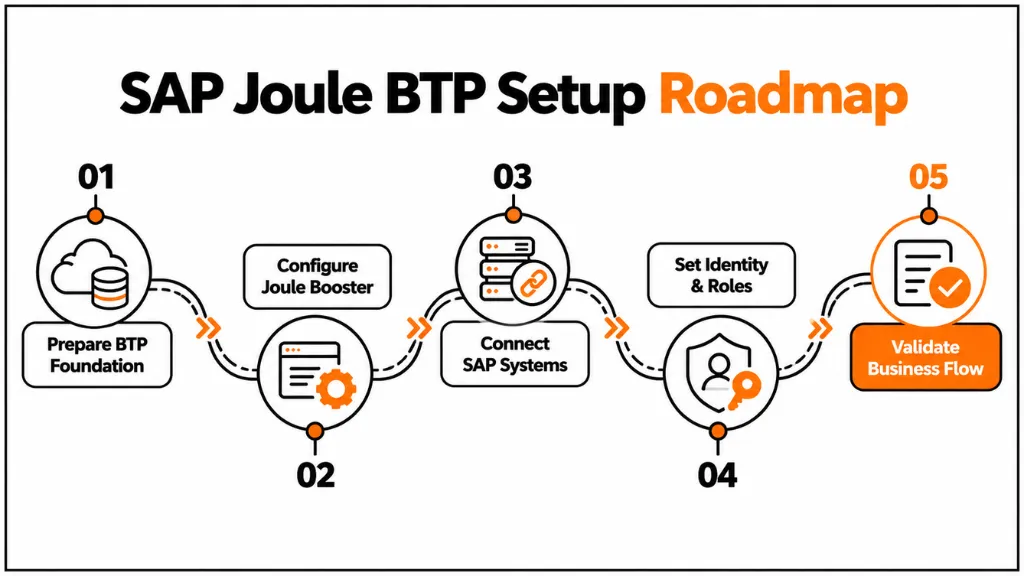
The current SAP documentation recommends using the Setting Up Joule booster when the supported scenario allows it. The booster can perform much of the end-to-end setup, while administrators can use the manual formation process when they need more control over the configuration.
Prerequisites for SAP Joule BTP Configuration
Before beginning the SAP Joule BTP configuration, verify the architecture rather than immediately creating service instances. SAP’s current documentation identifies an SAP BTP enterprise account, Cloud Identity Services, appropriate Joule entitlements, and a supported SAP product as important prerequisites for customer-managed provisioning. Joule and the integrated SAP products must also use the same SAP Cloud Identity Services tenant, with users represented consistently through the same identity.
The first check should therefore be the BTP global account. Confirm that the account is an enterprise account and that the required Joule services or application plans are available for the intended scenario. Entitlements are controlled at the global-account level and then assigned to the appropriate subaccount, so an administrator who cannot see the required plan should investigate entitlement availability before troubleshooting application-level configuration.
The next check is the target region and supported data center. Joule availability is not identical across every SAP BTP region or SAP cloud product. SAP maintains specific supported data centers and product requirements, so architects should validate the target environment against the current Joule documentation before designing the deployment.
Identity is equally important. If the organization already uses SAP Cloud Identity Services, verify which tenant is associated with the SAP product and whether the intended BTP environment can use the same tenant. Creating a separate identity tenant without considering the existing SAP application landscape can introduce user-mapping and authentication problems later.
For an existing SAP landscape, also document the systems that Joule needs to access. These may include SAP S/4HANA Cloud systems, SAP Build Work Zone, SAP Start, or other supported SAP applications. During the integration design, identify which system delivers the business capability, which system handles the user experience, and which system evaluates authorization.
Use the Joule Booster for Initial Setup
For supported scenarios, the Joule booster is generally the preferred starting point because it reduces the number of manual configuration steps. SAP’s current documentation explicitly recommends the Setting Up Joule booster for enabling Joule integration.
The administrator should first confirm the available Joule entitlement and identify the target subaccount. The booster can then be launched from the BTP cockpit and configured according to the products and capabilities required by the scenario. Exact screens and selectable options can change as SAP updates the Joule service, so administrators should follow the current booster instructions rather than relying on screenshots from older implementation guides.
The booster should not be treated as a substitute for architecture validation. It automates configuration, but administrators still need to understand the resulting systems, subscriptions, trust relationships, role collections, and formations. This becomes particularly important when an organization already has Joule configured because SAP restricts how systems can participate in Integration with Joule formations. Once the setup is done, you can start building with SAP Joule Studio.
A common example involves an organization that already has a Joule system in its global account. Running the setup process again may fail because the existing Joule system or identity-related system already belongs to another formation. SAP documents this condition and recommends that administrators manually add the relevant systems to the existing formation when they cannot run the booster again.
Configure Joule and SAP System Integration
The core of SAP Joule BTP configuration is the relationship between the Joule system and the SAP systems that provide business capabilities. In the BTP cockpit, this relationship is represented through a formation of type Integration with Joule.
SAP’s current process requires administrators to register or add the relevant systems in the global account’s system landscape. They then create an Integration with Joule formation and include the Joule system together with the supported SAP systems that should participate in the integration. SAP specifies that an Integration with Joule formation can contain only one Joule system, and a system can only participate in one such formation within a global account.
This architecture is important because Joule does not simply establish unrestricted connectivity to every system in the BTP account. The formation identifies the systems that participate in the supported integration scenario. Consequently, system registration and formation design should be treated as architectural configuration rather than as an optional administrative step.
Before creating the formation, verify that the target SAP system is supported for the intended Joule capability. SAP also provides solution-specific integration documentation because different SAP products can have different prerequisites and configuration steps after the core Joule integration has been established.
For example, an SAP S/4HANA Cloud scenario may expose business capabilities that Joule can use through the supported integration model, while a custom enterprise process may require a different extension approach. Administrators should therefore avoid assuming that connecting a system automatically exposes every application or business operation to Joule.
Configure Identity and Authorization
Authentication and authorization should be designed before users are given access to Joule. Joule depends on identity integration with the connected SAP landscape, and SAP states that Joule and the integrated SAP products must use the same SAP Cloud Identity Services tenant for customer-managed provisioning scenarios. Users must also be represented consistently using the same global user ID.
This requirement prevents a common implementation problem in which a user can authenticate successfully but does not have the expected business authorization in the connected SAP system. Authentication proves who the user is; authorization determines what that user can access or execute. Joule does not remove this distinction.
The BTP cockpit also follows the principle that Joule operates within the permissions available to the authenticated administrator. SAP explains that Joule in the BTP cockpit is bound to the user’s cockpit authorization, meaning Joule can only perform administrative actions that the user is already authorized to perform.
For production systems, apply least-privilege access to both administrators and business users. Avoid assigning broad administrator role collections simply because a user needs to test Joule. Instead, identify the exact role collections required for the relevant Joule application, BTP service, Work Zone content, or SAP backend capability.
Security testing should also cover what happens when a user lacks a required backend authorization. A successful Joule conversation does not necessarily mean the underlying business operation should succeed. The expected result is that the user’s existing authorization boundaries continue to apply. Extensions on BTP should respect clean core principles, and an SAP clean core dashboard can show where risks already exist.
Configure SAP Build Work Zone Integration
A correct SAP Joule BTP configuration requires more than activating a Joule service in an SAP BTP subaccount. The implementation must connect the right SAP systems through the supported Joule integration model. It must also establish consistent identity through SAP Cloud Identity Services and apply the required BTP and backend authorizations. When needed, administrators must configure Work Zone or custom capabilities. The Joule booster can simplify the initial setup. However, administrators still need to understand the resulting formations, systems, roles, and trust relationships.
As SAP expands Joule across business applications and BTP development scenarios, configuration governance will become more important. Organizations should treat Joule as part of their SAP cloud architecture. This means managing identity, authorization, integration, testing, and lifecycle controls. It also means avoiding an isolated approach to Joule as an AI interface. A structured architecture gives organizations a stronger foundation for extending Joule while maintaining existing enterprise security controls.
The Work Zone configuration requires attention to trust, destinations, services, content exposure, and role assignments. SAP’s administration guidance includes establishing trust with a supported identity provider, configuring SSO to connected ABAP systems where applicable, creating destinations, activating required OData services, and assigning business authorizations.
This matters when users expect Joule to navigate them to applications or business functions. The navigation target must be correctly exposed by the source SAP product and consumed by Work Zone. Joule can use the navigation configuration to resolve supported intent-based navigation targets, but the backend content and authorization model still determine whether the user can actually access the target application.
For a production rollout, test the complete sequence rather than testing only the Joule chat interface: user authentication → Joule access → business request → authorization check → backend processing → response → application navigation. This identifies whether a failure belongs to identity, Joule integration, Work Zone, the backend system, or authorization.
Configure Joule Studio and Custom Capabilities
Standard Joule capabilities and custom Joule capabilities should be treated as separate implementation paths. Standard capabilities depend on SAP-supported integrations, while custom scenarios can involve Joule Studio, APIs, workflows, SAP Build Process Automation, and other BTP services.
Joule Studio is relevant when an organization needs Joule to interact with enterprise processes that are not covered by the standard capabilities. SAP Community implementation material describes Joule Studio as a development environment for creating skills and actions, integrating APIs, defining conversational capabilities, building workflows, and connecting enterprise systems.
A custom capability should therefore begin with a business process and API contract rather than with the conversational prompt. Define what the user is allowed to request, which backend service performs the action, which input parameters are required, what authorization applies, and what response should be returned. This approach makes the resulting capability easier to test and govern.
For scenarios involving document grounding or enterprise data, additional BTP services may be required. Recent SAP Community implementation guidance for Joule Studio document grounding, for example, describes configurations involving SAP AI Core, SAP AI Launchpad, Object Store, and appropriate service keys and role assignments.
These services should not be added simply because they are associated with AI; they should be introduced only when the chosen Joule capability requires them. Check for SAP Cloud ALM readiness gaps before you roll out the configuration.
Validate the Configuration
Validation should begin at the infrastructure level and move toward the business scenario. First confirm that the Joule system exists in the expected BTP global account, the required systems are registered, and the Integration with Joule formation contains the intended systems.
Next, test authentication with a controlled user account. Confirm that the user’s identity resolves consistently across SAP Cloud Identity Services, BTP, Work Zone where applicable, and the connected SAP application. If the user can authenticate but cannot perform an expected action, investigate role collections and backend authorization before changing the Joule configuration.
The next test should validate the actual business capability. Use a controlled request that has a known expected result, then verify whether Joule reaches the correct backend service and returns the expected response. For write operations, use a non-production environment or a controlled business object where possible.
Finally, test negative scenarios. Remove or restrict an authorization temporarily in a test environment and verify that Joule does not bypass the backend security model. Also test expired sessions, unavailable backend services, invalid input, unsupported requests, and navigation failures. These tests provide more useful evidence about the production readiness of the configuration than a successful demonstration alone.
Common SAP Joule Configuration Mistakes
Treating Joule as a Standalone BTP Subscription
Creating the Joule-related service or subscription is only one part of the implementation. The complete architecture can include identity, system registration, formations, backend integration, Work Zone, and authorization. A subscription that exists without the required integration path does not establish a usable business scenario.
Using Different Identity Tenants
Using different SAP Cloud Identity Services tenants across Joule and connected SAP products can create inconsistent user identities. SAP specifically requires the same Cloud Identity Services tenant for Joule and integrated products in customer-managed provisioning scenarios.
Repeating the Booster Setup
Running the Joule booster repeatedly in an already configured global account can produce conflicts because Joule and related systems may already belong to an Integration with Joule formation. Check the existing system landscape and formation configuration before attempting another automated setup.
Granting Excessive BTP Roles
Giving administrators broad role collections may make initial testing easier, but it creates unnecessary production risk. Role collections should reflect the administrator’s responsibility, while business users should receive only the authorizations required for their business scenarios.
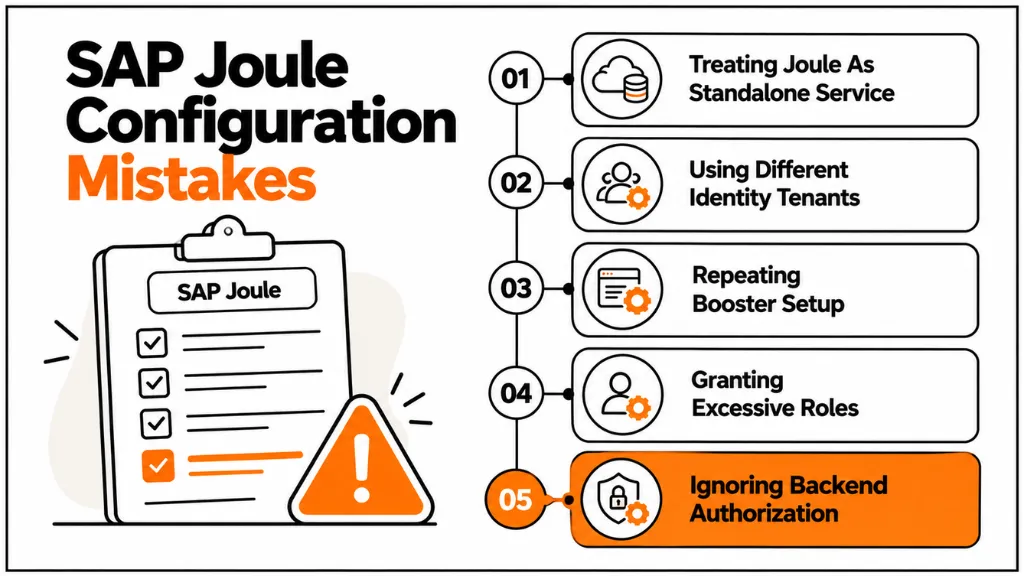
Assuming Joule Overrides Backend Authorization
Joule should not be designed as a mechanism for bypassing SAP authorization. The user must still have the appropriate permissions for the underlying business operation. Testing should explicitly confirm that restricted users remain restricted.
Adding AI Services Without a Defined Use Case
SAP AI Core, AI Launchpad, Object Store, and related services can be appropriate for certain Joule Studio and grounding scenarios, but they are not universal prerequisites for every Joule implementation. Introduce additional services according to the capability architecture and documented prerequisites.
Conclusion
A correct SAP Joule BTP configuration requires more than activating a Joule service in an SAP BTP subaccount. The implementation must connect the right SAP systems through the supported Joule integration model. It must also establish consistent identity through SAP Cloud Identity Services and apply the required BTP and backend authorizations. When needed, administrators must configure Work Zone or custom capabilities. The Joule booster can simplify the initial setup. However, administrators still need to understand the resulting formations, systems, roles, and trust relationships.
As SAP expands Joule across business applications and BTP development scenarios, configuration governance will become more important. Organizations should treat Joule as part of their SAP cloud architecture. This means managing identity, authorization, integration, testing, and lifecycle controls. It also means avoiding an isolated approach to Joule as an AI interface. A structured architecture gives organizations a stronger foundation for extending Joule while maintaining existing enterprise security controls. Roles and authorizations matter here, so verify segregation of duties in SAP as well.
Frequently Asked Questions
1. What is SAP Joule BTP configuration?
SAP Joule BTP configuration is the process of preparing SAP Business Technology Platform and connected SAP systems so Joule can authenticate users, access supported business capabilities, and operate within existing authorization boundaries. It can include entitlements, identity services, system registration, Joule formations, Work Zone integration, and solution-specific configuration.
2. Is the Joule booster required for SAP BTP setup?
No, the booster is not the only possible configuration method. SAP documents a manual process for creating an Integration with Joule formation, but SAP currently recommends the Setting Up Joule booster for supported scenarios because it can automate the end-to-end setup. Manual configuration remains useful when an existing landscape requires controlled changes.
3. Which identity service does SAP Joule use?
SAP Joule integrations use SAP Cloud Identity Services, with the exact authentication architecture depending on the integrated SAP solution. For customer-managed provisioning, SAP requires Joule and integrated SAP products to use the same Cloud Identity Services tenant and consistent user identities.
4. Can SAP Joule integrate with SAP Build Work Zone?
Yes. SAP documents Joule integration with supported SAP Build Work Zone editions, including Standard, Advanced, and SuccessFactors editions. The configuration involves identity, content exposure, navigation, and authorization, and SAP currently documents a one-Joule-instance-to-one-Work-Zone-instance relationship for the supported integration.
5. Does SAP Joule require SAP BTP role collections?
Role collections are relevant to the BTP administration and application authorization model. The required collections depend on the Joule scenario and the user’s responsibility. Administrators should assign only the roles needed for their tasks instead of granting broad permissions across the BTP account.
6. Can Joule perform SAP BTP administration tasks?
Joule in the SAP BTP cockpit can assist with supported administrative tasks involving accounts, users, permissions, services, Cloud Foundry resources, and navigation. However, its actions remain constrained by the permissions of the authenticated user. SAP also notes that these Joule administrative capabilities do not support the Neo environment.
7. When should Joule Studio be used?
Joule Studio should be considered when standard Joule capabilities do not cover a required business scenario and the organization needs custom skills, actions, APIs, or workflows. A custom capability should have a defined business process, API contract, authorization model, input validation, and error-handling design before development begins.
8. How should SAP Joule configuration be tested before production?
Test the configuration from identity through backend processing rather than testing only the Joule interface. Validate authentication, role collections, system formation, backend authorization, business responses, navigation, error handling, and restricted-user scenarios. Testing should include both successful requests and deliberately invalid or unauthorized requests.





One Response