
Your CDS view activates cleanly. The service binding publishes without an error. However, you open the Fiori elements preview — and the Create button simply isn’t there. This is one of the most common walls developers hit with RAP: they can build each object in isolation — a table, a CDS entity, a behavior definition — but the transaction that connects them never quite comes together, and there’s no single error message pointing at why. This ABAP RAP Model Tutorial builds that missing connection end to end, on the SAP BTP ABAP environment, the SAP S/4HANA Cloud ABAP environment, or SAP S/4HANA 2022 and higher: a draft-enabled task business object, a title validation rule, a published OData V4 UI service, and a working Fiori Elements preview where Create actually works — because every layer agrees with every other layer.
ABAP RAP Model Tutorial Prerequisites
To begin, use current ABAP Development Tools in Eclipse and connect to an SAP BTP ABAP environment, an SAP S/4HANA Cloud ABAP environment, or SAP S/4HANA 2022 or higher. Notably, SAP’s RAP100 mission uses the same system scope for its managed end-to-end Fiori application path.
Next, create a transportable package named ZRAP_TASK_DEMO, or use your project’s approved naming prefix. Essentially, the package keeps the table, CDS entities, behavior objects, classes, metadata, service definition, and binding together; however, $TMP is suitable only for a disposable local experiment.
Additionally, you need permission to create and activate repository objects, maintain a transport request, and publish a local service endpoint. Furthermore, for SAP S/4HANA on-premise or private cloud, you may also need access to the Gateway administration step used to publish an OData V4 service group outside the development system.
This ABAP RAP Model Tutorial uses managed persistence because the application owns its table. It also enables draft because SAP documents full Fiori elements’ support for OData V4 UI services in draft-enabled scenarios, and draft gives the user a backend-stored work-in-progress state before activation.
Step 1 — Create the Persistent Task Table in the ABAP RAP Model Tutorial
First, create a database table named ZRAP_TASK under the package. Essentially, this is the active persistence: activated task instances are stored here after the RAP save sequence completes.
Therefore, use a raw 16-byte UUID key because managed internal early numbering can generate that key during Create without a numbering implementation. Notably, SAP limits managed numbering to UUID-compatible raw(16) keys in managed business objects.
Meanwhile, the two timestamp pairs solve different problems. Specifically, LastChangedAt becomes the total ETag used when an edit draft is resumed, while LocalLastChangedAt becomes the entity ETag used to stop an OData client from overwriting a state it did not read. Consequently, SAP recommends both controls for draft business objects
// S/4HANA 1909+ required; this tutorial targets S/4HANA 2022+
@EndUserText.label: ‘RAP task data’
@AbapCatalog.enhancement.category: #NOT_EXTENSIBLE
@AbapCatalog.tableCategory: #TRANSPARENT
@AbapCatalog.deliveryClass: #A
@AbapCatalog.dataMaintenance: #RESTRICTED
define table zrap_task {
key client : abap.clnt not null;
key task_uuid : sysuuid_x16 not null;
title : abap.char(80);
status : abap.char(1);
due_date : abap.dats;
created_by : abp_creation_user;
created_at : abp_creation_tstmpl;
last_changed_by : abp_lastchange_user;
last_changed_at : abp_lastchange_tstmpl;
local_last_changed_by : abp_locinst_lastchange_user;
local_last_changed_at : abp_locinst_lastchange_tstmpl;
}
Then, save and activate the table before creating the CDS entity. In that case, if ADT reports that an ABP_* reuse element is unknown, the connected backend does not provide the expected RAP reuse types or your tutorial is running on an older release than this ABAP RAP Model Tutorial targets.
Importantly, do not insert demo rows directly into the table. Instead, the goal is to verify that Create passes through RAP numbering, determination, validation, draft handling, and managed persistence rather than bypassing the business object.
Step 2 — Build the CDS Root Data Model in the ABAP RAP Model Tutorial
First, create a data definition named ZR_RAP_Task and choose the root view entity template. The root entity is the top node of the business object; a larger ABAP RAP example would add child nodes through compositions, but one root keeps the transaction easy to inspect.
The CDS layer gives technical database fields stable business names and adds semantics for framework-managed administrative values. It does not yet make the entity transactional: behavior is added in the next step.
// S/4HANA 1909+ required; this tutorial targets S/4HANA 2022+
@AccessControl.authorizationCheck: #NOT_REQUIRED
@EndUserText.label: ‘RAP task root entity’
define root view entity ZR_RAP_Task
as select from zrap_task
{
key task_uuid as TaskUUID,
title as Title,
status as Status,
due_date as DueDate,
@Semantics.user.createdBy: true
created_by as CreatedBy,
@Semantics.systemDateTime.createdAt: true
created_at as CreatedAt,
@Semantics.user.lastChangedBy: true
last_changed_by as LastChangedBy,
@Semantics.systemDateTime.lastChangedAt: true
last_changed_at as LastChangedAt,
@Semantics.user.localInstanceLastChangedBy: true
local_last_changed_by as LocalLastChangedBy,
@Semantics.systemDateTime.localInstanceLastChangedAt: true
local_last_changed_at as LocalLastChangedAt
}
Activate the root entity and use ADT data preview only to confirm that its fields and aliases compile. At this point the preview should be empty, because no RAP Create request has reached active persistence.
The separation matters. Essentially, the root model defines reusable business data, while a later projection decides which fields and operations a particular UI service receives. SAP describes RAP as a CDS-based business object model whose behavior, data modeling, and service exposure sit in separate layers.
This SAP RAP model tutorial deliberately keeps @AccessControl.authorizationCheck: #NOT_REQUIRED for a controlled demonstration. It does not replace production access control, DCL roles, or RAP authorization implementation.
Step 3 — Add Draft-Enabled Managed Behavior in the ABAP RAP Model Tutorial
First, right-click ZR_RAP_Task, create a behavior definition, and name the behavior pool ZBP_R_RAP_TASK. Essentially, the behavior definition turns the CDS root into a transactional business object and tells the managed runtime which operations, locks, ETags, draft actions, numbering rules, and field controls apply.
Add with draft at header level. SAP requires a separate draft table, a total ETag, and the standard draft actions for a draft-enabled root; ADT can generate the draft table after you reference it in the definition.
// S/4HANA 1909+ required; this tutorial targets S/4HANA 2022+
managed implementation in class zbp_r_rap_task unique;
strict ( 2 );
with draft;
define behavior for ZR_RAP_Task alias Task
persistent table zrap_task
draft table zrap_task_d
lock master total etag LastChangedAt
authorization master ( none )
etag master LocalLastChangedAt
{
create;
update;
delete;
// RAP generates the raw(16) UUID during Create
field ( numbering : managed, readonly ) TaskUUID;
// The managed runtime maintains these audit fields
field ( readonly )
CreatedBy,
CreatedAt,
LastChangedBy,
LastChangedAt,
LocalLastChangedBy,
LocalLastChangedAt;
// Fiori elements marks Title as required
field ( mandatory ) Title;
// Set the initial status while the draft is modified
determination setInitialStatus on modify { create; }
// Stop activation when the title is empty
validation validateTitle on save { create; update; field Title; }
Edit draft action;
Activate optimized draft action;
Discard draft action; Resume draft action;
// Run the validation before draft activation
draft determine action Prepare
{
validation validateTitle;
}
mapping for zrap_task
{
TaskUUID = task_uuid;
Title = title;
Status = status;
DueDate = due_date;
CreatedBy = created_by;
CreatedAt = created_at;
LastChangedBy = last_changed_by;
LastChangedAt = last_changed_at;
LocalLastChangedBy = local_last_changed_by;
LocalLastChangedAt = local_last_changed_at;
}
}
Generating the Draft Table and Behaviour Pool in the ABAP RAP Model Tutorial
Place the cursor on zrap_task_d and use the ADT quick fix to generate the draft table. Do not hand-design its draft administration columns unless you have a specific reason; the generator derives the correct persistence structure from the business object.
Create the behavior pool with the ADT quick fix. The global class remains an empty framework anchor, while the determination and validation go into a local handler class in the behavior pool’s Local Types section. SAP uses this same split for RAP handler implementations.
” S/4HANA 1909+ required; this tutorial targets S/4HANA 2022+
CLASS zbp_r_rap_task DEFINITION
PUBLIC
ABSTRACT
FINAL
FOR BEHAVIOR OF zr_rap_task.
ENDCLASS.
CLASS zbp_r_rap_task IMPLEMENTATION.
ENDCLASS.
In practice, authorization master ( none ) keeps this ABAP RAP Model Tutorial runnable without a custom authorization handler. Nonetheless, never copy that choice into a productive business object without an explicit security decision.
Step 4 — Implement Logic in the ABAP RAP Model Tutorial
Open the Local Types section of ZBP_R_RAP_TASK and create the handler methods. Notably, the determination sets status O only when a newly created instance has no status; repeated execution therefore returns the same result, which matches SAP’s idempotence requirement for determinations.
The validation reads the current transactional state in local mode. When the title is empty, it adds the instance to FAILED and returns a field-bound error message through REPORTED, so the draft remains available but cannot activate.
” S/4HANA 1909+ required; this tutorial targets S/4HANA 2022+
CLASS lhc_Task DEFINITION
INHERITING FROM cl_abap_behavior_handler.
PRIVATE SECTION.
METHODS setInitialStatus
FOR DETERMINE ON MODIFY
IMPORTING keys FOR Task~setInitialStatus.
METHODS validateTitle
FOR VALIDATE ON SAVE
IMPORTING keys FOR Task~validateTitle.
ENDCLASS.
CLASS lhc_Task IMPLEMENTATION.
METHOD setInitialStatus.
READ ENTITIES OF zr_rap_task IN LOCAL MODE
ENTITY Task
FIELDS ( Status )
WITH CORRESPONDING #( keys )
RESULT DATA(lt_tasks).
” Update only new tasks whose status is still empty
MODIFY ENTITIES OF zr_rap_task IN LOCAL MODE
ENTITY Task
UPDATE FIELDS ( Status )
WITH VALUE #(
FOR ls_task IN lt_tasks
WHERE ( Status IS INITIAL )
( %tky = ls_task-%tky
Status = ‘O’ ) ).
ENDMETHOD.
METHOD validateTitle.
READ ENTITIES OF zr_rap_task IN LOCAL MODE
ENTITY Task
FIELDS ( Title )
WITH CORRESPONDING #( keys )
RESULT DATA(lt_tasks).
LOOP AT lt_tasks INTO DATA(ls_task).
” Clear any older message from this validation state area
APPEND VALUE #(
%tky = ls_task-%tky
%state_area = ‘VALIDATE_TITLE’
) TO reported-task.
IF ls_task-Title IS INITIAL.
” Mark this task as failed so activation is rejected
APPEND VALUE #(
%tky = ls_task-%tky
) TO failed-task.
” Return an error on the Title field in Fiori elements
APPEND VALUE #(
%tky = ls_task-%tky
%state_area = ‘VALIDATE_TITLE’
%msg = new_message_with_text(
severity = if_abap_behv_message=>severity-error
text = ‘Enter a task title.’ )
%element-Title = if_abap_behv=>mk-on
) TO reported-task.
ENDIF.
ENDLOOP.
ENDMETHOD.
ENDCLASS.
Activating and Understanding Trigger Times in the ABAP RAP Model Tutorial
First, activate the behavior definition, draft table, global behavior pool, and local implementation together. In fact, a syntax error in one object can keep the entire transactional model inactive.
The determination runs on modify, while the validation runs in the save sequence and through the Prepare draft determine action. Specifically, SAP distinguishes these trigger times: on-modify logic reacts during interaction, while on-save validation protects persistence and activation.
The ABAP RAP Model Tutorial uses both trigger times so you can observe the difference in the preview. Status appears while you edit the draft, but the title error blocks the transition from draft data to active persistence.
This is the point where the ABAP RAP Model Tutorial becomes more than a CRUD generator. The framework still performs standard persistence, but your handler contributes business rules without replacing the managed save sequence.
For more on RAP business logic, see our guide on validations, determinations, and messages in RAP
Before moving on, activate every behavior artifact and clear the Problems view. The ABAP RAP Model Tutorial depends on the active BDEF signature matching the generated local handler methods exactly; stale quick-fix code is a frequent cause of methods that never trigger.
Step 5 — Create the ABAP RAP Model Tutorial Projection
Create projection view ZC_RAP_Task. In this way, the projection keeps the reusable root business object separate from the contract required by this Fiori UI, allowing a future Web API or role-specific UI to expose a different field and behavior set.
// S/4HANA 1909+ required; this tutorial targets S/4HANA 2022+
@AccessControl.authorizationCheck: #NOT_REQUIRED
@EndUserText.label: ‘Task UI projection’
@Metadata.allowExtensions: true
define root view entity ZC_RAP_Task
provider contract transactional_query
as projection on ZR_RAP_Task
{
key TaskUUID,
Title,
Status,
DueDate,
CreatedBy,
CreatedAt,
LastChangedBy,
LastChangedAt,
LocalLastChangedBy,
LocalLastChangedAt
}
Create its projection behavior definition. Projection behavior does not reimplement the operations; use exposes behavior already provided by the underlying object.
// S/4HANA 1909+ required; this tutorial targets S/4HANA 2022+
projection;
strict ( 2 );
use draft;
define behavior for ZC_RAP_Task alias Task
use etag
{
create;
update;
delete;
Edit;
Activate;
Discard;
Resume;
Prepare;
}
Adding UI Metadata in the ABAP RAP Model Tutorial
Create a metadata extension for ZC_RAP_Task. SAP recommends metadata extensions because they keep UI annotations outside the core data definition while still contributing UI information to the service metadata.
// S/4HANA 1909+ required; this tutorial targets S/4HANA 2022+
@Metadata.layer: #CORE
@UI: {
headerInfo: {
typeName: ‘Task’,
typeNamePlural: ‘Tasks’,
title: {
type: #STANDARD,
value: ‘Title’
annotate entity ZC_RAP_Task with
{
@UI.hidden: true
TaskUUID;
@UI.facet: [{
id: ‘TaskDetails’,
purpose: #STANDARD,
type: #IDENTIFICATION_REFERENCE,
label: ‘Task Details’,
position: 10
]
@UI.lineItem: [{ position: 10, label: ‘Title’ ]
@UI.identification: [{ position: 10, label: ‘Title’ ]
Title;
@UI.lineItem: [{ position: 20, label: ‘Status’ ]
@UI.identification: [{ position: 20, label: ‘Status’ ]
@UI.selectionField: [{ position: 10 ]
Status;
@UI.lineItem: [{ position: 30, label: ‘Due Date’ ]
@UI.identification: [{ position: 30, label: ‘Due Date’ ]
@UI.selectionField: [{ position: 20
DueDate;
Activate all three projection objects. Missing @Metadata.allowExtensions: true or an inactive metadata extension commonly produces a technically working service whose preview has no useful columns.
This ABAP RAP Model Tutorial hides the UUID because it is a technical key, but it keeps administrative fields in the projection for ETag and framework use. Do not remove fields required by projected behavior simply because you do not want them displayed.
[INTERNAL LINK: Fiori elements metadata → CDS UI Annotations for RAP List Reports]
Step 6 — Expose the ABAP RAP Model Tutorial Service
Create service definition ZUI_RAP_TASK and expose the projection as Tasks. A service definition chooses the CDS entities included in the business service; it does not choose the transport protocol.
// S/4HANA 1909+ required; this tutorial targets S/4HANA 2022+
@EndUserText.label: ‘RAP task UI service’
define service ZUI_RAP_TASK {
expose ZC_RAP_Task as Tasks;
}
Create service binding ZUI_RAP_TASK_O4 with type OData V4 – UI. The service binding connects the definition to a protocol, supports local publication, and offers the Fiori elements preview; SAP recommends OData V4 wherever possible for transactional services and separates binding from business logic so another protocol can reuse the same service definition.
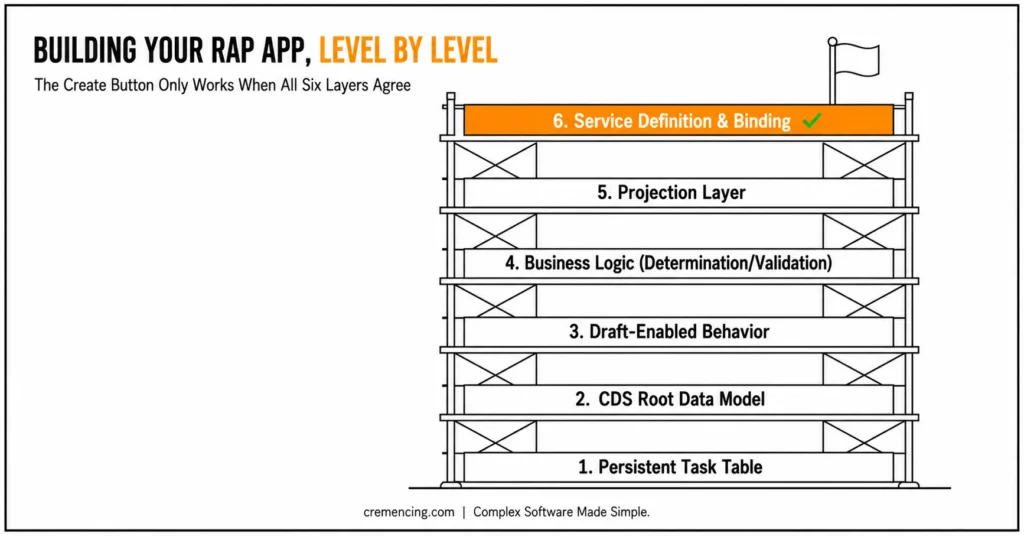
Activate the binding, choose Publish, select the Tasks entity set, and open Preview. As a result, the Create button works only when these contracts agree. The base behaviour must declare the operation, the projection behaviour must expose it, the service must include the projection, and the binding must publish the correct entity set. The browser should show a list report with create, edit, delete, draft handling, filter fields, and an object page generated from the backend metadata.
| Decision | Choose This | When |
|---|---|---|
| Persistence | Managed RAP | New application owns its own table (as in this tutorial) |
| Persistence | Unmanaged / managed with unmanaged save | An existing BAPI or legacy save logic must remain in control |
| Object layer | Root entity | Reusable core business object, persistence + behavior |
| Object layer | Projection entity | Consumer-specific contract (this Fiori UI, a future Web API) |
Publishing and Validating the ABAP RAP Model Tutorial Service
On SAP S/4HANA on-premise or private cloud, local publication in development does not transport the enabled endpoint. Transaction /IWFND/V4_ADMIN manages OData V4 service groups; use it in each target system to activate the transported service group according to your Gateway deployment model. SAP states that a published local endpoint is enabled only for the current system.
Create a task with a title and leave status empty. The determination should set O, and Save should activate the draft into ZRAP_TASK.
This is the first end-to-end checkpoint in the ABAP RAP Model Tutorial. A successful save proves that the UI metadata, projected operations, draft actions, handler logic, managed save sequence, and active table agree on the same business object.
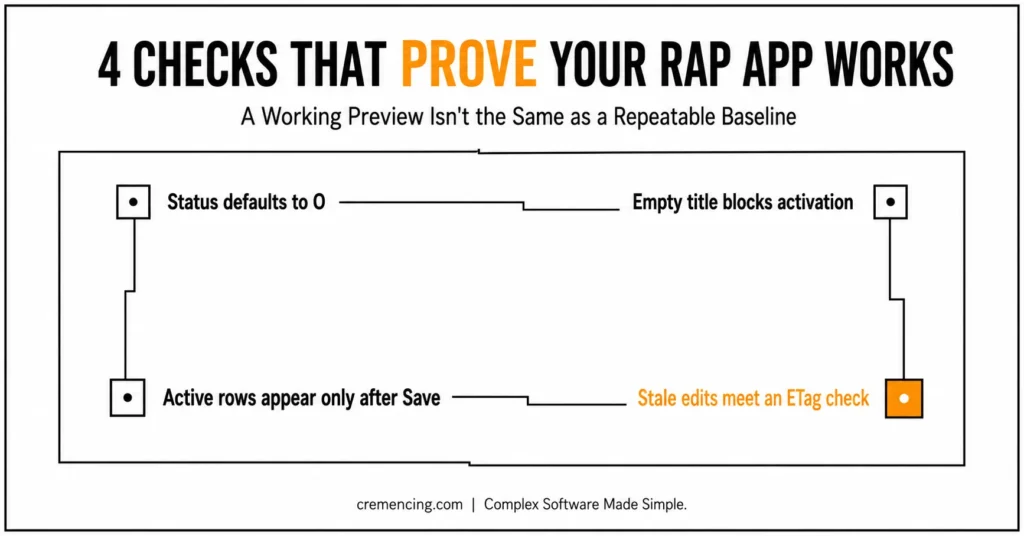
Create another task without a title. The ABAP RAP Model Tutorial is working correctly when activation stops and the Title field displays Enter a task title.
Do not treat the preview as deployment. The ABAP RAP Model Tutorial ends with a local development endpoint; launchpad integration, catalogs, roles, target mappings, and production service activation are separate delivery tasks.
ABAP RAP Model Tutorial Testing and Validation
Start with the UI path because it tests metadata, projected behavior, draft actions, messages, service exposure, and persistence together. Create, save, edit, resume, and delete one task, then refresh the list report after every operation.
Open ZRAP_TASK in ADT and run Data Preview. Confirm that only activated records appear in active persistence and that UUID, creation timestamps, local ETag, and total ETag fields have values; draft-only changes belong in the generated draft table until activation. SAP’s draft model stores work in a separate draft persistence and moves consistent data to the active database through activation.
Test the validation by clearing Title on an existing draft. Save must fail with the field-bound message, while the draft remains available for correction.
Test optimistic concurrency with two browser sessions. Open the same active task in both sessions, start editing in one, save a competing change where the workflow allows it, and verify that the ETag controls prevent an unnoticed overwrite or stale draft resume.
Inspect the service binding metadata and confirm that Tasks exposes the business fields plus draft-related service capabilities. SAP’s service binding editor also exposes service URLs, entity sets, publication state, and Fiori elements preview controls.
Finally, run an ATC check on the package. A working preview proves runtime integration, but ATC can still find naming, released-API, or cloud-readiness problems that the browser does not reveal.
| Step | Object Created | Purpose |
|---|---|---|
| 1 | ZRAP_TASK (table) | Active persistence |
| 2 | ZR_RAP_Task (CDS root view) | Business data model |
| 3 | ZBP_R_RAP_TASK + ZRAP_TASK_D | Behavior + draft table |
| 4 | lhc_Task handler class | Determination + validation logic |
| 5 | ZC_RAP_Task + projection behavior | UI-specific contract |
| 6 | ZUI_RAP_TASK + ZUI_RAP_TASK_O4 | Service definition + OData V4 binding |
Conclusion
This ABAP RAP Model Tutorial connected all the layers required to turn a database table into a working transactional Fiori Elements application. The final app depends on more than CDS exposure: active persistence stores committed data, the root CDS entity defines the business model, managed behavior controls transactional operations, draft handling protects work in progress, and the behavior handler applies validations and determinations.
The projection layer then separates the reusable business object from the requirements of a specific consumer. UI metadata controls how fields, filters, list columns, and object-page sections appear, while the service definition and OData V4 binding make the business object available to Fiori elements without requiring a manually coded SAPUI5 interface.
The Create button works only when these contracts agree. The base behaviour must declare the operation, the projection behavior must expose it, the service must include the projection, and the binding must publish the correct entity set. When one layer is missing or inactive, the problem often appears in the UI even though its cause exists deeper in the RAP stack.
This application now provides a reusable baseline for more advanced RAP ABAP development. You can extend it with value helps, status actions, side effects, feature control, child compositions, authorization checks, determinations, validations, and ABAP Unit tests while keeping each responsibility in its correct layer.
The key lesson is not simply how to generate a Fiori app. It is how to structure a RAP business object so that persistence, business logic, service exposure, and UI behavior remain maintainable as the application grows.
Frequently Asked Questions
1. When should I use RAP?
Generally, RAP is best suited for new SAP Fiori applications, transactional OData services, Web APIs, and upgrade-stable ABAP extensions on supported S/4HANA or ABAP Cloud systems. For instance, a managed ABAP RAP example suits application-owned persistence. However, existing BAPIs or legacy save logic may instead require managed unmanaged save or unmanaged behavior.
2. Where is RAP available?
Typically, RAP is available on the SAP BTP ABAP environment, SAP S/4HANA Cloud ABAP environment, and SAP S/4HANA on-premise from 1909, with feature differences by release. That said, this SAP RAP model tutorial uses the narrower RAP100 scope of SAP S/4HANA 2022 or higher for its full exercise flow.
3. Should I choose managed or unmanaged RAP?
In most cases, managed RAP is the right choice when the framework can own standard persistence, locking, ETags, and the save sequence. On the other hand, unmanaged or managed with unmanaged save becomes necessary when an existing API must remain responsible for persistence. Additionally, choosing the right implementation type also has cost implications — for a broader view of how SAP platform decisions affect your budget, see our guide on SAP BTP pricing.
4. Where can I open the SAP Fiori elements app preview?
Simply, open the active RAP service binding, select the exposed entity set, and choose Preview. In fact, the service binding is the repository object that provides the integrated Fiori elements preview for a UI service.
5. What is the ABAP RAP model?
Essentially, the ABAP RAP model is SAP’s CDS- and behavior-based application model for transactional business objects, Fiori services, and APIs. In particular, it separates persistence, data modeling, behavior, service projection, UI metadata, and protocol binding — which is the architecture demonstrated by this ABAP RAP model tutorial.
6. How do I create a RAP application in ABAP?
First, create the persistence, CDS root entity, behaviour definition, handler logic, projection, projected behavior, UI metadata, service definition, and service binding. Then, publish the binding and test its entity set through Fiori elements. Ultimately, these are the same core stages used in official RAP learning flows and ABAP examples.
7. What is the difference between the root entity and the projection entity in RAP?
Essentially, the root entity defines the reusable core business object, including its persistence mapping and behavior. The projection entity, on the other hand, exposes only the fields and operations required by a specific consumer, such as a Fiori UI or Web API. Therefore, this separation allows multiple consumers to reuse the same root object with different exposed contracts.
8. Why does RAP require both a determination and a validation for similar-looking logic?
Generally, determinations run automatically during modify operations to set default or derived values, such as an initial status. Validations, however, run during the save sequence to enforce business rules before activation, such as requiring a title. Consequently, using the correct trigger type ensures that logic executes at the right point in the transactional lifecycle.
9. Can I add additional fields or actions after publishing the RAP service?
Yes, you can extend the root entity, behavior definition, or projection with additional fields, actions, or validations after initial publication. However, each change requires reactivating the affected objects and republishing the service binding for the updates to appear in the Fiori elements preview. As a result, maintaining a consistent activation sequence across layers remains essential during ongoing development.
10. What happens if the draft table is missing or not generated correctly?
Typically, without a properly generated draft table, the behavior definition activation fails, since draft-enabled root entities require this dedicated persistence structure. In such cases, using the ADT quick fix to regenerate the draft table usually resolves the issue automatically. Therefore, manually altering the draft table structure is generally not recommended unless there is a specific technical reason.





2 Responses