
Introduction
A Fiori developer can know JavaScript, build an attractive SAPUI5 screen, and still end up with an application that performs poorly or fails when it reaches the SAP backend. However, the problem is usually not one missing technology. Instead, it is the gap between the technologies: UI5 renders the interface, JavaScript controls application behavior, and OData connects the frontend to backend services SAP Fiori development combines SAPUI5, JavaScript, and OData to build responsive enterprise applications.
This distinction becomes especially important when you move from a demo application to a production SAP Fiori project. For example, a table binding can trigger backend requests, an inefficient filter can return far more data than the screen needs, and an incorrect authorization setup can prevent an otherwise functional app from reaching its service.
For that reason, this guide explains how SAPUI5, JavaScript, and OData fit together in a real Fiori development workflow. More specifically, it focuses on the boundaries between the three technologies, data binding, service requests, performance, security, version management, testing, and deployment so developers can design applications that remain maintainable beyond the first working prototype.
The Role of SAPUI5, JavaScript, and OData in Building Modern SAP Fiori Apps
Paragraph At the core of SAP Fiori development is a modular stack designed to keep the user interface decoupled from backend business logic. SAPUI5 provides the JavaScript-based client framework, using an MVC architecture to construct responsive visual interfaces directly in the browser. Rather than querying enterprise databases directly, SAPUI5 communicates asynchronously through OData an open REST-based protocol that exposes SAP S/4HANA CDS views or SAP Gateway services as structured resources.
By leveraging the SAPUI5 OData Model, frontend components bind to backend endpoints using standard HTTP requests for seamless CRUD operations, $batch handling, and real-time state synchronization. This architecture ensures frontend developers can refine user experiences in JavaScript without disrupting core ABAP logic, establishing a stable, scalable foundation for enterprise applications.
What Is SAP Fiori Development Language
SAP Fiori Development Language is the set of technologies for developing modern SAP applications that feature simple user interfaces combined with real-time data interaction.
It is not a complete programming language by itself. Rather, it is a technology stack that rests on three essential components.
Core Components Explained
SAPUI5 (UI5 Framework)
SAPUI5 is a JavaScript-based, front-end framework. It provides:
- Injecting pre-built UI controls (tables, forms, charts).
- Responsive design capabilities
- MVC (Model-View-Controller) architecture
This helps them implement enterprise-grade applications with minimal coding effort on the UI end. If the requirement goes beyond standard SAP functionality, see our guide to SAP Fiori Custom App Development for the broader development lifecycle.
JavaScript
JavaScript works as the logic layer.
It handles:
- Event-driven interactions
- Data manipulation
- Application flow and navigation
Although UI5 is based on JavaScript, if there were no JavaScript, then it would be completely static and non-interactive.
Open Data Protocol (OData)
OData connects the frontend and SAP backend systems. OData provides the backend data, while SAP UI5 JavaScript controls how that data appears on the SAP Fiori screen.
It enables:
- Real-time data retrieval
- Create, Read, Update, and Delete (CRUD)
- Standardized API communication
This connection between OData and SAP UI5 JavaScript makes SAP Fiori applications dynamic and data-driven. A well-structured SAP Fiori development approach also requires careful attention to data binding, OData requests, performance, and backend integration.
How These Technologies Work Together
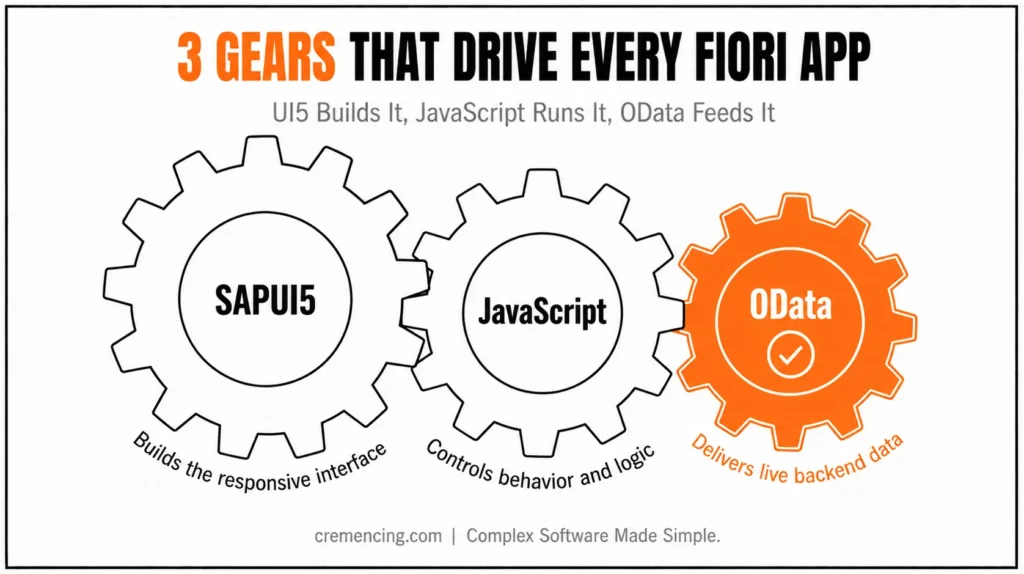
- UI5 builds the user interface
- JavaScript controls behaviour and logic
- OData delivers backend data
It connects the relationship between frontend and enterprise data, where users interact with real-time business knowledge through a modern interface.
| Layer | Primary responsibility | Typical SAP technology | Main troubleshooting question |
|---|---|---|---|
| UI | Render controls and layouts | SAPUI5/XML | Is the control and binding configured correctly? |
| Application logic | Events, routing, formatting, client behaviour | JavaScript/controllers | Is the controller logic behaving correctly? |
| Data model | Manage frontend data access | UI5 OData model | Is the model configured for the correct service/version? |
| API/service | Expose business data and operations | OData service | Is the requested resource and operation supported? |
| Backend | Business rules, authorization, persistence | ABAP/S/4HANA | Is the service returning valid data and enforcing authorization? |
| Access | Launchpad/application access | Fiori Launchpad/BTP roles | Does the user have the required roles and authorizations? |
How UI5, JavaScript, and OData Actually Interact
A useful way to understand SAP Fiori development is to separate responsibilities rather than treating UI5, JavaScript, and OData as three interchangeable technologies.
SAPUI5 owns the presentation layer. Controls such as tables, forms, lists, dialogues, and buttons render the user interface. XML views commonly define the structure, while controllers provide event handling and application behaviour.
JavaScript owns client-side application logic. Controllers can respond to user actions, trigger navigation, format values, validate input, and coordinate model interactions. Business-critical rules should not be hidden exclusively inside frontend controllers when those rules must also be enforced by the backend.
OData provides the service interface. The UI5 application communicates with an OData service through HTTP requests. Depending on the service and OData version, the application can read resources, create entities, update existing data, or delete resources. OData is a key part of SAP Fiori development because it connects the frontend application with backend SAP services.
The important point is that these layers are connected through models and bindings, not by directly embedding backend logic into the UI. In SAP Fiori development, optimizing OData requests and limiting unnecessary data retrieval can significantly improve application responsiveness
.JavaScript plays an important role in SAP Fiori development by handling events, application logic, navigation, and client-side behavior.
A typical request path looks like this:
UI5 control → data binding → OData model → HTTP request → backend OData service → response → model update → UI refresh
This separation becomes particularly important when troubleshooting. If a table displays no records, the problem might be the binding path, model configuration, request URL, service metadata, backend authorization, or the service implementation itself. Checking only the UI will not identify every failure point.
How SAP Fiori Development Language Works
The workflow is a key part of mastering the SAP Fiori development language.
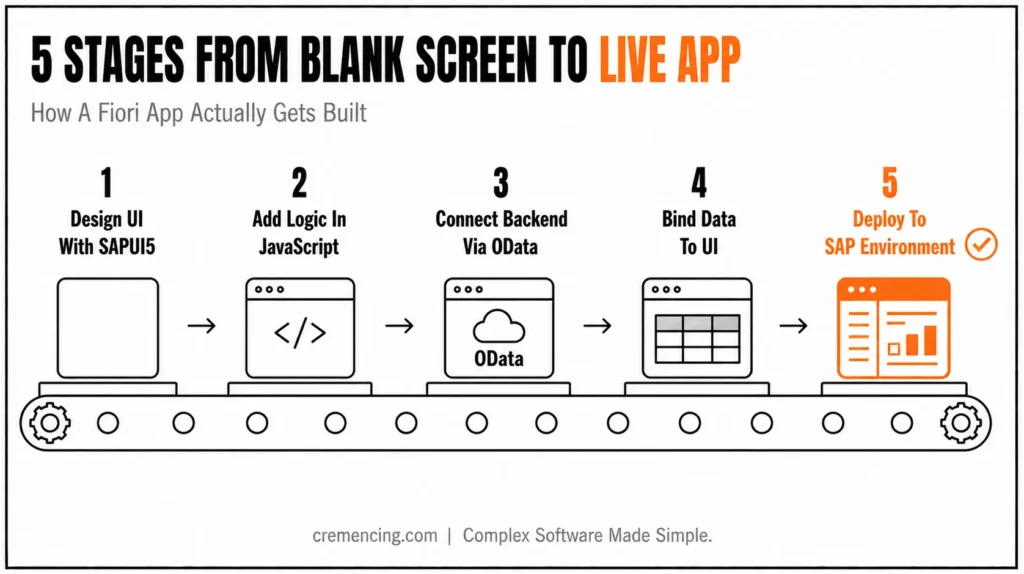
Step 1 — UI design using SAPUI5 H3
This whole development process starts with the UI being made.
Views are defined using XML or JavaScript by Developers. With UI5, there are reusable UI components available that cut down the development time.
Typical UI elements include:
- Tables for displaying business data
- Forms for user input
- Dashboards for analytics
Key Tip:
Use XML views whenever possible. They are easier to refactor and decouple UI from logic.
Step 2—Making your logic in JavaScript
Once the UI is prepared, JavaScript controllers manage how your application behaves.
They manage:
- Button clicks and user inputs
- Routing and navigation
- Data formatting and validation
For example:
As soon as the user clicks “Submit,” JavaScript fires an OData request.
On the other hand, JavaScript can change UI dynamically with data loading.
Step 3—OData: Now connect to the backend
OData services are the bridge between the frontend and the backend.
In UI5, developers configure OData models to access data from SAP systems like S/4HANA.
Common Operations:
- GET → Retrieve data
- POST → Create records
- PUT/PATCH → Update data
- DELETE → Remove entries
Real Project Example:
A sales order app:
- UI displays order list (UI5)
- JavaScript handles filters
- OData fetches live SAP data
Step 4 — Data Binding between UI and Backend
Where UI5 stands out is data binding.
In place of updating UI elements manually, developers bind the UI components directly to data models.
Types of Binding:
- One-way binding
- Two-way binding
- Expression binding
Benefits:
- Automatic UI updates
- Less code
- Better performance
Step 5 – Deploy in SAP Environment
Deployment is not the same thing as launchpad access. Where the application is hosted and how users reach it depend on the SAP landscape.
In an ABAP-based deployment, SAPUI5 application content can be stored in the SAPUI5 ABAP repository. In SAP BTP Cloud Foundry, applications can be stored in the HTML5 Application Repository. SAP documentation describes the HTML5 Application Repository as centralized storage for HTML5 application static content.
The launchpad then provides the business-user entry point and access configuration. In addition, BTP scenarios may require additional services and role assignments before users can access the application. Therefore, deployment should account for both application hosting and the access configuration required by the target architecture.
Therefore, a deployment checklist should identify three separate concerns:
- Where is the application hosted?
- Where does the OData service run?
- How are users authenticated and authorized to launch the application and consume its backend service?
SAP Fiori Development Language Benefits & Return on Investment
The SAP Fiori development language brings measurable business value.
Faster Development
Development time cut by up to 40% thanks to reusable UI5 components. However, less custom UI coding is needed
Better User Experience
Clean, intuitive design improves usability. Decreases employee training time by 30–50%
Real-Time Data Access
OData ensures live data synchronisation, eliminating delays from batch processing
Reduced Maintenance Costs
Modular architecture simplifies updates, with fewer bugs owing to the consistent framework.
Enterprise Scalability
Works seamlessly with SAP S/4HANA; supports cloud and hybrid environments
SAP Fiori UI5 + OData Quick Reference
UI5
- XML views → UI structure
- Controllers → client-side behavior
- Models → application data/state
- Bindings → connect controls to model data
OData
- GET → read
- POST → create
- PATCH/PUT → update, depending on protocol/service
- DELETE → delete, where supported
$filter→ restrict results$select→ request selected properties$orderby→ sort results$top→ limit returned records
Production checks
- Confirm OData V2/V4
- Inspect network requests
- Avoid unnecessary payloads
- Validate authorizations
- Test error handling
- Confirm SAPUI5 version
- Test deployment and launchpad access
Before building a custom interface, check whether an existing SAP Fiori application already covers the business requirement.
Common Pitfalls & How to Avoid Them
Even veteran developers make mistakes when developing with Fiori.
Common Mistakes
- Hiding business logic inside UI controllers
- On the left side of this database model, OData calls (performance hit from too many OData calls)
- Ignoring MVC architecture
- Not optimizing data binding
- Using values instead of models live tagging)
Best Practices
- Follow MVC strictly
- Use component-based architecture
- Optimize OData calls using:
- Batching
- Filtering
- Pagination
- Keep controllers clean and focused
- Use reusable UI fragments
The Practical Stuff that Most Tutorials Skip Over
Most of the blogs fall no further than a tool explanation. However, the actual success story is how you implement them in production.
Performance Optimization Strategy
- Batch multiple requests using OData batching
- Defer loading on larger datasets
- Avoid unnecessary UI re-rendering
Designing OData Requests for Performance
OData performance problems often begin with the amount of data requested rather than the rendering technology itself.
For example, a list page rarely needs every property of every backend record. Use query options such as $select to request only the required properties and $filter to restrict the result set. $orderby can control sorting, while $top and other supported mechanisms can limit the amount of data returned.
The objective is not simply to make an HTTP request faster. The application should minimize unnecessary data transfer, avoid repeated requests, and prevent the browser from rendering data the user does not need.
Before optimizing, inspect the actual network requests generated by the application. Check the request URL, payload size, response time, number of requests, and whether the backend is returning substantially more data than the UI consumes.
For large datasets, combine server-side filtering and paging with an appropriate UI5 binding strategy. Use batching only where it makes sense for the application’s request pattern and backend behaviour.
Security Considerations
- Use SAP Gateway authentication
- Implement role-based access control
- Authorization checks to protect sensitive data
Version Control & Upgrades
UI5 updates can be breaking for your applications.
Best approach:
- Lock UI5 versions
- Test before upgrading
- Maintain backward compatibility
Testing Strategy
- Use QUnit for unit testing
- Test OData services separately
- Perform integration testing before deployment
Conclusion
Overall, SAPUI5, JavaScript, and OData work together to make SAP Fiori applications more dynamic, data-driven, and suitable for enterprise business processes. However, the confusion often arises because UI5, JavaScript, and OData are taught separately, even though they work together in real-world applications. In practice, developers need to understand how these technologies interact rather than treat them as isolated components. Otherwise, they may write inefficient code, make unnecessary backend requests, or introduce stability issues. For example, a poorly designed data binding can increase backend traffic, while excessive data retrieval can affect application performance.
As a result, understanding how these layers connect is essential for building reliable and maintainable SAP Fiori applications. Ultimately, the goal is to use each technology for its intended role while ensuring that they work together as a single application architecture.
Ultimately, effective SAP Fiori development depends on using SAPUI5, JavaScript, and OData together while maintaining performance, security, and a reliable user experience.
In this tutorial, I will explain how we design UI5 and how it is easy to integrate with JavaScript and OData in real time. Performance stuff (PFX stuff), best practices, secrets buried in the fine print of most tutorials – all aimed at getting you comfortable with creating production-grade Fiori applications.
FAQ
What is OData in SAP Fiori?
OData is an API protocol for connecting frontend apps with SAP backend systems.
Is learning SAP Fiori development good for beginners?
Yes. From the beginner’s standpoint, a few weeks would be sufficient time to build apps there.
What is SAPUI5 used for in SAP Fiori?
SAPUI5 is the JavaScript-based UI framework used to build many SAP Fiori applications. It provides controls, models, data binding, routing, and application-development capabilities.
What is the difference between SAPUI5 and JavaScript?
JavaScript is a programming language. SAPUI5 is a framework built around JavaScript that provides application controls, models, binding, routing, and other capabilities for enterprise web applications.
How does SAPUI5 connect to S/4HANA?
An SAPUI5 application can consume backend services such as OData services exposed by an SAP system. The UI5 model manages communication between the application and the service.
Should SAP Fiori developers learn OData?
Yes. Developers working on applications that consume OData services should understand service metadata, entity sets, CRUD operations, filtering, paging, bindings, and request handling.





4 Responses