
Function modules in SAP ABAP are still worth mastering, and classes haven’t replaced them that’s the direct answer. The longer one is that most ABAP developers use function modules every week without ever learning why they exist, which is why so many only discover how they actually work the moment a BAPI fails silently in production or an RFC call times out with no useful error.
Function modules aren’t a legacy holdover you tolerate until you can migrate to classes. They’re the only mechanism SAP gives you for RFC communication, update-task deferral, and background processing three things that show up in almost every real integration and every document-posting scenario you’ll touch as a professional ABAP developer.
This post breaks down what function modules in SAP ABAP actually are, why they remain structurally necessary rather than merely traditional, and what separates a developer who can call a standard FM from one who can debug it when it breaks.
Why Metadata-Driven Development Matters in SAP Fiori Elements
SAP Fiori development becomes easier to maintain when developers choose the appropriate development model instead of manually building every interface. SAP documentation describes Fiori Elements as a template- and metadata-driven approach in which predefined floorplans, OData services, and annotations determine much of the application UI.
This reduces the need for application-specific JavaScript UI coding and allows developers to focus more on business requirements. SAP Fiori Tools also supports working with service metadata and annotations during application development, helping developers understand and modify the UI structure.
For projects using Fiori elements, developers should therefore understand OData metadata and annotations before adding custom code. Custom extensions remain possible, but the available approach depends on the Fiori elements version, OData protocol, and application architecture.
What Is a Function Module in SAP ABAP?
A function module (FM) is a reusable piece of code that exists as a self-contained block in the Function Library, a central repository within the SAP system.
Unlike a simple FORM routine or a method within a local class, a function module has a formally defined interface (import, export, changing, tables, and exceptions). Other programs can call it across clients and even remote systems. Think of it as a black box with a contract: you provide input, it performs a task, and it returns output consistently
FUNCTION z_calculate_discount.
*"----------------------------------------------------------------------
*"*"Local interface:
*"  IMPORTING
*"     VALUE(IV_MATNR) TYPE MATNR
*"     VALUE(IV_QUANTITY) TYPE MENGE_D
*"  EXPORTING
*"     VALUE(EV_DISCOUNT_PCT) TYPE P DECIMALS 2
*"  EXCEPTIONS
*"     MATERIAL_NOT_FOUND
*"     INVALID_QUANTITY
*"----------------------------------------------------------------------

  IF iv_quantity <= 0.
    RAISE invalid_quantity.
  ENDIF.

  SELECT SINGLE matnr FROM mara INTO @DATA(lv_matnr)
    WHERE matnr = @iv_matnr.

  IF sy-subrc <> 0.
    RAISE material_not_found.
  ENDIF.

  " discount calculation logic here
  ev_discount_pct = 5.

ENDFUNCTION.
Why Function Modules in SAP ABAP Are Key to Professional Development
Function modules are the core of the professional case.
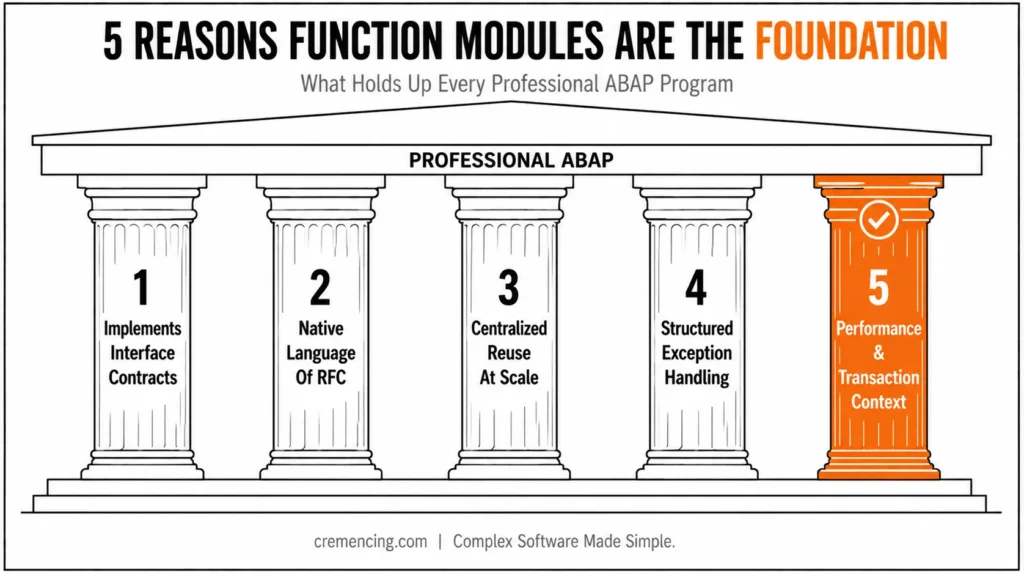
1. They implement interface contracts.
They are interface contracts.
Predictability is one of the characteristics of professional software.
If you explicitly specify the parameter details in the function module, including their data types, whether they are passed by value or by reference, and whether they are required or optional, the function module establishes a clear contract between the caller and the implementation.
This is not a luxury. Clarity of the interfaces is what keeps you from finding bugs after weeks of development in a large SAP landscape (hundreds of developers and thousands of programs).
Function Modules in SAP ABAP vs. FORM Routines vs. Class Methods
| Aspect | FORM Routine | Function Module | Class Method (OO ABAP) |
|---|---|---|---|
| Scope | Local to the program | Global, Function Library | Global (or local to class) |
| Interface typing | Optional — USING/CHANGING params can be untyped | Formal, typed (import/export/changing/tables) | Formal, typed |
| Callable remotely (RFC) | No | Yes, if RFC-enabled | No (not directly) |
| Exception handling | Manual, via return codes | Named exceptions + sy-subrc | Class-based exceptions (TRY/CATCH) |
| Update task/background task | No | Yes (IN UPDATE TASK, IN BACKGROUND TASK) | No |
| Preferred for | Legacy, quick local logic | RFC, BAPIs, update/background processing | New business logic, OOP design |
If a parameter is of type MATNR, all developers who invoke that FM are aware of what they need to pass to it. There’s no confusion. This is quite different from a poorly designed FORM routine that accepts USING p_value without an explicit data type, making the code harder to maintain and increasing the risk of production issues.
2. In SAP, they are the native language of the RFC Architecture.
- All SAP systems communicate with one another and with external systems with the help of Remote Function Call (RFC).
- All BAPIs, IDocs, middleware, and third-party connectors talk in the same language: RFC.
- RFC can only be used with function modules.
- Not classes.
- Not FORM routines.
Function Modules.
Function Modules are no longer just useful but necessary when your ABAP development crosses a system boundary and in any real enterprise, it will.
Without a full understanding of them, a developer cannot develop any integration, cannot write any BAPI, and cannot join in purposefully in any system-to-system architecture. When extending standard SAP behaviour, developers frequently combine function modules with the SAP enhancement framework.
3. They provide centralized reuse at scale.
- SAP offers thousands of standard function modules.
- CONVERSION_EXIT_MATN1_INPUT, BAPI_PO_CREATE1, and HR_GB_BSI_PAYSLIP_GENERATE, these are production-ready implementations that run in millions of systems worldwide. They’re globally addressable, independently maintainable, and any ABAP context can call them.
- SAP’s decision to package reusable logic in function modules is deliberate, as function modules are globally addressable, independently maintainable, and callable from various ABAP contexts.
- You can package your own business logic and inherit the same properties in function modules.
- Pricing calculation, document validation routine, authorization check – write once, call anywhere, maintain anywhere.
- This is the basis of DRY (Don’t Repeat Yourself) in ABAP at an enterprise level.
4. They offer error handling in a structured fashion through exceptions.
There is a formal exception mechanism for the Function Modules.
- Named exceptions such as
NOT_FOUND,INVALID_INPUT, andAUTHORITY_CHECK_FAILEDare defined and handled by the caller using checks onsy-subrc. - This is not for syntactic convenience, but as a pattern to explicitly communicate failure states.
- Professional programs don’t silently crash or give incorrect results.
- They predict risks and deal with them.
- Both the function module writer and the caller must follow this discipline because of the exception model.
5. They contain options for performance and transaction context.
Function modules also offer execution attributes which are not available in other ABAP constructs:
- RFC-enabled: lets outside systems call the FM.
- Update module: enables deferred execution via SAP’s concept of Logical Unit of Work (LUW), which is the backbone of deferred execution with SAP: CALL FUNCTION … IN UPDATE TASK.
- Background task: Allows running it asynchronously with the help of IN BACKGROUND TASK.
These are the key characteristics of SAP’s transactional integrity model.
For any developer who creates documents, posts, or workflows, understanding them is mandatory.
It is an absolute must for any ABAP developer creating documents, postings, or workflows.
Common Misconceptions About Function Modules in SAP ABAP
Function modules have been replaced by classes and methods.
- Partially true with a nuance. Classes, interfaces, and inheritance are the preferred approaches for new development, particularly for complex business logic, and these are the paradigms of object-oriented ABAP.
- Object-oriented ABAP is based on the paradigm of classes, interfaces, and inheritance — particularly for complex business logic.
- For these other kinds of tasks, such as RFC, BAPIs, update tasks, or background tasks, there is only one alternative: Function Modules.
- Both paradigms live side-by-side and mutually call each other.
- If a developer finds that they “prefer OOP” instead of function modules, they will run into a wall very soon.
I don’t need to have a deep understanding of standard FMs; I can just call them out.
You can do that, though till it all goes wrong. When an RFC call doesn’t work all the time, or when a BAPI returns an error message that’s hard to understand.
Knowing the inner workings of how parameters pass, how exceptions work, and how update FMs connect with the commit cycle helps you troubleshoot issues with confidence. As SAP development evolves, developers also need to understand modern approaches like ABAP for SAP HANA 2.0 to build faster and more efficient solutions.
The following error appears on the screen: “SAP Function modules are out of date.”
- Function Modules were added to R/2 and have been continuously growing since then.
- They are capable of handling all current ABAP syntax, can use object references, and fit seamlessly into modern frameworks.
- They’re not new, so to say; TCP/IP isn’t new; it’s foundational, and it’s not going anywhere, is calling them “outdated.”
- This presentation brings several practical tips to the table for working professionally with function modules.
Here is a step-by-step approach to upgrading your FM skills:
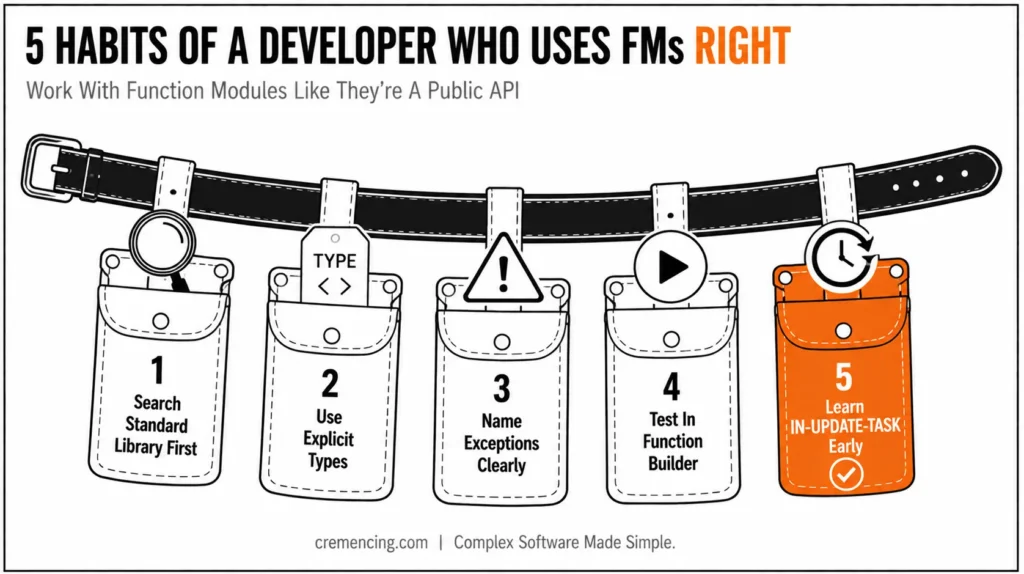
- Search the standard library before writing a new FM; Read before building.
- Likely, SAP has already developed something similar to what you need.
- Examine the interface, read the documentation, and explore using SE37.
- If you do this often, you won’t have to reinvent proven logic and will save a lot of development time.
- Use explicit types for all import/export parameters, preferably using Data Dictionary elements.
- Do not use any type unless necessary.
- The first line of defence against integration bugs is the type system.
- Each function module should raise exceptions with descriptive, documented names.
- The calling party will rely on this contract.
- Treat it as if it were a public API.
- The Function Builder’s test environment allows you to test an FM without needing to use it in context in a controlled way with controlled inputs.
Use it
- It is much easier to isolate the FM during development and debugging than to run an entire program and hope execution follows the correct path.
- One of the less obvious features of SAP development is the IN-UPDATE-TASK mechanism.
- Learn about it before you have a posting problem in production, not after!
Conclusion
Function modules in SAP ABAP aren’t a relic you tolerate until the rest of your codebase catches up to object-oriented ABAP — they’re the only mechanism SAP gives you for RFC, update tasks, and background processing, and every serious integration eventually runs through one whether you planned for it or not.
The developers who get burned aren’t the ones who use function modules; everyone does. It’s the ones who never learned how the interface contract, the exception model, or the update-task mechanism actually works underneath the CALL FUNCTION statement. That gap doesn’t show up in a code review. It shows up the first time a BAPI returns success but nothing actually posts, or an RFC call fails with no explanation three systems away from where you’re debugging. Learn how function modules in SAP ABAP actually work before that happens, not after.
FAQs
What exactly is a function module?
It’s a reusable, callable block of ABAP code stored centrally in the function library, with a formally defined interface (import, export, changing, tables, and exceptions) that other programs, even on remote systems, can call.
How is it different from a FORM routine or a class method?
A FORM routine is local to a program and often lacks strict typing, while a Function Module has an explicit, typed interface that acts as a contract between caller and implementation. Unlike methods, it also supports remote calls, while FORMs and local methods do not provide this capability.
Are Function Modules outdated now that ABAP is object-oriented?
Not for everything. OOP (classes, interfaces, inheritance) is the modern choice for complex business logic, but certain mechanisms RFC, BAPIs, update tasks, background tasks still require Function Modules specifically. The two paradigms coexist and call each other.
Why are Function Modules tied to RFC?
Remote Function Call, the protocol SAP systems use to talk to each other and to external systems, only works through function modules. BAPIs, IDocs, and most middleware integrations are built on this same mechanism, so any integration work eventually runs into them.
What’s the point of the formal exception model?
Function Modules let you define named exceptions (e.g., NOT_FOUND, INVALID_INPUT) that the caller checks via sy-subrc. It forces explicit handling of failure states rather than silent crashes or bad data slipping through.
What do “RFC-enabled,” “update task,” and “background task” mean in practice?
RFC-enabled lets external systems call the module; IN UPDATE TASK defers execution until the database commit as part of SAP’s Logical Unit of Work (LUW); IN BACKGROUND TASK runs it asynchronously. These control how a Function Module behaves inside SAP’s transactional model, which matters a lot for anything posting documents or running workflows.
Can a function module be object-oriented internally?
Yes — the FM’s interface stays procedural (import/export/exceptions), but the code inside it can freely instantiate and call classes. Many modern standard FMs are thin wrappers around class-based logic underneath.
What’s the practical difference between a BAPI and a regular function module?
Every BAPI is a function module, but not every function module is a BAPI. A BAPI is an FM that follows SAP’s Business Object naming and interface conventions, is meant for external/business-object-level access, and is documented as a stable public API. Regular FMs carry no such guarantee of stability.
What should I do when a function module doesn’t raise the exception I expected?
Check sy-subrc immediately after the call, even if you didn’t explicitly list every exception; unhandled internal errors often surface as OTHERS. Then use SE37’s test environment to run the FM standalone with the same inputs and inspect its internal logic or debug it directly.
Are function modules in SAP ABAP used in ABAP Cloud or RAP-based development?
Only in a restricted form; ABAP Cloud only allows calling function modules that are explicitly released as part of a stable API. You can’t call arbitrary FMs the way you can in classic on-premise ABAP, which is part of why RAP and OData services increasingly replace custom FM-based integrations for new cloud-native development.




