
A broken enhancement rarely fails quietly. It fails during month-end close, during a background job nobody’s watching, or during the one transaction path the developer never tested and by the time anyone notices, the fix isn’t a code review, it’s an emergency transport, a Sev-1 ticket, and a very uncomfortable call with the business. The enhancement framework in SAP ABAP gives you the tools to extend SAP without modifying standard objects, but the tools don’t protect you from a bad decision made in the first five minutes: which extension point to use, and why.
Most SAP shops don’t get burned by BAdIs or explicit enhancement spots those come with a documented contract. They get burned by implicit enhancements dropped into a stable-looking include, with no switch check, no company-code filter, and no test outside the one happy-path transaction that was open at the time. This post lays out five rules that catch that failure before it reaches QA not what enhancement points and BAdIs are, but the decision order and defensive coding pattern that keeps them from breaking standard behavior when your code runs somewhere you didn’t plan for.
Why Enhancement Framework in SAP ABAP Breaks Standard Behaviour
The enhancement framework in SAP ABAP lets developers add custom logic to SAP standard objects without directly changing SAP source code. That is useful, but it also creates risk because your code runs inside a standard runtime path that SAP owns. If your custom logic assumes one transaction, one caller, one document type, or one foreground user path, it can break other flows.
The root cause is usually poor decision-making order. Developers jump to an implicit enhancement before checking the configuration, a released API, a standard BAdI, or an explicit enhancement spot. Competitor tutorials often explain what enhancement points, enhancement sections, and BAdIs are, but they rarely explain how to decide which option is safest.
SE18 is the SAP GUI transaction used to inspect BAdI definitions and enhancement spots. SE19 is the transaction used to create or maintain enhancement implementations. SE80 is the Object Navigator, which helps inspect packages, programs, classes, function groups, and related repository objects.
The new enhancement framework in SAP ABAP groups several extension techniques under one model, including BAdIs, explicit enhancement points, explicit enhancement sections, and implicit enhancement options. The framework itself is not the problem. Bad placement, broad conditions, missing switch checks, and weak testing are the real reason standard behaviour breaks.
Step-by-Step Fix: 5 Rules for Safe SAP Enhancements
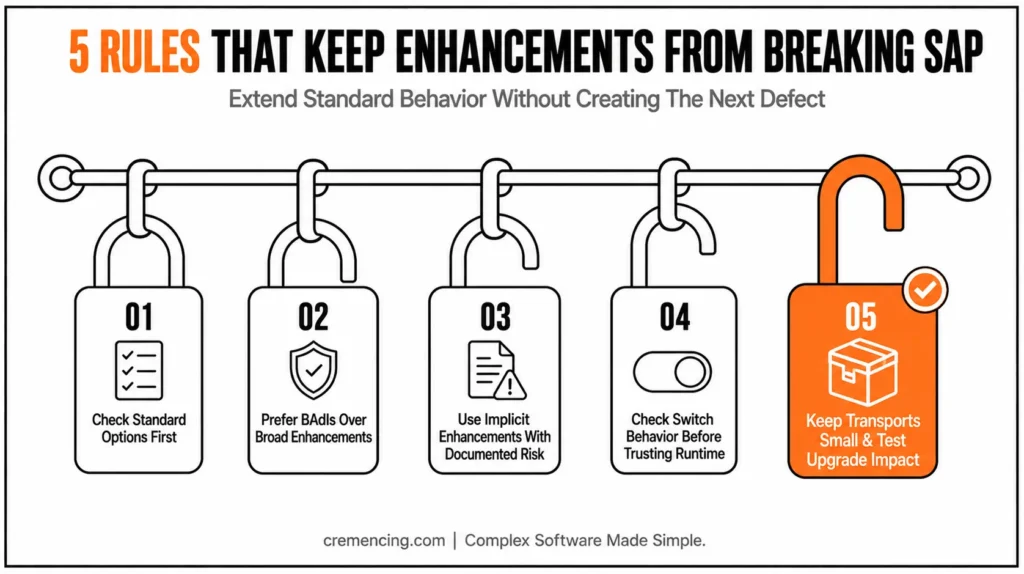
Rule 1 — Check standard options before enhancing
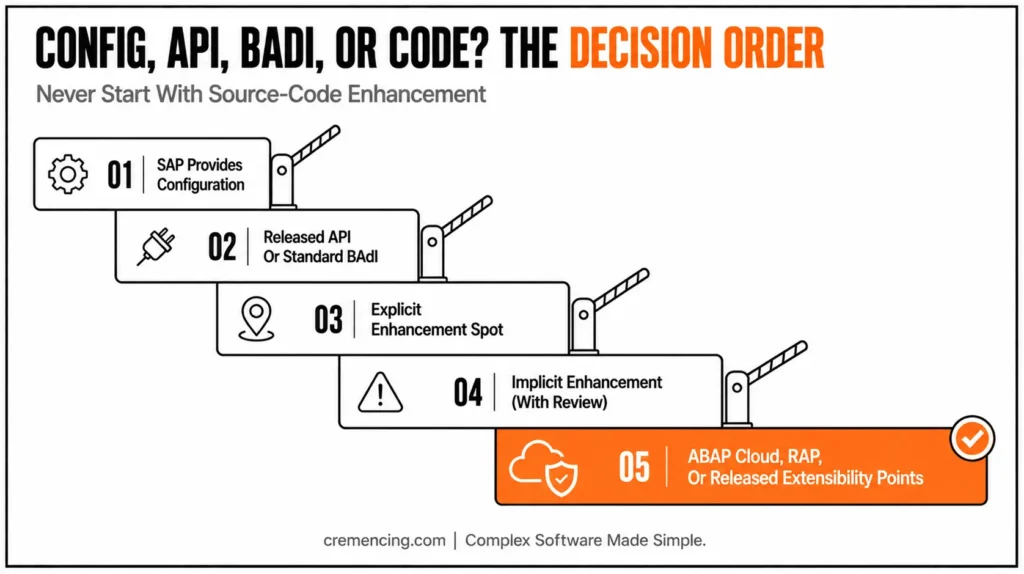
Never start with source-code enhancement. First check configuration, output control, substitution, validation, released APIs, standard BAdIs, and application-specific extension options. If SAP already provides a controlled hook, use that instead of placing custom code inside a random standard include.
Use this decision order:
| Requirement Situation | Preferred Option |
| SAP provides configuration | Use configuration first |
| SAP provides a released API or standard BAdI | Use the released API or BAdI |
| SAP provides an explicit enhancement spot | Use the explicit enhancement option |
| No explicit option exists but the source position is stable | Consider implicit enhancement with review |
| Requirement changes standard behavior heavily | Recheck design before modification |
| ABAP Cloud or S/4HANA clean-core project | Use released APIs, RAP, or released extensibility points |
This is the first rule because many enhancement defects start before any code exists. The developer chooses the wrong technique, and then every later test only proves the wrong design works in one case.
Rule 2—Prefer BAdIs over broad source-code enhancements
A BAdI is usually safer than a broad implicit source-code enhancement because SAP defines the method signature and intended extension point. When you use enhancement spot SAP ABAP through a BAdI, you usually get a clearer contract: input parameters, changing parameters, filter values, and a documented business moment.
Use SE18 to inspect the BAdI definition. Check the interface, filter dependency, multiple-use setting, fallback behavior, and documentation. Use SE19 to create the implementation only after you understand when the method runs.
Keep your bad BAdI method small. Put the business rule in a helper class so you can test the logic without repeatedly entering the transaction. Before creating append structures or enhancing standard tables, it’s important to understand the SAP Data Dictionary and how SAP defines metadata.
REPORT z_enhancement_guard_demo.
TYPES: BEGIN OF ty_context,
bukrs TYPE bukrs, ” Company code that controls the rule
tcode TYPE sy-tcode, ” Transaction code that triggered the flow
END OF ty_context.
CLASS lcl_enhancement_guard DEFINITION.
PUBLIC SECTION.
CLASS-METHODS should_run
IMPORTING is_context TYPE ty_context
RETURNING VALUE(rv_run) TYPE abap_bool. ” True when enhancement logic should run
ENDCLASS.
CLASS lcl_enhancement_guard IMPLEMENTATION.
METHOD should_run.
rv_run = abap_false. ” Default is safe: do not run custom logic
IF is_context-bukrs <> ‘1000’. ” Limit rule to one company code
RETURN. ” Exit when company code is not relevant
ENDIF.
IF is_context-tcode <> ‘ME21N’. ” Limit rule to the intended transaction
RETURN. ” Exit when caller is not the expected path
ENDIF.
rv_run = abap_true. ” Run custom logic only after all checks pass
ENDMETHOD.
ENDCLASS.
DATA ls_context TYPE ty_context. ” Demo context for the guard
DATA lv_run TYPE abap_bool. ” Result from guard method
ls_context-bukrs = ‘1000’. ” Demo company code
ls_context-tcode = ‘ME21N’. ” Demo transaction code
lv_run = lcl_enhancement_guard=>should_run( ls_context ). ” Check if rule applies
IF lv_run = abap_true.
WRITE: / ‘Enhancement logic is allowed for this context.’.
ELSE.
WRITE: / ‘Enhancement logic is skipped for this context.’.
ENDIF.
This pattern prevents a common bug: custom logic running in every caller. Use it inside BAdI implementations, explicit enhancement spots, or implicit enhancements when you need defensive checks.
Rule 3 — Use implicit enhancements only with documented risk
Implicit enhancements exist at predefined technical positions, such as the beginning or end of methods, forms, function modules, and includes. They are tempting because they appear almost everywhere. That availability does not make them safe.
Use an implicit enhancement only when no standard configuration, BAdI, explicit enhancement spot, released API, or clean extension option fits. Document why you used it, where it sits, what business case it covers, and how to deactivate it. Also document the upgrade risk because the surrounding SAP source may change.
Do not place large business processes inside implicit enhancements. Call a small helper method and keep the enhancement plug-in readable.
CLASS zcl_enhancement_rule DEFINITION PUBLIC FINAL CREATE PUBLIC.
PUBLIC SECTION.
CLASS-METHODS validate_status
IMPORTING iv_status TYPE char1
RETURNING VALUE(rv_ok) TYPE abap_bool. ” Validation result
ENDCLASS.
CLASS zcl_enhancement_rule IMPLEMENTATION.
METHOD validate_status.
rv_ok = abap_false. ” Reject by default
IF iv_status = ‘A’. ” Allow only approved status
rv_ok = abap_true. ” Mark rule as valid
ENDIF.
ENDMETHOD.
ENDCLASS.
Inside the enhancement, call this class and return early when the rule does not apply. That keeps standard-source plug-in code small and makes the real rule easier to test.
Rule 4 — Check switch behavior before trusting runtime
The enhancement switch framework in sap matters when enhancement implementations depend on business functions or switches. In those cases, an implementation may exist but not run because the switch state blocks it. The opposite can also happen after activation in another system.
| System | Business function status | Enhancement implementation | Observed behavior |
|---|---|---|---|
| DEV | Active | Active | Runs as expected |
| QA | Not activated | Active | Silently skipped — looks like “the code doesn’t work” |
| PRD | Active (different scope) | Active | Runs, but for a broader set of company codes/document types than tested |
Before testing, check whether the enhancement implementation belongs to a switched package or switch-controlled framework. Ask the functional lead whether the related business function is active in DEV, QA, and PRD. Do not assume all systems have the same switch state.
This rule is important in ECC enhancement packages and S/4HANA landscapes with activated business functions. If a rule works in DEV but does not run in QA, do not debug the BAdI method first. Check the switch and implementation activation state first.
Rule 5 — Keep transports small and test upgrade impact
Enhancement implementations move through transports like other repository objects. A messy transport can move unrelated logic, inactive objects, or half-tested implementations into QA. Keep the enhancement, helper class, test report, and related objects in a clear package and transport plan.
Use a naming standard that tells the next developer what the implementation does. Include the SAP object, business area, and short purpose in the name where project naming rules allow it. Add comments that explain why the enhancement exists, not only what the code does.
For S/4HANA upgrades, review implicit enhancements carefully. Explicit BAdIs and released extension points usually give you a clearer contract. Implicit hooks depend more heavily on SAP source structure, so they need extra upgrade checks.
How to Verify the Enhancement Before Transport
Start in SE18. SE18 displays BAdI and enhancement spot definitions, so use it to confirm the correct spot, interface, filters, and documentation. Then use SE19 to inspect or maintain the implementation and confirm that it is active.
Run the business transaction in the foreground and set a debugger breakpoint inside the enhancement. Confirm three things: the enhancement runs only for the intended case, it exits safely for unrelated cases, and it does not change standard data too early. If the logic touches update processing, check SM13, the SAP GUI transaction for update requests and update failures.
Check ST22 after testing. ST22 displays ABAP short dumps, so it helps catch runtime errors caused by missing data, invalid assumptions, or failed type conversions. Run background or batch paths if the same standard object can execute outside the dialog transaction.
Before transport, review object list, package, naming, activation state, and dependency objects. If the enhancement depends on switch state or business functions, compare DEV, QA, and PRD settings. This verification is where many tutorial-only explanations fail: they stop at activation, while real projects fail at runtime path, update tasks, or transport.
Mistakes That Bring Enhancement Bugs Back
The first mistake is enhancing too early. If a configuration, a released API, or a standard BAdI fits, use that before source-code enhancement. The enhancement framework in SAP ABAP should not become the default answer for every missing requirement.
The second mistake is writing broad logic with weak conditions. Enhancement code must check the company code, document type, transaction, caller path, or feature flag where needed. Otherwise, it can run in background jobs, interfaces, or transactions the developer never tested.
The third mistake is treating implicit enhancements as upgrade-safe by default. They are useful, but they sit close to SAP source structure. Document the reason, keep the plug-in small, and review it after support package or S/4HANA upgrades.
The fourth mistake is ignoring switch state and transport discipline. An enhancement may activate in DEV and still behave differently in QA if business functions, switches, packages, or dependent objects differ. Always verify before release. Many enhancement implementations invoke reusable Function Modules in SAP ABAP instead of duplicating business logic.
5 Rules — Quick Reference
| Rule | Core check | T-code(s) | Risk if skipped |
|---|---|---|---|
| 1. Check standard options first | Config, released API, standard BAdI, explicit spot | SPRO, SE18 | Wrong technique locks in a fragile design |
| 2. Prefer BAdIs over broad enhancements | Interface, filter, multi-use, fallback | SE18, SE19 | Enhancement runs in unintended callers |
| 3. Use implicit enhancements only with documented risk | Business case + deactivation plan documented | SE80, ADT | Upgrade breaks undocumented custom logic |
| 4. Check switch behavior | Business function state per system | SFW5 (functional lead check) | “Works in DEV, silent in QA” |
| 5. Keep transports small | Package/object scope, naming | SE09/SE10 | Untested logic rides into QA/PRD |
Conclusion
The enhancement framework in SAP ABAP helps you extend SAP standard logic, but it does not protect you from poor design choices. Safe enhancement starts before coding: check configuration, released APIs, BAdIs, explicit spots, switch state, and clean-core rules first. That first review often prevents the biggest mistakes before they reach DEV.
Use the five rules as your review checklist. Prefer controlled BAdIs, document implicit enhancement risks, isolate custom logic, test all runtime paths, and verify dumps, update failures, transports, and upgrade impact before release. That is how you extend SAP without breaking the standard process.
A good enhancement should be small, traceable, and easy to deactivate. If another developer opens SE19 six months later, they should understand why the implementation exists, when it runs, and what business rule it protects. If the logic needs a long explanation or touches too many unrelated cases, the design probably needs another review.
In ECC and S/4HANA on-premise systems, classic sap enhancement techniques such as BAdIs, explicit enhancement points, enhancement sections, and implicit enhancements still matter. In S/4HANA clean-core work, you must also compare them with released APIs, RAP extension models, and key-user extensibility. The safest option is not always the one that lets you write code fastest.
Before transport, prove the enhancement in the real runtime path. Test foreground and background processing, check ST22 for dumps, check SM13 if update logic is involved, and confirm switch behavior when the enhancement switch framework in sap applies. Enhancement code that only works in one happy-path transaction is not ready for QA. Learn more about SAP Data Dictionary and why it remains an essential skill for every ABAP developer.
So treat the enhancement framework in sap abap as a controlled extension tool, not a shortcut into standard SAP code. Use it when the business case is clear, the extension point is correct, and the test evidence is strong. That is the difference between extending SAP safely and creating the next upgrade defect.
FAQs
1. What is an enhancement framework in SAP ABAP?
The enhancement framework in sap abap is SAP’s model for adding custom behavior to standard applications without modifying the original SAP object directly. It includes BAdIs, explicit enhancement points, enhancement sections, and implicit enhancement options. Use it carefully because custom logic still runs inside standard processes.
2. What is the new enhancement framework in SAP ABAP?
The new enhancement framework in sap abap groups several enhancement techniques under a common model. It organizes enhancement options, enhancement spots, and enhancement implementations. It also supports BAdIs and source-code enhancement options, giving developers a structured way to extend SAP standard logic.
3. What is an enhancement spot in SAP?
An enhancement spot sap object groups enhancement options. In practice, it helps developers find where SAP allows custom logic through BAdIs or explicit source-code enhancements. Always inspect the spot definition before implementation, because the available parameters and runtime point decide whether it fits your requirements.
4. What is the t-code for the enhancement spot in SAP?
The common enhancement spot sap tcode path is SE18 for viewing BAdI or enhancement spot definitions and SE19 for creating or maintaining enhancement implementations. SE80 and ADT can also help inspect related packages and objects. [INTERNAL LINK: SE18 and SE19 guide → SAP Enhancement Spot Tcodes Explained]
5. What are SAP enhancement techniques?
Common sap enhancement techniques include customer exits, user exits, classic BAdIs, new BAdIs, explicit enhancement points, enhancement sections, and implicit enhancements. In S/4HANA clean-core projects, also check released APIs, RAP extension options, and key-user extensibility before choosing a classic enhancement.
6. What is enhancement switch framework in SAP?
The enhancement switch framework in sap controls whether certain enhancements or business functions are active. If switch state differs between DEV, QA, and PRD, an implementation may behave differently. Always check switch and business function settings when an enhancement does not run as expected.
7. Can I download enhancement framework in SAP ABAP PDF material?
Yes, many learners search for enhancement framework in sap abap pdf, but older PDFs may miss S/4HANA and clean-core guidance. Use SAP Help, SAP Community, and project-specific standards for current behavior. [INTERNAL LINK: SAP ABAP PDF resources → Best SAP ABAP Learning Resources for Developers]





One Response