Your Solution Manager roadmap now has a hard date. Mainstream maintenance for SolMan 7.2 ends on December 31, 2027. Whether you run ECC 6.0, S/4HANA 2023, RISE with SAP, or a mixed landscape, SAP Cloud ALM is the strategic destination but not a one-to-one replacement, so the SAP ALM vs Solution Manager decision affects ChaRM, ITSM, test assets, monitoring, licensing, and infrastructure; by the end, you’ll know which platform fits, what will not migrate, and how to switch without disrupting active projects.
Choose SAP Cloud ALM as the strategic destination for cloud-centric and modern hybrid landscapes. Keep Solution Manager temporarily when active ChaRM cycles, ITSM, mature test assets, or customer-specific processes still depend on it. The correct SAP ALM vs Solution Manager answer is usually a phased transition, not an overnight replacement.
SAP ALM vs Solution Manager:
First, fix the terminology. SAP ALM means application lifecycle management—the processes and tools used to manage implementation, operations, change, testing, and support.
Within that portfolio, SAP Cloud ALM is one specific product. Solution Manager 7.2 and SAP Focused Run are others, each aimed at different requirements. None of these products have functional parity with one another, according to SAP, so “SAP ALM replaces SolMan” is too broad to guide an architecture decision.
SAP Solution Manager vs SAP Cloud ALM: Old Way vs New Way
| Decision area | SAP Solution Manager 7.2: old way | SAP Cloud ALM: new way |
| Delivery model | Customer-managed ABAP and Java platform, usually on-premises | SAP-managed cloud service based on SAP BTP |
| Product direction | Mature platform with mainstream maintenance ending in 2027 | SAP’s strategic ALM destination |
| Best fit | Deeply customized on-premise and hybrid ALM processes | Cloud-centric and modern hybrid landscapes |
| Platform operations | Customer handles sizing, patching, upgrades, database, backup, and availability | SAP operates and updates the service |
| Process design | Customer-specific workflows and extensive configuration | Standardized processes with controlled extension and integration points |
| Change control | Mature ChaRM processes, approvals, cycles, retrofit, and transport governance | Change and Deployment Management with features, releases, deployment orchestration, and traceability |
| ITSM | Integrated IT service management and message processing | No built-in SolMan-equivalent ITSM; integrate a third-party service desk |
| Testing | Test Suite, BPCA, TBOMs, SEA, Focused Build test steps, and defect handling | Manual test management plus supported test-automation integrations |
| Operations | Broad system, application, process, job, and technical monitoring | Central monitoring for supported cloud and on-premise systems, integrations, jobs, users, and business processes |
| Project approach | Project Management, Process Management, Focused Build, and custom governance | SAP Activate-oriented tasks, requirements, processes, testing, and deployment readiness |
| Data transition | Source of existing projects, documents, tests, and change records | Selective transfer for supported content; several SolMan data types do not move |
| Licensing basis | Usage rights depend on an active qualifying on-premise maintenance agreement | One tenant is included for customers with qualifying Enterprise Support rights |
| Maintenance horizon | Mainstream maintenance to December 31, 2027; selected extended-maintenance functions to 2030 | Continuous cloud delivery under SAP’s current ALM strategy |
SAP ALM vs Solution Manager: What the Table Doesn’t Show
The table shows why SAP ALM vs Solution Manager cannot be settled by counting features. Solution Manager offers years of accumulated depth, especially where teams have built custom ChaRM status models, retrofit rules, release calendars, service-desk queues, Business Process Change Analyzer content, and formal test governance.
SAP Cloud ALM removes the need to operate the ALM platform itself, but it asks teams to adopt a more standardized operating model.
The 2027 Maintenance Deadline, Explained
The maintenance date also needs precise wording. Mainstream maintenance for SAP Solution Manager 7.2 ends on December 31, 2027.
Customers choosing optional extended maintenance for SAP Business Suite 7 can receive extended maintenance through 2030 for selected Solution Manager functions, including requirements, projects, processes, Test Suite, change control, ITSM, and landscape management. SAP still recommends completing the transition to SAP Cloud ALM before the end of 2027.
For SAP S/4HANA Cloud Public Edition, RISE-led programs, and cloud-heavy portfolios, SAP Cloud ALM normally aligns better with the target architecture. For a large ECC or S/4HANA on-premise estate with advanced operations, SAP also positions SAP Focused Run as a possible companion where monitoring scale or on-premise depth exceeds cloud ALM requirements.
Solution Manager’s Limits (SAP ALM vs Solution Manager)
SAP Solution Manager became the control plane for many SAP estates because it could connect project governance, process documentation, transports, testing, monitoring, support, and system-landscape information in one customer-managed platform.
In established environments, SolMan is rarely “just monitoring.” It may hold years of solution documentation, custom transaction types, approval logic, ChaRM cycles, test plans, business-process structures, service messages, dashboards, and audit evidence.
However, that depth remains Solution Manager’s main advantagebehaviour in the SAP ALM vs Solution Manager comparison. ChaRM can enforce customer-specific change types, status transitions, approval gates, transport-of-copies As a result, SAP recommends planning a move to a third-party ITSM tool, cross-system movement, retrofit, and emergency-change controls.
Test Suite can connect process scope with impact analysis, test planning, execution, defects, and reporting. ITSM can receive messages, connect external desks, and support integrated service processes.
The same depth creates the transition problem. Every customer-specific workflow becomes a dependency that must be classified:
- Retain temporarily
- Redesign in SAP Cloud ALM
- Move to another SAP product
- Move to a third-party platform
- Archive for legal or audit purposes
- Retire because the process no longer provides value
A project team that only compares menu items will miss the real work hidden in Z-configurations, custom reports, RFC integrations, background jobs, organizational rules, and manual controls built around SolMan.
The Operational Cost of Keeping SolMan Running
“In addition, Solution Manager requires an operational stack.” Your team remains responsible for capacity, patching, kernel and component maintenance, HANA or another supported database, Java dependencies where applicable, backup, high availability, interfaces, security hardening, and troubleshooting.
Consequently, those tasks consume Basis and ALM capacity even when the business receives no new lifecycle-management capability from the effort.
The 2027 milestone turns that cost into a roadmap risk. Waiting until the final maintenance year leaves little time to inspect actual usage, close open ChaRM cycles, decide where ITSM moves, prepare selective data transfer, retest integrations, train users, and build new audit procedures.
SAP’s transition guidance therefore starts with discovery through SAP Readiness Check rather than a direct technical conversion.
Even so, do not switch off SolMan simply because a Cloud ALM tenant exists. Active implementation projects may still rely on Solution Manager structures and Focused Build processes.
The Operational Cost of Keeping SolMan Running
SAP’s guidance favors completing running projects in Solution Manager where practical and starting suitable new work in Cloud ALM. This creates a controlled coexistence period rather than a rushed cutover.
Cloud ALM’s Advantages (SAP ALM vs Solution Manager)
SAP Cloud ALM changes the operating model before it changes individual features. SAP runs the platform, delivers updates, and provides standardized capabilities for implementation, operations, and service.
Customers connect supported cloud services and On-premises systems, configure data collection deliberately, and use Cloud ALM without maintaining a separate SolMan technical stack.
For implementation, Cloud ALM connects roadmap tasks, requirements, user stories, process content, test preparation, defects, releases, and deployment readiness.
For operations, it covers supported scenarios such as:
- Health Monitoring
- Integration and Exception Monitoring
- Business Process Monitoring
- Job and Automation Monitoring
- Real User Monitoring
- Configuration and Security Analysis
However, coverage varies by product and use case. Architects should verify the Supported Solutions matrix rather than assume every Solution Manager metric has an equivalent in Cloud ALM.
Change and Deployment Management in Cloud ALM
Change and deployment management is central to the SAP Cloud ALM vs SAP Solution Manager decision. Cloud ALM uses requirements, features, releases, deployment plans, and transport-tool integrations to coordinate changes and provide traceability.
It can support ABAP-based deployment scenarios for eligible on-premises and private-cloud systems, but it is not ChaRM running in a browser.
This difference prevents a common mistake: rebuilding every SolMan customization before anyone asks whether the control is still needed.
Use the transition to simplify approval chains, remove unused statuses, standardize release definitions, and separate lifecycle governance from service management. When an existing ChaRM design represents a legal, security, or audit requirement, map the requirement first.
Then decide whether Cloud ALM, SAP Cloud Transport Management, another DevOps tool, or a controlled coexistence period should satisfy it.
ChaRM Doesn’t Transfer: SAP ALM vs Solution Manager
SAP states that the transition of Change Request Management data to Cloud ALM is not planned. Its recommendation is to close open change cycles in Solution Manager and then activate Change and Deployment Management in Cloud ALM.
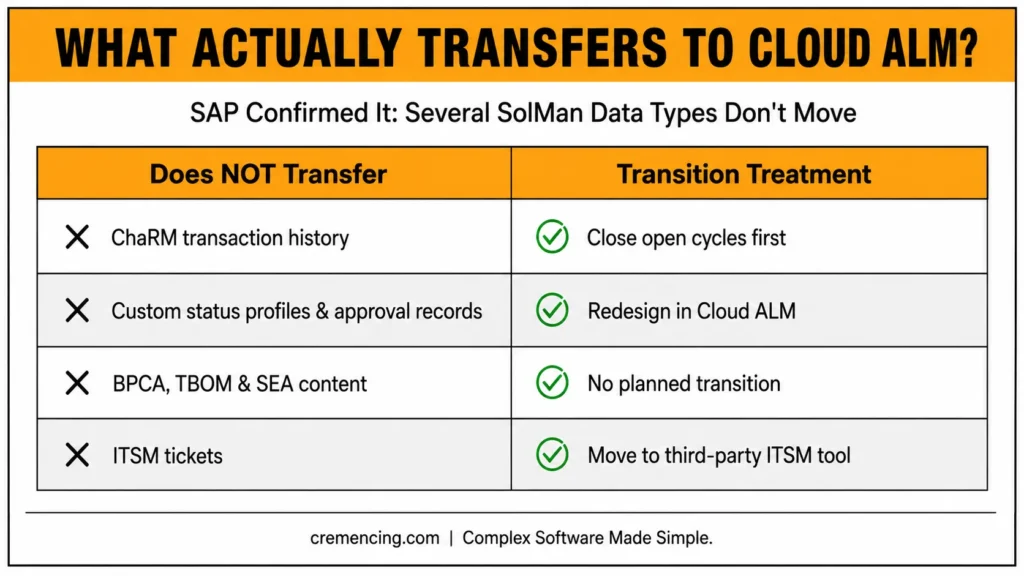
That means you should not expect these items to move automatically:
- Existing ChaRM transaction history
- Custom status profiles
- Approval records
- Retrofit history
- Emergency-change records
- Customer-specific workflow logic
- Custom reports tied to ChaRM tables
Treat this part of the SAP ALM vs Solution Manager roadmap as process redesign, not only data migration.
ITSM in SAP ALM vs Solution Manager
ITSM requires a separate decision. SAP Cloud ALM does not include a built-in ITSM capability equivalent to Solution Manager ITSM.
SAP recommends planning a move to a third-party ITSM tool and provides integration options so Cloud ALM events can create or update external tickets. Do not hide this gap inside a generic “feature parity” row.
For organizations using Solution Manager as the service desk, the ITSM destination can determine the entire transition sequence.
Testing Requires an Asset-Level Review
SAP supports selective transfer of test cases and Focused Build test steps, but transition of BPCA content, TBOMs, and Scope and Effort Analyser content is not planned.
Meanwhile, Cloud ALM supports manual testing and integrationsintegrations withwith Tricentis Test Automation for SAP and other providers through supported interfaces. The future test model may therefore combine transferred manual assets, redesigned regression scope, and a new automation architecture.
Licensing Must Be Checked, Not Assumed
SAP Cloud ALM usage rights for one tenant are included with qualifying SAP Enterprise Support, Enterprise Support cloud editions, or Product Support for Large Enterprises arrangements. The published scope and resource baselines still apply.
Additional capacity, consulting services, connected products, or third-party tools may carry separate costs.
For RISE customers, do not assume Cloud ALM entitlement automatically preserves every Solution Manager usage right. The contract and remaining on-premise maintenance position matter, especially during coexistence.
Validate entitlement with SAP before building a transition plan that requires SolMan beyond the rights attached to the retained landscape.
Migration Checklist: From Solution Manager to SAP Cloud ALM
1. Establish Ownership and the Final Decision Date
Assign an ALM transition owner across Basis, architecture, development, testing, release management, operations, service management, security, audit, and commercial teams.
Even though extended maintenance may apply, work backward from December 31, 2027. The deadline should cover productive adoption, not merely Cloud ALM tenant provisioning backwards
2. Run SAP Readiness Check for SAP Cloud ALM
Implement SAP Note 3236443 and run the collector in the Solution Manager system that best represents productive usage.
SAP Readiness Check identifies current capability use, maps equivalent functions in Cloud ALM or other SAP products, and highlights potential blockers such as ChaRM dependencies and selective-data-transfer preparation.
Additionally, existing analyses receive capability-availability updates quarterly, although new collector data may be required when SAP changes the analysis itself.
For a step-by-step breakdown of this same transition, see our SAP ALM vs Solution Manager migration guide.
3. Inventory Processes, Not Only Technical Components
List every active capability:
- ChaRM
- Focused Build
- Process Management
- Solution Documentation
- Test Suite
- BPCA
- Scope and Effort Analyzer
- ITSM
- System and application monitoring
- EarlyWatch Alert-related processes
- Job management
- Custom Code Management
- Landscape functions
- Reporting
- External integrations
For each capability, record its owner, users, data volume, legal-retention requirements, custom configuration, interfaces, peak periods, and business impact.
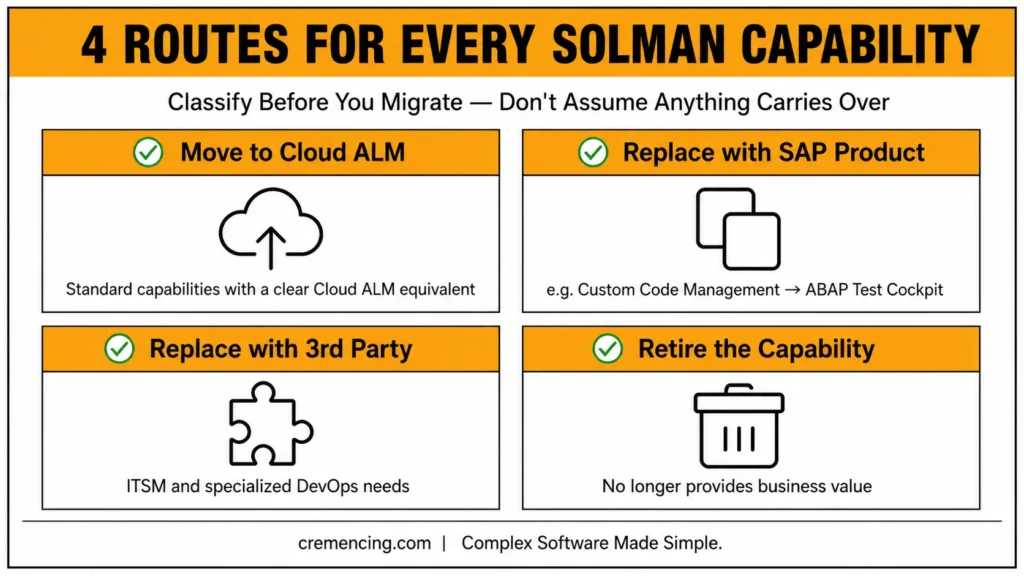
4. Classify Each Capability Into a Target Route
Use four possible routes:
- Move to SAP Cloud ALM.
- Replace with another SAP product.
- Replace with a third-party platform.
- Retire the capability.
ITSM normally requires an external service-management decision. Advanced, high-volume operations may justify SAP Focused Run.
Custom Code Management functions may move toward SAP for Me, ABAP Development Tools, ABAP Test Cockpit, and related services rather than Cloud ALM itself.
5. Separate Transferable Data From Non-Transferable History
Create an explicit transfer matrix before scheduling migration waves.
| SolMan content or process | Transition treatment |
| Test cases | Use selective data transfer where supported |
| Focused Build test steps | Transfer selectively where supported |
| Requirements and WBS information | Assess available export, import, or supported transfer options |
| Running projects | Complete in SolMan where practical; start suitable new projects in Cloud ALM |
| ChaRM transactional data | No planned direct transition; close open cycles |
| BPCA and TBOM content | No planned transition |
| Scope and Effort Analyzer content | No planned transition |
| Historical reporting data | Retain or archive separately; Cloud ALM collects new data after activation |
| ITSM tickets and service processes | Plan migration or archival with the selected third-party ITSM platform |
SAP’s current transition guidance confirms that ChaRM-related data, BPCA and TBOM content, SEA content, and historical analytics do not simply transfer into Cloud ALM.
6. Design Coexistence Around Active Change Cycles
Close ChaRM cycles before their cutover whenever possible. Do not split one governed release across two tools without explicit ownership, reconciliation, and audit rules.
Start Cloud ALM with a controlled project or monitoring scope. Prove the integration and operating procedure before expanding by capability or landscape.
7. Rebuild Integrations Through Supported Interfaces
Catalog all RFCs, web services, external test tools, service desks, reporting feeds, job schedulers, transport tools, identity services, and notification channels.
Replace SolMan-specific integration points with Cloud ALM APIs or supported product integrations. Test failure handling, authentication renewal, event duplication, data retention, and access control—not only the successful path.
8. Validate Managed-System Connectivity
For supported ABAP on-premise and private-cloud scenarios, use the managed-system setup transaction, /SDF/ALM_SETUP, to register and configure the connection to SAP Cloud ALM.
When troubleshooting supported transport-management configurations, use the diagnostic transaction, /SDF/ALM_DIAGNOSTIC, in the required clients. These transactions support connectivity and diagnosis; they do not prove that every Solution Manager capability has moved.
9. Pilot One End-to-End Lifecycle
Choose a real but controlled scope covering:
- Requirement creation
- Process assignment
- Development tracking
- Transport deployment
- Test execution
- Defect handling
- Go-live readiness
- Production monitoring
- External ticket creation
Measure approval time, transport traceability, missing data, alert quality, user effort, and audit evidence. A successful login or connected system is not enough to approve the new operating model.
10. Define Exit Criteria for Solution Manager
Exit criteria should include:
- Closed ChaRM cycles
- Transferred or archived test assets
- Completed running projects
- ITSM cutover
- Confirmed monitoring coverage
- Retained legal records
- Decommissioned interfaces
- User training
- New support ownership
- Licensing confirmation
- Approved fallback procedures
Only then should the SAP ALM vs Solution Manager decision move from coexistence to retirement.
Conclusion
The SAP ALM vs Solution Manager choice should shape your SAP roadmap before the 2027 deadline shapes it for you. Make SAP Cloud ALM the strategic target, but base the transition route on evidence, including ChaRM cycles, ITSM, test assets, monitoring depth, licensing, and active projects. This approach helps teams avoid rushed decisions and identify which existing capabilities require a replacement, integration, or temporary coexistence strategy.
Run SAP Readiness Check and plan coexistence deliberately before retiring Solution Manager. Then, move each critical process to its confirmed destination and validate the new operating model before switching off the old platform. Retire SolMan only after every critical control has a confirmed destination, so the transition supports business continuity rather than creating new operational gaps.
Frequently Asked Questions
1. Is SAP Cloud ALM just a cloud-based SAP Solution Manager?
No. SAP Cloud ALM is a separately designed cloud service with standardised processes, while Solution Manager supports customer-specific on-premise and hybrid ALM processes. Since the products don’t have functional parity, the SAP ALM vs SolMan decision requires process mapping rather than a screen-by-screen replacement.
2. Does SAP Cloud ALM have ITSM or ticketing like Solution Manager?
No. SAP Cloud ALM ITSM functionality equivalent to Solution Manager is not in scope. The recommended path is moving service-management processes to a third-party ITSM tool and integrating it with Cloud ALM APIs for alert-driven ticket creation and updates.
3. Is ChaRM possible in SAP Cloud ALM?
Cloud ALM provides Change and Deployment Management, not a direct copy of ChaRM. Existing workflows, statuses, cycles, retrofit rules, and transaction history do not automatically move. Evaluate the required controls, close open SolMan cycles, and redesign the process using supported Cloud ALM capabilities.
4. Can SAP Cloud ALM monitor on-premises systems?
Yes, for supported SAP products and monitoring use cases. You must register each relevant system and client correctly, configure data collection, and verify the Supported Solutions matrix. Cloud ALM can monitor cloud and selected on-premises systems, but support differs by product and capability.
5. What will replace SAP Solution Manager after 2027?
SAP positions SAP Cloud ALM as the strategic destination for most customers. SAP Focused Run can supplement it for advanced, high-volume, or extensive on-premises monitoring, while third-party tools may handle ITSM or specialized DevOps requirements. The final SAP Solution Manager replacement architecture may therefore contain more than one product.
6. Can organizations run SAP Cloud ALM and Solution Manager at the same time during migration?
Yes, SAP’s own guidance favors a controlled coexistence period rather than a rushed cutover. Active ChaRM cycles and implementation projects can continue in Solution Manager while new work starts in Cloud ALM.
7. Does Business Suite 7 extended maintenance change the 2027 deadline?
Customers on optional extended maintenance can retain selected Solution Manager functions through 2030. However, SAP still recommends completing the Cloud ALM transition before the end of 2027 regardless.
8. What happens to custom ChaRM status models and transaction types after migration?
These do not transfer automatically, since Change Request Management data migration to Cloud ALM is not planned. Teams must close open cycles and redesign the process using Cloud ALM’s supported capabilities instead.
9. Is SAP Readiness Check required before starting a Cloud ALM migration?
While not strictly mandatory, SAP’s transition guidance begins with discovery through SAP Readiness Check rather than direct technical conversion. It identifies current capability use and highlights blockers like ChaRM dependencies early.
10. Do RISE with SAP customers automatically get full Cloud ALM entitlement?
Not necessarily — Cloud ALM entitlement does not automatically preserve every Solution Manager usage right for RISE customers. Contract terms and the remaining on-premise maintenance position must be validated with SAP directly.
References
SAP Solution Manager Maintenance Strategy
SAP Readiness Check for SAP Cloud ALM