
Platform decisions can become a critical issue when maintenance deadlines loom near. Organisations still using SAP Solution Manager 7.2 should be careful to evaluate their SAP Solution Manager capabilities instead of considering the entire platform as one block; otherwise, it is in the period of mainstream maintenance until 2027. That is important because SAP’s existing guidance places SAP Cloud ALM as the preferred ALM platform for the transition, and the capabilities of SAP Solution Manager are still present in current operational and change processes and could be quite entrenched.
It’s not just a matter of “What will replace SAP Solution Manager?” The more interesting question is, “What capabilities do we use to operate our business, and what will be the next thing for each of them? Before 2027 arrives, it’s worth taking stock of which SAP Solution Manager capabilities your organization still relies on daily.
Core Assessment Takeaway
The 2027 mainstream maintenance deadline for SAP Solution Manager 7.2 requires a capability-by-capability evaluation rather than a direct “lift-and-shift” platform migration. Because SAP Cloud ALM follows a different architectural paradigm, each SolMan module carries a distinct target path, dependency profile, and risk level.
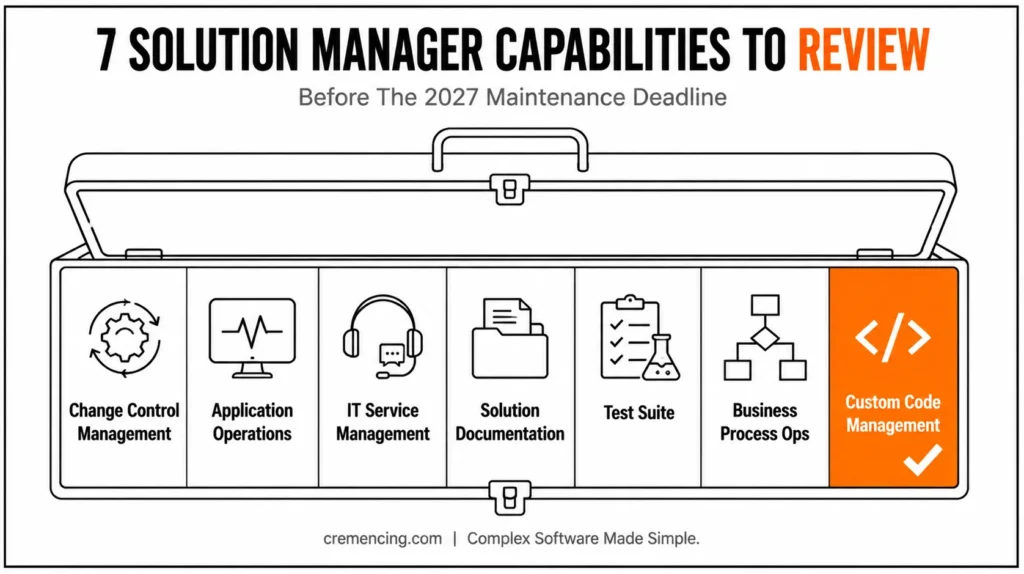
The 7 Capabilities — Quick Checklist
- Change Control Management (ChaRM, Quality Gates)
- Application Operations & Technical Monitoring
- IT Service Management & Incident Handling
- Solution Documentation & Process Management
- Test Suite & Change Impact Analysis
- Business Process Operations
- Custom Code Management & Quality Controls
Why Reviewing SAP Solution Manager Capabilities Matters Now
On-premise application lifecycle management platform for implementing, operating, monitoring, maintaining, and changing SAP landscapes. The functions included in SAP Solution Manager 7.2 cover all stages of the product lifecycle, such as change control management, IT service management, application operations, solution documentation, test suite, business process operations, and more.
The important point for 2027 planning is that these capabilities don’t all have the same role or future path. One organization may depend heavily on ChaRM for controlled transports, while another may primarily use Solution Manager for technical monitoring. A third may have years of business-process documentation stored in solution documentation but barely use the remaining platform.
That means a simple “migrate SAP Solution Manager” project can produce the wrong result. You could move functionality nobody uses while overlooking a process that your development, support, or compliance teams rely on every day.
Solution Manager vs Cloud ALM: Quick Comparison
| Capability | SAP Solution Manager 7.2 | SAP Cloud ALM |
|---|---|---|
| Change Control | ChaRM, Quality Gate Management | Not a direct one-for-one equivalent; requires process redesign |
| Application Operations | Deep system/DB/host monitoring | Cloud-centric monitoring, different metric scope |
| ITSM/Incident Handling | Native service desk, external ITSM integration | Task management, typically paired with external ITSM |
| Documentation | Solution Documentation, Business Blueprint (read-only legacy) | Process documentation, different structure |
| Testing | Test Suite, change impact analysis | Task and requirement tracking, different testing model |
| Business Process Operations | Job Management scenarios | Business process and task monitoring |
| Custom Code Management | Custom Code Management via SOLMAN_SETUP | Not a direct replacement — typically paired with ABAP Test Cockpit / other tools |
The first step is therefore a capability-level assessment.
For each capability, ask four questions:
- Is the capability actively used?
- Which teams and processes depend on it?
- Does the organization need the same function after 2027?
- What is the target platform or replacement process?
This approach gives you a much clearer picture than treating SAP Solution Manager as a single application that must simply be switched off.
7 SAP Solution Manager Capabilities to Review Before 2027
The seven areas below represent some of the most important capabilities to assess in an SAP Solution Manager 7.2 landscape. Your exact inventory may differ, but these functions commonly affect change control, operations, service management, documentation, testing, and custom-code governance.
1. SAP Solution Manager Capabilities: Change Control Management
If your development teams use SAP Solution Manager to control transports, this capability deserves early attention.
SAP Solution Manager’s Change Control Management brings together change request management, quality gate management, and transport-related functions. Change Request Management can connect a requested change with its implementation and movement through the system landscape, while Quality Gate Management provides phase-based controls before changes progress. SAP documentation describes the process as covering change management through the physical transport of changes from development toward production. For many organizations, this is more than a ticketing workflow. It can be the control layer around SAP development.
Your review should identify:
- Whether ChaRM actively controls production transports
- Which change types and workflows are configured
- Whether approvals depend on Solution Manager
- How emergency changes are handled
- Whether quality gates are mandatory
- Which development systems connect through CTS or related transport infrastructure
- Whether non-SAP components also participate in the process
The key question isn’t whether you can technically replace ChaRM. It’s whether your current governance model can survive the change.
If ChaRM currently prevents unauthorized or untested changes from reaching production, replacing it requires an equivalent control process—not simply another ticketing system.
2. Application Operations and Technical Monitoring
Application Operations is another major area to assess because it can reach deeply into daily SAP operations.
SAP Solution Manager 7.2 Application Operations includes system and application monitoring, database and host monitoring, user experience monitoring, interface and connection monitoring, exception management, job monitoring, technical administration, and analytics. Its monitoring model can cover SAP and non-SAP technologies, while end-to-end tracing helps identify where time is spent across complex system landscapes.
Start by documenting what your operations team actually monitors.
For example, your organization may depend on Solution Manager for:
- System availability alerts
- SAP HANA or database monitoring
- Background job monitoring
- Interface failures
- Integration message flows
- Exception management
- User experience monitoring
- Technical dashboards
- End-to-end diagnostics
The next question is whether each monitoring requirement has a defined target.
Don’t assume every operational feature has a one-for-one migration path. Monitoring requirements often depend on your architecture, especially if you run a hybrid landscape containing SAP S/4HANA, SAP BTP services, legacy ECC systems, third-party applications, and external integrations.
Create a capability matrix that maps every alert source to its future monitoring owner.
If an alert currently reaches an operations team through SAP Solution Manager, you should know exactly where that alert will originate after the transition.
3. IT Service Management and Incident Handling
SAP Solution Manager IT Service Management can provide service-desk functionality for incident handling across business units, internal IT, SAP, and partners. SAP documentation also describes bidirectional integration with external ticket systems, which matters when organizations operate hybrid or outsourced support models. This capability needs a process review, not just a software review.
Map the complete incident lifecycle:
User report → incident creation → categorization → assignment → diagnosis → escalation → resolution → closure
Then identify where SAP Solution Manager participates.
You should also document:
- Incident types
- Service-level agreements
- Escalation rules
- Support-team assignments
- Email or portal integration
- External service-desk integration
- Knowledge management dependencies
- Reporting requirements
- Links between incidents and changes
The last point is particularly important.
If your support process connects incidents to change requests and transports, moving ITSM independently can break traceability. The future architecture must preserve the relationship between the original business problem, the corrective change, testing, approval, and production deployment.
4. Solution Documentation and Process Management
Documentation often becomes the least visible but most difficult asset to replace.
SAP Solution Manager 7.2 Solution Documentation supports structured documentation of solutions, business processes, and related technical information. SAP’s documentation also notes that some older functions, including Solution Directory, Business Blueprint, Project Administration, and Configuration, became obsolete in 7.2 while remaining available in read mode.
Before moving anything, determine what your organization actually stores there.
You may find:
- Business process structures
- Process documentation
- Technical system relationships
- Custom documentation
- Operational procedures
- Process ownership information
- Links to test cases
- Change-related references
The review should classify content into three groups:
Keep: Information still required for operations, audits, projects, or support.
Clean: Duplicate, obsolete, or outdated content that should not move.
Archive: Historical material that must remain accessible but doesn’t require active maintenance.
This is where many migration projects lose time. Teams focus on moving data without first deciding whether that data still has business value. A clean inventory reduces migration scope and gives you a better foundation for future process documentation.
5. Test Suite and Change Impact Analysis
Testing is another capability that deserves a dedicated assessment.
SAP Solution Manager Test Suite supports testing activities across SAP solutions, including processes that span multiple systems. SAP documentation describes its role in analyzing change impact and organizing end-to-end integration testing for critical business processes.
Review how your organisation uses it today.
Ask:
- Where are test plans stored?
- Who owns test cases?
- Are automated tests connected?
- How do you identify affected business processes?
- How do you document test execution?
- How do change requests connect to testing?
- Which regression tests must remain available?
Don’t limit the review to test cases.
The bigger asset may be the relationship between business process → system → change → test → result.
If that chain currently exists inside SAP Solution Manager, your future ALM architecture must preserve enough traceability for your compliance and release processes.For organizations moving toward SAP S/4HANA or expanding cloud adoption, this review becomes even more important because the testing landscape can become more distributed.
6. Business Process Operations
Business Process Operations focuses on the operational health of business processes rather than only the technical availability of systems.
This distinction matters.A system can be technically available while a critical business process is failing. For example, an SAP system might be online while sales orders remain blocked, background jobs fail, or interfaces stop processing business documents.
SAP Solution Manager provides business-process-oriented capabilities alongside its broader application operations functions. Its configuration framework includes Business Process Operations scenarios such as Job Management.
During your assessment, identify:
- Critical business processes under monitoring
- Background jobs tied to those processes
- Business-critical interfaces
- Exception monitoring rules
- Process-specific alerts
- Operational KPIs
- Teams responsible for remediation
Then classify each requirement as technical monitoring, business-process monitoring, or both.
This classification helps prevent a common mistake: replacing a business-process monitoring requirement with basic infrastructure monitoring.
If your business depends on a process completing correctly, monitoring CPU utilization alone won’t tell you that the process failed.
7. Custom Code Management and Quality Controls
Custom code becomes increasingly important as organizations prepare for SAP S/4HANA transformation and Clean Core strategies.
SAP Solution Manager includes Custom Code Management within its configuration scope, and SAP documentation identifies it as one of the scenarios configured through SOLMAN_SETUP. Your assessment should determine whether Solution Manager is used to:
- Inventory custom developments
- Analyze custom code
- Identify unused objects
- Support S/4HANA migration preparation
- Track custom-code remediation
- Support quality checks
- Provide governance around development
Don’t treat this capability as an isolated technical inventory.
The real value comes from connecting custom objects to business processes and future transformation decisions.
For example, a custom ABAP report that appears unused may still support a critical month-end process. Removing it without understanding its business context creates risk.
Review custom code together with process owners, developers, and architects. Then decide which activities belong in your future S/4HANA transformation and Clean Core strategy.
How to Review Your SAP Solution Manager Capabilities Before 2027
A practical review should move from inventory to decisions.
Step 1: Build a capability inventory
List every SAP Solution Manager function your organization currently uses.
Don’t rely only on system administrators. Interview:
- SAP Basis teams
- ABAP developers
- Functional consultants
- Release managers
- Service-desk teams
- Business process owners
- SAP architects
- Compliance teams
Different teams often depend on different capabilities without realizing how interconnected they are.
Step 2: Map each capability to a business process
For every function, document:
Capability → Users → Process → Integration → Data → Business impact
This shows whether the capability is genuinely critical.
For example:
ChaRM → Development Team → Production Change Process → CTS → Change Records → High
That is much more useful than simply recording “ChaRM: Active.”
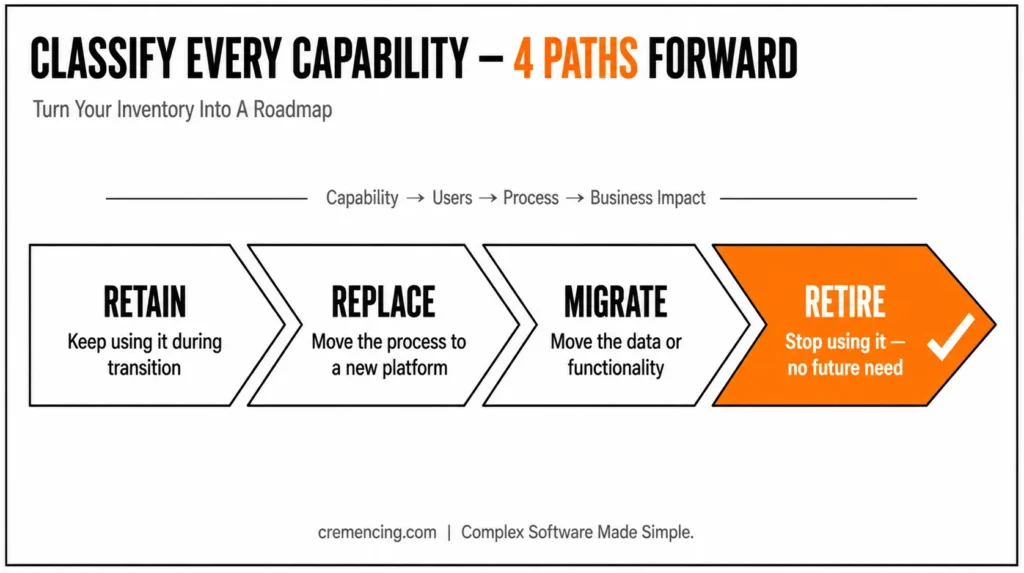
Step 3: Classify the future action
Use four categories:
| Category | Meaning |
| Retain temporarily | Continue using the capability while the transition is prepared |
| Replace | Move the process to another platform |
| Migrate | Move relevant data or functionality to a target platform |
| Retire | Stop using the capability because it has no future requirement |
This classification makes your roadmap actionable.
Step 4: Evaluate SAP Cloud ALM and other target platforms
SAP Cloud ALM is SAP’s current strategic ALM platform for cloud-centric implementation and operations scenarios, while SAP Solution Manager remains relevant for existing on-premise landscapes during its maintenance period. SAP itself directs customers toward transition planning and provides SAP Readiness Check for SAP Cloud ALM.
That doesn’t mean every SAP Solution Manager capability should move immediately or that every workload has an identical replacement.
Instead, evaluate your actual landscape:
- ECC systems
- SAP S/4HANA systems
- SAP BTP services
- SAP cloud solutions
- Third-party applications
- Existing ITSM platforms
- Existing monitoring tools
The target architecture should reflect the landscape you operate—not simply the product you currently own.
Step 5: Prioritize by risk
Not every capability deserves the same migration priority.
Start with functions that affect:
- Production changes
- Business-critical monitoring
- Incident resolution
- Compliance and auditability
- Testing and release governance
- Critical operational documentation
This creates a risk-based roadmap instead of a feature-by-feature migration checklist.
Common Mistakes When Reviewing SAP Solution Manager Capabilities
Mistake 1: Treating 2027 as a single shutdown date
SAP Solution Manager 7.2 will be in “mainstream maintenance” until 2027; this does not imply that all organizations can wait until 2027 to start assessing. A big landscape can require a lot of time to figure out dependency relationships, determine target platforms, redesign processes, and test integrations.
Mistake 2: Assuming SAP Cloud ALM replaces every capability identically
Just because the platform changes doesn’t mean the features change as well.
Your objective should be the business process that you want to be supported, not just the screen or transaction that you used before.
Mistake 3: Migrating data without cleaning it
Transferring legacy documentation, legacy test cases, or legacy configuration can add value in migration without benefit. Before deciding which data to move, review the data.
Mistake 4: Ignoring integrations
The greatest migration issues are typically at the edges.
A capability can be linked to CTS, an external ITSM tool, email, monitoring, test automation, or custom applications. Do document those integrations before switching from the platform.
SAP Solution Manager Capabilities: Final Takeaway
Reviewing SAP Solution Manager capabilities before 2027 isn’t optional groundwork — it’s the foundation of a safe transition. Mainstream maintenance doesn’t end overnight, but dependency mapping, process redesign, and integration testing all take real time to get right.
The seven areas covered here — change control, application operations, ITSM, documentation, testing, business process operations, and custom code management — rarely move as a single block. Each one carries its own users, processes, and business impact. Treating them separately, rather than as one platform switch, is what separates a controlled migration from a rushed one.
Start with a capability inventory. Map each function to the team and process behind it. Classify what to retain, replace, migrate, or retire. Then prioritize by risk, not convenience.
Organizations that assess their SAP Solution Manager capabilities early rather than waiting for 2027 to arrive give themselves more room to plan. They can evaluate SAP Cloud ALM properly, clean up legacy data, and protect the integrations that matter most.
FAQ
1. Does SAP Support continue to provide support for SAP Solution Manager?

Yes. SAP Solution Manager 7.2 is still in the scope of the mainstream maintenance until 2027. That doesn't mean that organizations should delay planning; however, SAP now defines SAP Cloud ALM as the strategic direction for transition planning. Carefully consider actual SAP Solution Manager capabilities when determining what to keep, replace, or move.
2. What problem is SAP Solution Manager being discontinued to solve?
For various cloud-based implementation and operation scenarios, SAP Cloud ALM is SAP’s preferred ALM platform, but without a direct replacement of each and every ALM capability offered by SAP Solution Manager. You should align individual processes with the required future platforms in a suitable migration strategy for your SAP Solution Manager.
3. What is left of ChaRM, when SAP Solution Manager?
ChaRM should be used in conjunction with your change-control process, and not as a standalone tool. How to handle approvals, transport sequencing, testing, emergency changes and audit trail will need to be determined by the organization. These controls should be retained in your future SAP Change Control Management environment, regardless of the platform that is used.
4. Can SAP Solution Manager monitor SAP S/4HANA?
Yes, with SAP Solution Manager 7.2, application operations and monitoring are available for supported landscapes, such as system, database, host, interface, connection, and exception monitoring. Organizations should determine the architecture of their current SAP system and future monitoring needs to decide which SAP application operations capabilities to keep or move to SAP S/4HANA.
5 Do you need SAP S/4HANA for SAP Solution Manager?
No, SAP S/4HANA doesn’t need to use SAP Solution Manager as the only ALM platform. It will depend upon your landscape, life cycle processes, operational model, and cloud adoption. Assess SAP Cloud ALM in conjunction with SAP Solution Manager for a future-oriented SAP S/4HANA strategy.
6. What happens to data stored in SAP Solution Manager after 2027?
Data isn’t automatically deleted when mainstream maintenance ends, but organizations should not treat that as a reason to delay planning. Migrating, archiving, or retiring documentation, test cases, and configuration data requires a deliberate review — waiting until the deadline compresses a process that benefits from lead time.
7. Does SAP Cloud ALM require SAP S/4HANA to be useful?
No. SAP Cloud ALM can support hybrid landscapes that include SAP S/4HANA, SAP BTP services, and in some scenarios legacy or third-party systems, depending on the specific capability and supported scope. Organizations should verify current supported scenarios against SAP’s Cloud ALM documentation rather than assuming full parity with Solution Manager’s broader on-premise coverage.
8. Can organizations run SAP Solution Manager and SAP Cloud ALM in parallel during the transition?
Yes, many organizations use both during a transition period — retaining Solution Manager for capabilities not yet migrated while adopting SAP Cloud ALM for cloud-centric or newly implemented scenarios. This parallel approach is often more practical than a single cutover, provided integration and data ownership between the two are clearly defined.
9. What’s the risk of doing nothing until 2027?
The main risk isn’t the maintenance deadline itself — it’s running out of time to properly assess dependencies, redesign processes, and test integrations. Large landscapes with entrenched ChaRM, ITSM, or documentation dependencies can take significant time to map and migrate safely; starting that work close to the deadline increases the chance of rushed decisions.
10. Who should lead a SAP Solution Manager capability review?
Effective reviews typically involve a cross-functional group rather than a single owner — SAP Basis, ABAP development, functional consultants, release management, service-desk teams, business process owners, and compliance, since different teams often depend on different capabilities without full visibility into each other’s usage.
References
.





2 Responses