
SAP Solution Lifecycle Management becomes important when a developer finishes a change. A functional consultant tests it. A release manager approves it. A basis administrator transports it to production. Six weeks later, a business user reports a reporting mismatch, and no one on the team can immediately say which of those five handoffs introduced it, because each one lived in a different tool with no shared thread connecting them.
That’s not a tooling failure in any single system. Every tool in that chain may have worked exactly as designed. The failure is that the lifecycle itself the connection between what was requested, what was built, what was tested, what was deployed, and what’s now happening in production was never actually one continuous, traceable process.
This is the gap SAP’s evolving ALM portfolio is built to close: SAP Cloud ALM, SAP Solution Manager, SAP Focused Run, and the SAP Solution Lifecycle Management service for BTP each cover part of this picture, but they solve different problems for different landscapes. The question isn’t which one is newest; it’s which combination actually gives your organization a lifecycle it can trace end to end.
SAP Solution Lifecycle Management with Cloud ALM
SAP Application Lifecycle Management (ALM) structures solution governance by connecting implementation, operations, and service delivery across hybrid environments. Cloud-centric platforms like SAP Cloud ALM standardize deployment through pre-configured SAP Activate methodology content, accelerating initial configuration and data migration tasks.
During operations, integrated telemetry monitors business processes, integration interfaces, and synthetic user transactions to maintain continuous availability. Automated transport management and central change control minimize operational risk during maintenance cycles by validating dependencies before transport deployment. For enterprise landscapes, functional coverage depends heavily on the chosen toolset: while legacy SAP Solution Manager handled complex on-premise governance, SAP Cloud ALM offers a native cloud alternative, leaving advanced hybrid automation to tools like SAP Focused Run depending on overall landscape complexity.
Fragmented SAP Solution Lifecycle Management
The problem with traditional SAP lifecycle management usually isn’t one broken transaction or one missing feature. It’s fragmentation. A project team may manage implementation activities in one system, transport changes through another process, monitor production with separate tools, track incidents in an IT service platform, and document business processes somewhere else. Each tool may work correctly on its own, but the complete lifecycle becomes difficult to follow.
Imagine a change moving through a typical landscape:
Development → Quality → Production
A developer creates a change. A functional consultant tests it. A release manager approves it. A basis administrator transports it. Operations monitors production. The service desk handles an incident if something fails. If these activities don’t share enough context, the organization loses traceability.
You may know that a transport reached production, but not immediately know
- Which requirement triggered it?
- Which test case validated it?
- Who approved it?
- Which business process does it affect?
- Did production monitoring detect a problem?
- Which incident resulted from the change?
That gap becomes more serious as SAP landscapes grow.
A company running ECC 6.0 may have years of custom development, interfaces, batch jobs, and integrations. An SAP S/4HANA environment may add cloud services, SAP BTP extensions, APIs, and hybrid integrations.
How SAP Solution Lifecycle Management Covers the Full Lifecycle
This is why SAP Application Lifecycle Management focuses on the full application lifecycle rather than only deployment. SAP describes ALM as covering activities such as collecting business demand, defining requirements, configuring and documenting solutions, moving changes into production, supporting ongoing operations, and improving service-level fulfilment.
The old approach can still function, but the cost appears in the handoffs.
More manual coordination means more opportunities for:
- Incomplete documentation
- Untracked changes
- Failed transports
- Testing gaps
- Delayed incident resolution
- Duplicate monitoring
- Unclear ownership
The real weakness isn’t that individual tools don’t work. It’s that the lifecycle doesn’t always behave like one connected process.
SAP Solution Lifecycle Management Comparison
| Feature | Older Fragmented Approach | Modern Lifecycle Management Approach |
| Deployment | Manual or tool-specific deployment activities | Structured deployment and lifecycle processes |
| Change Management | Separate change requests and manual coordination | Integrated change processes and traceability |
| Monitoring | Multiple monitoring tools | Centralized or integrated monitoring depending on landscape |
| Testing | Testing managed separately from implementation | Test planning and execution integrated into ALM processes |
| Operations | Reactive incident handling | Proactive monitoring and operational management |
| Documentation | Distributed across systems and teams | Centralized lifecycle information where supported |
| Cloud Integration | Often handled separately | Cloud-aware ALM platforms such as SAP Cloud ALM |
| SAP BTP Solutions | Separate deployment and administration workflows | Dedicated SAP Solution Lifecycle Management service capabilities |
| Maintenance | Manual tracking across teams | Lifecycle-based maintenance planning and monitoring |
| Reporting | Data collected from multiple systems | Integrated analytics and lifecycle visibility |
| Landscape Management | System-specific administration | Broader landscape and solution-level visibility |
The important point is that the “new” approach doesn’t mean every SAP customer must replace every existing tool immediately. SAP’s ALM portfolio currently includes SAP Cloud ALM, SAP Solution Manager, and SAP Focused Run, with each serving different operational and lifecycle-management needs. SAP Solution Manager 7.2 remains relevant for existing on-premise landscapes, while SAP identifies SAP Cloud ALM as its go-to ALM platform for customers moving toward cloud and hybrid scenarios.
Integrated SAP Solution Lifecycle Management
Modern SAP Solution Lifecycle Management focuses on connecting the activities that surround an SAP solution instead of treating implementation, deployment, operations, and maintenance as isolated stages.
The exact architecture depends on your SAP landscape. For an SAP customer running a cloud or hybrid environment, SAP Cloud ALM provides standardized ALM processes for implementation, operations, and consumption of SAP support services. SAP’s ALM portfolio also includes SAP Solution Manager and SAP Focused Run, each serving different use cases. This shift is especially urgent given that Solution Manager reaches end-of-life in 2027, pushing many businesses to modernize their lifecycle management approach now.
For customers using SAP Solution Manager 7.2, the platform supports areas including application operations, business process monitoring, change control management, custom code management, IT service management, job scheduling management, landscape management, maintenance planning, process management, and testing.
For SAP BTP specifically, the SAP Solution Lifecycle Management service provides a more focused lifecycle model for solutions built using multi-target applications.
The service supports activities such as:
- Deploying solutions
- Updating solutions
- Monitoring solutions
- Deleting solutions
- Subscribing to multitenant solutions
- Transporting MTA-based application content through CTS+
SAP’s feature scope documentation describes the service as supporting continuous deployment, configuration, and maintenance of complex business applications through multi-target applications and solution modeling.
In a fragmented model:
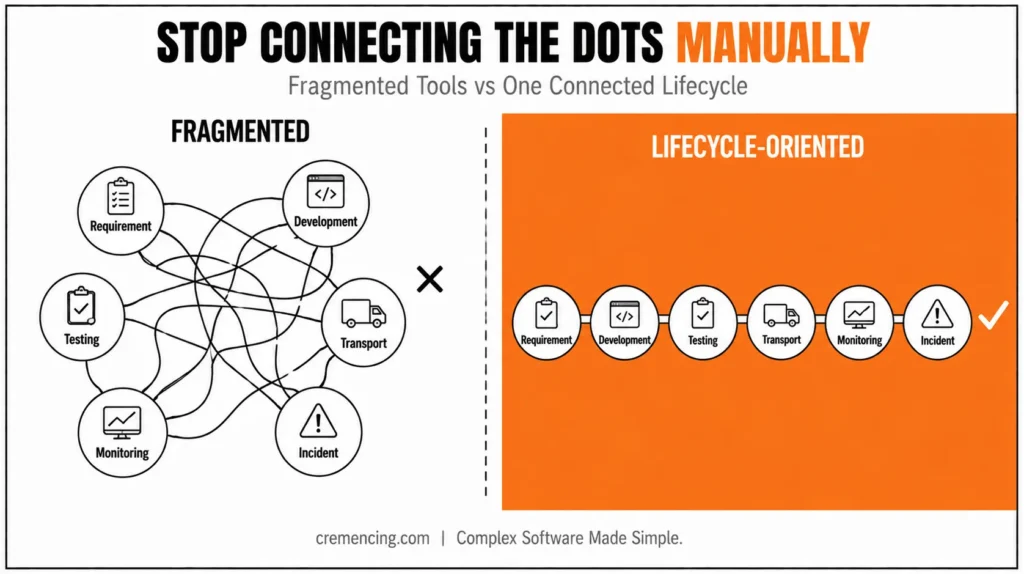
Requirement → Tool A
Development → Tool B
Testing → Tool C
Transport → Tool D
Monitoring → Tool E
Incident → Tool F
The team must manually connect the dots.
In a lifecycle-oriented model:
Requirement → Implementation → Change → Test → Deployment → Operations → Monitoring → Improvement
The goal is to maintain traceability across the lifecycle. That doesn’t mean every activity happens inside one application. It means the tools and processes should work together closely enough that teams can understand what happened across the solution lifecycle.
This approach also changes how teams think about maintenance. Maintenance isn’t something that begins after go-live. It starts before deployment.
A well-managed lifecycle considers the following:
- Technical dependencies
- Business process impact
- Test coverage
- Transport sequencing
- Monitoring requirements
- Operational ownership
- Support procedures
- Future updates
That shift can reduce the gap between project delivery and steady-state operations. Instead of handing a solution to operations and saying, “The project is finished,” the lifecycle continues. The solution moves from implementation into operation, then into continuous improvement.
SAP Solution Lifecycle Management with Cloud ALM
SAP Cloud ALM is particularly relevant for organizations managing cloud and hybrid SAP landscapes. SAP describes it as a cloud-based ALM solution for cloud and hybrid customers while also supporting on-premise-only scenarios. Its stated focus includes standardized ALM processes for implementation, operations, and SAP support-service consumption.
This makes it relevant to teams moving away from an exclusively on-premise lifecycle model. The key benefit isn’t simply that the platform is cloud-based.
- The bigger value is process integration.
- Implementation teams need visibility into project progress.
- Operations teams need visibility into system health.
- Business teams need visibility into process performance.
- Management needs visibility into risks and delivery status.
A modern ALM platform can connect these perspectives more effectively than isolated spreadsheets and disconnected tools. However, organizations shouldn’t assume that moving to SAP Cloud ALM automatically solves every lifecycle-management problem.
The quality of the result still depends on:
- Correct configuration
- Clear ownership
- Defined processes
- Reliable integrations
- Accurate system data
- Consistent testing
- Strong change governance
Technology supports lifecycle management. It doesn’t replace lifecycle governance.
Where SAP Solution Manager Still Fits
SAP Solution Manager remains important for many established SAP landscapes. SAP currently documents SAP Solution Manager 7.2 and lists capabilities across application operations, business process monitoring, change control management, custom code management, IT service management, landscape management, maintenance planning, process management, and testing. Moreover, SAP also states that Solution Manager 7.2 is in mainstream maintenance until 2027 and provides transition guidance toward SAP Cloud ALM.
That means an organization shouldn’t make a lifecycle decision based solely on the phrase “old versus new.” The correct question is:
Which lifecycle-management architecture fits our current SAP landscape and future roadmap?
A large ECC environment with extensive Solution Manager processes may require a carefully planned transition.
A new cloud-first implementation may have different requirements. A hybrid enterprise may use multiple ALM and operations capabilities together. The architecture should follow the landscape.
Where SAP Focused Run Fits
SAP Focused Run addresses another part of the lifecycle.
SAP positions it as an on-premise solution for service providers and customers with advanced operations requirements, with capabilities for high-volume system and application monitoring, alerting, and analytics. This distinction matters because lifecycle management is broader than monitoring.
A monitoring platform can tell you that a system is unhealthy. An ALM process helps you understand what changed, what business process is affected, who owns the issue, and what action should follow. That is why organizations should avoid trying to force every lifecycle activity into one tool.
The better approach is to define the lifecycle first and then map each activity to the appropriate platform.
The SAP BTP Solution Lifecycle Management Service
The specific SAP Solution Lifecycle Management service for SAP BTP deserves separate attention. This service isn’t simply another name for SAP Application Lifecycle Management. It addresses the lifecycle of solutions deployed using the multi-target application concept.
SAP documentation describes capabilities for deploying, updating, monitoring, deleting, and subscribing to solutions. Deployment can be performed through the SAP BTP cockpit, the SAP BTP command-line interface, or CTS+ for supported application content.
For a BTP solution provider, the lifecycle may look like:
Build MTA → Deploy Solution → Provide Subscription → Monitor → Update → Retire
That lifecycle differs from traditional ECC or S/4HANA transport management. The technical architecture has changed, so the lifecycle process must change with it.
This is one reason modern SAP landscapes require architects to distinguish between the following:
- SAP Application Lifecycle Management
- SAP Solution Manager
- SAP Cloud ALM
- SAP Focused Run
- SAP Solution Lifecycle Management service for SAP BTP
They overlap in the broader lifecycle conversation, but they don’t perform identical jobs.
SAP Solution Lifecycle Management Migration Checklist
Moving from fragmented lifecycle management to a more integrated model requires more than installing a new platform. Use this checklist before starting the transition.
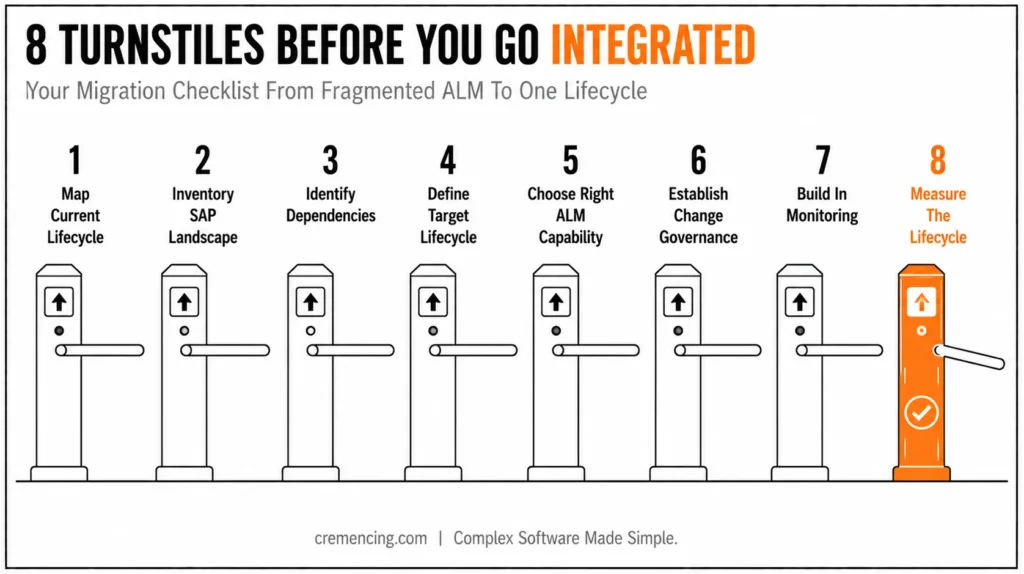
1. Map Your Current Lifecycle
Document how requirements, development, testing, transports, deployment, monitoring, incidents, and maintenance work today.
2. Inventory Your SAP Landscape
List:
- ECC systems
- SAP S/4HANA systems
- SAP BTP accounts
- Cloud applications
- Third-party integrations
- Interfaces
- Monitoring platforms
- Existing ALM tools
Your target architecture depends on this inventory.
3. Identify Existing Dependencies
Document integrations with:
- SAP Solution Manager
- SAP Cloud ALM
- SAP Focused Run
- IT service management platforms
- Transport management systems
- Testing tools
- Monitoring tools
This step prevents teams from removing a tool that another process still depends on.
4. Define Your Target Lifecycle
Create a clear flow:
Plan → Build → Test → Deploy → Operate → Monitor → Improve
Assign ownership to every stage.
5. Choose the Right SAP ALM Capability
Evaluate whether your requirements fit SAP Cloud ALM, SAP Solution Manager, SAP Focused Run, or a combination.
Don’t select a platform solely because it is newer. Select it because it supports the lifecycle your organization actually needs.
6. Establish Change Governance
Define how changes move from development to production.
Include:
- Approval rules
- Testing requirements
- Emergency changes
- Transport sequencing
- Rollback procedures
- Production validation
7. Build Monitoring Into the Lifecycle
Don’t wait until go-live to decide what needs monitoring. Define monitoring requirements during implementation.
8. Measure the Lifecycle
Track metrics such as the following:
- Deployment frequency
- Change failure rate
- Incident volume after releases
- Mean time to resolution
- Test completion
- Transport failures
- Business process disruptions
These measurements show whether the lifecycle is actually improving.
Conclusion
SAP Solution Lifecycle Management is all about connecting the entire lifespan of an SAP solution from initial implementation decision to deployment, operation, change, monitoring, and continuous maintenance.
Whether or not a fragmented process to integrated lifecycle management can improve traceability and ownership of the process will depend on the platform used, which can be different for each landscape. Each of these has different needs: SAP Cloud ALM, SAP Solution Manager, SAP Focused Run, and the SAP BTP Solution Lifecycle Management service. The best approach is to first consider your life cycle and then choose tools that will help you with that lifecycle.
Frequently Asked Questions
1. What is SAP Solution Lifecycle Management?
SAP Solution Lifecycle Management is the systematic management of an SAP solution throughout its implementation, deployment, operation, change, monitoring, and maintenance. In general, SAP ALM, it is represented by platforms like SAP Cloud ALM, SAP Solution Manager, and SAP Focused Run, and there’s also an SAP dedicated solution lifecycle management service for SAP BTP scenarios.
2. What is SAP Application Lifecycle Management?
SAP Application Lifecycle Management covers the processes used to manage SAP and non-SAP solutions throughout their lifecycle. It describes activities including requirements, solution configuration, documentation, change deployment, ongoing operations, and service improvement.
3. Is SAP Solution Manager still used?
Yes, SAP Solution Manager 7.2 remains relevant for many existing SAP landscapes. SAP lists capabilities including change control, application operations, business process monitoring, custom code management, testing, and landscape management.
4. What is the difference between SAP Cloud ALM and SAP Solution Manager?
SAP Cloud ALM is SAP’s cloud-based ALM platform for cloud and hybrid scenarios, while SAP Solution Manager 7.2 remains an established on-premise ALM platform with broad lifecycle capabilities. The right choice depends on landscape, deployment model, existing processes, and future roadmap rather than simply choosing the newer platform.
5. What is SAP Focused Run used for?
SAP Focused Run is designed for advanced operations needs, including high-volume system and application monitoring, alerting, and analytics. It complements broader SAP system monitoring and ALM processes rather than replacing every implementation, testing, change-management, or service-management capability.
6. Do I need SAP Cloud ALM, Solution Manager, and Focused Run all at once?
No, most organizations use a combination based on landscape type; the post’s Migration Checklist step 5 (Choose the Right SAP ALM Capability) is specifically about evaluating this rather than assuming you need every platform.
7. What’s the difference between the SAP BTP Solution Lifecycle Management service and SAP Cloud ALM?
They operate at different layers; the BTP service manages deployment/update/monitoring of multi-target applications (MTAs) specifically, while Cloud ALM manages the broader implementation-to-operations lifecycle across the wider SAP landscape.
8. Can CTS+ be used for both on-premise and BTP content?
CTS+ runs on an on-premise ABAP system and is limited to MTA-format content for BTP artifacts; it’s one option among several (alongside SAP Cloud Transport Management) rather than a universal transport mechanism.
9. What are the earliest signs a lifecycle-management approach is too fragmented?
The post’s own list is a good starting checklist: incomplete documentation, untracked changes, failed transports, testing gaps, delayed incident resolution, and unclear ownership.
10. Does moving to a more integrated lifecycle model require replacing existing tools?
No, the post is explicit that adopting an integrated approach doesn’t mean replacing every existing tool immediately; it means making the tools and processes work together with enough shared context for traceability.




