
Most organizations running SAP Solution Manager are using less than half of what they’re licensed for. SolMan ships free with every SAP license, runs EarlyWatch Alert reports on autopilot, and then sits there — ChaRM half-configured, business process monitoring never touched, SOLMAN_WORKCENTER last opened during the original install.
That gap between “we have SAP Solution Manager” and “we’re actually using it” isn’t a minor inefficiency. It costs teams real hours every time a change reaches production without an approval trail, and waiting longer only makes it more expensive to fix.. This post breaks down the 7 capabilities SAP Solution Manager actually provides, which ones are worth switching on first, and whether your organization should be planning a move to SAP Cloud ALM instead.
Most organizations running SAP Solution Manager are using less than half of what they’re licensed for. SolMan ships free with every SAP license, runs EarlyWatch Alert reports on autopilot, and then sits there — ChaRM half-configured, business process monitoring never touched, SOLMAN_WORKCENTER last opened during the original install.
That gap between “we have SolMan” and “we’re actually using SolMan” isn’t a minor inefficiency. Every unapproved change that reaches production costs real hours, and leaving the gap open only drives the cost higher over time.
This post breaks down the 7 capabilities SolMan actually provides, which ones are worth switching on first, and whether your organization should be planning a move to SAP Cloud ALM instead.
Maximizing SAP Operations with SolMan
SAP Solution Manager (SolMan) 7.2 optimizes enterprise IT service delivery by unifying application lifecycle management across on-premises and hybrid SAP landscapes. Built on a dual-stack architecture (ABAP and Java) that communicates with managed systems via RFC connections and ST-PI diagnostics agents, SolMan centralizes seven core operational functions—including Change Request Management (ChaRM), EarlyWatch Alert (EWA) monitoring, and Business Process Change Analyzer (BPCA). This integrated approach provides end-to-end traceability, linking technical transport changes directly to business-level process impacts and incident tickets. While mainstream maintenance for SolMan 7.2 runs through 2027, mature organizations leverage its deep governance and testing capabilities to stabilize operations before planning a phased transition to SAP Cloud ALM.
What Is SAP Solution Manager, and Where SAP Solution Management Fits
SAP Solution Manager (SolMan) is SAP’s on-premise application lifecycle management platform. It’s the tool that implements, monitors, tests, and documents both SAP and non-SAP systems from one place. It ships free with your SAP license, which is exactly why most landscapes already have it running somewhere, usually underused. Any real sap solution management approach starts by admitting that free access isn’t the same as active use.
The platform matters because it centralizes seven distinct operational functions that would otherwise live in seven different tools. Skip SolMan, and you’re rebuilding most of that manually — tool by tool, team by team. Usually, that means less integration between them. That’s because a separate ticketing system doesn’t automatically know which change request caused the incident it just logged. The catch is release timing:
That timing question splits into two very different conversations depending on your landscape. Organizations running complex, multi-system on-premises or hybrid environments still get real value from deepening their SolMan usage today. The alternative—SAP Cloud ALM—is built around cloud-native, simplified processes. It doesn’t yet match SolMan’s configurability for large hybrid estates. Organizations already cloud-centric, by contrast, gain little from investing further in SolMan capabilities they’ll retire in a few years. Know which category you’re in before reading the next six sections. That changes how much time is worth spending on each one.
How SAP Solution Manager Actually Works
The Dual-Stack Architecture
SolMan 7.2 runs as two cooperating systems, not one. That’s an ABAP stack and a Java stack, both required for full functionality. The ABAP stack is where you’ll spend most of your time — work centers, ChaRM transactions, and configuration all run through it. It’s reachable the same way you’d reach any AS ABAP system. The Java stack handles specific UI and integration services that the ABAP side calls into. That’s why an upgrade requires keeping both stacks on compatible support package levels — mismatched levels are a documented cause of upgrade failures.
Managing System vs. Managed System
SolMan calls itself the “managing system.” Every SAP or non-SAP system it monitors is a “managed system.” Some teams call this a satellite system. It connects through RFC.
Before any of the 7 capabilities below can function, that RFC connection has to exist. You set it up through transaction SM59. The managed system also needs current diagnostics agents installed. Specifically, that means the ST-PI and ST-A/PI add-ons.
Skipping the agent check most commonly causes EWA reports to come back empty. It’s also why business process monitoring sometimes shows no data at all. That’s because the managing system is asking a managed system a question. It doesn’t yet have the plugin to answer.
ABAP Development Inside SolMan
This managing-system/managed-system split also explains why ABAP development inside SolMan itself looks completely ordinary. Since the ABAP stack is a standard AS ABAP system underneath, standard transactions like SE38 and SE80 work the same way they would on any ECC or S/4HANA system.
The SAP_BC_DWB_ABAPDEVELOPER authorization role grants the same ABAP Workbench access it would anywhere else. What’s different isn’t the development experience; it’s the data model layered on top. ChaRM, Solution Documentation, and BPMon all read from and write to the same underlying repository, which is what lets an incident in ITSM point directly back to the transport that caused it, without any custom integration work.
Configuration Priority Table
| Capability | Configuration Effort | Priority Order | Depends On |
|---|---|---|---|
| EarlyWatch Alert (EWA) | Low | 1st | RFC connection, diagnostics agents |
| ChaRM | Medium–High | 2nd | Transport route control |
| Solution Documentation | Medium | 3rd | Process ownership assigned |
| BPMon / BPCA | Medium | 4th | Solution Documentation (must be current) |
| ITSM | Medium | 5th | ChaRM (for change-incident linkage) |
| Focused Build / Focused Run | High | 6th (as needed) | Stable core capabilities first |
7 Ways SAP Solution Manager Improves SAP Operations
Quick Reference — Prerequisites Checklist
Ownership assigned for each business process branch in Solution Documentation
RFC connection configured via SM59
ST-PI and ST-A/PI diagnostics agents current on all managed systems
ABAP and Java stack support package levels confirmed compatible
Solution/system landscape documented in SolMan before configuring BPMon or BPCA
1. EarlyWatch Alert (EWA) — Proactive System Health
EWA is SolMan’s automated weekly health check. It covers patch levels, database status, critical authorizations, and performance trends. All of it gets summarized into one report per managed system.
Most teams treat the weekly report as a formality to file away. But the actual operational win is in the trend line. A single week’s authorization warning is noise. Three consecutive weeks of the same warning is a pattern worth acting on — before an auditor finds it first.
It runs through SOLUTION_MANAGER or the SOLMAN_WORKCENTER system monitoring tab, and it catches capacity and security issues before they become incidents—which is the entire point of a proactive tool instead of a reactive one. Most teams treat the weekly report as a formality to file away, but the actual operational win is in the trend line: a single week’s authorization warning is noise; three consecutive weeks of the same warning is a pattern worth acting on before an auditor finds it first.
Ad-Hoc EWA Generation
If a scheduled EWA didn’t run and you need one immediately, the ad-hoc path uses a specific report rather than the newer work center UI:
” Ad-hoc EarlyWatch Alert generation — SolMan 7.1/7.2
” Run via SE38, not as a background job
REPORT rdsmop_main.
” 1. Execute RDSMOP_MAIN from SE38 in the SolMan system
” 2. Select the target Solution / managed system when prompted
” 3. Confirm the session date — this triggers SDCCN on the satellite system
” 4. Once the SDCCN session completes, the EWA report generates automatically
” Note: newer configs use Technical Monitoring work centers, but RDSMOP_MAIN
” remains the documented fallback per SAP Community configuration threads
2. Change Request Management (ChaRM) — Controlled Change
SAP Solution Manager’s ChaRM module turns ‘someone transported something to production’ into a governed, auditable workflow. It requires review, testing, and sign-off before the transport is released. This is the feature most audits specifically check for, because it ties every production change back to an approved business reason instead of a developer’s judgment call alone.
Set up correctly within SolMan, ChaRM also blocks transports that skip the approval sequence entirely. That’s the actual operational win — not the paperwork. It’s the technical enforcement that paperwork can’t be bypassed under deadline pressure. That enforcement point is where most half-finished ChaRM rollouts fail: teams configure the workflow steps but leave the underlying transport route open as a manual bypass “just in case,” which quietly defeats the entire governance model the moment a deadline gets tight.
3.SAP Solution Manager Test Suite & BPCA — Safer Releases
Within SolMan, the Business Process Change Analyzer (BPCA) answers a question ChaRM alone can’t: given this specific change, which business processes actually need retesting?It cross-references the transport contents against your documented process library. Then it feeds that scope directly into Test Suite. There, test packages get assigned to testers and can run through Component-Based Test Automation (CBTA) overnight.
The gap SolMan’s Test Suite closes is regression testing everything versus regression testing what actually changed—a meaningful difference when a landscape has hundreds of documented business processes and a change touches three of them. Running CBTA scripts overnight against just that scoped set means testers walk in the next morning to results already waiting. That beats spending the first two hours of a release window manually clicking through screens. Those screens had zero chance of being affected anyway.
4. Business Process Monitoring (BPMon) — Business-Level Visibility
SAP Solution Manager’s BPMon adds business-relevant KPIs order backlogs, interface queue depth, and batch job throughput on top of a documented business process, with alerting when those figures cross a threshold. This is the layer that tells a business user “orders are backing up in VA01 processing” instead of an IT alert that just says a batch job runtime exceeded a technical limit.
Configuring a BPMon KPI in SAP Solution Manager takes a key figure definition tied to an existing process step, which means BPMon’s usefulness depends entirely on solution documentation (way 6) already being accurate. The two features are built to work together, not in isolation. Skip that dependency and you’ll spend a configuration afternoon defining thresholds against a process map that no longer matches production, which produces alerts that look precise but point at the wrong step entirely.
5. IT Service Management (ITSM) — Centralized Support
SolMan’s ITSM gives you incident, problem, and request management inside the same system already running EWA and ChaRM, instead of a bolted-on third-party ticketing tool with a separate integration to maintain. An incident raised against a managed system can link directly to the change that caused it, closing the loop between “something broke” and “here’s the change request that broke it.”
That link is SolMan’s operational payoff — support teams stop guessing which recent transport might be responsible, because ChaRM and ITSM already share the same underlying data model. It also changes the incident review conversation: instead of a postmortem asking “what changed recently,” the incident record already lists the exact change request, who approved it, and which tests ran against it before go-live.
6. Solution Documentation — The Single Source of Truth
SAP Solution Manager’s Solution Documentation capability captures every business process, its technical objects, and its configuration in one BPMN-based repository, built with drag-and-drop modelling rather than the older, harder-to-navigate interface earlier SolMan releases shipped with. It’s the foundation every other capability on this list depends on: BPCA needs it to scope tests, BPMon needs it to attach KPIs, and ChaRM needs it to show impact analysis during approval.
Treat an out-of-date process library as a silent failure mode — every downstream feature keeps running, just against stale information. That’s worse than an obvious outage, because nobody notices until someone scopes a test wrong. The fix isn’t a bigger documentation project; it’s assigning ownership of specific process branches to the teams who actually change them, so updates happen as a normal part of a project close-out instead of a separate cleanup effort nobody schedules.
7. Focused Build & Focused Run — Accelerated Delivery
Focused Build extends ChaRM and Test Suite with templates and dashboards purpose-built for large, multi-team implementation projects. Think S/4HANA rollouts with dozens of parallel work streams that need synchronized releases. Focused Run, in contrast, targets steady-state operations at scale. It provides deeper root-cause analysis and monitoring for landscapes too large for standard SolMan monitoring to handle comfortably.
Both ship as part of standard SolMan usage rights, but they follow their own maintenance timeline independent of core SolMan, which is worth checking specifically if your organization already licenses either one. The practical distinction to remember: Focused Build is a project-phase accelerator. You’ll likely turn it off once an implementation goes live. Focused Run, on the other hand, is meant to stay on indefinitely. It’s your steady-state monitoring layer for a landscape too large for standard SolMan dashboards. SolMan’s EWA reports are only useful if the change management process feeding them is disciplined; otherwise, you’re monitoring noise.
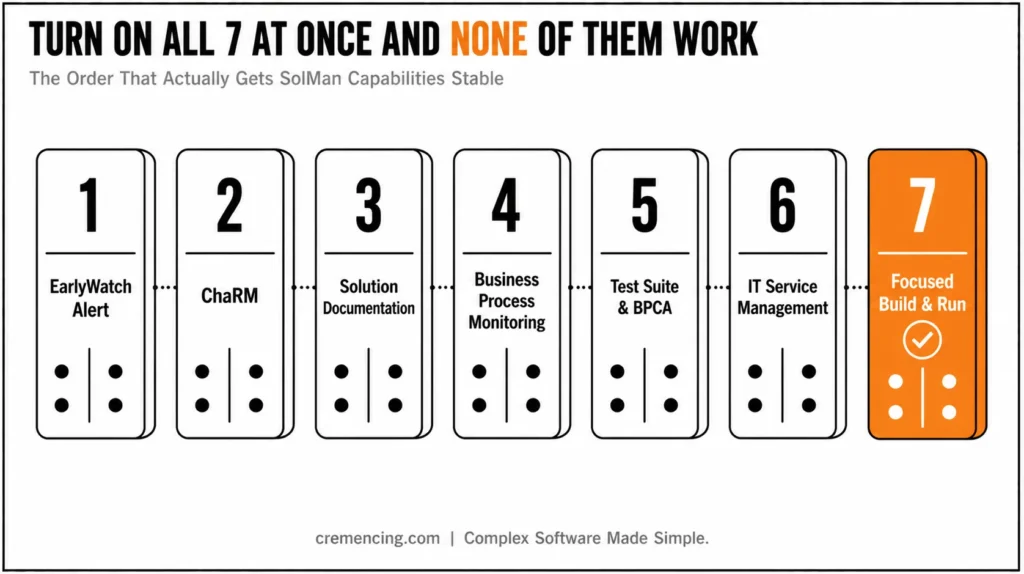
Turning all seven on at once is how most SolMan rollouts stall. Each one has its own configuration project behind it. Trying to run all seven in parallel usually means none of them gets finished properly. A more realistic sequence starts with EWA. It needs the least configuration, and it immediately surfaces whether your landscape has hygiene issues nobody’s tracked. ChaRM comes next if audit or change-governance pressure already exists. Solution documentation follows that. BPMon and BPCA both depend on it being current before they’re worth configuring at all. ITSM and the focused offerings are worth adding once the first four are stable, not before. Bolting incident management onto a change process that isn’t enforced yet just produces incident records nobody can trust
SAP Solution Manager vs. SAP Cloud ALM
| Factor | SAP Solution Manager | SAP Cloud ALM |
| Deployment model | On-premise, dual-stack (ABAP + Java) | Fully cloud-native, SAP-managed |
| Best fit | Complex, hybrid, on-premise-heavy landscapes | Cloud-centric or cloud-only landscapes |
| Maintenance | Mainstream ends late 2027 (Note 3255311) | Continuously updated by SAP, no customer maintenance |
| Change governance depth | ChaRM — deep, highly configurable | Lighter-weight, improving each release |
| Migration between the two | Not directly possible different architectures | Same |
| Cost model | Included with SAP license, self-hosted infrastructure | Included with SAP Enterprise Support / cloud subscriptions |
The decision isn’t really “which is better?” It’s “Which landscape are you actually running?” A complex on-premise or hybrid environment with mature ChaRM processes gets more value staying on SolMan through 2027 and planning a deliberate transition. A cloud-centric landscape gains more by starting fresh on Cloud ALM now, since data and configuration don’t migrate between the two platforms regardless of when you switch.
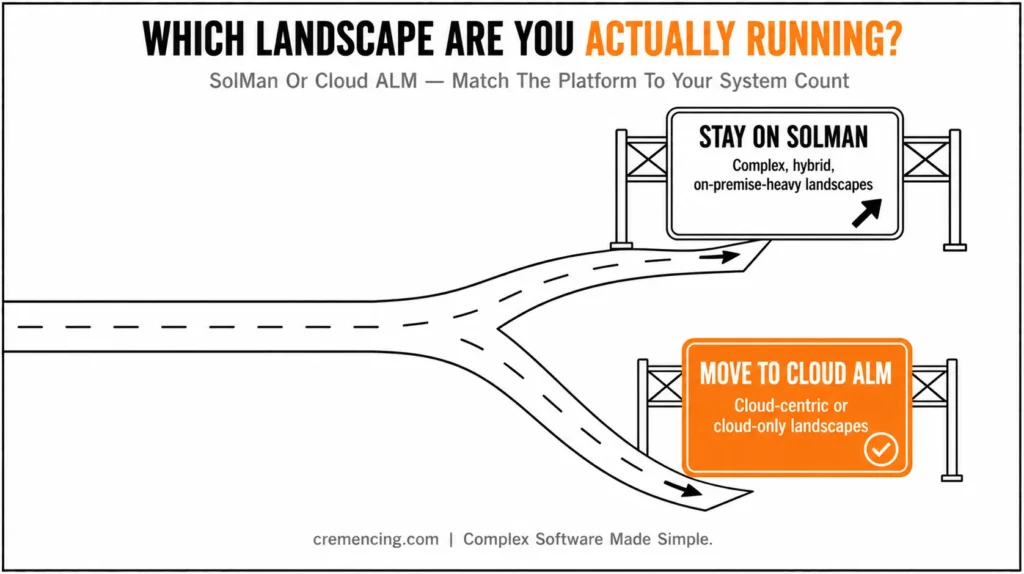
The organizations that get this wrong tend to make the decision based on which platform is newer rather than which one matches their actual system count and hosting model—a mismatch that shows up eighteen months later as a half-finished migration nobody budgeted the second half for.
Conclusion
A successful SAP solution management strategy isn’t about activating every capability at once. It’s about identifying the biggest operational risks and starting with two or three capabilities that address them. EarlyWatch Alert comes first when system health isn’t monitored proactively; ChaRM follows once production changes need approval and audit control; Solution Documentation then provides the process foundation everything else depends on.
SAP Solution Manager’s real value comes from how its capabilities work together. EWA flags developing risks, ChaRM controls changes, Test Suite reduces release risk, BPMon connects monitoring to business outcomes, and ITSM links incidents back to their root cause. These benefits only appear when the platform is configured gradually and aligned with real operational needs. See where SolMan fits among the essential SAP tools teams standardize on.
Treat SolMan 7.2’s 2027 maintenance end as a planning horizon, not a rushed deadline. Complex landscapes can keep gaining value while preparing a controlled transition; cloud-centric organizations should evaluate Cloud ALM sooner. Start with what solves today’s biggest problems, stabilize, then build a realistic roadmap forward.
Frequently Asked Questions
1. What is SAP Solution Manager?
It’s SAP’s central application lifecycle management platform for implementing, monitoring, testing, and documenting SAP and non-SAP systems. Community threads describing it in plain terms confirm it functions as the shared project and support hub across a landscape. [INTERNAL LINK: getting started → SAP Solution Manager Configuration Guide]
2. How do I configure EarlyWatch Alert in Solution Manager?
Start by confirming ST-PI and ST-A/PI are current on the managed system, then set up the RFC connection via SM59 before activating EWA in Solution_Manager or SOLMAN_WORKCENTER. SAP Community configuration threads document this as a multi-step process, not a single toggle.
3. How do I generate an ad-hoc EarlyWatch Alert report?
Run report RDSMOP_MAIN from SE38 in the SolMan system, select the target solution, and confirm the session date to trigger SDCCN on the satellite system. This is the documented fallback when the newer Technical Monitoring work center doesn’t expose an ad-hoc option directly.
4. Is there a full list of SAP Solution Manager transaction codes?
No single official list exists, but the most-used core set includes SOLUTION_MANAGER, SOLMAN_WORKCENTER, SDCCN, and SM59. SAP Community threads asking this exact question confirm even experienced admins compile their own reference list rather than find one published by SAP.
5. Is SAP Solution Manager being discontinued?
Not immediately—mainstream maintenance for SolMan 7.2 runs through the end of 2027, with limited extended maintenance available to 2030. SAP is actively steering new SAP Solution Management strategy toward SAP Cloud ALM as the long-term direction, so 2027 is the date to plan around, not panic about today.
6. What’s the difference between ChaRM and standard SAP transport management?
Standard transport management moves changes between systems without built-in approval enforcement. ChaRM adds a governed workflow on top and can technically block a transport release that skips the approval sequence, which plain transport management can’t do on its own.
7. Does SAP Solution Manager require a dedicated server?
Yes, SolMan runs as its own system with both an ABAP and a Java stack, separate from the SAP systems it manages. [NEEDS SME VERIFICATION: confirm current sizing guidance]
8. Can SAP Solution Manager monitor non-SAP systems?
Yes. Any system connected as a “managed system” through RFC — SAP or non-SAP — can be monitored, provided the appropriate diagnostics agents are installed.
9. What happens to existing SolMan configuration if we migrate to SAP Cloud ALM?
Configuration and data don’t migrate directly between the two platforms, since they use different architectures. Organizations typically need to reconfigure relevant capabilities in Cloud ALM.
10. Is Focused Run the same as standard SolMan monitoring?
No. Focused Run targets steady-state operations at scale, with deeper root-cause analysis for landscapes too large for standard SolMan monitoring. It ships under standard SolMan usage rights but follows its own maintenance timeline.





2 Responses