

The SAP S/4HANA Mercy Paradox in an Agile Enterprise World
Picture this: your S/4HANA Cloud system just received its quarterly update, and a business unit needs a custom approval workflow live by next week. The old playbook — custom ABAP development inside the core — means weeks of build time and a system that’s now harder to upgrade next quarter. This is exactly the tradeoff SAP BTP Extension Suite was built to eliminate.
The SAP BTP Extension Suite exists to remove that tradeoff entirely. It’s a cloud-native platform that lets businesses build S/4HANA extensions — often without writing a single line of code — while keeping the ERP core untouched and upgrade-safe. For CIOs, enterprise architects, and SAP transformation leaders, mastering this toolset isn’t optional anymore; it’s the difference between an S/4HANA landscape that stays agile and one that accumulates technical debt with every release.
In this blog, you will find out:
- What is this and why it matters to modern SAP projects
- How ‘no-code’ extension development is facilitated by the SAP BTP Extension Suite
- What success looks like when implementing it as an enterprise
- How the lessons of successful enterprises applying the product unlock maximum value in their S/4 Cloud deployment
What is the SAP BTP Extension Suite?
The SAP BTP (Business Technology Platform) Extension Suite provides a broad range of tools and services that enable companies to add capabilities around S/4HANA, integrate third-party apps, and develop new processes – without changing the core ERP.
Key features include:
- Non-destructive: Developed by dragging, dropping, and configuring by templates without writing code.
- Integration: SAP system and non-SAP systems connected via APIs, event-driven architecture, and pre-packaged integration.
- Quick time-to-value: Release extensions in the cloud faster than ever, flattening project schedules.
- Governance and security: Ensure compliance, control who is able to build and deploy extensions.
With these capabilities, companies can personalize workflows or build new applications and automate processes easily with few to no risks that were previously associated with custom development.
Why It Matters that SAP BTP Extension Suite is Pay-Per-Use
Failed digital transformation projects do not, as a rule, have the SAP core at their heart, but run into problems. On top of that, when organizations are unable to adequately modify standard processes in line with new business demands.
Without an effective extension strategy:
- IT is spending too long on manual custom development.
- Projects take longer and cost more
- Upgrading gets complicated and dangerous
- Innovation slows, limiting competitive advantage
These challenges are addressed by SAP BTP Extension Suite through:
- Agility: Quickly create and deploy extensions that will meet the needs of your organisation.
- Upgrade-Safety: Extensions can be maintained outside the S/4HANA core system and, in addition, are low risk during upgrade.
- Expandability: Add more features, automate work, and integrate other systems without difficulty.
- Business Empowerment: No-code empowers business users to innovate on their own and lessens the burden on IT.
Consequently, it turns the necessity of extension development from a cost into an advantage.
Develop without Coding on SAP BTP Extension Suite
One of the strong points in SAP BTP Extension Suite is the no-code/low-code practice. This enables business users and citizen developers to create extensions through visual tools, templates, and guided experiences without needing to be hardcore programmers.
Core Capabilities
App Building
- Fiori app drag-and-drop UI builders
- Pre-configured forms and workflow templates
- Reusable components for faster deployment
App Building in practice runs through SAP Build Apps, SAP’s low-code application development tool — its drag-and-drop UI builder and pre-configured Fiori-aligned templates are what business users actually work in when they say they’re “building an extension without code.”
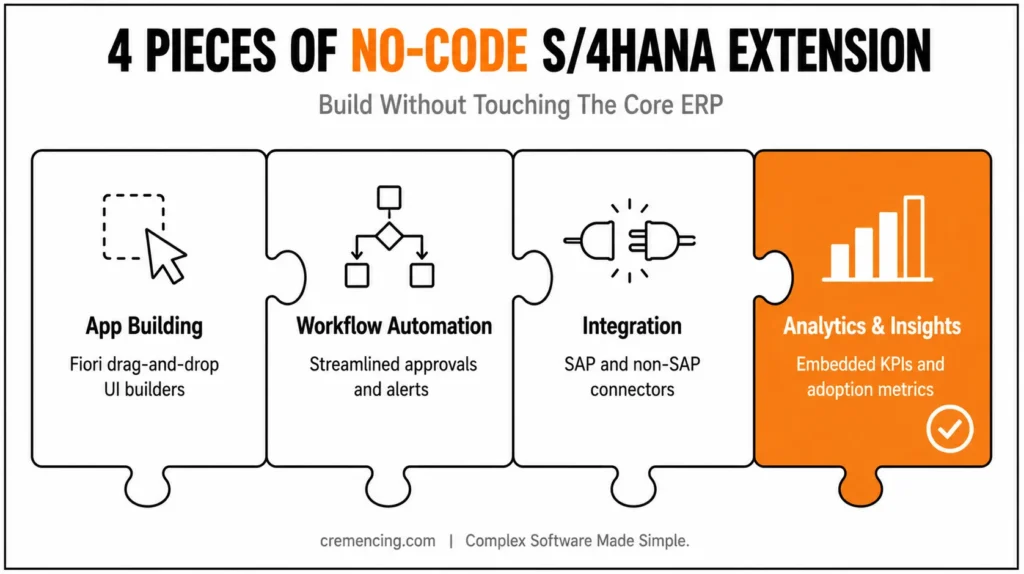
Workflow Automation
- Streamline and simplify complex business processes, approvals, and alerts
- Triggering of workflows based on the events in S/4HANA or external systems
- Minimize manual mistakes and achieve consistency in processes
Workflow automation is handled through SAP Build Process Automation, which combines process workflow design with RPA-style automation for repetitive tasks — this is the specific service behind the “streamline approvals and alerts” capability described above.
Integration capabilities run through SAP Integration Suite, which provides the pre-packaged connectors, API management, and event-driven (event mesh) architecture referenced earlier — this is the component that actually connects SAP and non-SAP systems, rather than a generic “integration” feature bundled into the Extension Suite itself.
Integration
- Integrate SAP and non-SAP systems with ease
- Out-of-the-box connectors for many enterprise applications
- A message-based architecture for real-time process updates
Analytics & Insights
- Deliver insights with extensions by embedding analytics for action
- Monitor KPIs, performance metrics, and process efficiency
- Watch as extensions are adopted with a pulse in real time
Example:
There is a manufacturing company that is automating its vendor onboarding with SAP Business Technology Platform Extension Suite. And finally, bold users can visualize the workflow, approval, and notification process. Within days, the system begins channeling new vendor information through S/4HANA, eliminating manual entry and errors—all without IT having to lift a finger.
| Capability | SAP BTP Service | What It Does |
|---|---|---|
| App Building | SAP Build Apps | Low-code UI builder for custom S/4HANA-facing apps |
| Workflow Automation | SAP Build Process Automation | Process workflows, approvals, and RPA-style automation |
| Integration | SAP Integration Suite | API management, connectors, event-driven integration |
| Collaboration/Portal | SAP Build Work Zone | Unified access point for extensions and apps |
Advantages of Using SAP BTP Extension Suite
- Faster Time-to-Value: Without code development and pre-packaged templates, there is no need to extend in months but in weeks, with excellent Return On Investment (ROI) for digital transformation endeavors.
- Reduced Technical Debt: Upgrades and patches are less risky because the extensions live outside of the core S/4HANA system. It enables IT teams to spend less time managing custom code and more time on innovation.
- Empowered Business Users: Business users can design and iterate applications themselves, avoiding IT bottlenecks and ensuring extensions support operational realities.
- Seamless Integration: Extensions can facilitate S/4HANA to connect with cloud apps, third-party solutions, and other SAP solutions, bringing one enterprise landscape.
- Enhanced Governance: SAP BTP supports role-based controls, monitoring, and audit logs to help you stay compliant while mitigating operational risk.
Guidelines for Implementing SAP BTP Extension Suite
Step 1:
How to Decide on Extension
- Determine what functions require in-app customizations or cloud-based additions. Focus on:
- Processes that need rapid innovation
- Workflows that require cross-system integration
- Tasks bringing measurable business value through automation and analytics
Step 2:
Drive Participation Early From Key Users
- Educate citizen developers and business analysts in no-code tools
- Involve them in requirements collection, testing, feedback loops, etc.
- Promote iterative design for quicker take-up
Step 3:
Prioritize Upgrade-Safe Extensions
- Leave the S/4HANA core intact to facilitate future upgrades
- Leverage BTP for complex logic, handling of external data or for new media applications
Step 4:
Combine Analytics and Monitoring
- Monitor KPIs for process efficiency, adoption, and ROI
- Spot bottlenecks or seldom-used extensions with dashboards
- Iteratively improve applications using data as the basis for insights
Step 5:
Govern and Scale
- Define who does what and how in the process of extending the activity/unit by role and approval workflow
- Keep a central list of add-ons to avoid double entries
- Hence, Scale winning apps across business units or regions
SAP BTP Extension Suite Rollout Checklist
- Scope: extend, don’t modify, the S/4HANA core
- Start with: high-friction, high-value processes (approvals, onboarding, reporting)
- Build with: SAP Build Apps (UI) + SAP Build Process Automation (workflow)
- Connect with: SAP Integration Suite
- Govern with: role-based access, central extension registry, versioning
- Measure with: adoption metrics, KPI dashboards, ROI tracking
Real-World Use Cases of SAP BTP Extension Suite
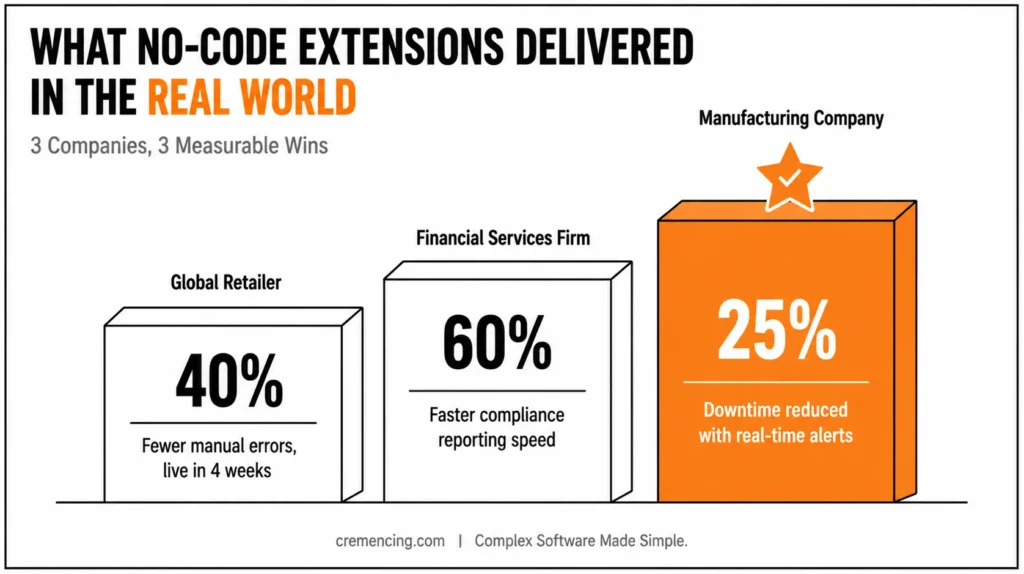
Global Retailer:
- Automatic pricing promotions updated to over 300 stores
- Reduced manual errors by 40%
- The new feature will be live in under 4 weeks
Financial Services Firm:
- Constructed a regulatory compliance dashboard that audits processes running in S/4HANA
- Improved reporting speed by 60%
- Empowered business users to create new compliance rules without IT intervention
Manufacturing Company:
- Developed the Digital Shop Floor Tracking system used in S/4HANA
- Reduced downtime by 25% with real-time warnings
Paris New Agent Experience VDI/VSI:
- Empower operations teams to personalize workflows
These are some of the expanded possibilities SAP BTP Extension Suite delivers, driving innovation at a faster pace, efficiency, and business agility.
Top Executives:
- Identify business-critical processes serviceable as no-code extensions
- User and citizen developer training on SAP BTP tools
- Focus on upgradable development to lower technical debt
- Add monitoring and analytics for visibility that leads to action
- Any extension shared amongst your team, keep it under your guidelines, versioning, and approvals
- Iteratively optimize extensions through adoption metrics and KPIs
Conclusion
The real value of SAP BTP Extension Suite isn’t that it’s “no-code” — it’s that it separates the pace of business change from the risk profile of your S/4HANA core. When a workflow needs to launch in weeks instead of a quarter, or a business unit needs a custom app without waiting on an IT backlog, the extensions built through SAP Build Apps, SAP Build Process Automation, and SAP Integration Suite absorb that change without ever touching the system that has to survive your next upgrade..
With SAP BTP Extension Suite mastered, organizations can:
- Develop S/4HANA apps faster and more efficiently
- Improve operational efficiency and adoption
- Extract quantifiable business value from digital projects
- Keep the core of your SAP clean and agile
Therefore, Executives don’t have the luxury to sit and wait in today’s fast-paced world. In other words, SAP BTP Extension Suite turns S4HANA from a static ERP into an agile, extensible platform to innovate, scale, and grow the business over the long term. For more insights read our blog on SAP in App vs Side by Side Extensibility
FAQs
What is the SAP BTP Extension Suite?
Essentially, it is a cloud-native platform for no-code/low-code extensions to S/4HANA. Moreover, it offers seamless integration with external systems. In addition, it provides real-time analytics for actionable insights.
How does no-code work in SAP BTP Extension Suite?
Basically, with visual tools, templates, and drag-and-drop components, you can develop less and build more. As a result, extensions come together faster than a traditional coding process. Consequently, business users can innovate without relying heavily on IT.
Is it possible for the SAP BTP Extension Suite to be connected with non-SAP landscapes?
Yes, indeed. Furthermore, it offers API-driven integration, event-driven workflows, and out-of-the-box third-party application support. Therefore, connecting SAP and non-SAP systems becomes effortless.
How does SAP BTP Extension Suite address technical debt?
To begin with, extensions are built outside the S/4HANA core. As a result, this approach guards against upgrade risk. In addition, it significantly reduces the maintenance effort needed to support custom code.
Who should take the primary role in SAP BTP Extension Suite’s initiatives?
Typically, CIOs, SAP transformation owners, enterprise architects, and business process leaders take the lead. However, success depends on all of them working together. Ultimately, this collaboration helps synchronize strategy, execution, and adoption.
What is the SAP BTP Extension Suite?
The SAP BTP Extension Suite is a cloud-native platform that lets businesses build S/4HANA extensions without touching the core ERP. Moreover, it supports no-code and low-code development through visual tools and templates. As a result, companies can innovate faster while keeping their core system stable.
How does no-code development work in SAP BTP Extension Suite?
No-code development relies on drag-and-drop builders, pre-configured templates, and reusable components. In addition, business users can design workflows and approvals without writing a single line of code. Consequently, IT teams spend less time on manual custom development.
Can SAP BTP Extension Suite integrate with non-SAP systems?
Yes, it can. Furthermore, it offers API-driven integration, event-driven architecture, and out-of-the-box connectors for third-party applications. Therefore, businesses can unify SAP and non-SAP landscapes into one connected ecosystem.
How does this suite reduce technical debt?
Extensions are built and maintained outside the S/4HANA core, which keeps the core clean. As a result, upgrades and patches become lower-risk and easier to manage. Additionally, IT teams face less maintenance burden over time.
Who should lead SAP BTP Extension Suite initiatives in an enterprise?
CIOs, enterprise architects, and SAP transformation leaders typically drive strategy and governance. However, business process leaders and citizen developers play an equally important role in adoption. Together, these stakeholders ensure the initiative delivers measurable ROI.
How is SAP BTP Extension Suite different from traditional ABAP custom development?
Traditional ABAP development modifies the S/4HANA core directly, creating upgrade risk and technical debt. Extensions built through BTP Extension Suite live outside the core, so they don’t need to be re-tested and re-migrated with every core upgrade.
Does SAP BTP Extension Suite require a separate license from S/4HANA Cloud?
Yes — SAP BTP is licensed and consumed separately (typically pay-per-use or subscription-based), distinct from the core S/4HANA license.
What’s the difference between in-app and side-by-side extensibility?
In-app extensibility makes small, low-risk customizations directly within S/4HANA Cloud using SAP-provided tools, without touching the core code. Side-by-side extensibility — which is what SAP BTP Extension Suite primarily enables — builds separate applications on BTP that connect to S/4HANA via APIs, keeping the core completely untouched.
Can IT still govern extensions built by business users through no-code tools?
Yes. SAP BTP includes role-based access controls, approval workflows, and audit logging specifically so IT retains governance oversight even when business users are building extensions themselves.
What skills does a team need to get started with SAP BTP Extension Suite?
Citizen developers can start with SAP Build Apps and SAP Build Process Automation using visual, low-code tools with minimal training. For more complex integrations or custom logic, a small technical team familiar with SAP Integration Suite and API design is still valuable.




