
Introduction:
Most SAP teams think they’ve done a technical assessment once the SAP Readiness Check report lands in their inbox. They haven’t.
The Readiness Check is a scan. It flags simplification items, customdeliverable; the code conflicts, and add-on compatibility gaps, but it doesn’t tell you which of those gaps are business-critical, what they’ll cost to fix, or who owns the remediation. That gap between “we ran a scan” and “we have an assessment” is exactly where RISE with SAP migrations go over budget.
This guide breaks down what a real RISE with SAP technical assessment covers beyond the automated tooling, the five steps high-performing teams run before they touch a migration project plan, and the governance structure most assessments skip entirely, the one that actually decides whether findings turn into fixes.
Over-budget RISE with SAP migrations have one thing in common. The technical assessment is a checkbox item, fast-tracked or incomplete, when it should be the very first step in all testing.
The RISE with SAP Technical Assessment is the way to determine whether your current landscape can migrate, what would need to change before moving, and how much the complete migration will cost your company. If you do not do it properly, you will spend the first quarter of your migration fixing issues that would have been highlighted in week one with a proper assessment.
What Your RISE with SAP Assessment Covers
A successful RISE with SAP transition requires a proactive strategy across six key areas. First, you must assess your current infrastructure and resolve S/4HANA compatibility issues. You also need to enforce a “clean core” custom code strategy.
Before moving, analyze your system sizing and high-availability needs. Next, run the SAP Readiness Check to find third-party add-on constraints. You should also refactor legacy ABAP objects onto the SAP Business Technology Platform (BTP).
Aggressive pre-migration data hygiene is equally essential. Purge logs and archive historical data to lower your memory footprint. Make sure to map all active integrations to secure network protocols.
Finally, set up clear identity management and audit user access roles. Defining duties under SAP’s Shared Responsibility Model ensures a secure, compliant deployment.
SAP Technical Assessment and Why It Is Key to Migration Success
RISE with SAP Technical Assessment is a systematic approach to your existing SAP landscape that helps you recognize technical gaps, compatibility with RISE with SAP solutions, and custom code dependencies.
It is not a sales exercise. This is not a vendor pitch. This is a technical deep dive that provides clarity on the current state of your landscape and what it can cleanly become before moving to SAP S/4HANA on the RISE platform.
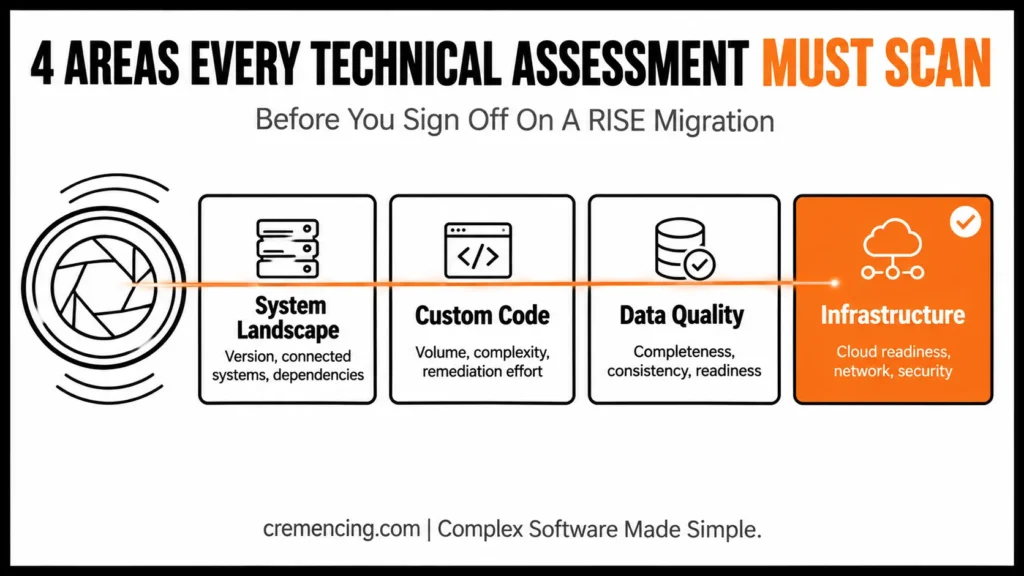
An application refers to the assessment, which usually focuses on four areas.
Readiness Check vs. Full Technical Assessment vs. Partner-Led Assessment
| SAP Readiness Check (automated) | Full Internal Technical Assessment | Partner-Led Assessment | |
|---|---|---|---|
| Scope | Simplification items, custom code scan, add-on compatibility | Adds interface inventory, data quality, infrastructure, business input | Same as full internal, plus benchmark data from prior RISE projects |
| Business stakeholder input | None | Required (Steps 2–4) | Required, structured via steering committee |
| Output | Automated report (PDF/Fiori app) | Prioritized remediation backlog with owners | Remediation backlog + contract/scope negotiation leverage |
| Typical duration | 1–3 days to run | 4–8 weeks (mid-size landscape) | 4–8 weeks, often faster with prior-project accelerators |
| Best used as | Input #1 to the assessment | The assessment itself | The assessment, when internal bandwidth or RISE experience is limited |
Teams that take this assessment seriously see consistently smoother migrations, fewer surprises at go-live, and more accurate project budgets. Teams that want to take shortcuts end up paying for each one they made during the next few months.
RISE with SAP Technical Assessment process in a step-by-step manner
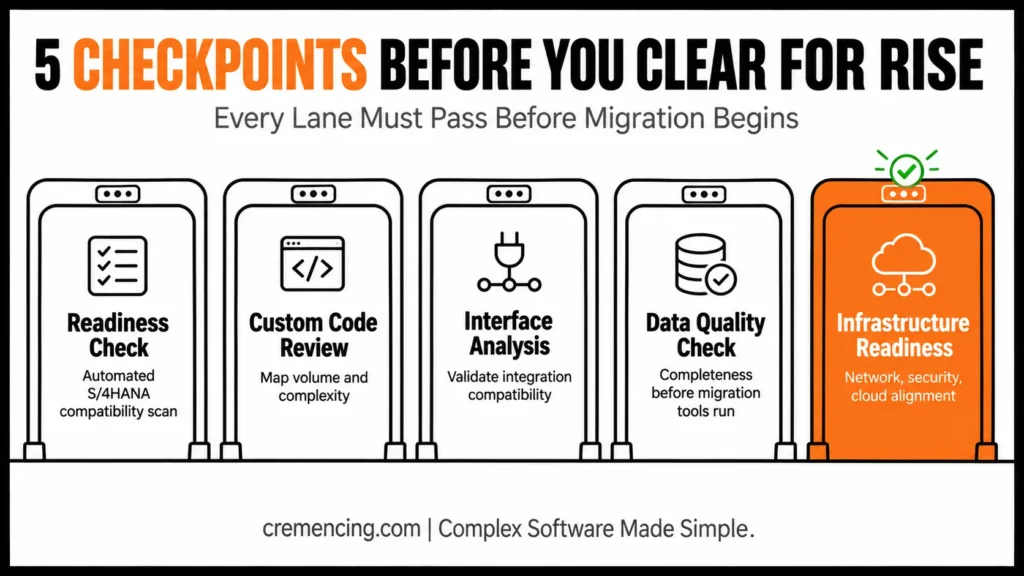
Step 1 — Perform the SAP Readiness Check
SAP Readiness Check: The readiness check is an automated analysis provided by SAP that checks your existing ECC or S/4HANA system to identify THE target S/4HANA version compatibility issues when running on RISE. It checks your site for deprecated functions, custom code conflicts, business function usage, and add-on compatibility.
In practice, the Readiness Check output you’ll be working from includes distinct analysis areas worth naming so your team knows what to actually open in the report: Simplification item impact, custom code analysis, business process analytics, add-on compatibility, and (where licensed) SAP business scenario recommendations.
Running the Readiness Check early allows your team to establish a baseline picture.
Step 2—Evaluate Custom Code Volume and Complexity
Custom code is always the biggest cause of migration surprises. You need to map all custom development in your landscape, categorize them by complexity, and decide if they need to be rewritten, retired, or use the standard SAP functionality, which is available as part of S/4HANA.
High-performing teams leverage SAP’s Custom Code Migration Worklist in conjunction with the Readiness Check output to seed remediation prioritisation. Do NOT remove every bit of custom code before moving. The first thing is to know exactly what you have and how much it will cost to handle.
Step 3 — Analyze Interface and Integration Terrain
You need to create a list of every interface connecting your SAP system with external applications & validate whether they are RISE compatible or not. This comprises RFC connections, IDocs, APIs, middleware integrations, and any 3rd party connectors that are being used.
Teams that omit this step often find that they have broken interfaces in the first week after they go live. Conducting a full interface inventory during the assessment avoids this issue altogether and provides the integration team with an orderly remediation backlog before migration efforts.
Step 4 — Check the data quality and what is needed for migration
It is the data migration that costs many RISE projects weeks they will never get back. A data quality assessment should be included in every technical assessment to determine incomplete master data, duplicates, inconsistent transactions, and any archiving of data that needs to happen before the migration tools can run cleanly.
It costs less to fix data quality issues the earlier they are surfaced. At the time of assessment, data issues result in hours of waste. Days are lost to the same problems that were identified during migration cutover.
Step 5 — Determine Infrastructure and Cloud Readiness
The last assessment phase checks if your existing infrastructure setup is compatible with the RISE with SAP cloud delivery model. It covers network bandwidth requirements, identity and access management setup, security policies alignment, and any on-premise systems that will stay connected even after the migration.
This step also uncovers any loose compliance or data residency qualifications that you must take into account in the RISE contract before agreeing.
Business Advantages and Return on Investment
| Outcome | What Teams Actually See |
| Accurate project budgeting | Study results show that assessment results directly decrease budget surprises by 40 to 60 percent |
| Faster migration execution | Upstream remediation of known issues gained time on the migration timeline |
| Cleaner go-live | Handling of interface and data-related issues resolved before cutover results in better results in lower post-go-live incidents |
| Better vendor negotiation | OMNI: Assessment Data Empowers Customers in RISE Contracting and Scope Negotiations |
| Reduced custom code debt | Assessment promotes rationalization through long-term maintainability |
| Lower risk of project failure | Migration success rates, on average, 30% higher for teams with full assessments |
RISE with SAP Migration Assessment
Types of Mistakes That Teams Make
Mistake 1— Treating the SAP Readiness Check as the full assessment process — The Readiness Check is just one of a variety of tools you should use to perform this analysis. Teams using the automated check and treating the assessment as complete overlook thread complexity, gaps in your system integration layers, and data quality issues not adequately diagnosed by this tool.
Mistake 2 — Assessment Without Business Stakeholders Inside Technical assessments that run without business input continually fall short on important process dependencies. Business teams understand which custom developments are actually utilized, what interfaces are business critical and what data sets cannot move with errors. Their input is not optional.
Mistake 3 — Custom Code Remediation Effort Most organizations last it custom code volume by 30 to 50 percent at the assessment stage. This is not pessimism: building buffer into the remediation timeframe according to your assessment results. It is accurate planning.
Mistake 4 — Not archiving data before assessment A data quality assessment on a system that is swollen with years of unarchived transactional data not only yields false conclusions but also results in massive migration effort over-estimates. Doing a little bit of archiving in advance of the assessment results in a cleaner and more accurate baseline.
Mistake 5 — Lack of structured assessment documents . Assessment findings that remain in the email and meeting notes won’t lead to action. Well-functioning teams generate an organized review report that connects each piece of evidence to a remediation custodian, effort estimate and timeline. This document is what you have a migration project plan.
Assessment governance layer that 99.9% migration teams ignore
Most of the RISE with SAP assessment content considers the technical steps. Very little of it addresses the governance behind the assessment process itself, so that its findings drive decisions.
Top-performing migration teams establish an Assessment Steering Committee, meeting weekly throughout the assessment phase. The committee consists of the SAP architect, project manager, IT director, and at least one upper-level business stakeholder. They are not the ones who administer the assessment. Their role is to determine actions from what the assessment reveals.
Assessment findings are left to pile up without resolution, absent this governance layer. Teams may discover issues, record them in a tool, and then wait for someone with the power to make decisions. Weeks pass. A single object has not been moved, and already the migration date gets pushed back.
A common danger with such assessments is that the recommendation processes move at a different pace than the assessments themselves, which this proposal eliminates by establishing a decision-making structure that keeps up with the assessment. Every finding gets an owner. Every remediation gets a deadline. Before you close the assessment phase, every risk has a mitigation plan for it.
The teams that create this stewardship layer complete their assessments faster, turn out more outputs in the form of change, and enter migration execution with a team already aligned on priorities and accountable for outcomes.
Conclusion
The RISE with SAP Technical Assessment is not a checkbox project. It is the activity that makes your migration either be successful on the first try or take three months of play to recover from the issues that mattered all along and what was never discovered.
Teams that spend the time wisely really understand what they are migrating, how it needs to be transformed before moving, and even what the project is going to cost. For the teams that found out in a hurry, their week two savings plans were indeed leadership price adjustments by month six.
Best thing you can do to ensure a successful RISE with SAP migration for your organization right now? Audit the completeness of how far along you are in your current assessment against this checklist and framework before entering that next project meeting.
Check out the entire RISE with SAP migration series and follow along with the process. You will see real
FAQ
Q1: What is the average duration of a RISE with SAP Technical Assessment?
A proper run of the assessment takes four to eight weeks for a mid-size SAP landscape. Ten to twelve weeks for more complex enterprise landscapes with a relatively high custom code footprint and a large number of interfaces. Migration teams make many costly decisions, perhaps the most common of which is compressing the timeline to accommodate a project start date.
Q2: Who should we involve in the RISE with SAP technical assessment?
Key stakeholders from SAP basis administrators, application architect(s), integration specialists, data migration lead, and senior business representatives from the critical functional areas are a must to deliver this assessment. Pristine assessments managed solely by the tech team always neglect business-critical dependencies, which show up tardily in the project.
Q3: What does the SAP Readiness What does the check consist of, and how does it fit into the assessment?
SAP Readiness Check an automated SAP tool that checks your existing system for any conflicts with S/4HANA. This is a good initial step to the technical evaluation but does not replace it. This means it is the first input rather than an assessment of data in a bigger evaluation.
Q4: Does this mean that we can conduct the RISE with SAP technical assessment on our own, or do we need a partner?
SAP organizations with competent SAP architects and basis administrators can perform a significant part of the assessment in-house. But the reality is that most organizations need an SAP partner in play who has performed more than one RISE assessment and understands exactly where gaps and risks are commonly found in business landscapes similar to yours.
Q5: What if the assessment shows that our current landscape has very major problems?
The identification of key findings is common and anticipated in many RISE with SAP assessments. The assessment exists to bring these issues to light while it is still possible to address them. Standard reactions are an increased remediation period, moving the migration window or finding extra time and resources in the project plan through documented findings.
Q6: Does the RISE with SAP Technical Assessment differ between S/4HANA Cloud Private Edition and Public Edition?
Significantly. Private Edition assessments focus heavily on custom code remediation options (rewrite, retire, or replace). Public Edition has a fixed core, so the same assessment step shifts almost entirely to evaluating what can move to BTP-based side-by-side extensibility instead.
Q7: What’s the difference between SAP Readiness Check 2.0 and the custom code output feeding into it?
The Readiness Check surfaces simplification item conflicts and flags custom code that needs review. Whether that custom code list routes into the Simplification Item Catalogue or a separate custom-code-specific app depends on your release and license tier.
Q8: What deliverables should we actually receive at the end of a technical assessment?
At minimum: a prioritized remediation backlog with named owners and effort estimates, an interface compatibility matrix, a data quality summary with archiving recommendations, and an infrastructure readiness checklist. If any of these are missing, the assessment isn’t done regardless of whether a Readiness Check report was produced.
Resources
SAP Readiness Check
RISE with SAP Official Implementation and Technical Resource
RISE with SAP migration discussions and live project experiences on SAP Community




