
Introduction
Your ERP system is live, but users are still reporting transaction errors, authorization failures, integration problems, and performance issues. That is where ERP implementation support gets tested—not when the production system simply goes live.
A system can be technically available while critical business processes remain unstable. Therefore, SAP’s implementation framework treats operations and support as an important part of the transition, including helpdesk setup, incident management, post-go-live change management, and user-related operations. Moreover, SAP Cloud ALM supports operations activities such as incident detection, root-cause analysis, problem correction, and recurring-resolution automation.
As a result, effective ERP implementation support requires more than a helpdesk. It brings together functional consultants, technical specialists, support analysts, business-process expertise, monitoring, documentation, and clear escalation paths.
This article breaks down the roles, services, skills, and support processes needed to move from implementation into stable ERP operations, with SAP-specific considerations based on the deployment model.
What is ERP implementation support?
ERP implementation support should be treated as a transition layer between project delivery and steady-state operations.
The support model typically begins before or around cutover, rather than waiting until users start reporting problems. In fact, a mature team prepares incident ownership, escalation routes, technical monitoring, user support, documentation, known-error procedures, and post-go-live change controls before production usage even begins.
For SAP implementations, this can include:
- Cutover and production-readiness support
- Hypercare immediately after go-live
- Incident and problem management
- Functional process support
- Technical troubleshooting
- Integration monitoring
- Authorization and role support
- Performance monitoring
- Defect correction
- User enablement and documentation
- Controlled post-go-live changes
- Transition from project resources to the long-term support organization
Furthermore, SAP Cloud ALM’s SAP Activate task content specifically covers operations and support activities, including helpdesk setup, incident management, post-go-live change management, and user-related operations standards.
ERP Implementation Support Job Description
Some of the common responsibilities mentioned in an ERP implementation support job description are:
- Monitoring system performance
- Resolving user issues
- Managing system updates
- Supporting business processes
- Coordinating with technical teams
They are the users of the system that they support.
| Support Role | Primary Responsibility | SAP-Specific Focus |
|---|---|---|
| ERP Support Analyst | Incident intake, triage, user assistance | Business transactions, recurring incidents, escalation |
| Functional Consultant | Business-process support and configuration | Finance, procurement, sales, supply chain, etc. |
| SAP Technical Consultant | Technical troubleshooting and solution changes | ABAP, integrations, APIs, performance, extensibility |
| SAP Basis/Platform Specialist | Technical platform operations | System health, transports, jobs, connectivity, administration |
| Integration Specialist | Interface monitoring and troubleshooting | APIs, middleware, message failures, integration flows |
| Security/Authorization Specialist | Access and authorization support | Roles, authorizations, access issues |
| Support Manager | SLA, escalation, capacity, reporting | Support governance and service performance |
| Business Process Owner | Business validation and prioritization | Process ownership, acceptance, business impact |
For example, SAP documentation continues to identify role-based responsibilities across implementation and lifecycle activities. Similarly, SAP Cloud ALM provides implementation roles including project lead, project member, test engineer, change manager, and deployment manager.
How ERP Implementation Support Works: Step-by-Step Process
Step 1: Incident Management
- Working on system issues (their first responsibility).
- Identify and log incidents
- Analyze root cause
- Provide a quick resolution
Fast response minimizes business disruption.
Step 2: Training and Assisting the User
- Users often need guidance.
- Answer user queries
- Provide training sessions
- Create documentation
Well-trained users reduce support load.
Step 3: System Monitoring
- Continuous monitoring ensures system health.
- Track performance metrics
- Identify bottlenecks
- Prevent system failures
Step 4: Change and Enhancement Management
- ERP systems evolve.
- Implement new features
- Adjust configurations
- Support business changes
Step 5: Work with Tech Team
- Support teams work with:
- Developers
- Infrastructure teams
- Consultants
Collaboration ensures faster problem resolution.
Step 6: Reporting and Optimization
- Regular reporting helps improve performance.
- Analyze system usage
- Identify improvement areas
- Recommend optimizations
Support Roles and Services for ERP Implementation
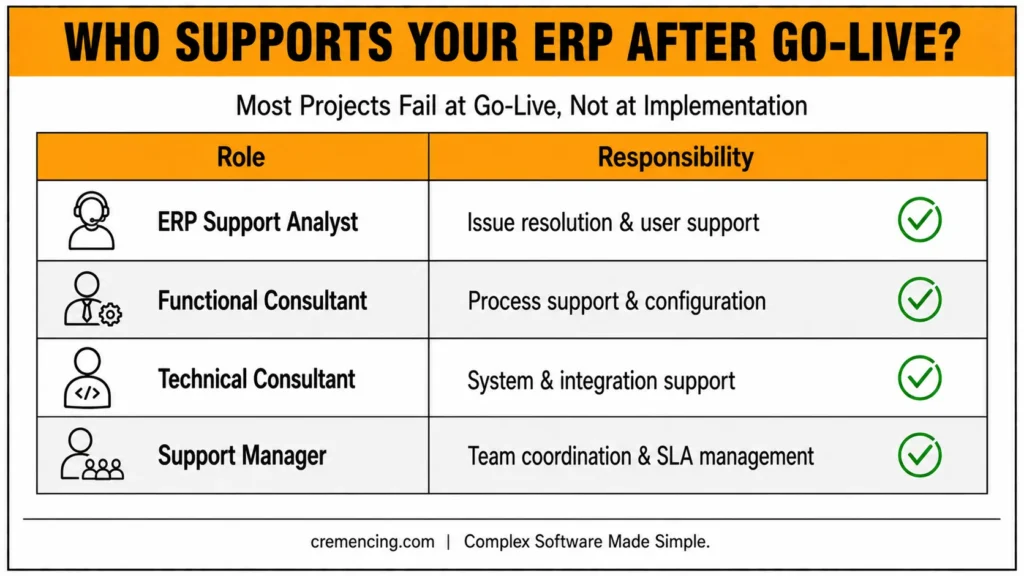
| Role | Responsibility |
|---|---|
| ERP Support Analyst | Issue resolution and user support |
| Functional Consultant | Process support and configuration |
| Technical Consultant | System and integration support |
| Support Manager | Team coordination and SLA management |
Core ERP Implementation Support Services
- Helpdesk support
- System monitoring
- Performance tuning
- User training
- System upgrades and patches
Ultimately, this step helps ensure these services can continue to serve your business successfully in the long run. The support team may include technical consultants responsible for troubleshooting, integrations, development, and technical solution design.
What are the skills you need to assist with ERP implementation?
Technical Knowledge
Understanding ERP systems is essential.
Database basics
System configuration
Integration concepts
Problem-Solving Skills
Support roles require quick thinking.
Identify issues
Analyze root causes
Provide effective solutions
Communication Skills
Every day, users come into contact with support professionals.
Explain technical issues clearly
Guide non-technical users
Business Process Understanding
ERP systems support business operations.
Finance
Supply chain
HR
Understanding processes improves support quality.
Adaptability
ERP environments change frequently.
New updates
System upgrades
Changing business needs
The advantage and value of ERP Implementation Support
Reduced Downtime
Effective support minimizes system disruptions.
Faster issue resolution through defined incident ownership, escalation paths, monitoring, and documented support procedures.
Improved User Productivity
Good support empowers the user to be productive.
Better System Performance
Continuous monitoring improves efficiency.
Higher ROI from ERP Investment
Effective support helps protect the ERP investment by maintaining system availability, resolving operational issues, supporting users, and managing controlled improvements.
Improved Business Continuity
Reliable systems support uninterrupted operations.
ERP Implementation Support: Common Mistakes and Best Practices
Mistake 1: Treating Go-Live as the Finish Line
Better approach: Plan hypercare and support ownership before cutover.
Mistake 2: Using One Team for Every Issue
Better approach: Define functional, technical, security, integration, infrastructure, and management escalation paths.
Mistake 3: Measuring Only Ticket Volume
Better approach: Track resolution time, repeat incidents, SLA performance, incident causes, and business impact.
Mistake 4: Fixing Symptoms Without Root-Cause Analysis
Better approach: Separate incident resolution from problem management.
Mistake 5: Allowing Undocumented Knowledge
Better approach: Convert recurring fixes into searchable support documentation.
Mistake 6: Treating Every Enhancement as an Emergency
Better approach: Classify requests and apply controlled change management.
Career Path And Growth in ERP Implementation Support
Yet there is no blog on how to get ahead in your career.
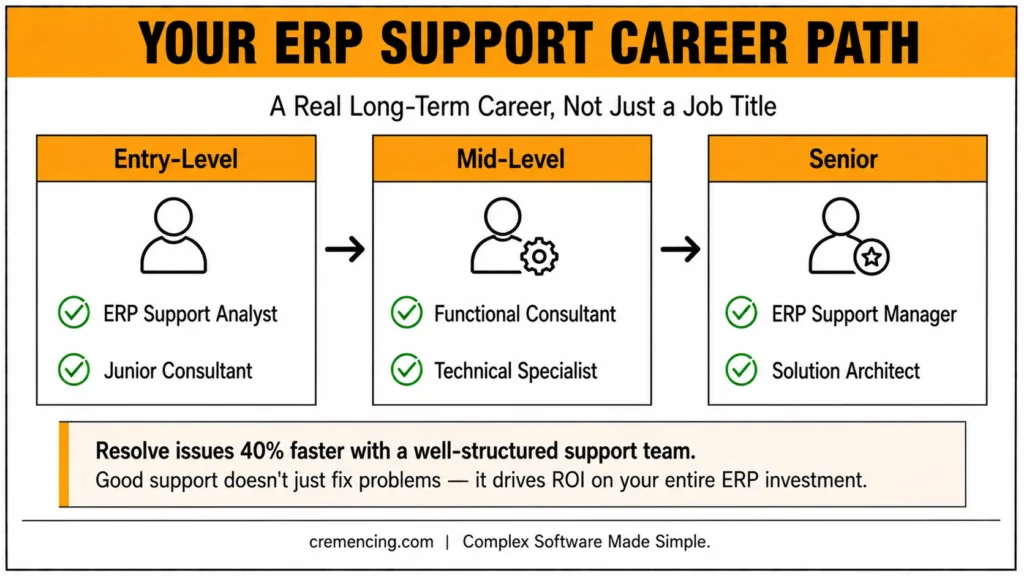
Entry-Level Roles
ERP Support Analyst
Junior Consultant
Mid-Level Roles
Functional Consultant
Technical Specialist
Senior Roles
ERP Support Manager
Solution Architect
Growth Opportunities
You can transition to:
ERP Support Professional
Implementation roles
Consulting
Project management
It makes ERP support a good long-term career option. Platform-level support may also involve system administration, monitoring, jobs, transports, and technical operations.
Conclusion
Go-live is not the point where ERP responsibility ends. It is the point where the support model has to prove that the implementation can operate in the real business environment.
A strong ERP implementation support model connects the people responsible for business processes, functional configuration, technical troubleshooting, integrations, security, platform operations, and service management. In addition, it gives those teams defined escalation paths, monitoring, documentation, incident processes, and controlled change management.
At the same time, SAP environments require the support model to reflect the deployment architecture. For example, SAP Activate and SAP Cloud ALM incorporate operations and support activities, including helpdesk, incident management, post-go-live change management, and hypercare.
Ultimately, the practical test is not simply whether the ERP system went live. Instead, what matters is whether your organization can detect problems quickly, identify their root causes, support users, control changes, and continuously improve the system after production begins. Technical support may also require custom development when standard SAP functionality does not fully meet a business requirement
That is what turns ERP implementation support from a reactive helpdesk into an operational capability. Looking to strengthen your ERP implementation support? Train, organize your team, and get the maximum ROI on your ERP.
FAQ Section
What is ERP implementation support?
It is nothing more than post-go-live support, and once the ERP is deployed, an organization continues to help ensure system stability while at the same time attempting to assist end users.
What role does ERP support play?
It includes system monitoring, problem solving and also end-user assistance and performance optimization.
Why is ERP support important?
Enhancement of system stability and productivity, minimizing the possibilities for errors, maximize the ROI.
What roles are needed for ERP implementation support?
Typical roles include support analysts, functional consultants, technical consultants, platform/Basis specialists, integration specialists, security specialists, support managers, and business process owners.
How do you measure ERP support performance?
Useful measures include incident resolution time, SLA compliance, repeat incidents, incident backlog, critical incidents, change-related incidents, integration failures, and business impact.
What should an ERP support team do before go-live?
Before production begins, the team should establish support ownership, escalation paths, monitoring, documentation, user support procedures, integration checks, known-error procedures, and cutover responsibilities.
Resources
https://www.sap.com/products/erp.html
https://www.oracle.com/erp/
https://www.microsoft.com/dynamics-365




