
When a production issue occurs during month-end closing, it becomes more than a technical problem. Instead, it can become an ownership problem when no one knows who should respond, what the ticket status means, or what needs to happen next. As a result, teams can lose valuable time while they coordinate the response.
This often happens when SAP support teams still rely on email, spreadsheets, and customized follow-up instead of a structured IT service management workflow. With a defined workflow, teams can assign ownership, track ticket status, and coordinate the next action more consistently.
Informal processes get difficult to track and govern as SAP environments grow in S/4HANA, cloud service integrations, and multiple support teams. Structured incident, service request, problem, and change management are introduced with clear ownership, priorities, and measurable workflows in SAP ITSM. This article will discuss the reasons why SAP teams are transitioning from the old support model and how SAP service management can increase accountability, better handle responses, and better manage day-to-day SAP operations.
What is SAP ITSM and how is it going to impact SAP Operations?
SAP teams can now have a structured approach to support, rather than depending on emails, spreadsheets, and individual follow-ups with SAP customers, thanks to SAP service management. The most noticeable difference is the visibility and accountability.
A typical support model requires teams to ask:
Who is responsible for this situation?
How urgent is it?
How’s it going?
Which SLA applies?
Was this a similar issue in the past?
These details are integrated into a well-defined service management workflow in SAP ITSM. By having a consistent process, teams can assign ownership of incidents, prioritize them, track progress, and manage service requests.
SAP Solution Manager ITSM offers features for centralized message management, incident processing, and service-related workflows. This enables a better operational picture for support teams and allows them to address SAP issues based on a set process and not on a social basis.
Why SAP ITSM Matters for Modern SAP Landscapes
The biggest reason companies adopt SAP ITSM is landscape complexity. A business process rarely depends on one SAP component anymore.
A sales process may involve:
- SAP S/4HANA SD
- SAP Commerce Cloud
- Integration middleware
- External payment systems
A problem in one area may appear as a symptom somewhere else. Without structured incident management, teams waste time determining ownership.
SAP support services create a service layer where issues can be categorized based on:
- Business impact
- SAP component
- Priority
- Responsible support group
This reduces unnecessary handovers.
Business Users Expect Service-Level Visibility
Business users no longer want only a confirmation that “someone is checking.”
They expect:
- Ticket numbers
- Status updates
- Ownership details
- Expected resolution timelines
An SAP ITSM solution provides this transparency through defined workflows. Instead of sending multiple follow-up emails, users can track each request as it moves through the service process. As a result, support teams can manage ownership, status, and next actions more consistently.
SAP Teams Need Better Governance
SAP changes directly affect business operations.
A configuration adjustment in:
- SAP FI
- SAP MM
- SAP SD
- SAP PP
can influence critical business activities.
ITSM connects support activities with governance processes by maintaining records of:
- Requests
- Approvals
- Resolution steps
- Communication history
This becomes especially important for organizations operating regulated or global SAP environments.
Repeated Incidents Reveal Bigger Problems
Traditional support models often solve symptoms. SAP service management helps teams identify patterns.
Example:
A company receives repeated incidents because purchase orders fail approval. A traditional approach fixes every ticket separately. An ITSM-based approach identifies: “The same workflow issue is causing multiple incidents.” The team can then create a problem record, perform root cause analysis, and prevent future disruptions.
How the SAP ITSM Solution Improves Incident and Service Management
An SAP ITSM solution does more than replace email-based ticket handling. It creates a structured operating model where SAP support teams can manage incidents, requests, changes, and recurring problems through defined processes.
For organizations running SAP S/4HANA environments, support complexity increases as more applications, integrations, and business users depend on SAP processes.
A controlled IT service management approach helps teams answer critical operational questions:
- Who owns this issue?
- How urgent is it?
- What business process is affected?
- Has this problem happened before?
- What action prevented it from returning?
SAP Solution Manager 7.2 includes IT Service Management as one of its Application Lifecycle Management processes, supporting structured service operations for SAP landscapes.
SAP Incident Management Creates a Predictable Support Process
Incident management focuses on restoring normal service operation after an unexpected issue occurs.
For example:
A customer service team cannot create sales orders because of an SAP SD error. As a result, the issue may move through multiple conversations before reaching the correct expert in a traditional support model.
- The user contacts support.
- Support identifies the module.
- The functional consultant investigates.
- The developer checks technical details.
- The business waits.
With SAP incident management, the process becomes controlled:
User creates incident → Ticket classification → Priority assignment → Responsible team → Analysis → Resolution → Documentation
The difference is not only speed.
The difference is that every action becomes traceable.
Support managers can review:
- Number of open incidents
- Average resolution time
- Escalated issues
- Repeated failures
- Team workload
This creates measurable SAP support operations.
SAP Service Request Management Separates Requests From Real Incidents
One common mistake in SAP support is treating every user request as an incident.
They are different.
- An incident means something is not working as expected.
- A service request is a standard business or IT requirement.
Examples of service requests:
- Creating a new SAP user
- Extending authorization access
- Requesting master data updates
- Creating report variants
- Requesting system information
SAP ITSM separates these processes, so support teams can prioritize correctly. For example, a missing authorization request should not compete with a production posting failure.
As a result, this classification also improves reporting because organizations can see whether they are dealing with:
- Technical failures
- Access problems
- Process gaps
- Training requirements
Problem Management Helps SAP Teams Fix Root Causes
Incident management restores service. Problem management prevents the same issue from returning. Consider a company where purchase orders fail approval every week.
A traditional support model may create individual fixes:
First, Ticket 1 was solved.
Next, Ticket 2 was solved.
Then, Ticket 3 solved.
The underlying workflow problem remains.
With SAP ITSM, repeated incidents can be analyzed together.
The team may discover:
- Incorrect workflow configuration
- Missing authorization assignment
- Master data inconsistency
- Integration failure
Instead of repeatedly fixing symptoms, the organization addresses the root cause. This reduces recurring SAP incidents and improves long-term system stability.
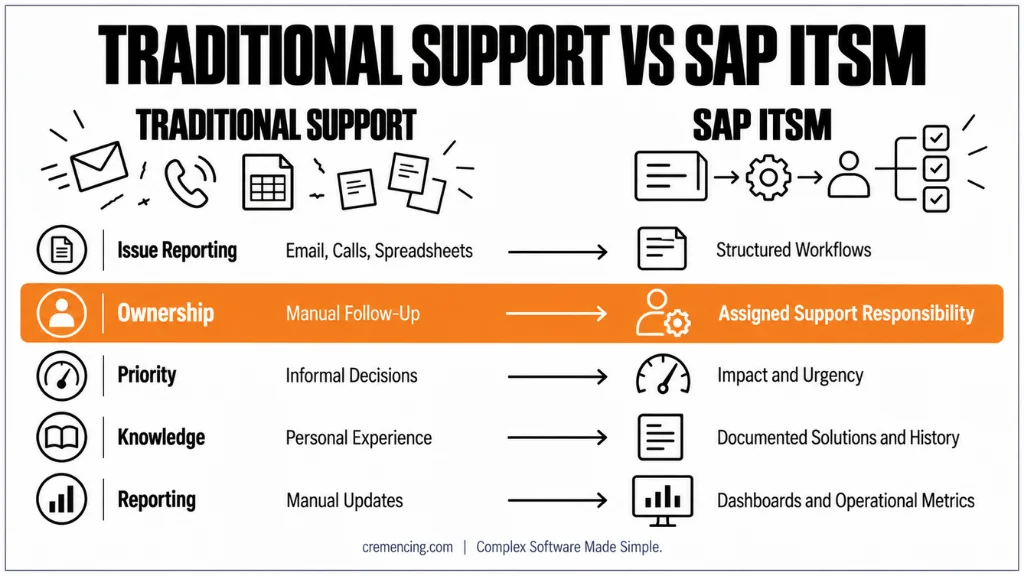
SAP ITSM vs Traditional Support Models
The biggest difference between traditional SAP support and SAP ITSM is process control.
| Area | Traditional Support Model | SAP ITSM Approach |
| Issue reporting | Email, calls, spreadsheets | Structured incident and request workflows |
| Ownership | Depends on manual follow-up | Assigned support responsibility |
| Priority | Often decided informally | Based on impact and urgency |
| Knowledge sharing | Stored in personal experience | Documented solutions and history |
| Reporting | Manual status updates | Operational dashboards and metrics |
Traditional support depends heavily on individual knowledge. IT service management for SAP repeatable processes that remain effective even when team members change.
SAP Solution Manager ITSM and SAP Cloud ALM Considerations
Customers need to understand that SAP ITSM capabilities depend on the SAP platform being used.
It includes:
- Incident management
- Service request management
- Change control integration
- Application lifecycle management processes
Many SAP ECC and SAP S/4HANA on-premise customers continue using SAP Solution Manager for operational governance. However, organizations should also consider SAP’s transition direction toward SAP Cloud ALM. It recommends that customers evaluate the move from SAP Solution Manager toward SAP Cloud ALM as part of their ALM strategy. Check the SAP ITSM Tools Feature.
SAP Cloud ALM
Cloud ALM is designed for cloud-focused SAP application lifecycle management.
It provides capabilities around:
- Implementation monitoring
- Operations monitoring
- Business process monitoring
- Integration monitoring
SAP Cloud ALM also supports service-related operational scenarios, although customers should evaluate their exact ITSM requirements because Solution Manager ITSM and Cloud ALM capabilities are not identical.
For example:
A company heavily dependent on SAP Solution Manager ITSM workflows should analyze the following:
- Existing incident processes
- Change management requirements
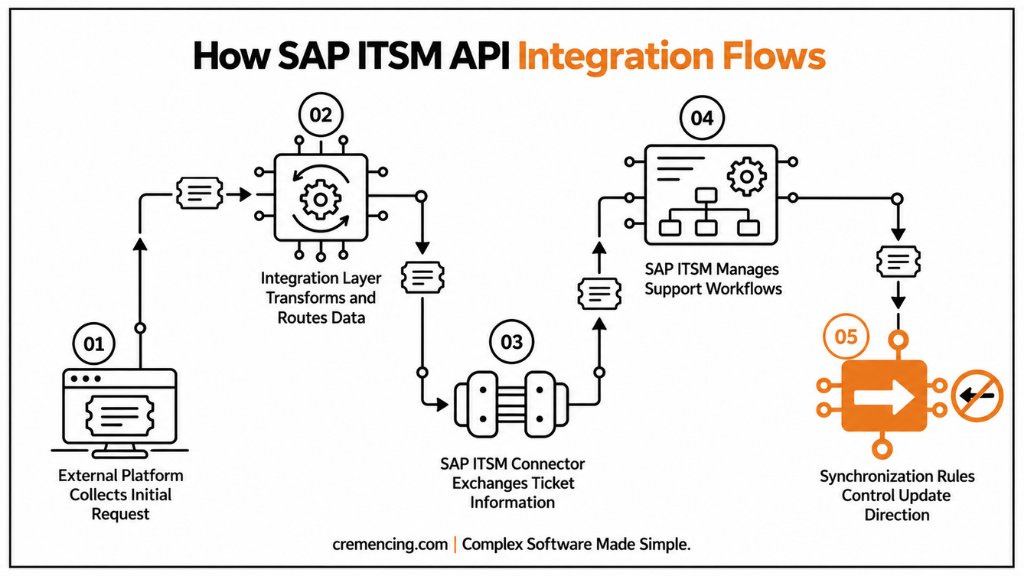
- External ticket integrations
- Historical data migration needs
What SAP Teams Should Consider Before Implementing ITSM
Implementing SAP ITSM requires process design before technical configuration. The tool supports the process. It does not create the process automatically.
Define Incident and Request Categories
SAP teams should first decide how issues will be classified.
For example:
SAP FI posting error → Finance support queue
SAP authorization issue → Security team
Integration failure → Middleware support
Clear categorization improves routing accuracy.
Design Support Workflows
Organizations should define:
- Ticket statuses
- Approval requirements
- Escalation rules
- SLA expectations
- Responsible teams
A poorly designed workflow creates unnecessary complexity.
Connect Monitoring and Operational Data
SAP ITSM becomes more valuable when combined with monitoring capabilities.
Examples:
- System alerts
- Application monitoring
- Integration monitoring
- Business process monitoring
This allows teams to identify problems earlier instead of waiting for users to report them.
SAP Cloud ALM provides monitoring and operational capabilities for SAP landscapes, including business process and integration monitoring scenarios.
Train SAP Support Teams
A successful SAP ITSM implementation depends on adoption.
Consultants need to understand:
- Correct ticket classification
- Proper documentation
- Root cause analysis
- Knowledge sharing practices
The platform provides structure, but teams create the improvement.
Conclusion
SAP teams are moving toward SAP ITSM because modern SAP landscapes require more than manual ticket handling. As organizations adopt S/4HANA, cloud integrations, and connected business applications, support processes need clear ownership, measurable workflows, and better visibility.
SAP service management helps organizations move from reactive issue handling toward structured service operations. They give support teams a consistent way to manage incidents, service requests, problems, and changes while maintaining visibility into priorities, ownership, and resolution progress.
However, implementing ITSM is not simply about introducing another ticketing tool. Organizations also need to define support roles, establish escalation paths, set realistic SLAs, and standardize how teams handle recurring issues. Over time, this structured approach can help teams identify repeated incidents, improve root-cause analysis, and reduce dependence on individual consultants.
Whether an organization continues with SAP Solution Manager ITSM or evaluates SAP Cloud ALM, the objective remains the same: build a support model that improves accountability, operational control, and business confidence. The right ITSM approach gives SAP teams a more consistent foundation for managing support as the landscape continues to grow.
Frequently Asked Questions
1. What is SAP ITSM full form?
The full form of SAP ITSM is SAP Information Technology Service Management. It is a framework used to manage SAP-related IT services through structured processes such as incident management, service requests, problem management, and change management.
SAP ITSM helps organizations move away from informal support methods by creating defined workflows, ownership rules, and service tracking processes.
2. Why are companies adopting SAP ITSM solutions?
Companies adopt SAP ITSM solutions because traditional support methods become difficult to manage as SAP landscapes grow more complex.
SAP ITSM provides better control over incident handling, ownership tracking, SLA monitoring, and reporting. It helps organizations support SAP S/4HANA environments where multiple applications, integrations, and teams are involved.
3. What is the difference between SAP ITSM and traditional SAP support?
Traditional SAP support usually depends on emails, meetings, and manual follow-ups.
SAP ITSM introduces structured workflows where incidents and requests have defined categories, priorities, owners, and resolution paths. The difference is not only how tickets are created. It is how the entire support operation is controlled and measured.
4. Is SAP ITSM available only in SAP Solution Manager?
No. SAP ITSM capabilities have historically been available through SAP Solution Manager 7.2, especially for customers running SAP ECC and SAP S/4HANA on-premise landscapes.
Organizations adopting cloud-focused SAP strategies may also evaluate SAP Cloud ALM depending on their operational requirements and application landscape.
5. How does SAP ITSM improve incident management?
SAP ITSM improves incident management by creating a consistent process for reporting, categorizing, assigning, and resolving issues. Instead of manually searching for the correct consultant, incidents are routed through defined support workflows.
This helps teams reduce delays and maintain a complete history of the issue lifecycle.
6. What is the role of SAP service request management?
SAP service request management handles standard user requirements that are not caused by system failures.
Examples include:
- User access requests
- Authorization changes
- Report requests
- Master data updates
Separating service requests from incidents helps SAP teams measure support workload more accurately and prioritize business-critical problems.
7. How does SAP ITSM support SAP S/4HANA environments?
SAP ITSM supports SAP S/4HANA environments by providing structured processes for managing operational issues across complex landscapes.
S/4HANA systems often connect with SAP Fiori applications, cloud services, APIs, and external platforms. SAP ITSM helps teams maintain visibility when multiple technical and functional areas are involved.
8. Should companies use SAP Solution Manager ITSM or SAP Cloud ALM?
The decision depends on the SAP landscape and future strategy. SAP Solution Manager 7.2 remains relevant for many SAP ECC and SAP S/4HANA on-premise customers with established ITSM processes. SAP Cloud ALM is designed for cloud-focused SAP application lifecycle management scenarios.
Organizations should evaluate existing workflows, integrations, reporting needs, and future SAP roadmaps before selecting the platform.





2 Responses