
Writing Groovy scripts in SAP CPI should not be a trial-and-error effort, but it is still the case for many teams. No autocomplete. Limited debugging. Frequent runtime errors. Most SAP CPI teams lose the same 20–30 minutes on every non-trivial Groovy script not writing the logic but finding the missing semicolon, the wrong import, or the null pointer that only shows up after a full iFlow deployment.
Multiply that by a team shipping a dozen scripts a sprint, and the cost isn’t a minor inconvenience it’s a recurring tax on every integration project’s timeline. It happens because CPI’s built-in script editor was never built to be a development environment: no autocomplete, no real debugger, no way to test a change without redeploying.
The fix isn’t a different way of writing Groovy; it’s writing it somewhere else entirely, in a proper IDE, before it ever touches CPI. This post covers which Groovy IDEs actually fit SAP CPI’s runtime, how to set one up correctly, and the part most guides skip—why the IDE alone won’t fix your scripting problems if your team’s workflow around it stays the same.
Groovy IDEs for SAP CPI
So, basically, Groovy IDEs for SAP CPI is a dev environment to build your Groovy Scripts outside the SAP Cloud Platform Integration.
Developers use IDEs to:
- Instead of using CPI’s built-in editor exclusively,
- Write scripts with syntax highlighting and autocomplete
- Debug logic before deployment
- Manage reusable code efficiently
- Reduce dependency on trial-and-error testing
| Feature | IntelliJ IDEA | Eclipse IDE | VS Code |
|---|---|---|---|
| Native Groovy support | Yes (bundled plugin) | No — requires Groovy-Eclipse plugin | No — requires extensions |
| Debugging depth | Full breakpoint/variable inspection | Full, once configured | Basic, extension-dependent |
| Setup effort | Low | Medium | Low |
| Best fit | Teams doing heavy scripting across many iFlows | Existing SAP/Java-standardized teams | Teams already on VS Code for other work |
| Cost | Free (Community) / paid (Ultimate) | Free | Free |
Common Groovy IDE options include:
- IntelliJ IDEA
- Eclipse IDE
- Visual Studio Code (with extensions)
NOTE: Each offers a varying degree of flexibility, but all serve to provide the same solution: slow and error-prone scripting within CPI.
SAP CPI Script Development with Groovy IDEs
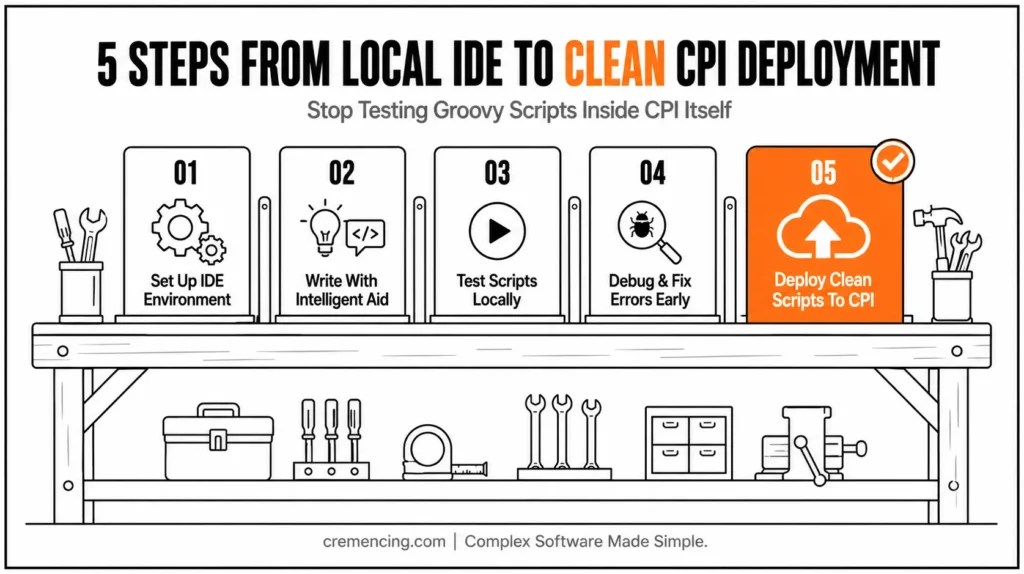
Part 1 — Create IDE Environment
Have your favorite IDE installed and set up:
- Groovy SDK
- Java Development Kit (JDK)
- Required dependencies for SAP CPI
It makes certain that your scripts run locally first before they are deployed.
Step 2 — Craft Scripts with Intelligent Aid
Unlike CPI’s editor, IDEs provide:
- Autocomplete suggestions
- Syntax validation
- Code formatting
This minimizes basic mistakes and accelerates development.
Step 3 — Run the Test Scripts Locally
If you need to visit the hosted site rather than deploying to CPI every time:
- Run scripts locally
- Use mock data for testing
- Validate logic instantly
This saves a lot of debugging time.
Step 4 — Troubleshoot and Address Errors Early
With built-in debugging tools:
- Set breakpoints
- Inspect variables
- Trace execution flow
You catch problems earlier in the development cycle.
Step 5 — Deploy Clean, Optimized Scripts to CPI
Once tested:
- Copy scripts into CPI
- Integrate with iFlows
- Execute with confidence
No more redeploying just to make some minor change.
Why Groovy IDEs Are A Boon For SAP CPI And Its Benefits
While convenience is a consideration when selecting Groovy IDEs, it straightforwardly interlaces with performance, cost, and delivery speed.
Key Benefits
- Faster development cycles
- 30–50% less scripting time: autocomplete and reusable code
- Fewer production errors
- Use debugging and validation tools to catch issues early
- Reduced deployment iterations
- Minimize back-and-forth testing inside CPI
- Improved code quality
- Cleaner, more maintainable scripts
- Better team collaboration
- Share and version-control scripts easily
ROI Impact
- Lower development costs
- Faster project delivery
- Lowered downtime triggered by script failures
This provides a tangible competitive advantage for integration-heavy environments.
Top Mistakes to Stay Away from While Utilizing Groovy IDEs
With the right tools, however, many teams fail to maximize value due to poor implementation.
Mistake #1: Skipping Local Testing
If you only use CPI testing, what is the point of using an IDE?
Mistake #2: CPI Runtime Mismatch
Scripts may break after being deployed if your local setup does not reflect CPI’s environment.
Mistake #3: Overcomplicating Scripts
But those IDE features actually make scripts harder to maintain if used unnecessarily.
Mistake #4: Ignoring Reusability
If you don’t create reusable functions, you’ll end up doing the same thing over and over.
Best Practices
- Mirror CPI runtime conditions locally
- Keep scripts modular and reusable
- Use version control (Git)
- Document logic clearly
The Missing Link Between Most Teams and IDEs
Here’s what the better part of blogs doesn’t say:
Using a Groovy IDE is not going to solve your scripting issues.
The problem is not tools but workflow.
What’s Missing in Most Teams
- No standardized scripting structure
- No shared reusable libraries
- No testing framework for Groovy scripts
- The IDE and CPI lifecycle are completely separate
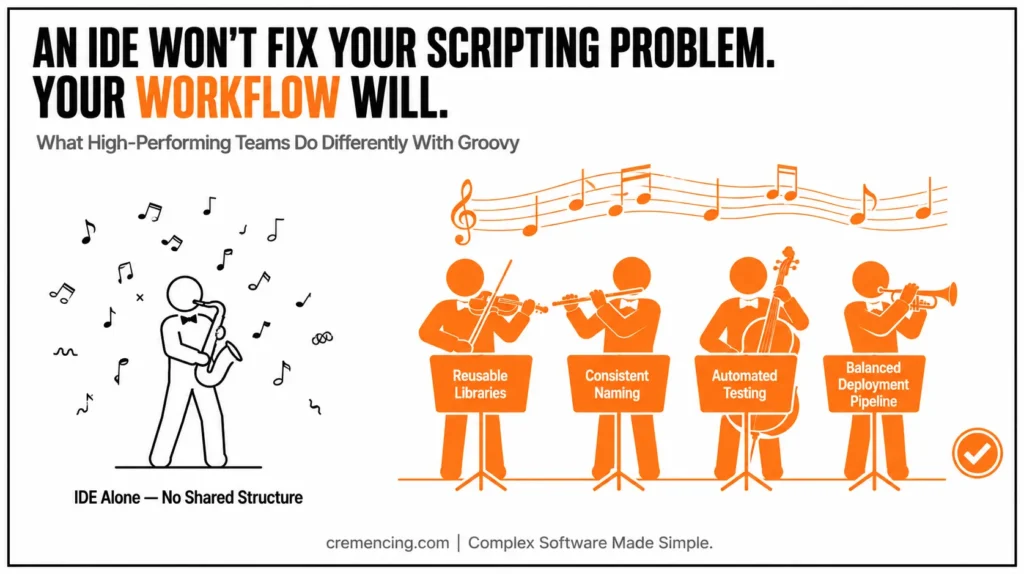
What High-Performing Teams Do Differently
- Build internal Groovy libraries
- Use consistent naming and structure
- Automate testing workflows
- Balance IDE use with your deployment pipelines
Result:
As a result, they don’t just prepare their scripts much faster — they scale integration development proportionally.
SAP CPI Scripting Performance Pitfalls: Tips and Tricks for what not to do
We implement optimized Groovy workflows, reusable libraries, and faster debug systems inside SAP CPI.
Let’s streamline your integration process.
Conclusion
The real gap isn’t which Groovy IDE you pick — IntelliJ, Eclipse, and VS Code all get you past CPI’s bare-bones editor. The gap is what happens after: whether your team mocks the CPI runtime properly, keeps a shared script library instead of rewriting logic per iFlow, and version-controls what actually ships.
Teams that treat the IDE as the whole solution get faster typing and the same deployment surprises. Teams that pair it with a standardized local-testing setup and a reusable library are the ones who actually stop redeploying just to fix a missing semicolon. Start with the IDE — but build the workflow around it before you call the problem solved.
Groovy IDE for SAP CPI is no longer an option; it is a must-have for teams willing to develop Groovy scripts faster, cleaner, and more reliably. But the real power comes from combining IDEs with structured workflows and reusable components. That’s how you transition from slow and reactive scripting to scalable integration development. For more insights, read about Groovy Identity in SAP CP.
FAQ
What is the best Groovy IDE for SAP CPI?
IntelliJ IDEA is the most chosen IDE because of its various advanced debugging and support for Groovy. But Eclipse and VS Code are also good choices.
How can I test SAP CPI Groovy scripts locally?
Yes. If the appropriate setup (Groovy + JDK + mock data) is in place, you can simulate the majority of the logic before deploying.
Which tools can be used as a Groovy IDE to integrate with SAP CPI?
Not directly. Scripts can be written in the IDE, and then deployed either manually or through CI/CD pipelines.
Do I need an IDE that supports script development for SAP CPI?
Not a must, but highly recommended to increase your development speed with fewer errors.
How do Groovy IDEs help minimize errors?
They offer real-time validation, debugging tools, and structured coding environments that help avoid common mistakes. This gets you ready to remove scripting bottlenecks from SAP CPI. With Groovy best practices and SAP-tuned development methods, we assist enterprises in building high-throughput integration workflows without errors.
How do I simulate the SAP CPI Message object locally without deploying?
By mocking or stubbing the com.sap.gateway.ip.core.customdev.util.Message interface, either with a community mocking library or a hand-built stub class matching the methods your scripts call.
Is version control (Git) necessary for SAP CPI Groovy scripts, or just nice to have?
It’s effectively necessary once more than one developer touches the same script library without it, teams lose track of which version is actually deployed in which iFlow.




