
The biggest mistake in the ABAP VS Code discussion is treating the editor switch as the main decision.
It is not. SAP has made ABAP development available in Visual Studio Code, but that does not mean Eclipse ADT has become obsolete or that every ABAP workload should move immediately. The real question is whether the VS Code tooling supports the object types, backend release, connection model, debugging workflow, and delivery process your team actually uses.
That distinction matters because ABAP Development Tools for Visual Studio Code are expanding quickly, while feature availability still depends on the connected backend and the specific capability being used. SAP itself continues to position Eclipse as the recommended environment for full-featured ABAP development until feature parity is reached.
For developers building RAP services, CDS models, ABAP classes, tests, and Fiori-related applications, VS Code can eliminate much of the editor switching that previously separated ABAP work from the rest of the application stack. For teams maintaining broad classic ABAP landscapes, however, Eclipse may still be the safer primary tool.
The useful question, therefore, is not “VS Code or Eclipse?” It is “Which ABAP workloads can VS Code handle reliably in my landscape today?”
Comparison
The ABAP Cloud VS Code Extension does not introduce a new ABAP language. The change is how the developer reaches repository objects, combines tools, receives editor services, and exposes source context to supported AI assistants.
| Area | VS Code | Eclipse ADT | Decision point |
|---|---|---|---|
| RAP development | Strong fit | Strong fit | VS Code is practical for modern RAP workflows |
| CDS development | Supported | Supported | Validate backend-specific features |
| ABAP classes | Supported | Supported | Either can work for supported scenarios |
| ABAP Unit | Supported | Supported | Validate team test workflow |
| ATC | Supported | Supported | Check project/backend requirements |
| Classic Dynpro/Web Dynpro | Limited/out of initial scope | Mature support | Keep Eclipse |
| SAP GUI-dependent work | Not integrated | Available | Keep Eclipse |
| On-premise/private-cloud connection | RFC | Mature ADT connectivity | Validate exact backend |
| BTP ABAP environment/public cloud | HTTP | Supported | Validate cloud-specific workflow |
| AI/MCP tooling | Strong VS Code integration | Also supported in ADT | Separate AI licensing and governance |
| Full classic ABAP coverage | Not yet feature-parity equivalent | Broader | Eclipse remains the safer default |
The ABAP Cloud VS Code Extension Marketplace listing currently includes classes, interfaces, structures, database tables, lock objects, type groups, function groups and modules, programs, and includes. It also lists CDS artifacts, RAP artifacts, debugging, ABAP Unit, ATC, repository search, activation, transports, RFC and HTTP connectivity, predictive completion, and MCP tools.
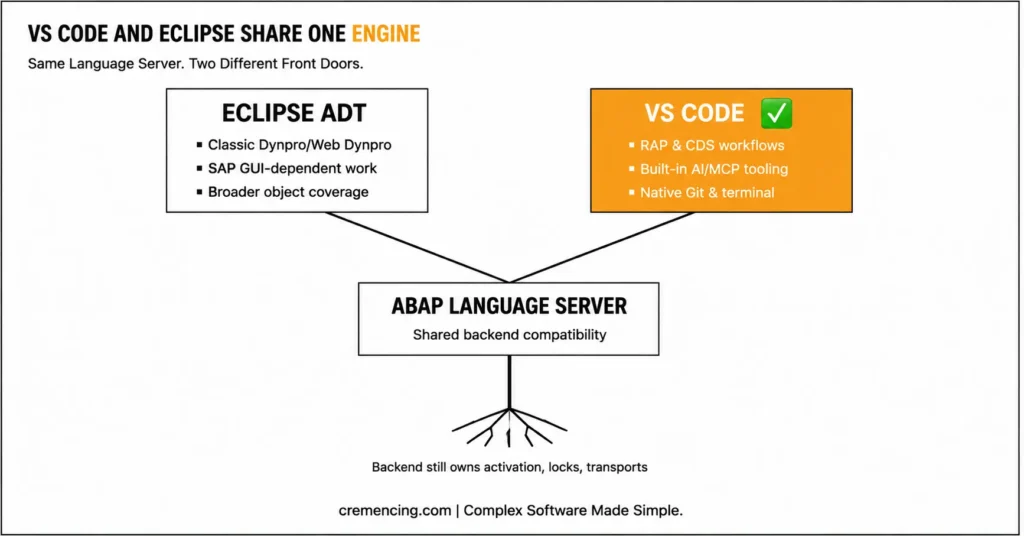
The ABAP Cloud VS Code Extension still treats the backend as authoritative. Packages, object locks, inactive versions, activation, language versions, authorizations, and transport assignments still belong to the connected ABAP system; VS Code does not turn those objects into an independent local Git repository. If you are evaluating the broader shift toward modern ABAP tooling, see our analysis of ABAP Development in VS Code and how it changes the traditional Eclipse workflow.
That distinction matters for ABAP development in VS Code. You can browse and edit ABAP objects through a file-shaped workspace, but you must still follow repository rules and activate changes on the backend before other developers or runtime processes can use them.
Eclipse remained the official centre of ABAP work
Before the official ABAP Cloud VS Code Extension, a typical mixed project forced developers to split their attention. ABAP classes, CDS views, behavior definitions, tests, and transports lived in Eclipse ADT, while SAPUI5, CAP, TypeScript, JSON, YAML, terminals, Git clients, and many AI extensions lived in VS Code.
Eclipse handled that ABAP work well. It provided official backend connectivity, mature object editors, repository navigation, debugging, ABAP Unit, ATC, quick fixes, transport integration, and years of behaviour familiar to SAP teams.
The cost appeared at the workflow boundary. A developer building a RAP service and its Fiori application could move repeatedly between editors, search systems, shortcut schemes, terminals, extension settings, and source contexts.
That context switch did not change runtime performance, but it increased the number of places required to understand and deliver one feature. Pairing this extension with a BTP trial is the fastest way to get hands-on — see 7 ways to start ABAP development on SAP BTP for free
Community extensions filled part of the gap
ABAP in Visual Studio Code existed before SAP’s official ABAP Cloud VS Code Extension. Community projects mounted repository objects through remote file-system concepts and added syntax support, snippets, activation, or object browsing.
Those projects proved that developers wanted the workflow now provided by the ABAP Cloud VS Code Extension. They also had to solve connection handling, object locking, source representation, and activation without owning SAP’s complete ADT client architecture.
Before the ABAP Cloud VS Code Extension, the main problem was not that every community tool failed. The problem was inconsistent scope: one tool could edit source well, another could browse objects, and another could support a specific connection setup, while teams still kept Eclipse nearby for official coverage.
The ABAP code did not need a different dialect
A basic class-run example in Eclipse ADT could look like this:
CLASS zcl_discount_service DEFINITION
PUBLIC
FINAL
CREATE PUBLIC.
PUBLIC SECTION.
INTERFACES if_oo_adt_classrun.
METHODS calculate_net_amount
IMPORTING
iv_gross_amount TYPE decfloat34
iv_discount_pct TYPE decfloat34
RETURNING
VALUE(rv_net_amount) TYPE decfloat34.
ENDCLASS.
CLASS zcl_discount_service IMPLEMENTATION.
METHOD calculate_net_amount.
DATA lv_discount_amount TYPE decfloat34.
” Convert the percentage into an amount before subtraction
lv_discount_amount = iv_gross_amount * iv_discount_pct / 100.
” Return the calculated net value to the caller
rv_net_amount = iv_gross_amount – lv_discount_amount.
ENDMETHOD.
METHOD if_oo_adt_classrun~main.
DATA lv_net_amount TYPE decfloat34.
” Execute a small example that can be run from ADT
lv_net_amount = calculate_net_amount(
iv_gross_amount = ‘100.00’
iv_discount_pct = ‘10.00’ ).
” Write the result to the class-run console
out->write( lv_net_amount ).
ENDMETHOD.
ENDCLASS.
Nothing in this source is “Eclipse syntax.” The class belongs to the ABAP repository, and the editor sends changes to the backend.
Where the old approach still wins
Eclipse remains the better default when a team touches a wide range of classic ABAP objects, expects SAP GUI integration, or depends on editor functions that VS Code has not yet matched. SAP’s Q&A states that classic UI models such as Dynpro and Web Dynpro are outside the initial VS Code focus and that Eclipse remains the recommended environment for full-featured ABAP development until feature parity improves.
Eclipse also offers institutional familiarity. Existing onboarding material, keyboard habits, project layouts, debugging routines, and support playbooks often assume ADT for Eclipse.
That history is an operational advantage, not a reason to reject the ABAP Cloud extension for VS Code. It means the safe adoption path is workload-based rather than ideological.
Code and Advantages
SAP now owns the complete VS Code path
The official ABAP Cloud VS Code Extension uses an ABAP language server built from the client-side code that also powers ADT for Eclipse. SAP describes this shared architecture as the reason both IDEs can reuse backend compatibility and common development capabilities instead of maintaining unrelated implementations.
VS Code communicates with the language server through editor protocols, while the language server communicates with supported ABAP backends through ADT services. The result is native VS Code behaviour—completion, diagnostics, hover information, navigation, formatting, references, actions, and workspace files—without copying the repository to a local folder.
SAP uses a virtual file system because ABAP source lives on the ABAP server. Each supported object receives a file-based representation in the workspace, which suits VS Code editing, diffs, and AI context while preserving the backend repository model.
Installation and connection are now product workflows
SAP documents Windows 10 or later and macOS 14 or later for the ABAP Cloud VS Code Extension. Windows installations also require the Microsoft Visual C++ v14 Redistributable x64 package.
Install ABAP Development Tools for VS Code from the Extensions view and verify that SAP SE is the publisher. Then open the Command Palette and run ABAP: New Destination.
Choose RFC for an on-premise or SAP S/4HANA Cloud Private Edition system. Choose HTTP for SAP BTP ABAP environment or SAP S/4HANA Cloud Public Edition.
RFC discovery depends on local or global SAP UI Landscape files. The system must have a configuration entry in SAP Logon Pad or a global corporate landscape before the ABAP Cloud VS Code Extension can display it.
After authentication, add a destination, package, or local-object collection as a workspace folder. You can also open an object directly through the Command Palette without first adding an entire system tree.
The same class now sits beside the rest of the project
The class source remains valid in the ABAP Cloud VS Code Extension. The useful change is that its unit test, CDS model, RAP behaviour, service definition, Fiori files, terminal, and project notes can sit in one editor context.
Add a local ABAP Unit class to test the calculation:
CLASS ltc_discount_service DEFINITION
FINAL
FOR TESTING
DURATION SHORT
RISK LEVEL HARMLESS.
PRIVATE SECTION.
METHODS calculates_ten_percent_discount FOR TESTING.
ENDCLASS.
CLASS ltc_discount_service IMPLEMENTATION.
METHOD calculates_ten_percent_discount.
DATA lo_service TYPE REF TO zcl_discount_service.
DATA lv_net_amount TYPE decfloat34.
” Create the production class used by this unit test
lo_service = NEW zcl_discount_service( ).
” Call the method with a predictable test input
lv_net_amount = lo_service->calculate_net_amount(
iv_gross_amount = ‘100.00’
iv_discount_pct = ‘10.00’ ).
” Fail the test if the returned value is not 90
cl_abap_unit_assert=>assert_equals(
act = lv_net_amount
exp = CONV decfloat34( ‘90.00’ ) ).
ENDMETHOD.
ENDCLASS.
Run ABAP Unit tests from VS Code and inspect the results without opening a second testing tool. SAP’s documentation also describes integrated coverage support and ATC checks for repository quality.
Set a breakpoint in the test or production method and start debugging. The VS Code debugger provides variables, watches, breakpoints, a call stack, and standard stepping actions; SAP documents F5 for starting a debug session and Ctrl+Shift+F10 for running ABAP Unit tests.
[INTERNAL LINK: ABAP Unit testing → Practical ABAP Unit Tests for Service Classes]
Version 1.1 changes the evaluation
Launch-day articles often describe version 1.0. SAP’s current 1.1 release notes add or document structures, function groups and modules, programs and includes, type groups, CDS entity buffers, more service-binding options, destination logon commands, CDS annotation navigation, and direct access to SAP Help.
Backend ranges differ by feature, so check the release-note row for each object your team needs.
This is why a generic statement such as “the ABAP Cloud VS Code Extension supports ABAP” is not useful enough. A development lead should ask whether the extension supports the team’s actual object types on the actual backend release.
The ABAP Cloud VS Code Extension has a particularly strong fit for RAP and CDS work. SAP’s feature list includes service bindings, service definitions, behavior definitions, change documents, number-range objects, CDS definitions, metadata extensions, entity extensions, access controls, and related ABAP classes.
AI access is useful, but licensing and policy still apply
The ABAP Cloud VS Code Extension lists predictive code completion and ADT Model Context Protocol tools. SAP says compatible coding agents can work with ABAP files when they support the virtual workspace model, and its official Q&A names GitHub Copilot as confirmed while discussing other agents more cautiously.
Do not treat all AI functions as part of the free editor installation. The Marketplace states that certain SAP Joule for Developers capabilities require an additional licence.
A technical rollout therefore needs two approvals: permission to use the IDE extension and permission to use each AI service with company source code. Review data handling, tenant rules, code-retention settings, model selection, audit needs, and whether an agent may activate objects or run tools against a connected system.
What still does not change
The ABAP Cloud VS Code Extension does not remove ABAP Cloud language restrictions. The backend still enforces the object’s language version and whether APIs are released for cloud development.
It also does not make every project Git-native. Transports remain central for repository movement in standard ABAP landscapes, even though developers may use Git-related tools for adjacent project content or approved ABAP lifecycle scenarios.
Finally, VS Code does not remove the need for Eclipse on day one. The ABAP Cloud VS Code Extension works best when a team defines a supported workload, validates it, and keeps an agreed fallback for unsupported tasks.
Migration Checklist
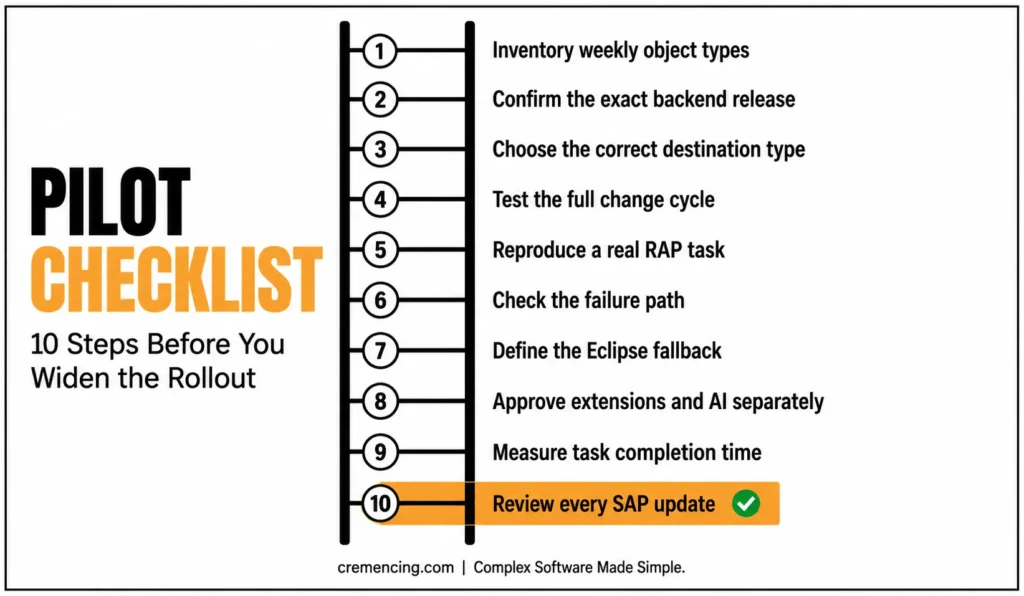
Treat this as an IDE adoption, not an emergency replacement. The safest ABAP Cloud VS Code Extension route is a controlled pilot with one representative development stream.
- Inventory weekly object types. List classes, interfaces, CDS artifacts, RAP objects, programs, includes, function modules, Dictionary objects, classic screens, enhancements, and specialised editors. Compare the list with the ABAP Cloud VS Code Extension Marketplace page and SAP’s 1.1 release notes.
- Confirm the backend, not only the product name. Record the exact SAP_BASIS or S/4HANA release and support package. Connection support does not guarantee that every new object editor works on that release.
- Choose the correct destination type. Use RFC for supported on-premise or private-cloud systems and HTTP for BTP ABAP environment or public cloud. For RFC, confirm that SAP UI Landscape configuration is visible on the developer machine.
- Test the full change cycle. Open an existing object, create a new object, save it, activate it, assign it to a transport, find references, run ABAP Unit, execute ATC, and debug a failing path. Do not approve the ABAP Cloud VS Code Extension after testing only syntax colouring.
- Reproduce a real RAP task. Create or edit a CDS definition, behavior definition, service definition, service binding, and supporting class. This tests the workflow where ABAP Cloud extensibility gains the most from a shared VS Code workspace.
- Check the failure path. Disconnect the network, use an expired login, trigger a syntax error, hit an object lock, and test an inactive dependency. Developers need to know where diagnostics appear before a production ticket arrives.
- Define the Eclipse fallback. Name the object types and tasks that remain in Eclipse. Document how developers move between the tools without overwriting inactive changes or losing track of transports.
- Approve extensions and AI separately. The SAP extension, GitHub Copilot, third-party agents, formatters, and MCP clients do not carry the same licence or data policy. Create an allowlist rather than letting every developer assemble a different toolchain.
- Measure task completion time. Compare a real feature in Eclipse-only and mixed VS Code workflows. Measure object discovery, editing, activation, tests, debugging, transport work, and front-end switching—not application runtime, which the editor does not improve.
- Review every SAP update. ABAP Cloud VS Code Extension version 1.1 already changed the object-coverage discussion, and SAP’s roadmap lists more planned work. Re-run the pilot checklist before widening the approved scope.
A successful migration does not mean every ABAP developer uninstalls Eclipse. It means the team can state, with evidence, which tasks the ABAP Cloud VS Code Extension handles reliably and which tasks still need another tool.
Conclusion
The ABAP Cloud VS Code Extension changes the development surface rather than the ABAP runtime or repository model. ABAP objects still belong to the connected backend, where packages, inactive versions, locks, authorizations, activation, and transport requests remain under SAP system control.
What changes is the developer workflow. SAP-supported repository editing, RAP and CDS development, navigation, debugging, ABAP unit testing, ATC checks, transport handling, and AI-facing tools can now operate within Visual Studio Code. This reduces editor switching for teams that already use VS Code for SAPUI5, CAP, TypeScript, Git, terminals, and related SAP development tasks.
The extension should not be treated as an immediate replacement for Eclipse ADT. Eclipse still provides broader coverage for classic ABAP development, specialized object editors, SAP GUI-dependent workflows, and features that the current VS Code release does not yet support fully.
A controlled rollout is therefore the safest approach. Test the extension against your actual backend release, object types, connection method, debugging requirements, quality checks, and transport process. Keep Eclipse available for identified gaps, and review SAP’s release notes whenever a new extension or backend version becomes available.
The best adoption decision is based on validated development workflows rather than editor preference alone. Use the ABAP Cloud VS Code Extension, where it reduces context switching and supports the complete delivery cycle while retaining established tools for work that has not yet reached feature parity.
Frequently Asked Questions
1. Will ADT for Visual Studio Code replace Eclipse?
No. SAP positions ADT for VS Code as an additional option while Eclipse remains the recommended IDE for full-featured work. Use the ABAP Cloud extension for VS Code for validated RAP, CDS, class, and service workflows, and keep Eclipse for unsupported editors or deeper classic tooling. [INTERNAL LINK: Eclipse ADT comparison → ADT for VS Code vs. Eclipse]
2. Which ABAP backend versions does ADT for VS Code support?
The connection layer follows broad ADT backend compatibility, but individual features have their own release ranges. SAP’s Q&A mentions systems down to SAP NetWeaver 7.3 EHP1 SP04, while version 1.1 rows list different minimum releases for specific object types. Check both connection and object support.
3. Why does ADT for VS Code use a virtual file system?
Because ABAP repository source lives on the connected server, not as ordinary local files. The virtual workspace gives ABAP in VS Code a file-oriented editing model while the backend still owns activation, locks, packages, and transports. It also lets supported AI tools read the workspace representation.
4. Why do I get “No system configurations found” for an RFC destination?
The extension cannot find a usable entry in the local or global SAP UI Landscape file. Add or correct the system in SAP Logon Pad, confirm the landscape path, and reopen ABAP: New Destination. SAP Community users reported this exact issue during the first release.
5. How do I install the ABAP Cloud VS Code Extension?
Install “ABAP Development Tools” from the VS Code Extensions view and verify SAP SE as publisher. SAP currently documents Windows 10 or later and macOS 14 or later; Windows also needs the x64 Microsoft Visual C++ v14 runtime. Restart VS Code, then create a destination.
6. How do I connect an ABAP system to Visual Studio Code?
Run ABAP: New Destination and select the connection type that matches your system. Use RFC for on-premise or private cloud and HTTP for BTP ABAP environment or public cloud. Add the destination or package as a workspace folder after login.





2 Responses