Introduction
For years, “ABAP in VS Code” meant a thin BTP-only extension or a community-built remote filesystem plugin. That changed at SAP Sapphire 2026: SAP shipped ABAP Development Tools (ADT) for Visual Studio Code, a first-party extension now generally available on the VS Code Marketplace.
This isn’t a port of a handful of Eclipse features. It’s a re-architected toolchain built on six years of internal work to decouple ABAP tooling from Eclipse that brings code completion, navigation, syntax checking, a working ABAP debugger, ABAP Unit integration, ABAP Test Cockpit checks, and transport management directly into VS Code. It connects to both on-premise/private cloud systems via RFC and public cloud/BTP systems via HTTP.
Most existing content online still describes the old BTP-only, debugger-less extension. This guide reflects the current GA release.
Should You Use VS Code for ABAP Now?
As of the June 2026 GA release, abap development in vs code is a credible option for ABAP Cloud development and RAP UI services — not just a lightweight companion tool anymore. It now includes real debugging, transport handling, and unit testing, which were the main blockers before.
It is not yet a full Eclipse replacement for every scenario. The first release is scoped around the ABAP Cloud development model and RAP UI services specifically. If your work involves classic programming models, Dynpro, or Web Dynpro, Eclipse ADT remains the primary tool until VS Code coverage expands.
What Actually Shipped VS Code ADT vs the Old Extension
This is the gap nearly every existing article online misses, because most were written before the GA announcement. The new extension is fundamentally different from the earlier BTP-only tooling:
- Backend connectivity: Supports both on-premise/private cloud systems (via RFC) and public cloud/BTP systems (via HTTP) — not BTP-only.
- Debugging: Full ABAP debugger support, including breakpoints, step over/into/out, and variable inspection.
- Testing: Native ABAP Unit test execution and ABAP Test Cockpit (ATC) checks inside the editor.
- Transport management: Search, create, and assign objects to transport requests directly from VS Code.
- Object scope: ABAP classes, interfaces, CDS artifacts (data definitions, metadata extensions, entity extensions, types, aspects, access controls), service definitions, service bindings, and behavior definitions — covering 12+ object types in the first release.
- Architecture: Built on a new ABAP Language Server, with development objects still stored server-side through a “virtual workspace” filesystem layer (so this is connected development, not a local-files model).
The earlier community plugin (vscode_abap_remote_fs) still exists and remains useful for extras like cross-system comparison. But the first-party ADT for VS Code extension is now the strategic path SAP is investing in. Developers working with analytics and reporting scenarios can also benefit from understanding ABAP skills used in SAP BW development, especially when handling enterprise data models.
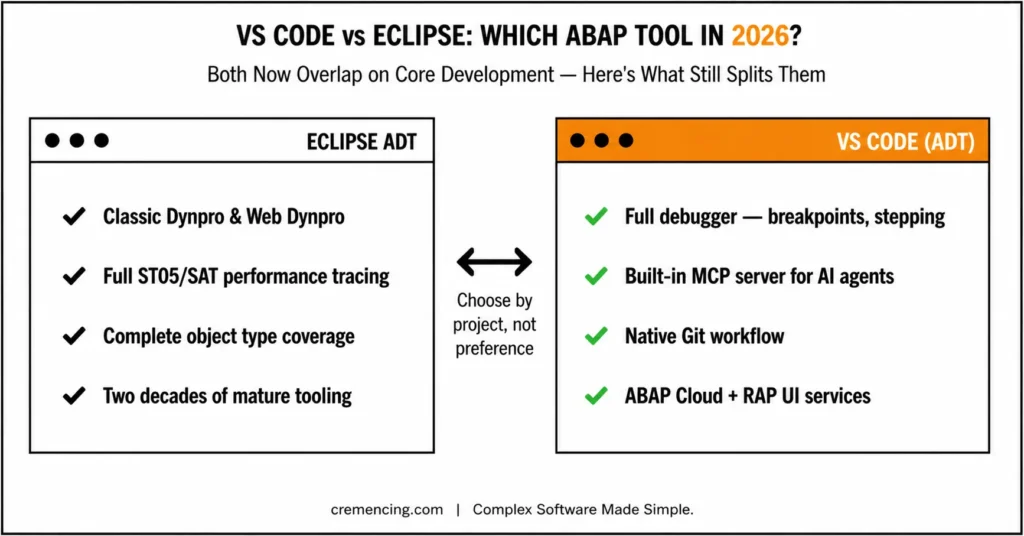
“ABAP Development in VS Code vs Eclipse ADT: Side-by-Side”
| Feature | Eclipse ADT | VS Code (ADT for VS Code, 2026 GA) |
| System access | Full S/4HANA backend | On-premise/private cloud (RFC) and BTP/public cloud (HTTP) |
| Debugging | Advanced ABAP debugger | Full debugger: breakpoints, stepping, variable inspection |
| Transport handling | Full CTS integration | Search, create, and assign to transports |
| Unit testing | ABAP Unit, ATC | ABAP Unit and ATC supported |
| Object coverage | Comprehensive, all classic + cloud models | ABAP Cloud model + RAP UI services; classic Dynpro/Web Dynpro not planned |
| Performance trace (ST05, SAT) | Supported | Not yet covered in first release |
| AI/agentic tooling | Limited | Built-in MCP server for AI agents (e.g., Copilot) |
| Git integration | Limited | Native Git workflow |
| UI experience | Heavy but complete | Lightweight, fast |
The real decision point in 2026 isn’t “lightweight editor vs full IDE” anymore — it’s which object types and backend connection your project needs, since both tools now genuinely overlap on core development and debugging.
Eclipse-Based ABAP Development
Traditional SAP development still happens largely in Eclipse ADT, and for classic objects, it remains the only option.
Example workflow:
- Open Eclipse ADT
- Connect to the S/4HANA system
- Create an ABAP package
- Develop a class or report
- Activate the object in the backend
REPORT z_old_abap.
DATA lt_vbak TYPE TABLE OF vbak.
SELECT * FROM vbak
INTO TABLE lt_vbak
UP TO 10 ROWS.
LOOP AT lt_vbak INTO DATA(ls_vbak).
WRITE: / ls_vbak-vbeln. ” Display sales order number
ENDLOOP.
Where Eclipse still wins:
- Classic Dynpro and Web Dynpro development
- Deep performance tracing (ST05, SAT)
- Full lifecycle coverage across all ABAP object types
- Mature, battle-tested tooling for large enterprise landscapes
ABAP Development in VS Code
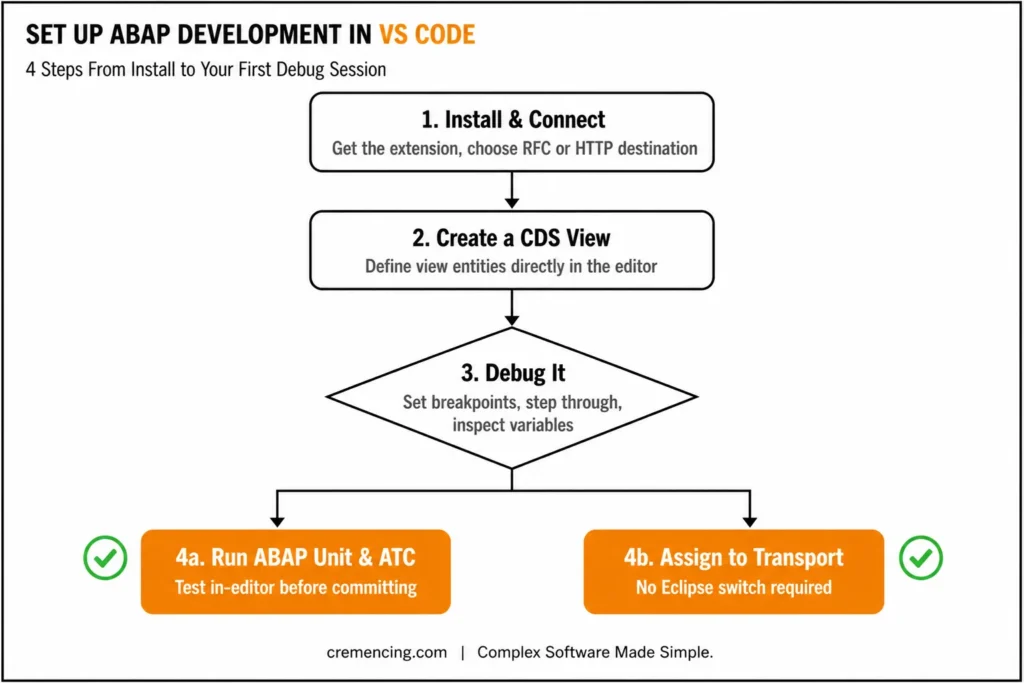
Here’s what setting up and working in the current GA extension actually looks like.
Step 1 — Install and connect
- Download and install the latest stable VS Code
- Open the Extensions view (Ctrl+Shift+X / Cmd+Shift+X)
- Search for “ABAP Development Tools for VS Code” (published by SAP SE) and install it
- Open the Command Palette and choose ABAP: New Destination
- Choose a connection type — RFC for on-premise/private cloud, or HTTP for BTP/public cloud
Step 2 — Create a CDS view
@EndUserText.label: ‘Sales Order Cloud View’
define view entity Z_CDS_SO
as select from /DMO/I_SalesOrder
{
key SalesOrder, // Business key
CustomerID, // Customer reference
TotalAmount // Order value
}
Step 3 — Debug it for real. Set breakpoints directly in VS Code, step through execution (step over, step into, step out), and inspect variables — this is the capability that was missing from earlier extensions and is now genuinely usable.
Step 4—Run ABAP Unit and assign a transport. Execute ABAP unit tests and ATC checks in-editor, then search for or create a transport request and assign your objects to it all without switching to Eclipse.
Why this matters: For RAP UI service development specifically, this closes a real workflow gap: developers working on RAP-based Fiori apps can now build both the frontend (SAPUI5) and backend (ABAP) pieces in the same tool, instead of switching between Eclipse and a separate frontend editor.
The AI Layer — MCP Server and Agentic Development
The extension ships with a built-in Model Context Protocol (MCP) server, which lets AI coding agents such as Microsoft Copilot interact directly with ABAP development objects inside your workflow. This was one of the most requested features from the ABAP developer community and is a meaningful shift: AI agents can now reason about and act on real ABAP artifacts (classes, CDS views, and behaviour definitions) rather than just plain text files.
One caveat worth knowing: because ABAP objects are stored server-side through a virtual workspace filesystem rather than as local files, not all AI tools currently support this filesystem model, so compatibility can vary by agent.
Some advanced AI capabilities under the “SAP Joule for Developers” umbrella require an additional license — worth checking before you plan a team rollout around AI-assisted ABAP development.
Setting the Record Straight: Timeline, Eclipse Status, and AI Setup
While ABAP Development Tools for VS Code feels like a major leap forward, it’s worth correcting one common claim: the extension wasn’t built over “six years” of internal work — SAP’s own announcement confirms the first version represents roughly eleven months of core development time, focused mainly on building the foundational architecture and RAP UI service support. The built-in ABAP MCP Server remains central to this release, bridging ABAP development with agentic AI tools like Microsoft Copilot. Notably, SAP officially still recommends Eclipse as the primary IDE for full-featured ABAP development until VS Code reaches feature parity, since both tools share the same underlying architecture. For teams setting up AI agents, SAP also recommends defining ABAP-specific rules through a custom AGENTS.md file, using SAP’s provided template as a starting point.
“Migration Checklist: Moving to ABAP Development in VS Code”
Before shifting work to ABAP development in VS Code, check:
| Question | Consideration |
| Is your project scoped to the ABAP Cloud development model or RAP UI services? | Determine whether modern ABAP Cloud and RAP capabilities are required. |
| Do you need RFC access to an on-premise/private cloud system, or HTTP access to BTP? | Evaluate your integration and connectivity requirements. |
| Does your team rely on classic Dynpro or Web Dynpro objects? | Stay on Eclipse for these legacy development objects. |
| Do you need ST05/SAT-level performance tracing? | This capability is not yet available in VS Code. |
| Is a Git-based workflow a priority for your team? | Consider whether version control and collaborative development are key requirements. |
| Do you want AI agents (e.g., Copilot) wired into ABAP objects via MCP? | Assess the need for AI-assisted development and automation. |
Most teams will run a hybrid model in 2026: VS Code for ABAP Cloud and RAP UI work, Eclipse ADT for classic objects, deep debugging edge cases, and performance tracing.
Conclusion
The rise of abap development in vs code doesn’t replace Eclipse ADT but as of the June 2026 GA release, it’s no longer the lightweight, debugger-less companion tool most existing articles still describe. With real debugging, transport management, ABAP Unit integration, and a built-in MCP server for AI agents, VS Code has become a legitimate primary IDE for ABAP Cloud and RAP UI service development.
Eclipse ADT still owns classic ABAP development — Dynpro, Web Dynpro, deep performance tracing, and the full breadth of object types built up over two decades. That isn’t changing soon.
In practice:
- VS Code → ABAP Cloud model, RAP UI services, Git-first workflows, AI-agent-assisted development
- Eclipse ADT → Classic objects, full backend lifecycle, ST05/SAT performance tracing, edge-case debugging
The question for most teams in 2026 isn’t “which IDE is better” — it’s “which IDE matches your project’s object types and backend connection.” Expect that line to keep moving as SAP expands VS Code’s coverage.
Frequently Asked Questions
1. What is abap development in vs code in 2026?
It’s development using SAP’s official ABAP Development Tools (ADT) for Visual Studio Code, generally available since June 2026, supporting both on-premise/private cloud (RFC) and BTP/public cloud (HTTP) systems with real debugging, transport management, and unit testing.
2. Is VS Code replacing Eclipse ADT?
Not entirely. The first release focuses on the ABAP Cloud development model and RAP UI services. Eclipse ADT remains the primary tool for classic programming models and anything outside that scope.
3. Can I actually debug ABAP in VS Code now? Yes. The 2026 release includes a full ABAP debugger with breakpoints, stepping, and variable inspection — a major change from earlier extensions.
4. Does VS Code ABAP work with on-premise systems, or only BTP?
Both. The extension supports on-premise/private cloud systems via RFC and public cloud/BTP systems via HTTP.
5. What is the ABAP MCP server?
A built-in Model Context Protocol server that lets AI agents, such as Microsoft Copilot, interact with ABAP development objects directly inside VS Code.
6. Can I manage transports from VS Code?
Yes. You can search, create, and assign objects to transport requests directly in the extension.
7. Should beginners use VS Code for ABAP? Yes, especially for ABAP Cloud and RAP UI service learning. For classic ABAP and full enterprise lifecycle work, Eclipse ADT is still necessary.
8. What’s the core difference between Eclipse and VS Code for ABAP today?
Eclipse covers the full breadth of ABAP development, including classic objects and deep performance tracing. VS Code now covers the ABAP Cloud model and RAP UI services with real debugging and transport support, plus built-in AI agent integration — but doesn’t yet cover classic Dynpro/Web Dynpro or performance tracing tools like ST05/SAT.
9.Do I need a separate license for the ABAP MCP Server itself?
No — the built-in MCP server ships with the extension, but some advanced AI capabilities under “SAP Joule for Developers” require an additional license, so check that separately for team rollouts.
10.Will my existing vscode_abap_remote_fs setup still work?
Yes — the community plugin still exists and remains useful for extras like cross-system comparison, but the first-party ADT for VS Code extension is now SAP’s strategic investment path going forward.